
Java is one of the most widely used programming languages in top tech companies due to its reliability, scalability, and performance. It is a popular choice for building enterprise-level applications and backend systems. This article provides a comprehensive list of 200+ Core Java interview questions for both freshers and experienced developers.
- Covers frequently asked Core Java interview questions
- Suitable for both beginners and experienced professionals
- Helps in quick revision and interview preparation
Java Interview questions for Freshers
1. Is Java Platform Independent?
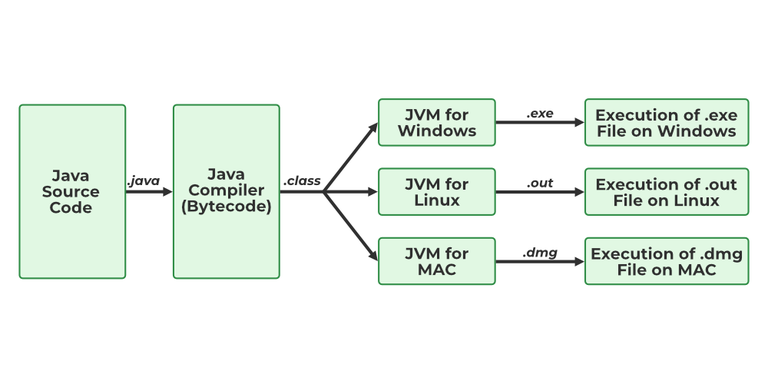
Java is a platform-independent programming language because its source code is compiled into bytecode rather than machine-specific code. This bytecode can run on any operating system that has a compatible Java Virtual Machine (JVM) installed.
- The javac compiler converts Java source code into platform-independent bytecode (.class file).
- A JVM is available for different operating systems, allowing the same bytecode to run everywhere.
- This enables Java to follow the principle "Write Once, Run Anywhere (WORA)."
2. What are the top Java Features?
Java is one the most famous and most used language in the real world, there are many features in Java that makes it better than any other language some of them are mentioned below:
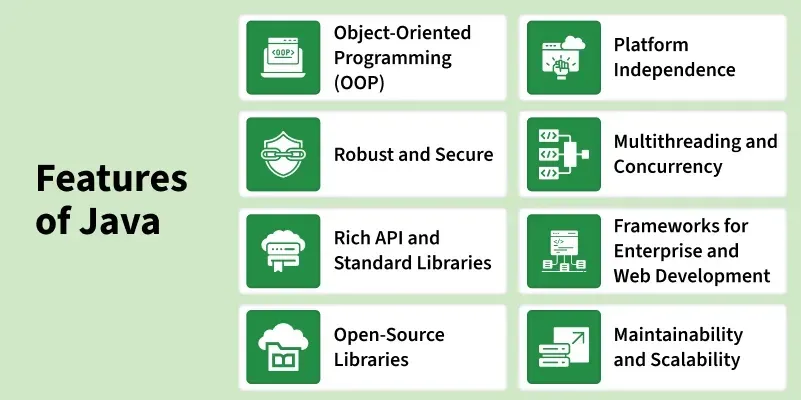
- Simple: Java is quite simple to understand and the syntax
- Platform Independent: Java is platform independent means we can run the same program in any software and hardware and will get the same result.
- Interpreted: Java is interpreted as well as a compiler-based language.
- Robust: features like Garbage collection, exception handling, etc that make the language robust.
- Object-Oriented: Java is an object-oriented language that supports the concepts of class, objects, four pillars of OOPS, etc.
- Secured: As we can directly share an application with the user without sharing the actual program makes Java a secure language.
- High Performance: faster than other traditional interpreted programming languages.
- Dynamic: supports dynamic loading of classes and interfaces.
- Distributed: feature of Java makes us able to access files by calling the methods from any machine connected.
- Multithreaded: deal with multiple tasks at once by defining multiple threads
- Architecture Neutral: it is not dependent on the architecture.
3. What is JVM?
The Java Virtual Machine (JVM) is a virtual machine that executes Java bytecode and provides a runtime environment for Java applications. It acts as a bridge between the Java program and the underlying operating system.
- JVM loads, verifies, and executes Java bytecode (.class files).
- It provides platform independence by allowing the same bytecode to run on different operating systems.
- JVM also manages memory, garbage collection, and runtime execution.
4. What is JIT?
JIT stands for (Just-in-Time) compiler is a part of JRE(Java Runtime Environment), it is used for better performance of the Java applications during run-time. The use of JIT is mentioned in step by step process mentioned below:
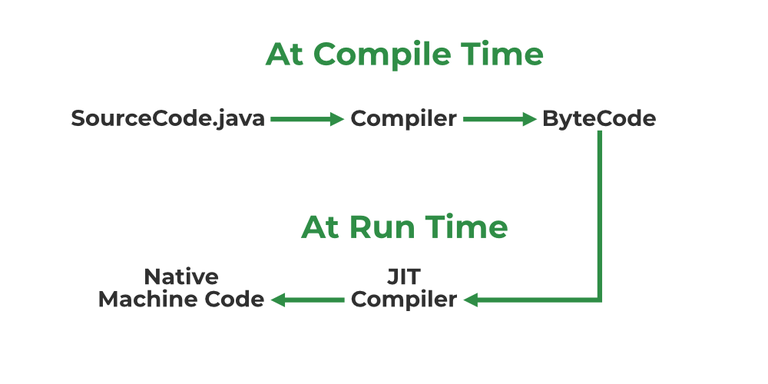
- Source code is compiled with javac to form bytecode
- Bytecode is further passed on to JVM
- JIT is a part of JVM, JIT is responsible for compiling bytecode into native machine code at run time.
- The JIT compiler is enabled throughout, while it gets activated when a method is invoked. For a compiled method, the JVM directly calls the compiled code, instead of interpreting it.
- As JVM calls the compiled code that increases the performance and speed of the execution.
5. What are Memory storages available with JVM?
JVM consists of a few memory storages as mentioned below:
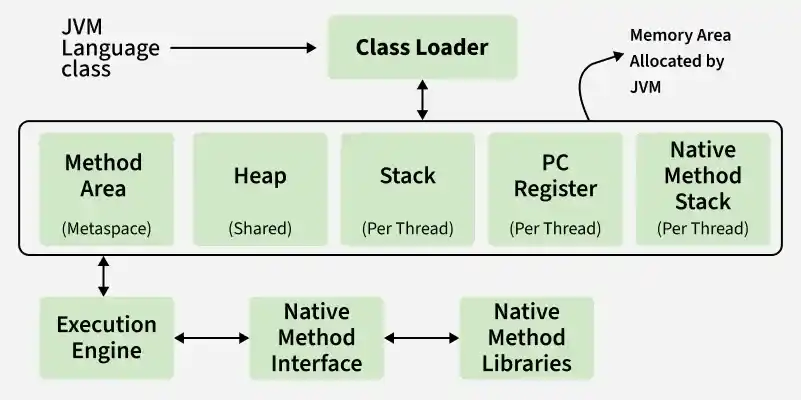
- Class(Method) Area: stores class-level data of every class such as the runtime constant pool, field, and method data, and the code for methods.
- Heap: Objects are created or objects are stored. It is used to allocate memory to objects during run time.
- Stack: stores data and partial results which will be needed while returning value for method and performing dynamic linking
- Program Counter Register: stores the address of the Java virtual machine instruction currently being executed.
- Native Method Stack: stores all the native methods used in the application.
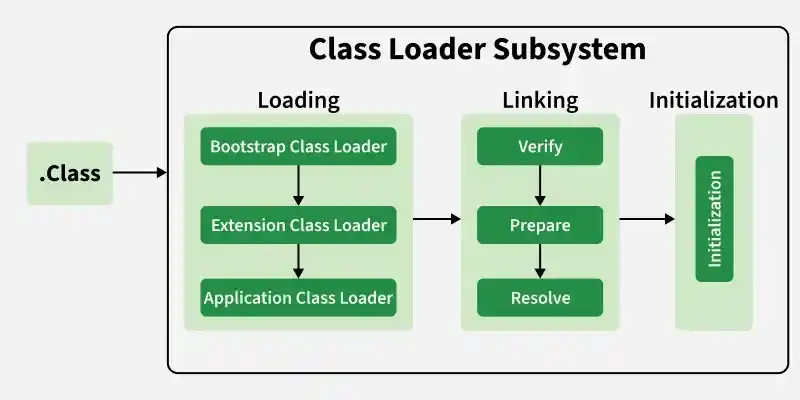
6. What is a classloader?
Classloader is a JVM component responsible for loading Java classes into memory at runtime. It loads classes only when they are needed, improving memory efficiency and application performance.
- Loads .class files into JVM memory dynamically.
- Supports dynamic class loading during program execution.
7. Difference between JVM, JRE, and JDK.
JVM, JRE, and JDK are the three main components of the Java platform. Together, they provide the environment required to develop, compile, and run Java applications.
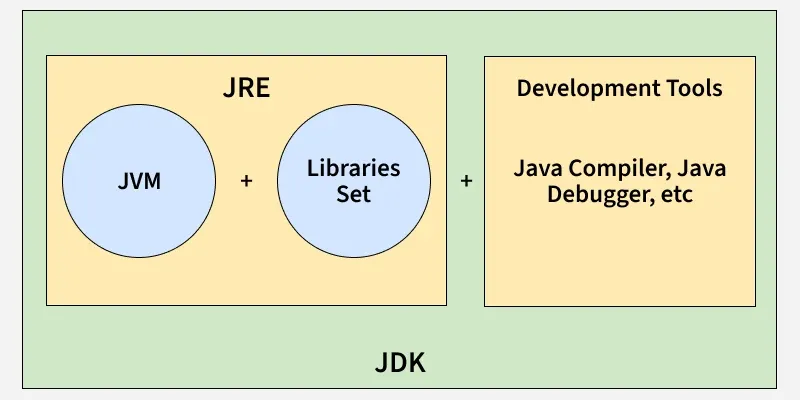
- JVM (Java Virtual Machine): Executes Java bytecode and provides platform independence.
- JRE (Java Runtime Environment): Contains JVM and libraries required to run Java applications.
- JDK (Java Development Kit): Contains JRE along with development tools such as the compiler (javac) and debugger.
8. What are the differences between Java and C++?
Java and C++ are both object-oriented programming languages, but they differ in design, memory management, and platform dependency.
| Feature | Java | C++ |
|---|---|---|
| Platform Dependency | Platform-independent (Write Once, Run Anywhere) | Platform-dependent |
| Memory Management | Automatic through Garbage Collection | Manual using new and delete |
| Multiple Inheritance | Not supported through classes (uses interfaces) | Supported directly |
| Pointers | Does not support explicit pointers | Supports pointers |
| Compilation | Compiles to bytecode and runs on JVM | Compiles directly to machine code |
| Operator Overloading | Not supported (except + for strings) | Supported |
9. Explain public static void main(String args[]) in Java.
The public static void main(String args[]) method is the entry point of a Java application. The JVM looks for this method and starts program execution from here.
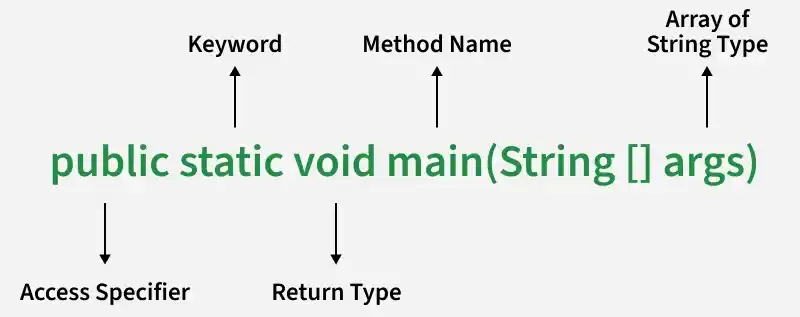
- public: Makes the method accessible from anywhere so that the JVM can invoke it.
- static: Allows the method to be called without creating an object of the class.
- void: Specifies that the method does not return any value.
- main: The predefined method name that acts as the starting point of program execution.
- String args[]: Stores command-line arguments passed to the Java program as an array of strings.
10. What is Java String Pool?
The Java String Pool (JSP) is a special memory area inside the heap where Java stores string literals. It helps save memory by reusing existing string objects instead of creating duplicate ones.
- String literals are stored in the String Pool to optimize memory usage.
- If a string already exists in the pool, Java returns the existing reference instead of creating a new object.
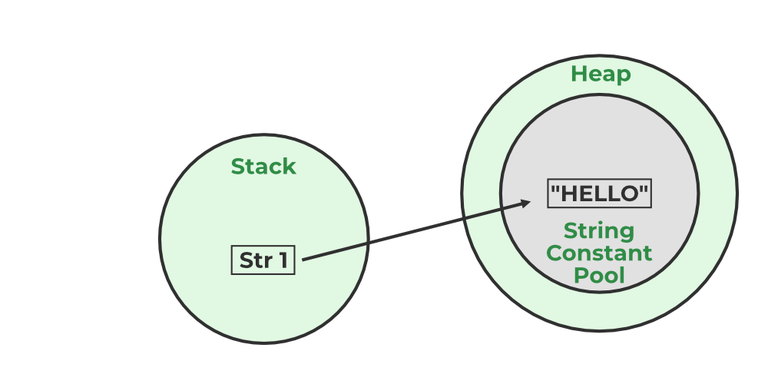
Example:
String str1="Hello";
// "Hello" will be stored in String Pool
// str1 will be stored in stack memory
11. What will happen if we don't declare the main as static?
We can declare the main method without using static and without getting any errors. But, the main method will not be treated as the entry point to the application or the program.
12. What are Packages in Java?
Packages in Java can be defined as the grouping of related types of classes, interfaces, etc providing access to protection and namespace management.
13. Why Packages are used?
Packages are used in Java in order to prevent naming conflicts, control access, and make searching/locating and usage of classes, interfaces, etc easier.
14. What are the advantages of Packages in Java?
There are various advantages of defining packages in Java.
- Packages avoid name clashes.
- The Package provides easier access control.
- We can also have the hidden classes that are not visible outside and are used by the package.
- It is easier to locate the related classes.
15. How many types of packages are there in Java?
There are two types of packages in Java
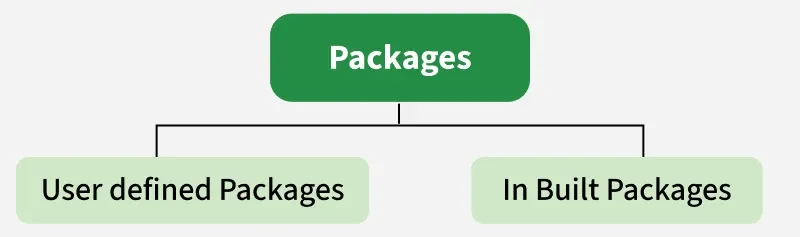
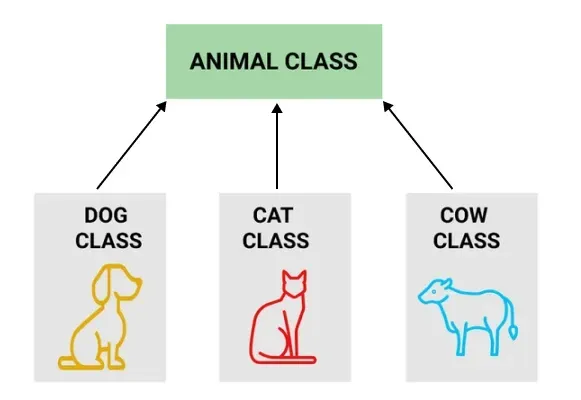
- User-defined packages
- Build In packages
16. Explain different data types in Java.
There are 2 types of data types in Java as mentioned below:
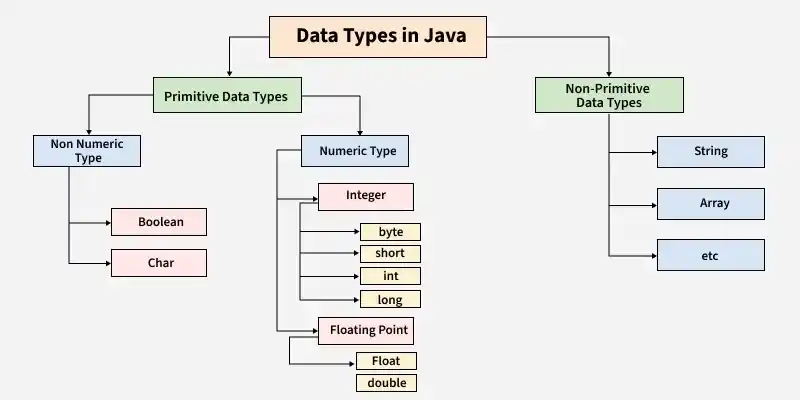
Primitive Data Type: Primitive data are single values with no special capabilities. There are 8 primitive data types:
- boolean: stores value true or false
- byte: stores an 8-bit signed two's complement integer
- char: stores a single 16-bit Unicode character
- short: stores a 16-bit signed two’s complement integer
- int: stores a 32-bit signed two’s complement integer
- long: stores a 64-bit two’s complement integer
- float: stores a single-precision 32-bit IEEE 754 floating-point
- double: stores a double-precision 64-bit IEEE 754 floating-point
Non-Primitive Data Type: Reference Data types will contain a memory address of the variable's values because it is not able to directly store the values in the memory. Types of Non-Primitive are mentioned below:
- String: Stores a sequence of characters.
- Array: Stores multiple values of the same type.
- Class: Blueprint for creating objects.
- Object: Instance of a class.
- Interface: Defines a contract that classes can implement.
17. When a byte datatype is used?
A byte is an 8-bit signed two-complement integer. The minimum value supported by bytes is -128 and 127 is the maximum value. It is used in conditions where we need to save memory and the limit of numbers needed is between -128 to 127.
18. Can we declare Pointer in Java?
No, Java doesn't provide the support of Pointer. As Java needed to be more secure because which feature of the pointer is not provided in Java.
19. What is the default value of byte datatype in Java?
The default value of the byte datatype in Java is 0.
20. What is the default value of float and double datatype in Java?
The default value of the float is 0.0f and of double is 0.0d in Java.
21. What is the Wrapper class in Java?
A Wrapper Class is a class that converts a primitive data type into an object and vice versa. It allows primitive values to be used where objects are required, such as in collections and generic classes.
- Each primitive data type has a corresponding wrapper class (e.g., int -> Integer, char -> Character, double → Double).
- Wrapper classes support features such as autoboxing (primitive to object) and unboxing (object to primitive).
22. Why do we need wrapper classes?
The wrapper class is an object class that encapsulates the primitive data types, and we need them for the following reasons:
- Wrapper classes are final and immutable
- Provides methods like valueOf(), parseInt(), etc.
- It provides the feature of autoboxing and unboxing.
23. Differentiate between instance and local variables.
Instance Variable | Local Variable |
|---|---|
Declared outside the method, directly invoked by the method. | Declared within the method. |
Has a default value. | No default value |
It can be used throughout the class. | The scope is limited to the method. |
24. What are the default values assigned to variables and instances in Java?
In Java When we haven’t initialized the instance variables then the compiler initializes them with default values. The default values for instances and variables depend on their data types. Some common types of default data types are:
- The default value for numeric types (byte, short, int, long, float, and double) is 0.
- The default value for the boolean type is false.
- The default value for object types (classes, interfaces, and arrays) is null.
- The null character, "u0000, " is the default value for the char type.
Example:
// Java Program to demonstrate use of default values
import java.io.*;
class GFG {
    // static values
    static byte b;
    static int i;
    static long l;
    static short s;
    static boolean bool;
    static char c;
    static String str;
    static Object object;
    static float f;
    static double d;
    static int[] Arr;
    public static void main(String[] args)
    {
        // byte value
        System.out.println("byte value" + b);
        // short value
        System.out.println("short value" + s);
        // int value
        System.out.println("int value" + i);
        // long value
        System.out.println("long value" + l);
        System.out.println("boolean value" + bool);
        System.out.println("char value" + c);
        System.out.println("float value" + f);
        System.out.println("double value" + d);
        System.out.println("string value" + str);
        System.out.println("object value" + object);
        System.out.println("Array value" + Arr);
    }
}
Output:
byte value0
short value0
int value0
long value0
boolean valuefalse
char value
float value0.0
double value0.0
string valuenull
object valuenull
Array valuenull
25. What is a Class Variable?
A class variable (also known as a static variable) is a variable that is declared inside a class using the static keyword. It belongs to the class itself rather than to individual objects and is shared among all instances of the class.
- Declared using the static keyword inside a class but outside methods, constructors, and blocks.
- Only one copy of the variable exists, regardless of how many objects are created.
- Can be accessed using the class name without creating an object.
// Java program to demonstrate use of Clas Variable
class GFG {
    public static int ctr = 0;
    public GFG() { ctr++; }
    public static void main(String[] args)
    {
        GFG obj1 = new GFG();
        GFG obj2 = new GFG();
        GFG obj3 = new GFG();
        System.out.println("Number of objects created are "
                           + GFG.ctr);
    }
}
Output
Number of objects created are 3
26. What is the default value stored in Local Variables?
There is no default value stored with local variables. Also, primitive variables and objects don't have any default values.
27. Explain the difference between instance variable and a class variable.
Both instance variables and class variables are declared inside a class, but they differ in ownership and memory allocation. An instance variable belongs to an object, whereas a class variable belongs to the class itself.
| Instance Variable | Class Variable |
|---|---|
| Declared without the static keyword. | Declared using the static keyword. |
| Each object gets its own separate copy. | A single copy is shared by all objects. |
| Memory is allocated when an object is created. | Memory is allocated once when the class is loaded. |
| Accessed using an object reference. | Can be accessed using the class name. |
| Changes affect only that particular object. | Changes are reflected across all objects. |
28. What is a static variable?
The static keyword is used to share the same variable or method of a given class. Static variables are the variables that once declared then a single copy of the variable is created and shared among all objects at the class level.
29. What is the difference between System.out, System.err, and System.in?
System.out - It is a PrintStream that is used for writing characters or can be said it can output the data we want to write on the Command Line Interface console/terminal.
import java.io.*;
// Driver Class
class GFG {
    // Main Function
    public static void main(String[] args)
    {
        // Use of System.out
        System.out.println("");
    }
}
System.err - It is used to display error messages.
import java.io.*;
// Driver Class
class GFG {
    // Main function
    public static void main(String[] args)
    {
        // Printing error
        System.err.println(
            "This is how we throw error with System.err");
    }
}
Output:
This is how we throw error with System.err
Although, System.err have many similarities both of them have quite a lot of difference also, let us check them.
| System.out | System.err |
|---|---|
It will print to the standard out of the system. | It will print to the standard error. |
It is mostly used to display results on the console. | It is mostly used to output error texts. |
It gives output on the console with the default(black) color. | It also gives output on the console but most of the IDEs give it a red color to differentiate. |
System.in - It is an InputStream used to read input from the terminal Window. We can't use the System.in directly so we use Scanner class for taking input with the system.in.
import java.util.*;
// Driver Class
class Main {
    // Main Function
    public static void main(String[] args)
    {
        // Scanner class with System.in
        Scanner sc = new Scanner(System.in);
        // Taking input from the user
        int x = sc.nextInt();
        int y = sc.nextInt();
        // Printing the output
        System.out.printf("Addition: %d", x + y);
    }
}
Output:
3
4
Addition: 7
30. What do you understand by an IO stream?
An I/O (Input/Output) Stream in Java is a flow of data between a program and an external source or destination, such as a file, keyboard, network, or another program. Streams provide a way to read data from an input source and write data to an output destination.

- Input Streams are used to read data from a source.
- Output Streams are used to write data to a destination.
- Java provides classes in the java.io package to handle input and output operations efficiently.
31. What is the Difference Between the Reader/Writer and InputStream/OutputStream Class Hierarchies?
Both hierarchies are used for I/O operations in Java, but they handle different types of data. The InputStream and OutputStream classes work with binary data, whereas the Reader and Writer classes work with character data.
| Reader/Writer | InputStream/OutputStream |
|---|---|
| Used for character-based data. | Used for byte-based (binary) data. |
| Handles Unicode characters automatically. | Handles raw bytes without character conversion. |
| Suitable for text files and text processing. | Suitable for images, audio, videos, and binary files. |
| Main classes are Reader and Writer. | Main classes are InputStream and OutputStream. |
| Examples: FileReader, BufferedReader, FileWriter. | Examples: FileInputStream, BufferedInputStream, FileOutputStream. |
32. What are the super most classes for all the streams?
In Java I/O, all byte streams and character streams are derived from four top-level abstract classes. These classes serve as the foundation for all stream-related operations.
- InputStream: The superclass of all byte input streams.
- OutputStream: The superclass of all byte output streams.
- Reader: The superclass of all character input streams.
- Writer: The superclass of all character output streams.
33. What are the FileInputStream and FileOutputStream?
To read and write data, Java offers I/O Streams. A Stream represents an input source or an output destination, which could be a file, an i/o device, another program, etc. FileInputStream in Java is used to read data from a file as a stream of bytes. It is mostly used for reading binary data such as images, audio files, or serialized objects.
Example:
File file = new File("path_of_the_file");
FileInputStream inputStream = new FileInputStream(file);
In Java, the FileOutputStream function is used to write data byte by byte into a given file or file descriptor. Usually, raw byte data, such as pictures, is written into a file using FileOutputStream.
Example:
File file = new File("path_of_the_file");
FileOutputStream outputStream = new FileOutputStream(file);
34. What is the purpose of using BufferedInputStream and BufferedOutputStream classes?
BufferedInputStream and BufferedOutputStream are used to improve the performance of input and output operations by reducing the number of direct interactions with the underlying device or file. They achieve this by storing data temporarily in a buffer.
- BufferedInputStream reads a large block of data into memory and provides it to the program as needed, reducing disk access.
- BufferedOutputStream stores data in a buffer and writes it to the destination in larger chunks, reducing write operations.
- Using buffering improves I/O efficiency and enhances overall application performance.
35. What are FilterStreams?
Filter Streams are special stream classes in Java that add extra functionality to existing input and output streams. They wrap another stream and process the data while it is being read or written.
- Filter streams enhance stream operations such as buffering, data conversion, and object serialization.
- They do not directly connect to a data source or destination; instead, they work on top of another stream.
Examples include BufferedInputStream, BufferedOutputStream, DataInputStream, and DataOutputStream.
36. What is an I/O filter?
An I/O filter also defined as an Input Output filter is an object that reads from one stream and writes data to input and output sources. It used java.io package to use this filter.
37. How many ways you can take input from the console?
Java provides several ways to take input from the console. Each approach has its own advantages and is suitable for different scenarios.
- Command-Line Arguments: Input is passed when the program is executed.
- BufferedReader Class: Reads character input efficiently from the console.
- Console Class: Provides methods for reading text and passwords securely.
- Scanner Class: Commonly used to read different types of input such as int, double, and String from the console.
38. Difference in the use of print, println, and printf.
print, println, and printf all are used for printing the elements but print prints all the elements and the cursor remains in the same line. println shifts the cursor to next line. And with printf we can use format identifiers too.
39. What are operators?
Operators are special symbols in Java that perform specific operations on variables, values, or expressions. They are used to manipulate data and produce a result.
- Operators perform tasks such as arithmetic calculations, comparisons, logical operations, and assignments.
- Java provides various types of operators, including Arithmetic, Relational, Logical, Assignment, Bitwise, Unary, and Ternary operators.
40. How many types of operators are available in Java?
Java provides different types of operators to perform various operations on variables and values. These operators help in arithmetic calculations, comparisons, logical decisions, bit manipulation, and more.
- Arithmetic Operators: Perform mathematical operations such as +, -, *, /, and %.
- Unary Operators: Operate on a single operand, such as ++, --, +, -, and !.
- Assignment Operator: Assign values to variables, such as =, +=, -=, *=, and /=.
- Relational Operators: Compare two values, such as ==, !=, >, <, >=, and <=.
- Logical Operators: Perform logical operations, such as &&, ||, and !.
- Ternary Operator: A shorthand form of the if-else statement using ? :.
- Bitwise Operators: Perform operations on individual bits, such as &, |, ^, and ~.
- Shift Operators: Shift bits left or right, such as <<, >>, and >>>.
- instance of operator: Checks whether an object is an instance of a specific class or interface.
Postfix operators are considered as the highest precedence according to Java operator precedence.
41. Explain the difference between >> and >>> operators.
Both >> and >>> are bitwise shift operators in Java used to shift bits to the right. The main difference is how they handle the sign bit (most significant bit).
| >> (Signed Right Shift) | >>> (Unsigned Right Shift) |
|---|---|
| Preserves the sign bit. | Does not preserve the sign bit. |
| Fills vacant leftmost bits with the sign bit (0 for positive, 1 for negative). | Always fills vacant leftmost bits with 0. |
| Used when the sign of the number should be maintained. | Used when only the bit pattern matters. |
| Also known as Arithmetic Right Shift. | Also known as Logical Right Shift. |
import java.io.*;

// Driver
class GFG {
    public static void main(String[] args) {
        int a = -16, b = 1;
        // Use of >>
        System.out.println(a >> b);
        a = -17;
        b = 1;
        // Use of >>>
        System.out.println(a >>> b);
    }
}
Output
-8
2147483639
42. Which Java operator is right associative?
In Java, the assignment operators are right-associative, meaning expressions are evaluated from right to left. This allows multiple assignments to be performed in a single statement.
- Assignment operators such as =, +=, -=, *=, and /= follow right-to-left associativity.
- In the expression a = b = c = 10, the value 10 is first assigned to c, then to b, and finally to a.
- Right associativity ensures that chained assignments work correctly.
43. What is dot operator?
The Dot operator in Java is used to access the instance variables and methods of class objects. It is also used to access classes and sub-packages from the package.
44. What is covariant return type?
A covariant return type allows an overridden method in a subclass to return an object of the subclass type instead of the superclass type.
- It is used in method overriding.
- The return type of the child class method must be a subclass of the parent class return type.
- It improves code readability and type safety.
45. What is the transient keyword?
The transient keyword is used at the time of serialization if we don’t want to save the value of a particular variable in a file. When JVM comes across a transient keyword, it ignores the original value of the variable and saves the default value of that variable data type.
46. What is String in Java?
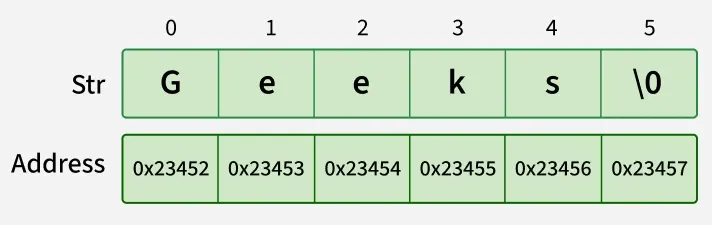
A String in Java is an object that represents a sequence of characters. It is used to store and manipulate text data.
- In Java, String is a class (from java.lang package), not a primitive data type.
- Strings are immutable, meaning their value cannot be changed after creation.
- Java provides a String pool to optimize memory usage by reusing string literals.
47. What are the differences between String and StringBuffer?
A String and StringBuffer in Java are used to handle text data, but they differ in how they store and modify the data.
| Feature | String | StringBuffer |
|---|---|---|
| Mutability | Immutable (cannot be changed after creation) | Mutable (can be changed after creation) |
| Performance | Slower for frequent modifications | Faster for frequent modifications |
| Memory Usage | Creates new object on every change | Modifies the same object |
| Thread Safety | Thread-safe due to immutability | Thread-safe (synchronized methods) |
| Usage | Best for fixed or constant data | Best for dynamic or frequently changing data |
48. What are the differences between StringBuffer and StringBuilder?
StringBuffer | StringBuilder |
|---|---|
| StringBuffer provides functionality to work with the strings. | StringBuilder is a class used to build a mutable string. |
| It is thread-safe (two threads can't call the methods of StringBuffer simultaneously) | It is not thread-safe (two threads can call the methods concurrently) |
| Comparatively slow as it is synchronized. | Being non-synchronized, implementation is faster |
49. Which among String Builder or String Buffer should be preferred when there are a lot of updates required to be done in the data?
When there are frequent updates to text data, StringBuilder or StringBuffer should be used instead of String because String is immutable and creates a new object for every change, making it inefficient.
| StringBuilder | StringBuffer |
|---|---|
| Faster performance | Slower due to synchronization |
| Not thread-safe | Thread-safe (synchronized) |
| Best for single-threaded environments | Best for multi-threaded environments |
50. Why is StringBuffer called mutable?
StringBuffer is called mutable because its content can be changed after the object is created without creating a new object.
- Unlike String, which creates a new object for every modification, StringBuffer modifies the same existing object.
- This makes it memory efficient for frequent string updates.
- It provides methods like append(), insert(), and delete() to modify data directly.
- StringBuffer is mutable because its value can be changed in the same memory location.
// Java Program to demonstrate use of stringbuffer
public class StringBufferExample {
    public static void main(String[] args)
    {
        StringBuffer s = new StringBuffer();
        s.append("Geeks");
        s.append("for");
        s.append("Geeks");
        String message = s.toString();
        System.out.println(message);
    }
}
Output
GeeksforGeeks
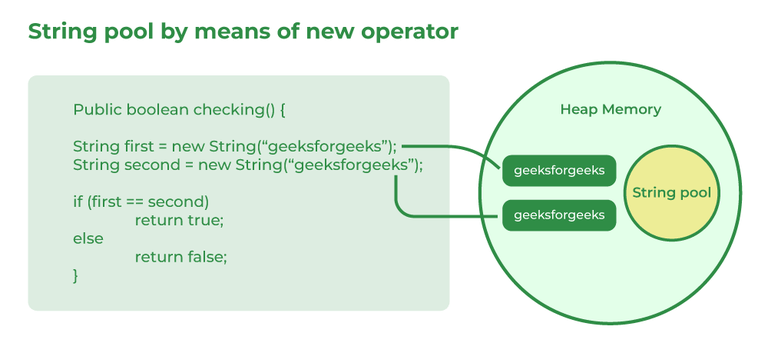
51. How is the creation of a String using new() different from that of a literal?
A String can be created either using a string literal or the new keyword. Both create String objects, but they differ in memory allocation and reuse.
- A string literal (e.g., String s = "Java";) is stored in the String Constant Pool and reused if the same value already exists.
- A String created using new (e.g., String s = new String("Java");) always creates a new object in heap memory, even if an identical string exists in the pool.
- String literals are more memory-efficient, while new guarantees a separate String object.
52. What is an array in Java?
An array in Java is a data structure used to store multiple values of the same data type in a single variable. It allows elements to be stored and accessed using an index.
- Arrays store elements in contiguous memory locations and have a fixed size once created.
- Each element is accessed using its index, which starts from 0.
- Arrays improve code readability and make it easier to manage large amounts of related data.
Syntax
int[] Arr = new int[5];
53. On which memory arrays are created in Java?
In Java, array objects are created in heap memory, which is used for dynamic memory allocation during program execution.
- If the array variable is a local variable, its reference is stored in the stack memory, while it points to the array object in the heap.
- Heap memory allows arrays to be shared and accessed by different parts of the program through references.
54. What are the types of an array?
There are two types of arrays i.e., Primitive arrays and References Arrays.
1. Single-Dimensional Arrays: Arrays that have only one dimension i.e., an array of integers or an array of strings are known as single-dimensional arrays.
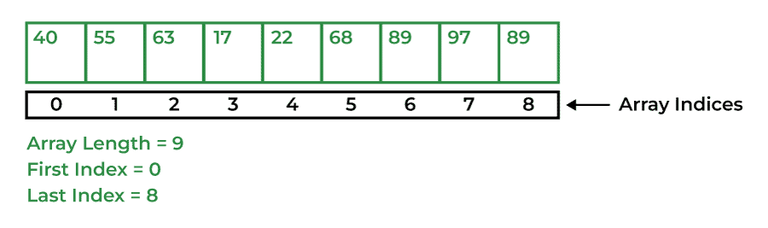
Syntax:
data_type[] Array_Name = new data_type[ArraySize];
2. Multi-Dimensional Arrays: Arrays that have two or more dimensions such as two-dimensional or three-dimensional arrays.
Syntax:
data_type[dim1][dim2]...[dimN] array_name = new data_type[size1][size2]...[sizeN];
55. Why does the Java array index start with 0?
The index of an array signifies the distance from the start of the array. So, the first element has 0 distance therefore the starting index is 0.
Syntax:
[Base Address + (index * no_of_bytes)]
56. What is the difference between int array[] and int[] array?
Both int array[] and int[] array are used to declare an array of integers in java. The only difference between them is on their syntax no functionality difference is present between them.
int arr[] is a C-Style syntax to declare an Array.
int[] arr is a Java-Style syntax to declare an Array.
However, it is generally recommended to use Java-style syntax to declare an Array. As it is easy to read and understand also it is more consistent with other Java language constructs.
57. How to copy an array in Java?
In Java, there are multiple ways to copy an array based on the requirements:
1. clone() Method (Shallow Copy)
- The clone() method creates a new array with its own memory but contains references to the same objects for non-primitive data types.
- For primitive arrays, it behaves like a deep copy since primitive values are directly copied.
int[] arr = {1, 2, 3, 5, 0};
int[] tempArr = arr.clone(); // Creates a new array with copied values
2. System.arraycopy() Method (Deep Copy)
- This method creates a new array and copies elements from the original array.
- It allows partial copying by specifying an offset and length.
int[] arr = {1, 2, 7, 9, 8};
int[] tempArr = new int[arr.length];
System.arraycopy(arr, 0, tempArr, 0, arr.length);
3. Arrays.copyOf() Method (Creates New Array)
- This method creates a new array and copies the entire original array into it.
- If the specified length is greater than the original array, extra elements are initialized with default values.
int[] arr = {1, 2, 4, 8};
int[] tempArr = Arrays.copyOf(arr, arr.length);
4. Arrays.copyOfRange() Method (Copying a Subset)
- Similar to copyOf(), but allows copying a specific range of elements.
int[] arr = {1, 2, 4, 8};
int[] tempArr = Arrays.copyOfRange(arr, 0, arr.length);
58. What do you understand by the jagged array?
A jagged array is an array of arrays in which each row can have a different number of elements. Unlike a regular multidimensional array, all rows are not required to have the same size.
- It helps save memory when different rows require different amounts of storage.
- In Java, a two-dimensional array is internally implemented as an array of arrays, making jagged arrays possible.
Syntax:
int[][] Arr = new int[][] {
{1, 2, 8},
{7, 5},
{6, 7, 2, 6}
};
59. Is it possible to make an array volatile?
Yes, an array reference can be declared as volatile in Java. However, the volatile keyword applies only to the array reference, not to the individual elements of the array.
- When an array is declared volatile, changes to the reference are immediately visible to all threads.
- Modifying an element of the array does not make that change automatically thread-safe or visible through volatile.
- For thread-safe updates to array elements, additional synchronization mechanisms may be required.
Example:
volatile int[] numbers = new int[5];
Here, numbers is a volatile reference to an array, but the elements numbers[0], numbers[1], etc., are not volatile.
60. What are the advantages and disadvantages of an array?
An array is a simple and efficient data structure used to store multiple elements of the same data type. It provides fast access to elements but has some limitations regarding size and flexibility.
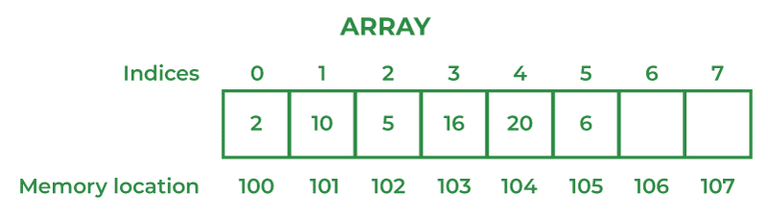
The advantages of Arrays are
- Arrays provide fast access to elements using their index.
- They store elements in contiguous memory locations, improving performance.
- Arrays are easy to use and suitable for storing large amounts of similar data.
Disadvantages of Arrays are
- Arrays have a fixed size, which cannot be changed after creation.
- They can store only homogeneous (same type) elements.
- Inserting or deleting elements can be inefficient because existing elements may need to be shifted.
61. What is an object-oriented paradigm?
The object-oriented paradigm is a programming approach that organizes software around objects, which contain both data (attributes) and behavior (methods). It helps in building modular, reusable, and maintainable applications.
- It is based on key concepts such as Encapsulation, Inheritance, Polymorphism, and Abstraction.
- It improves code reusability, scalability, and maintainability by promoting modular design.
62. What are the main concepts of OOPs in Java?
Object-Oriented Programming (OOP) in Java is based on four fundamental concepts that help in designing modular, reusable, and maintainable applications.
- Encapsulation: Bundles data and methods into a single unit (class) and restricts direct access to data using access modifiers.
- Inheritance: Allows one class to acquire the properties and behaviors of another class, promoting code reusability.
- Polymorphism: Enables a single interface or method to perform different actions depending on the object or context.
- Abstraction: Hides implementation details and exposes only the essential features to the user.
63. What is the difference between an object-oriented programming language and an object-based programming language?
Object-Oriented Programming Language | Object-Based Programming Language |
|---|---|
| Object-oriented programming language covers larger concepts like inheritance, polymorphism, abstraction, etc. | The scope of object-based programming is limited to the usage of objects and encapsulation. |
| It supports all the built-in objects | It doesn’t support all the built-in objects |
| Examples: Java, C#, etc. | Examples: Java script, visual basics, etc. |
64. How is the ‘new’ operator different from the ‘newInstance()’ operator in Java?
the new operator is used to create objects, but if we want to decide the type of object to be created at runtime, there is no way we can use the new operator. In this case, we have to use the newInstance() method.
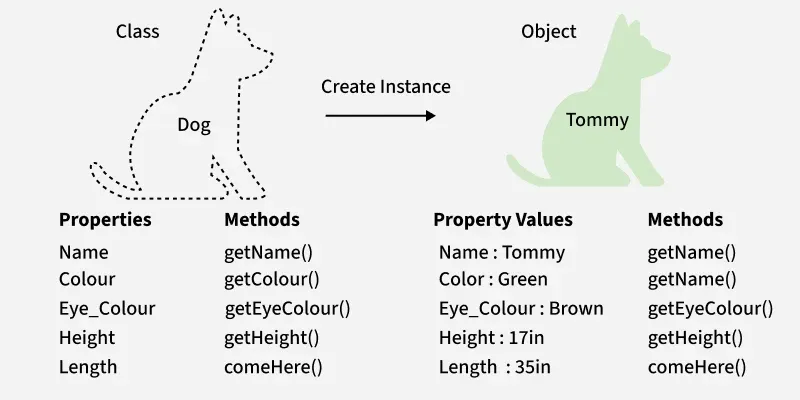
65. What are Classes in Java?
A class in Java is a blueprint or template used to create objects. It defines the properties (variables) and behaviors (methods) that objects of that class will have.
- A class contains fields (data members) and methods (member functions) that describe an object's state and behavior.
- Objects are created from a class using the new keyword.
- Classes help achieve encapsulation, reusability, and modularity in object-oriented programming.
For Example, Dog is a class, Tommy is an object of that class.
66. What is the difference between static (class) method and instance method?
Static(Class) method | Instance method |
|---|---|
Static method is associated with a class rather than an object. | The instance method is associated with an object rather than a class. |
Static methods can be called using the class name only without creating an instance of a class. | The instance methods can be called on a specific instance of a class using the object reference. |
Static methods do not have access to this keyword. | Instance methods have access to this keyword. |
Static methods can access only static members of the class. | Instance methods can access both static and non-static methods of the class. |
Static methods cannot be overridden because they are resolved at compile time, not at run time. This means that the compiler decides which method to call based on the reference type, not on the object type. | Instance methods can be overridden because they are resolved at run time, not at compile time. This means that the compiler decides which method to call based on the object type, not on the reference type. |
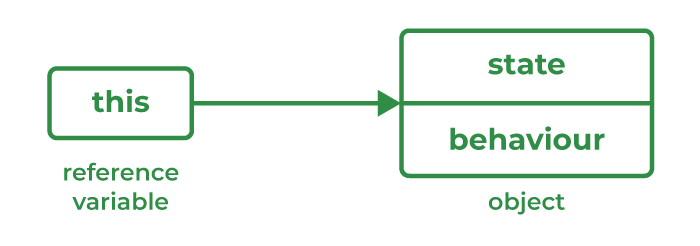
67. What is this keyword in Java?
The this keyword is a reference variable that refers to the current object of a class. It is used to access the current object's variables, methods, and constructors.
- It is commonly used to distinguish instance variables from local variables when they have the same name.
- It can be used to invoke the current class method or constructor.
68. What are Access Specifiers and their types in Java?
Access specifiers (also called access modifiers) are keywords used to control the visibility and accessibility of classes, variables, methods, and constructors in Java. They help implement encapsulation and protect data from unauthorized access.
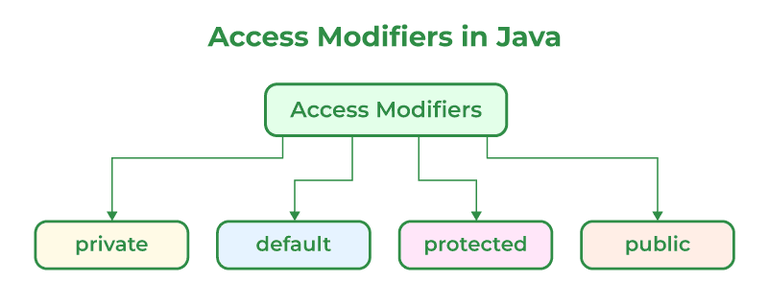
- public: Accessible from anywhere in the program, including different packages.
- protected: Accessible within the same package and by subclasses in other packages.
- default (package-private): Accessible only within the same package. No keyword is used.
- private: Accessible only within the same class.
69. What will be the initial value of an object reference which is defined as an instance variable?
The initial value of an object reference which is defined as an instance variable is a NULL value.
70. What is an object?
The object is a real-life entity that has certain properties and methods associated with it. The object is also defined as the instance of a class. An object can be declared using a new keyword.
71. What are the different ways to create objects in Java?
Methods to create objects in Java are mentioned below:
- Using new keyword
- Using new instance
- Using clone() method
- Using deserialization
- Using the newInstance() method of the Constructor class
To know more about methods to create objects in Java refer to this article.
72. What are the advantages and disadvantages of object cloning?
Object cloning in Java is the process of creating a copy of an existing object using the clone() method. It allows objects to be duplicated without creating them from scratch.
Advantages:
- Cloning provides a quick and efficient way to create a copy of an existing object.
- It reduces the need to manually copy each field, saving development time.
- It is useful when creating objects is expensive or complex.
Disadvantages:
- Cloning can be complex, especially when dealing with deep copies of objects containing references.
- The clone() method and Cloneable interface are often considered difficult to use and error-prone.
- A shallow copy may lead to unexpected behavior because referenced objects are shared between the original and cloned objects.
73. What are the advantages of passing this into a method instead of the current class object itself?
There are a few advantages of passing this into a method instead of the current class object itself these are:
- this is the final variable because of which this cannot be assigned to any new value whereas the current class object might not be final and can be changed.
- this can be used in the synchronized block.
74. What is the constructor?
A constructor is a special member of a class that is automatically called when an object is created. Its primary purpose is to initialize the object's data members.
- A constructor has the same name as the class and does not have a return type, not even void.
- It is invoked automatically when an object is created using the new keyword.
- Constructors help initialize objects with default or user-defined values.
Example:
class Student {
    String name;

    Student() { // Constructor
        name = "John";
    }
}
In this example, the constructor initializes the name variable when a Student object is created.
75. What happens if you don't provide a constructor in a class?
If you don't provide a constructor in a class in Java, the compiler automatically generates a default constructor with no arguments and no operation which is a default constructor.
76. How many types of constructors are used in Java?
There are two types of constructors in Java as mentioned below:
Default Constructor: It is the type that does not accept any parameter value. It is used to set initial values for object attributes.
class_Name();
// Default constructor called
Parameterized Constructor: It is the type of constructor that accepts parameters as arguments. These are used to assign values to instance variables during the initialization of objects.
class_Name(parameter1, parameter2......);
// All the values passed as parameter will be
// allocated accordingly
77. What is the purpose of a default constructor?
A default constructor is a no-argument constructor that is used to initialize an object with default values when no constructor is explicitly defined in a class.
- It is automatically provided by the Java compiler if the programmer does not create any constructor.
- It initializes instance variables with their default values, such as 0, false, or null.
- It allows objects to be created without passing any arguments.
78. What do you understand by copy constructor in Java?
The copy constructor is the type of constructor in which we pass another object as a parameter because which properties of both objects seem the same, that is why it seems as if constructors create a copy of an object.
79. Where and how can you use a private constructor?
A private constructor is used if you don't want any other class to instantiate the object to avoid subclassing. The use private constructor can be seen as implemented in the example.
Example:
import java.io.*;
class GFG {
    static GFG instance = null;
    public int x = 10;
    // private constructor can't be accessed outside the
    // class
    private GFG() {}
    // Factory method to provide the users with instances
    static public GFG getInstance()
    {
        if (instance == null)
            instance = new GFG();
        return instance;
    }
}
// Driver Class
class Main {
    public static void main(String args[])
    {
        GFG a = GFG.getInstance();
        GFG b = GFG.getInstance();
        a.x = a.x + 10;
        System.out.println("Value of a.x = " + a.x);
        System.out.println("Value of b.x = " + b.x);
    }
}
Output
Value of a.x = 20
Value of b.x = 20
80. What are the differences between the constructors and methods?
Java constructors are used for initializing objects. During creation, constructors are called to set attributes for objects apart from this few basic differences between them are:
- Constructors are only called when the object is created but other methods can be called multiple times during the life of an object.
- Constructors do not have a return type, whereas methods have a return type, which can be
voidor any other type. - Constructors are used to setting up the initial state but methods are used to perform specific actions.
81. What is an Interface?
An interface in Java is a blueprint of a class that defines a set of abstract methods that implementing classes must provide. It is used to achieve abstraction and support multiple inheritance.
- An interface contains method declarations (and can also contain default, static, and private methods in modern Java).
- A class implements an interface using the implements keyword and provides implementations for its methods.
- Interfaces help achieve abstraction, loose coupling, and code reusability.
import java.io.*;
interface Shape {
    double getArea();
    double getPerimeter();
}
class Circle implements Shape {
    private double radius;
    public Circle(double radius) { this.radius = radius; }
    public double getArea()
    {
        return Math.PI * radius * radius;
    }
    public double getPerimeter()
    {
        return 2 * Math.PI * radius;
    }
}
class GFG {
    public static void main(String[] args)
    {
        Circle circle = new Circle(5.0);
        System.out.println("Area of circle is "
                           + circle.getArea());
        System.out.println("Perimeter of circle is"
                           + circle.getPerimeter());
    }
}
Output
Area of circle is 78.53981633974483
Perimeter of circle is31.41592653589793
82. Give some features of the Interface.
An interface is used to define a contract that implementing classes must follow. It helps achieve abstraction and supports multiple inheritance in Java.
- An interface contains abstract methods that implementing classes must define.
- A class can implement multiple interfaces, allowing Java to achieve multiple inheritance.
- All variables declared in an interface are public, static, and final by default.
- All abstract methods are public and abstract by default.
- Interfaces support default, static, and private methods (introduced in Java 8 and Java 9).
- Interfaces promote abstraction, loose coupling, and code reusability in applications.
83. What is a marker interface?
An Interface is recognized as an empty interface (no field or methods) it is called a marker interface. Examples of marker interfaces are Serializable, Cloneable, and Remote interfaces.
84. What are the differences between abstract class and interface?
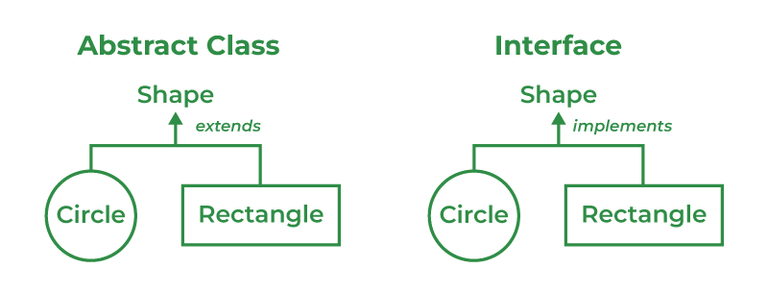
Abstract Class | Interface Class |
|---|---|
Both abstract and non-abstract methods may be found in an abstract class. | The interface contains only abstract methods. |
Abstract Class supports Final methods. | The interface class does not support Final methods. |
Multiple inheritance is not supported by the Abstract class. | Multiple inheritances is supported by Interface Class. |
Abstract Keyword is used to declare Abstract class. | Interface Keyword is used to declare the interface class. |
| extend keyword is used to extend an Abstract Class. | implements keyword is used to implement the interface. |
Abstract Class has members like protected, private, etc. | All class members are public by default. |
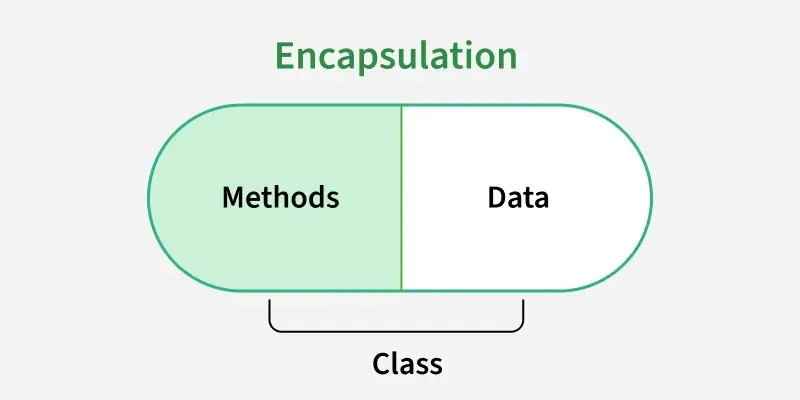
85. What do you mean by data encapsulation?
Data encapsulation is the process of wrapping data (variables) and the methods that operate on that data into a single unit called a class. It also restricts direct access to the data by using access modifiers.
- Encapsulation helps protect data from unauthorized access and modification.
- It is typically achieved by declaring variables as private and providing public getter and setter methods to access them.
- Encapsulation improves security, maintainability, and code reusability.
86. What are the advantages of Encapsulation in Java?
Encapsulation is an OOP concept that bundles data and methods into a single unit and restricts direct access to the data. It helps create secure, maintainable, and well-structured applications.
- Improves Data Security by hiding sensitive data and preventing unauthorized access.
- Provides Better Control Over Data through getter and setter methods, allowing validation before modifying values.
- Enhances Maintainability since internal implementation can be changed without affecting other parts of the program.
- Promotes Code Reusability by creating self-contained and modular classes.
- Supports Data Hiding, reducing the chances of accidental data modification.
- Makes Applications More Flexible by allowing controlled access to class members.
87. What is the primary benefit of Encapsulation?
The primary benefit of encapsulation is data hiding, which protects an object's data from unauthorized or unintended access and modification. It ensures that data can only be accessed through controlled methods.
- Encapsulation improves data security by restricting direct access to class variables.
- It provides better control over data through getter and setter methods.
- It enhances maintainability and flexibility by hiding implementation details from users of the class.
Example: In a banking application, the account balance can be kept private and accessed only through methods like deposit() and withdraw(), preventing invalid modifications.
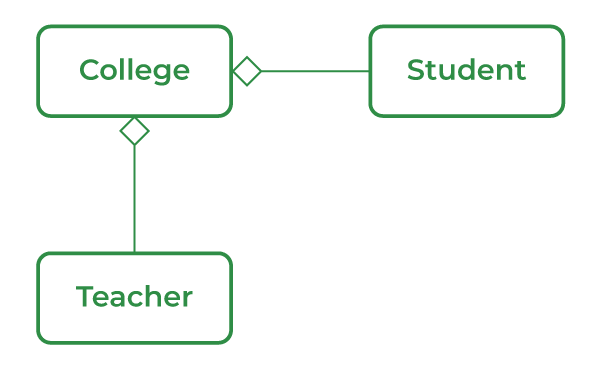
88. What do you mean by aggregation?
Aggregation is a special form of association in Java that represents a "has-a" relationship between two classes. In aggregation, one class contains a reference to another class, but both objects can exist independently of each other.
- Aggregation represents a weak relationship where the child object can exist even if the parent object is destroyed.
- It models real-world relationships such as College has Student or Teacher.
89. What is the ‘IS-A ‘ relationship in OOPs Java?
The IS-A relationship represents inheritance in Java, where one class inherits the properties and behaviors of another class. It indicates that a subclass is a specialized form of its superclass.
- The IS-A relationship is achieved using the extends keyword.
- It promotes code reusability by allowing a child class to inherit fields and methods from a parent class.
Example: A Dog IS-A Animal, so the Dog class can inherit properties and behaviors from the Animal class.
90. Define Inheritance.
Inheritance is an Object-Oriented Programming (OOP) concept that allows one class to acquire the properties and behaviors of another class. It promotes code reusability and establishes an IS-A relationship between classes.
- Inheritance allows a child class (subclass) to inherit fields and methods from a parent class (superclass).
- It helps reduce code duplication and improves maintainability.
- In Java, inheritance is achieved using the extends keyword.
Example: A Dog class can inherit the properties and behaviors of an Animal class because a Dog IS-A Animal.
91. What are the different types of inheritance in Java?
Inheritance is the method by which the Child class can inherit the features of the Super or Parent class. In Java, Inheritance is of four types:
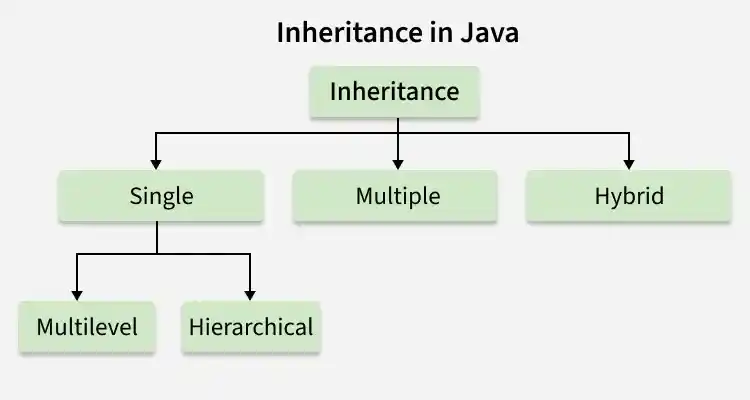
- Single Inheritance: When a child or subclass extends only one superclass, it is known to be single inheritance. Single-parent class properties are passed down to the child class.
- Multilevel Inheritance: When a child or subclass extends any other subclass a hierarchy of inheritance is created which is known as multilevel inheritance. In other words, one subclass becomes the parent class of another.
- Hierarchical Inheritance: When multiple subclasses derive from the same parent class is known as Hierarchical Inheritance. In other words, a class that has a single parent has many subclasses.
- Multiple Inheritance: When a child class inherits from multiple parent classes is known as Multiple Inheritance. In Java, it only supports multiple inheritance of interfaces, not classes.
92. What is multiple inheritance? Is it supported by Java?
Multiple inheritance is an Object-Oriented Programming concept where a class can inherit properties and behaviors from more than one parent class.
- It allows a class to acquire features from multiple classes, increasing code reusability.
- However, it can lead to ambiguity problems like the diamond problem, where conflicts arise if multiple parent classes have the same method.
Is it supported by Java?
- Java does not support multiple inheritance with classes to avoid ambiguity and complexity.
- Instead, Java achieves multiple inheritance using interfaces, where a class can implement multiple interfaces.
93. How is inheritance in C++ different from Java?
Inheritance in C++ | Inheritance in Java |
|---|---|
| C++ lets the user to inherit multiple classes. | Java doesn’t support multiple inheritances. |
| When a class is created in C++, it doesn’t inherit from the object class, instead exists on its own. | Java is always said to have a single inheritance as all the classes inherit in one or the other way from the object class. |
94. Is there any limitation to using Inheritance?
Yes, inheritance has some limitations in Java even though it is a powerful OOP feature.
- It can lead to tight coupling, meaning changes in the parent class may affect all child classes.
- It may increase complexity when class hierarchies become deep and difficult to manage.
- Java does not support multiple inheritance with classes, which limits flexibility.
- Overusing inheritance can reduce code flexibility, where composition might be a better choice.
Example issue: If a superclass changes its implementation, all subclasses inheriting it may unintentionally get affected.
95. Although inheritance is a popular OOPs concept, it is less advantageous than composition. Explain.
Inheritance is useful for achieving code reuse through an IS-A relationship, but in many real-world scenarios, composition (HAS-A relationship) is more flexible and safer.
- Inheritance creates a tight coupling between parent and child classes, so changes in the parent class can unintentionally affect all subclasses.
- Composition provides better flexibility, as objects are built by combining other objects instead of depending on a rigid class hierarchy.
- With composition, behavior can be changed at runtime by replacing components, whereas inheritance is fixed at compile time.
Example idea: Instead of Car extends Engine, it is better to design Car has an Engine, because an engine can be replaced without changing the car structure.
96. What is an association?
The association is a relation between two separate classes established through their Objects. It represents Has-A’s relationship.
97. What do you mean by aggregation?
Association is a relationship between two separate classes that establishes a connection between their objects. It represents a general “uses-a” or “has-a” relationship in OOP.
- Association defines how objects of one class are related to objects of another class.
- It does not imply ownership; both objects can exist independently.
- It is a broad relationship that can be further classified into aggregation and composition.
Example: A Teacher and a Student have an association because a teacher teaches students, but both can exist independently.
98. What is the composition of Java?
Composition in Java is a strong form of association that represents a “HAS-A” relationship, where one class contains objects of another class and controls their lifecycle.
- In composition, the child object cannot exist independently of the parent object.
- It is a strong ownership relationship, meaning if the parent object is destroyed, the contained objects are also destroyed.
- Composition is widely used to achieve code reuse and better design than inheritance.
Example: A House has Rooms, and rooms cannot exist without the house.
99. State the difference between Composition and Aggregation.
Aggregation | Composition |
|---|---|
It defines a "has a" relationship between the objects | It represents the part-of relationship |
Objects are independent of each other. | Objects are dependent on each other. |
Represent it by using the empty diamond. | Represent it by using the filled diamond. |
Child objects don't have a lifetime. | Child objects have a lifetime. |
100. Can the constructor be inherited?
No, constructors cannot be inherited in Java.
- Constructors are not members of a class; they are special blocks used to initialize objects, so they are not inherited by subclasses.
- However, a subclass can call the parent class constructor using the super() keyword.
- If a subclass does not explicitly call a constructor, Java automatically calls the default constructor of the parent class.
101. What is Polymorphism?
Polymorphism is defined as the ability to take more than one form It is of two types namely, Compile time polymorphism or method overloading- a function called during compile time. For instance, take a class ‘area’. Based on the number of parameters it may calculate the area of a square, triangle, or circle. Run time polymorphism or method overriding- links during run time. The method inside a class overrides the method of the parent class.
102. What is runtime polymorphism or dynamic method dispatch?
Dynamic method dispatch is a resolving mechanism for method overriding during the run time. Method overriding is the one where the method in a subclass has the same name, parameters, and return type as a method in the superclass. When the over-ridden method is called through a superclass reference, java determines which version (superclass or subclass) of that method is to be executed based upon the type of an object being referred to at the time the call occurs. Thus the decision is made at run time. This is referred to as dynamic method dispatch.
103. What is method overriding?
Method overriding, also known as run time polymorphism is one where the child class contains the same method as the parent class. For instance, we have a method named ‘gfg()’ in the parent class. A method gfg() is again defined in the sub-class. Thus when gfg() is called in the subclass, the method within the class id executed. Here, gfg() within the class overridden the method outside.
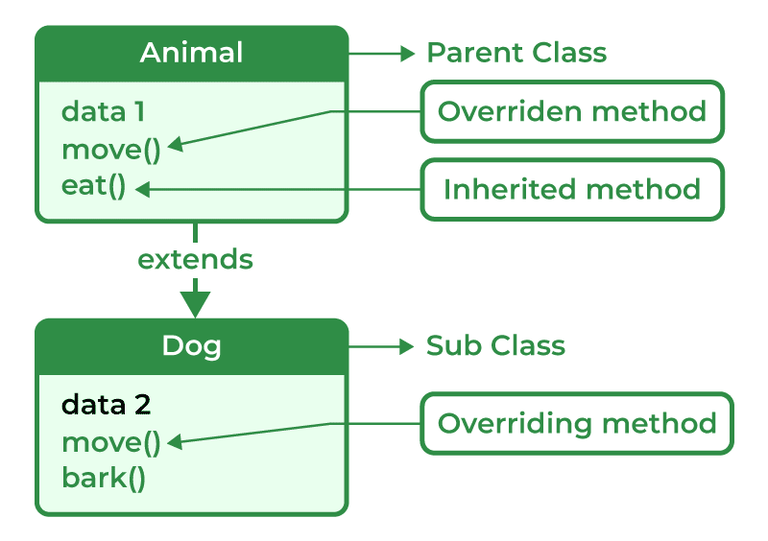
Method overriding is a method to achieve Run-time polymorphism in Java. Method overriding is a feature that allows a child class to provide a specific implementation of a method that is already provided by one of its parent classes. When a method in a child class has the same name, the same parameters or signature, and the same return type (or sub-type) as a method in its parent class, then the method in the subclass is said to override the method in the superclass.
104. What is method overloading?
In Java, Method Overloading allows different methods to have the same name, but different signatures where the signature can differ by the number of input parameters or type of input parameters, or a mixture of both.
Method overloading in Java is also known as Compile-time Polymorphism, Static Polymorphism, or Early binding. In Method overloading compared to the parent argument, the child argument will get the highest priority.
105. Can we override the static method?
No, as static methods are part of the class rather than the object so we can't override them.
106. Can we override the overloaded method?
Yes, since the overloaded method is a completely different method in the eyes of the compiler. Overriding isn't the same thing at all. The decision as to which method to call is deferred to runtime.
107. Can we overload the main() method?
Yes in Java we can overload the main method to call the main method with the help of its predefined calling method.
108. What are method overloading and method overriding?
Method Overloading: It is also known as Compile Time Polymorphism. In method overloading two or more methods are shared in the same class with a different signature.
Example:
// Java Program to demonstrate use of Method Overloading
import java.io.*;
class GFG {
    static int multiply(int a, int b) { return a * b; }
    static int multiply(int a, int b, int c)
    {
        return a * b * c;
    }
    static int multiply(int a, int b, int c, int d)
    {
        return a * b * c * d;
    }
    public static void main(String[] args)
    {
        System.out.println("multiply() with 2 parameters");
        System.out.println(multiply(4, 5));
        System.out.println("multiply() with 3 parameters");
        System.out.println(multiply(2, 3, 4));
        System.out.println("multiply() with 4 parameters");
        System.out.println(multiply(2, 3, 4, 1));
    }
}
Output
multiply() with 2 parameters
20
multiply() with 3 parameters
24
multiply() with 4 parameters
24
Method Overriding: Method Overriding occurs when a subclass can provide the implementation of a method which is already defined in the parent class or superclass. The return type, name and arguments must be similar to the methods in superclass.
Example:
// Java Program to demonstrate use of Method Overriding
import java.io.*;
class Vehicle {
    void drive()
    {
        System.out.println("drive() method of base class");
        System.out.println("driving the Car.");
    }
}
class Car extends Vehicle {
    void drive()
    {
        System.out.println(
            "drive() method of derived class");
        System.out.println("Car is driving.");
    }
}
class GFG {
    public static void main(String[] args)
    {
        Car c1 = new Car();
        Vehicle v1 = new Vehicle();
        c1.drive();
        v1.drive();
        Vehicle vehicle = new Car();
        // drive() method of Vehicle class is overridden by
        // Car class drive()
        vehicle.drive();
    }
}
Output
drive() method of derived class
Car is driving.
drive() method of base class
driving the Car.
drive() method of derived class
Car is driving.
Method Overloading | Method Overriding |
|---|---|
When two or multiple methods are in the same class with different parameters but the same name. | When a subclass provides its own implementation of a method that is already defined in the parent class. |
Method overloading can only happen in the same class or between a subclass or parent class. | Method overriding can only happen in Subclass. |
When an error occurs it is caught at the compile time of the program. | When an error occurs it is caught at Runtime of the program. |
Example of Compile Time Polymorphism. | Example of Run Time Polymorphism. |
Method Overloading may or may not require Inheritance. | Method overriding always needs Inheritance. |
It occurs within the class. | It is performed in two classes with an inheritance relationship. |
109. Can we override the private methods?
It is not possible to override the private methods in Java. Method overriding is where the method in the subclass is implemented instead of the method from the parent class. The private methods are accessible only within the class in which it is declared. Since this method is not visible to other classes and cannot be accessed, it cannot be overridden.
110. Can we change the scope of the overridden method in the subclass?
Yes, we can change the scope of an overridden method in the subclass, but only to make it wider or the same as the superclass method’s scope.
- If the overridden method in the superclass is public, the subclass method must be public (it cannot be protected, default, or private).
- If the overridden method in the superclass is protected, the subclass method can be protected or public, but not private or default.
- If the overridden method in the superclass has default (package-private) access, the subclass method can be default, protected, or public, but not private.
- A private method cannot be overridden because it is not visible to the subclass.
111. Can we modify the throws clause of the superclass method while overriding it in the subclass?
We can modify the throws clause of the Superclass method with some limitations, we can change the throws clause of the superclass method while overriding it in the subclass. The subclass overridden method can only specify unchecked exceptions if the superclass method does not declare any exceptions. If the superclass method declares an exception, the subclass method can declare the same exception, a subclass exception, or no exception at all. However, the subclass method cannot declare a parent exception that is broader than the ones declared in the superclass method.
112. Can you have virtual functions in Java?
Yes, Java supports virtual functions. Functions are by default virtual and can be made non-virtual using the final keyword.
113. What is Abstraction?
Abstraction refers to the act of representing essential features without including background details. The detailed information or the implementation is hidden. The most common example of abstraction is a car, we know how to turn on the engine, accelerate and move, however, the way engine works, and its internal components are complex logic hidden from the general users. This is usually done to handle the complexity.
114. What is Abstract class?
A class declared as abstract, cannot be instantiated i.e., the object cannot be created. It may or may not contain abstract methods but if a class has at least one abstract method, it must be declared abstract.
Example of an abstract class with abstract method:
// Java Program to implement
// abstract method
import java.io.*;
// Abstract class
abstract class Fruits {
    abstract void run();
}
// Driver Class
class Apple extends Fruits {
    void run()
    {
        System.out.println("Abstract class example");
    }
    // main method
    public static void main(String args[])
    {
        Fruits obj = new Apple();
        obj.run();
    }
}
Output
Abstract class example
115. When Abstract methods are used?
An abstract method is used when we want to use a method but want to child classes to decide the implementation in that case we use Abstract methods with the parent classes.
116. How can you avoid serialization in the child class if the base class is implementing the Serializable interface?
Serialization in the child class if the base class is implementing the Serializable interface then we can avoid it by defining the writeObject() method and throwing NotSerializableException().
117. What is Collection Framework in Java?
Collections are units of objects in Java. The collection framework is a set of interfaces and classes in Java that are used to represent and manipulate collections of objects in a variety of ways. The collection framework contains classes(ArrayList, Vector, LinkedList, PriorityQueue, TreeSet) and multiple interfaces (Set, List, Queue, Deque) where every interface is used to store a specific type of data.
118. Explain various interfaces used in the Collection framework.
Collection framework implements
- Collection Interface
- List Interface
- Set Interface
- Queue Interface
- Deque Interface
- Map Interface
Collection interface: Collection is the primary interface available that can be imported using java.util.Collection.
Syntax:
public interface Collection<E> extends iterable
119. How can you synchronize an ArrayList in Java?
An ArrayList can be synchronized using two methods mentioned below:
- Using Collections.synchronizedList()
- Using CopyOnWriteArrayList
Using Collections.synchronizedList():
public static List<T> synchronizedList(List<T> list)
Using CopyOnWriteArrayList:
- Create an empty List.
- It implements the List interface
- It is a thread-safe variant of ArrayList
- T represents generic
120. Why do we need a synchronized ArrayList when we have Vectors (which are synchronized) in Java?
ArrayList is in need even when we have Vectors because of certain reasons:
- ArrayList is faster than Vectors.
- ArrayList supports multithreading whereas Vectors only supports single-thread use.
- ArrayList is safer to use, as Vectors supports single threads and individual operations are less safe and take longer to synchronize.
- Vectors are considered outdated in Java because of their synchronized nature.
121. Why can’t we create a generic array?
Generic arrays can't be created because an array carriestype information of its elements at runtime because of which during runtime it throw 'ArrayStoreException' if the elements' type is not similar. Since generics type information gets erased at compile time by Type Erasure, the array store check would have been passed where it should have failed.
122. Can you explain how elements are stored in memory for both regular arrays and ArrayLists in Java? . Explain.
The elements of a regular array in Java are stored in contiguous memory locations, meaning that each element is stored in a sequential block of memory. This allows easy access to any element by its index because the address can be calculated using the base address of the array and the size of each element
In contrast, the ArrayList class implements a dynamic array, which means that its size can change as elements are added or removed. ArrayList elements are also stored in contiguous memory locations, similar to arrays. However, when an ArrayList reaches its capacity and more elements need to be added, a new, larger underlying array is created. The elements from the old array are then copied to the new one. This process ensures that the ArrayList can grow dynamically while keeping the elements in contiguous memory locations.
123. Explain the method to convert ArrayList to Array and Array to ArrayList.
Conversion of List to ArrayList
There are multiple methods to convert List into ArrayList
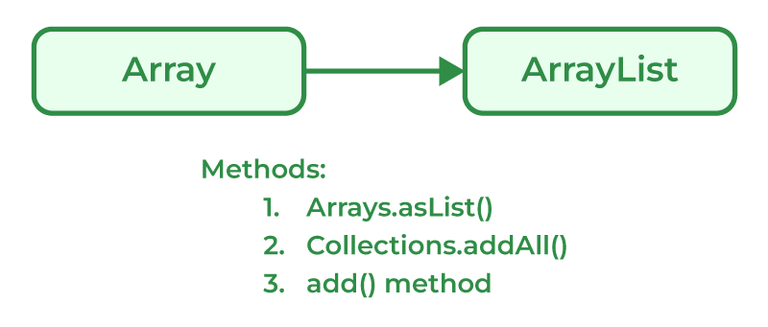
Programmers can convert an Array to ArrayList using asList() method of the Arrays class. It is a static method of the Arrays class that accepts the List object.
Syntax:
Arrays.asList(item)
Example:
// Java program to demonstrate conversion of
// Array to ArrayList of fixed-size.
import java.util.*;
// Driver Class
class GFG {
    // Main Function
    public static void main(String[] args)
    {
        String[] temp = { "Abc", "Def", "Ghi", "Jkl" };
        // Conversion of array to ArrayList
        // using Arrays.asList
        List conv = Arrays.asList(temp);
        System.out.println(conv);
    }
}
Output
[Abc, Def, Ghi, Jkl]
Conversion of ArrayList to Array
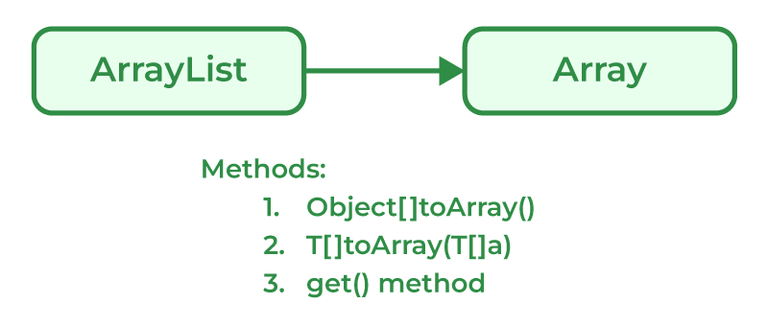
Java programmers can convert ArrayList to
Syntax:
List_object.toArray(new String[List_object.size()])Example:
import java.util.List;
import java.util.ArrayList;

// Driver Class
class GFG {
    // Main Function
    public static void main(String[] args) {
        // List declared
        List<Integer> arr = new ArrayList<>();
        arr.add(1);
        arr.add(2);
        arr.add(3);
        arr.add(2);
        arr.add(1);

        // Conversion
        Object[] objects = arr.toArray();

        // Printing array of objects
        for (Object obj : objects)
            System.out.print(obj + " ");
    }
}
Output
1 2 3 2 1
124. How does the size of ArrayList grow dynamically? And also state how it is implemented internally.
Due to ArrayLists array-based nature, it grows dynamically in size ensuring that there is always enough room for elements. When an ArrayList element is first created, the default capacity is around 10-16 elements which basically depends on the Java version. ArrayList elements are copied over from the original array to the new array when the capacity of the original array is full. As the ArrayList size increases dynamically, the class creates a new array of bigger sizes and it copies all the elements from the old array to the new array. Now, the reference of the new array is used internally. This process of dynamically growing an array is known as resizing.
125. What is a Vector in Java?
Vectors in Java are similar and can store multiple elements inside them. Vectors follow certain rules mentioned below:
- Vector can be imported using Java.util.Vector.
- Vector is implemented using a dynamic array as the size of the vector increases and decreases depending upon the elements inserted in it.
- Elements of the Vector using index numbers.
- Vectors are synchronized in nature means they only used a single thread ( only one process is performed at a particular time ).
- The vector contains many methods that are not part of the collections framework.
Syntax:
Vector gfg = new Vector(size, increment);
126. How to make Java ArrayList Read-Only?
An ArrayList can be made ready only using the method provided by Collections using the Collections.unmodifiableList() method.
Syntax:
array_readonly = Collections.unmodifiableList(ArrayList);
Example:
import java.util.*;

public class Main {
    public static void main(String[] argv) throws Exception {
        try {
            // creating object of ArrayList
            ArrayList<Character> temp = new ArrayList<>();
            // populate the list
            temp.add('X');
            temp.add('Y');
            temp.add('Z');
            // printing the list
            System.out.println("Initial list: " + temp);

            // getting readonly list
            // using unmodifiableList() method
            List<Character> new_array = Collections.unmodifiableList(temp);

            // printing the list
            System.out.println("ReadOnly ArrayList: " + new_array);

            // Attempting to add element to new Collection
            System.out.println("\nAttempting to add element to the ReadOnly ArrayList");
            new_array.add('A');
        } catch (UnsupportedOperationException e) {
            System.out.println("Exception is thrown : " + e);
        }
    }
}
Output
Initial list: [X, Y, Z]
ReadOnly ArrayList: [X, Y, Z]

Attempting to add element to the ReadOnly ArrayList
Exception is thrown : java.lang.UnsupportedOperationException
127. What is a priority queue in Java?
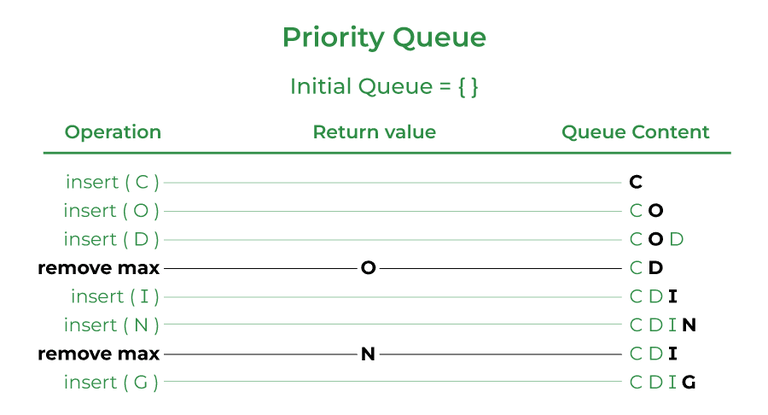
A priority queue is an abstract data type similar to a regular queue or stack data structure. Elements stored in elements are depending upon the priority defined from low to high. The PriorityQueue is based on the priority heap.
Syntax:
import java.util.*;

class PriorityQueueDemo {
    // Main Method
    public static void main(String args[]) {
        // Creating empty priority queue
        PriorityQueue<Integer> var1 = new PriorityQueue<Integer>();
        // Adding items to the pQueue using add()
        var1.add(10);
        var1.add(20);
        var1.add(15);
        // Printing the top element of PriorityQueue
        System.out.println(var1.peek());
    }
}
Output
10
128. Explain the LinkedList class.
LinkedList class is Java that uses a doubly linked list to store elements. It inherits the AbstractList class and implements List and Deque interfaces. Properties of the LinkedList Class are mentioned below:
- LinkedList classes are non-synchronized.
- Maintains insertion order.
- It can be used as a list, stack, or queue.
Syntax:
LinkedList<class> list_name=new LinkedList<class>();
129. What is the Stack class in Java and what are the various methods provided by it?
A Stack class in Java is a LIFO data structure that implements the Last In First Out data structure. It is derived from a Vector class but has functions specific to stacks. The Stack class in java provides the following methods:
- peek(): returns the top item from the stack without removing it
- empty(): returns true if the stack is empty and false otherwise
- push(): pushes an item onto the top of the stack
- pop(): removes and returns the top item from the stack
- search(): returns the 1, based position of the object from the top of the stack. If the object is not in the stack, it returns -1
130. What is Set in the Java Collections framework and list down its various implementations?
Sets are collections that don't store duplicate elements. They don't keep any order of the elements. The Java Collections framework provides several implementations of the Set interface, including:
- HashSet: HashSet in Java, stores the elements in a has table which provides faster lookups and faster insertion. HashSet is not ordered.
- LinkedHashSet: LinkedHashSet is an implementation of HashSet which maintains the insertion order of the elements.
- TreeSet: TreeSet stores the elements in a sorted order that is determined by the natural ordering of the elements or by a custom comparator provided at the time of creation.
131. What is the HashSet class in Java and how does it store elements?
The HashSet class implements the Set interface in the Java Collections Framework and is a member of the HashSet class. Unlike duplicate values, it stores a collection of distinct elements. In this implementation, each element is mapped to an index in an array using a hash function, and the index is used to quickly access the element. It produces an index for the element in the array where it is stored based on the input element. Assuming the hash function distributes the elements among the buckets appropriately, the HashSet class provides constant-time performance for basic operations (add, remove, contain, and size).
132. What is LinkedHashSet in Java Collections Framework?
The LinkedHashSet is an ordered version of Hashset maintained by a doubly-linked List across all the elements. It is very helpful when iteration order is needed. During Iteration in LinkedHashSet, elements are returned in the same order they are inserted.
Syntax:
LinkedHashSet<E> hs = new LinkedHashSet<E>();
Example:
import java.io.*;
import java.util.*;

// Driver Class
class GFG {
    // Main Function
    public static void main(String[] args) {
        // LinkedHashSet declared
        LinkedHashSet<Integer> hs = new LinkedHashSet<Integer>();
        // Add elements in HashSet
        hs.add(1);
        hs.add(2);
        hs.add(5);
        hs.add(3);
        // Print values
        System.out.println("Values:" + hs);
    }
}
Output
Values:[1, 2, 5, 3]
133. What is a Map interface in Java?
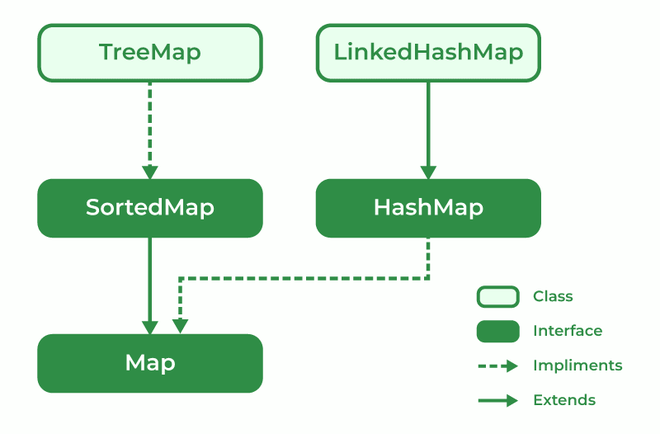
The map interface is present in the Java collection and can be used with Java.util package. A map interface is used for mapping values in the form of a key-value form. The map contains all unique keys. Also, it provides methods associated with it like containsKey(), contains value (), etc.
There are multiple types of maps in the map interface as mentioned below:
- SortedMap
- TreeMap
- HashMap
- LinkedHashMap
134. Explain Treemap in Java
TreeMap is a type of map that stores data in the form of key-value pair. It is implemented using the red-black tree. Features of TreeMap are :
- It contains only unique elements.
- It cannot have a NULL key
- It can have multiple NULL values.
- It is non-synchronized.
- It maintains ascending order.
135. What is EnumSet?
EnumSet is a specialized implementation of the Set interface for use with enumeration type. A few features of EnumSet are:
- It is non-synchronized.
- Faster than HashSet.
- All of the elements in an EnumSet must come from a single enumeration type.
- It doesn't allow null Objects and throws NullPointerException for exceptions.
- It uses a fail-safe iterator.
Syntax:
public abstract class EnumSet<E extends Enum<E>>
Parameter: E specifies the elements.
136. What is BlockingQueue?
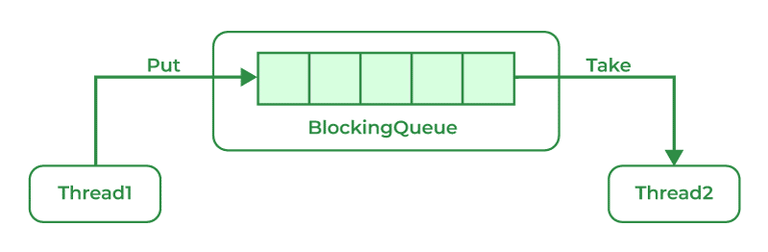
A blocking queue is a Queue that supports the operations that wait for the queue to become non-empty while retrieving and removing the element, and wait for space to become available in the queue while adding the element.
Syntax:
public interface BlockingQueue<E> extends Queue<E>
Parameters: E is the type of elements stored in the Collection
137. What is the ConcurrentHashMap in Java and do you implement it?
ConcurrentHashMap is implemented using Hashtable.
Syntax:
public class ConcurrentHashMap<K, V>
extends AbstractMap<K, V>
implements ConcurrentMap<K, V>, Serializable
Parameters: K is the key Object type and V is the value Object type
138. Can you use any class as a Map key?
Yes, we can use any class as a Map Key if it follows certain predefined rules mentioned below:
- The class overriding the equals() method must also override the hashCode() method
- The concurrentHashMap class is thread-safe.
- The default concurrency level of ConcurrentHashMap is 16.
- Inserting null objects in ConcurrentHashMap is not possible as a key or as value.
139. What is an Iterator?
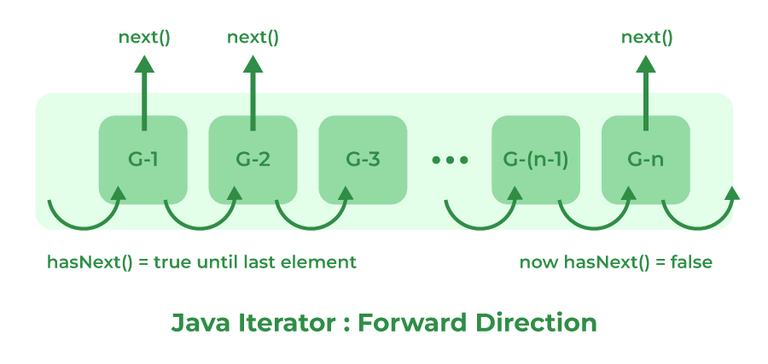
The Iterator interface provides methods to iterate over any Collection in Java. Iterator is the replacement of Enumeration in the Java Collections Framework. It can get an iterator instance from a Collection using the _iterator()_ method. It also allows the caller to remove elements from the underlying collection during the iteration.
140. What is an enumeration?
Enumeration is a user-defined data type. It is mainly used to assign names to integral constants, the names make a program easy to read and maintain. The main objective of the enum is to define user-defined data types.
Example:
// A simple enum example where enum is declared
// outside any class (Note enum keyword instead of
// class keyword)enum Color {
RED, GREEN, BLUE;
}
141. What is the difference between Collection and Collections?
Collection | Collections |
|---|---|
The Collection is an Interface. | Collections is a class. |
It provides the standard functionality of data structure. | It is to sort and synchronize the collection elements. |
It provides the methods that can be used for the data structure. | It provides static methods that can be used for various operations. |
142. Differentiate between Array and ArrayList in Java.
Array | ArrayList |
|---|---|
Single-dimensional or multidimensional | Single-dimensional |
For and for each used for iteration | Here iterator is used to traverse riverArrayList |
length keyword returns the size of the array. | size() method is used to compute the size of ArrayList. |
The array has Fixed-size. | ArrayList size is dynamic and can be increased or decreased in size when required. |
It is faster as above we see it of fixed size | It is relatively slower because of its dynamic nature |
Primitive data types can be stored directly in unlikely objects. | Primitive data types are not directly added to unlikely arrays, they are added indirectly with help of autoboxing and unboxing |
They can not be added here hence the type is in the unsafe. | They can be added here hence makingArrayList type-safe. |
The assignment operator only serves the purpose | Here a special method is used known as add() method |
143. What is the difference between Array and Collection in Java?
Array | Collections |
|---|---|
Array in Java has a fixed size. | Collections in Java have dynamic sizes. |
In an Array, Elements are stored in contiguous memory locations. | In Collections, Elements are not necessarily stored in contiguous memory locations. |
Objects and primitive data types can be stored in an array. | We can only store objects in collections. |
Manual manipulation is required for resizing the array. | Resizing in collections is handled automatically. |
The array has basic methods for manipulation. | Collections have advanced methods for manipulation and iteration. |
The array is available since the beginning of Java. | Collections were introduced in Java 1.2. |
144. Difference between ArrayList and LinkedList.
ArrayList | LinkedList |
|---|---|
ArrayList is Implemented as an expandable Array. | LinkedList is Implemented as a doubly-linked list. |
In ArrayList, Elements are stored in contiguous memory locations | LinkedList Elements are stored in non-contiguous memory locations as each element has a reference to the next and previous elements. |
ArrayLists are faster for random access. | LinkedLists are faster for insertion and deletion operations |
ArrayLists are more memory efficient. | LinkedList is less memory efficient |
ArrayLists Use more memory due to maintaining the array size. | LinkedList Uses less memory as it only has references to elements |
The search operation is faster in ArrayList. | The search operation is slower in LinkedList |
145. Differentiate between ArrayList and Vector in Java.
ArrayList | Vector |
|---|---|
ArrayList is implemented as a resizable array. | Vector is implemented as a synchronized, resizable array. |
ArrayList is not synchronized. | The vector is synchronized. |
ArrayLists are Faster for non-concurrent operations. | Vector is Slower for non-concurrent operations due to added overhead of synchronization. |
ArrayLists were Introduced in Java 1.2. | Vector was Introduced in JDK 1.0. |
Recommended for use in a single-threaded environment. | Vectors are Recommended for use in a multi-threaded environment. |
The default initial capacity of ArrayLists is 10. | In Vectors, the default initial capacity is 10 but the default increment is twice the size. |
ArrayList performance is high. | Vector performance is low. |
146. What is the difference between Iterator and ListIterator?
Iterator | ListIterator |
|---|---|
Can traverse elements present in Collection only in the forward direction. | Can traverse elements present in Collection both in forward and backward directions. |
Used to traverse Map, List, and Set. | Can only traverse List and not the other two. |
Indexes can't be obtained using Iterator | It has methods like nextIndex() and previousIndex() to obtain indexes of elements at any time while traversing the List. |
Can't modify or replace elements present in Collection | Can modify or replace elements with the help of set(E e) |
Can't add elements, and also throws ConcurrentModificationException. | Can easily add elements to a collection at any time. |
Certain methods of Iterator are next(), remove(), and hasNext(). | Certain methods of ListIterator are next(), previous(), hasNext(), hasPrevious(), add(E e). |
147. Differentiate between HashMap and HashTable.
HashMap | HashTable |
|---|---|
HashMap is not synchronized | HashTable is synchronized |
One key can be a NULL value | NULL values not allowed |
The iterator is used to traverse HashMap. | Both Iterator and Enumertar can be used |
HashMap is faster. | HashTable is slower as compared to HashMap. |
148. What is the difference between Iterator and Enumeration?
Iterator | Enumeration |
|---|---|
The Iterator can traverse both legacies as well as non-legacy elements. | Enumeration can traverse only legacy elements. |
The Iterator is fail-fast. | Enumeration is not fail-fast. |
The Iterators are slower. | Enumeration is faster. |
The Iterator can perform a remove operation while traversing the collection. | The Enumeration can perform only traverse operations on the collection. |
149. What is the difference between Comparable and Comparator?
Comparable | Comparator |
|---|---|
The interface is present in java.lang package. | The Interface is present in java.util package. |
Provides compareTo() method to sort elements. | Provides compare() method to sort elements. |
It provides single sorting sequences. | It provides multiple sorting sequences. |
The logic of sorting must be in the same class whose object you are going to sort. | The logic of sorting should be in a separate class to write different sorting based on different attributes of objects. |
Method sorts the data according to fixed sorting order. | Method sorts the data according to the customized sorting order. |
It affects the original class. | It doesn't affect the original class. |
Implemented frequently in the API by Calendar, Wrapper classes, Date, and String. | It is implemented to sort instances of third-party classes. |
150. What is the difference between Set and Map?
Set | Map |
|---|---|
The Set interface is implemented using java.util package. | The map is implemented using java.util package. |
It can extend the collection interface. | It does not extend the collection interface. |
It does not allow duplicate values. | It allows duplicate values. |
The set can sort only one null value. | The map can sort multiple null values. |
Java Intermediate Interview Questions
151. Explain the FailFast iterator and FailSafe iterator along with examples for each.
A FailFast iterator is an iterator that throws a ConcurrentModificationException if it detects that the underlying collection has been modified while the iterator is being used. This is the default behavior of iterators in the Java Collections Framework. For example, the iterator for a HashMap is FailFast.
Example:
import java.io.*;
import java.util.HashMap;
import java.util.Iterator;
import java.util.Map;

class GFG {
    public static void main(String[] args) {
        HashMap<Integer, String> map = new HashMap<>();
        map.put(1, "one");
        map.put(2, "two");

        Iterator<Map.Entry<Integer, String>> iterator = map.entrySet().iterator();
        while (iterator.hasNext()) {
            Map.Entry<Integer, String> entry = iterator.next();
            // this will throw a ConcurrentModificationException
            if (entry.getKey() == 1) {
                map.remove(1);
            }
        }
    }
}
Output:
Exception in thread "main" java.util.ConcurrentModificationExceptionA FailSafe iterator does not throw a ConcurrentModificationException if the underlying collection is modified while the iterator is being used. Alternatively, it creates a snapshot of the collection at the time the iterator is created and iterates over the snapshot. For example, the iterator for a ConcurrentHashMap is FailSafe.
Example:
import java.io.*;
import java.util.Iterator;
import java.util.Map;
import java.util.concurrent.ConcurrentHashMap;

class GFG {
    public static void main(String[] args) {
        ConcurrentHashMap<Integer, String> map = new ConcurrentHashMap<>();
        map.put(1, "one");
        map.put(2, "two");

        Iterator<Map.Entry<Integer, String>> iterator = map.entrySet().iterator();
        while (iterator.hasNext()) {
            Map.Entry<Integer, String> entry = iterator.next();
            // this will not throw an exception
            if (entry.getKey() == 1) {
                map.remove(1);
            }
        }
    }
}
152. What is Exception Handling?
An Exception is an Event that interrupts the normal flow of the program and requires special processing. During the execution of a program, errors and unplanned occurrences can be dealt with by using the Java Exception Handling mechanism. Below are some reasons why Exceptions occur in Java:
- Device failure
- Loss of Network Connection
- Code Errors
- Opening an Unavailable file
- Invalid User Input
- Physical Limitations (out of disk memory)
153. How many types of exceptions can occur in a Java program?
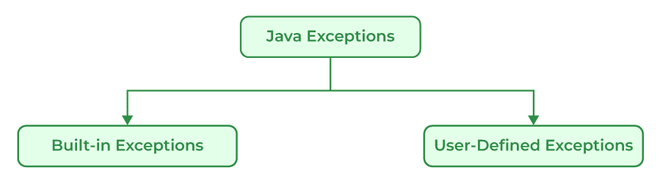
There are generally two types of exceptions in Java:
1. Built-in Exceptions: Built-in exceptions in Java are provided by the Java Libraries. These exceptions can be further divided into two subcategories i.e., checked and unchecked Exceptions. Below are some of the built-in exceptions in Java:
- ArrayIndexOutOfBoundsExceptions
- ClassNotFoundException
- FileNotFoundException
- IOException
- NullPointerException
- ArithmeticException
- InterruptedException
- RuntimeException
2. User-Defined Exceptions: User-defined exceptions are defined by the programmers themselves to handle some specific situations or errors which are not covered by built-in exceptions. To define user-defined exceptions a new class that extends the appropriate exception class must be defined. User-defined Exceptions in Java are used when the built-in exceptions are in Java.
154. Difference between an Error and an Exception.
Errors | Exceptions |
|---|---|
Recovering from Errors is not possible. | Recover from exceptions by either using a try-catch block or throwing exceptions back to the caller. |
Errors are all unchecked types in Java. | It includes both checked as well as unchecked types that occur. |
Errors are mostly caused by the environment in which the program is running. | The program is mostly responsible for causing exceptions. |
Errors can occur at compile time as well as run time. Compile Time: Syntax Error, Run Time: Logical Error. | All exceptions occur at runtime but checked exceptions are known to the compiler while unchecked are not. |
They are defined in java.lang.Error package. | They are defined in java.lang.Exception package |
Examples: java.lang.StackOverflowError, java.lang.OutOfMemoryError | Examples: Checked Exceptions: SQLException, IOException Unchecked Exceptions: ArrayIndexOutOfBoundException, NullPointerException, ArithmeticException. |
155. Explain the hierarchy of Java Exception classes.
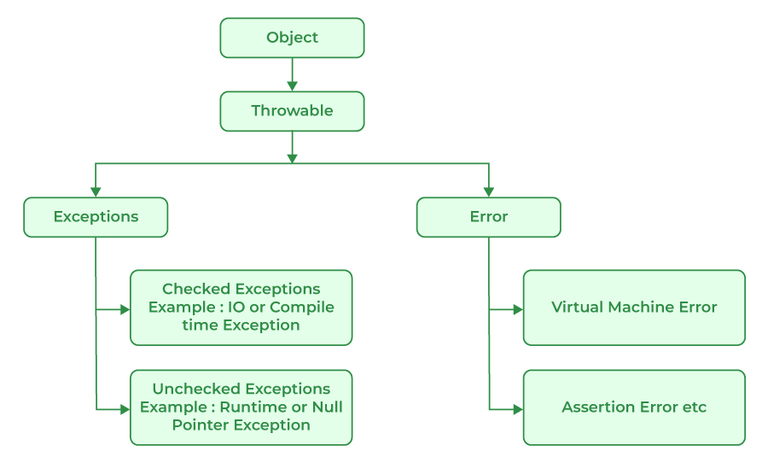
All exception and error types in Java are subclasses of the class throwable, which is the base class of the hierarchy. This class is then used for exceptional conditions that user programs should catch. NullPointerException is an example of such an exception. Another branch, error is used by the Java run-time system to indicate errors having to do with the JRE. StackOverflowError is an example of one of such error.
156. Explain Runtime Exceptions.
Runtime Exceptions are exceptions that occur during the execution of a code, as opposed to compile-time exceptions that occur during compilation. Runtime exceptions are unchecked exceptions, as they aren't accounted for by the JVM.
Examples of runtime exceptions in Java include:
- NullPointerException: This occurs when an application attempts to use a null object reference.
- ArrayIndexOutOfBoundsException: This occurs when an application attempts to access an array index that is out of bounds.
- ArithmeticException: This occurs when an application attempts to divide by zero.
- IllegalArgumentException: This occurs when a method is passed on an illegal or inappropriate argument.
Unlike checked exceptions, runtime exceptions do not require a declaration in the throws clause or capture in a try-catch block. However, handling runtime exceptions is advisable in order to provide meaningful error messages and prevent a system crash. Because runtime exceptions provide more specific information about the problem than checked exceptions, they enable developers to detect and correct programming errors more easily and quickly.
157. What is NullPointerException?
It is a type of run-time exception that is thrown when the program attempts to use an object reference that has a null value. The main use of NullPointerException is to indicate that no value is assigned to a reference variable, also it is used for implementing data structures like linked lists and trees.
158. When is the ArrayStoreException thrown?
ArrayStoreException is thrown when an attempt is made to store the wrong type of object in an array of objects.
Example:
// Java Program to implement
// ArrayStoreException
public class GFG {
    public static void main(String args[])
    {
        // Since Double class extends Number class
        // only Double type numbers
        // can be stored in this array
        Number[] a = new Double[2];
        // Trying to store an integer value
        // in this Double type array
        a[0] = new Integer(4);
    }
}
Example:
Exception in thread "main" java.lang.ArrayStoreException: java.lang.Integer
    at GFG.main(GFG.java:6)
159. What is the difference between Checked Exception and Unchecked Exception?
Checked Exception:
Checked Exceptions are the exceptions that are checked during compile time of a program. In a program, if some code within a method throws a checked exception, then the method must either handle the exception or must specify the exception using the throws keyword.
Checked exceptions are of two types:
- Fully checked exceptions: all its child classes are also checked, like IOException, and InterruptedException.
- Partially checked exceptions: some of its child classes are unchecked, like an Exception.
Unchecked Exception:
Unchecked are the exceptions that are not checked at compile time of a program. Exceptions under Error and RuntimeException classes are unchecked exceptions, everything else under throwable is checked.
160. What is the base class for Error and Exception?
Error is an illegal operation performed by the user which causes abnormality in the program. Exceptions are the unexpected events or conditions that comes while running the program, exception disrupts the normal flow of the program’s instructions.
Errors and Exceptions both have a common parent class which is java.lang.Throwable class.
161. Is it necessary that each try block must be followed by a catch block?
No, It is not necessary to use catch block after try block in Java as we can create another combination with finally block. Finally is the block which runs despite the fact that the exception is thrown or not.
162. What is exception propagation?
Exception propagation is a process in which the exception is dropped from to the top to the bottom of the stack. If not caught once, the exception again drops down to the previous method, and so on until it gets caught or until it reaches the very bottom of the call stack.
163. What will happen if you put System.exit(0) on the try or catch block? Will finally block execute?
System.exit(int) has the capability to throw SecurityException. So, if in case of security, the exception is thrown then finally block will be executed otherwise JVM will be closed while calling System. exit(0) because of which finally block will not be executed.
164. What do you understand by Object Cloning and how do you achieve it in Java?
It is the process of creating an exact copy of any object. In order to support this, a java class has to implement the Cloneable interface of java.lang package and override the clone() method provided by the Object class the syntax of which is:
Protected Object clone() throws CloneNotSupportedException{ return (Object)super.clone();}In case the Cloneable interface is not implemented and just the method is overridden, it results in CloneNotSupportedException in Java.
165. How do exceptions affect the program if it doesn't handle them?
Exceptions are responsible for abruptly terminating the running of the program while executing and the code written after the exception occurs is not executed.
166. What is the use of the final keyword?
The final keyword is used to make functions non-virtual. By default, all the functions are virtual so to make it non-virtual we use the final keyword.
167. What purpose do the keywords final, finally, and finalize fulfill?
i). final:
final is a keyword is used with the variable, method, or class so that they can't be overridden.
Example:
// Java Program to use final
// keyword
import java.io.*;
// Driver Class
class GFG {
    // Main function
    public static void main(String[] args)
    {
        final int x = 100;
        x = 50;
    }
}
Output:
./GFG.java:6: error: cannot assign a value to final variable x
          x=50;
          ^
1 error
ii). finally
finally is a block of code used with "try-catch" in exception handling. Code written in finally block runs despite the fact exception is thrown or not.
Example:
// Java Program to implement finally
import java.io.*;
// Driver class
class GFG {
    // Main function
    public static void main(String[] args)
    {
        int x = 10;
        // try block
        try {
            System.out.println("Try block");
        }
        // finally block
        finally {
            System.out.println(
                "Always runs even without exceptions");
        }
    }
}
Output
Try block
Always runs even without exceptions
iii). finalize
It is a method that is called just before deleting/destructing the objects which are eligible for Garbage collection to perform clean-up activity.
Example:
/*package whatever // do not write package name here */
import java.io.*;
class GFG {
    public static void main(String[] args)
    {
        System.out.println("Main function running");
        System.gc();
    }
    // Here overriding finalize method
    public void finalize()
    {
        System.out.println("finalize method overridden");
    }
}
Output
Main function running
168. What is the difference between this() and super() in Java?
this( ) | super( ) |
|---|---|
It represents the current instance of the class. | It represents the current instance of the parent class. |
Calls the default constructor of the same class. | Calls the default constructor of the base class. |
Access the methods of the same class. | Access the methods of the parent class. |
Points current class instance. | Points the superclass instance. |
169. What is multitasking?
Multitasking in Java refers to a program's capacity to carry out several tasks at once. Threads, which are quick operations contained within a single program, can do this. Executing numerous things at once is known as multitasking.
Example:
// Java program for multitasking
import java.io.*;
public class MyThread extends Thread {
    public void run()
    {
        // Code to be executed in this thread
        for (int i = 0; i < 10; i++) {
            System.out.println(
                "Thread " + Thread.currentThread().getId()
                + ": " + i);
        }
    }
}
public class GFG {
    public static void main(String[] args)
    {
        MyThread thread1 = new MyThread();
        MyThread thread2 = new MyThread();
        // Start the threads
        thread1.start();
        thread2.start();
    }
}
170. What do you mean by a Multithreaded program?
Multithreaded programs in Java contain threads that run concurrently instead of running sequentially. A computer can use its resources more efficiently by combining multiple tasks at once. Any program with multithreading allows more than one user to simultaneously use the program without running multiple copies. A multithreaded program is designed to run multiple processes at the same time which can improve the performance of a program and allows the program to utilize multiple processors and improves the overall throughput.
171. What are the advantages of multithreading?
There are multiple advantages of using multithreading which are as follows:
- Responsiveness: User Responsiveness increases because multithreading interactive application allows running code even when the section is blocked or executes a lengthy process.
- Resource Sharing: The process can perform message passing and shared memory because of multithreading.
- Economy: We are able to share memory because of which the processes are economical.
- Scalability: Multithreading on multiple CPU machines increases parallelism.
- Better Communication: Thread synchronization functions improves inter-process communication.
- Utilization of multiprocessor architecture
- Minimized system resource use
172. What are the two ways in which Thread can be created?
Multithreading is a Java feature that allows concurrent execution of two or more parts of a program for maximum utilization of the CPU. In general, threads are small, lightweight processes with separate paths of execution. These threads use shared memory, but they act independently, thus if any one thread fails it does not affect the other threads. There are two ways to create a thread:
- By extending the Thread class
- By implementing a Runnable interface.
By extending the Thread class
We create a class that extends the java.lang.Thread class. This class overrides the run() method available in the Thread class. A thread begins its life inside run() method.
Syntax:
public class MyThread extends Thread {
public void run() {
// thread code goes here
}
}
By implementing the Runnable interface
We create a new class that implements java.lang.Runnable interface and override run() method. Then we instantiate a Thread object and call the start() method on this object.
Syntax:
public class MyRunnable implements Runnable {
public void run() {
// thread code goes here
}
}
173. What is a thread?
Threads in Java are subprocess with lightweight with the smallest unit of processes and also has separate paths of execution. These threads use shared memory but they act independently hence if there is an exception in threads that do not affect the working of other threads despite them sharing the same memory. A thread has its own program counter, execution stack, and local variables, but it shares the same memory space with other threads in the same process. Java provides built-in support for multithreading through the Runnable interface and the Thread class.
174. Differentiate between process and thread?
A process and a thread are both units of execution in a computer system, but they are different in several ways:
Process | Thread |
|---|---|
A process is a program in execution. | A thread is a single sequence of instructions within a process. |
The process takes more time to terminate. | The thread takes less time to terminate. |
The process takes more time for context switching. | The thread takes less time for context switching. |
The process is less efficient in terms of communication. | Thread is more efficient in terms of communication. |
The process is isolated. | Threads share memory. |
The process has its own Process Control Block, Stack, and Address Space. | Thread has Parents’ PCB, its own Thread Control Block, and Stack and common Address space. |
The process does not share data with each other. | Threads share data with each other. |
175. Describe the life cycle of the thread?
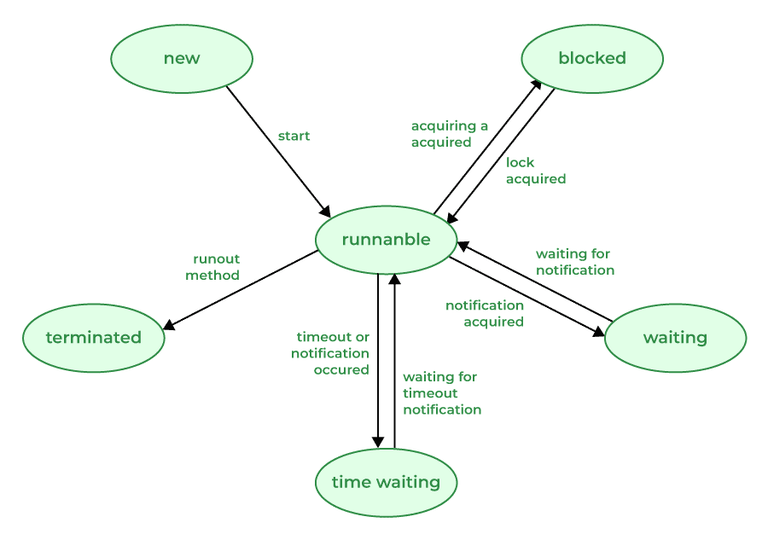
A thread in Java at any point in time exists in any one of the following states. A thread lies only in one of the shown states at any instant:
- New: The thread has been created but has not yet started.
- Runnable: The thread is running, executing its task, or is ready to run if there are no other higher-priority threads.
- Blocked: The thread is temporarily suspended, waiting for a resource or an event.
- Waiting: The thread is waiting for another thread to perform a task or for a specified amount of time to elapse.
- Terminated: The thread has completed its task or been terminated by another thread.
176. Explain the sleep() method under the Thread class.
The sleep() method in Java is used to pause the execution of the currently running thread for a specified period of time. During this time, the thread remains in a timed waiting state but does not release any locks or monitors it holds. After the specified sleep duration, the thread becomes runnable again.
Syntax:
public static void sleep(long milliseconds) throws InterruptedException;
public static void sleep(long milliseconds, int nanoseconds) throws InterruptedException;
Example:
class DemoSleep extends Thread {
    public void run() {
        for (int i = 1; i <= 5; i++) {
            System.out.println("Thread running: " + i);
            try {
                Thread.sleep(1000); // pauses for 1 second
            } catch (InterruptedException e) {
                System.out.println("Thread interrupted");
            }
        }
    }

    public static void main(String[] args) {
        DemoSleep t = new DemoSleep();
        t.start();
    }
}
Output:
Thread running: 1
Thread running: 2
Thread running: 3
Thread running: 4
Thread running: 5
177. Explain the main thread under Thread class execution.
Java provides built-in support for multithreaded programming. The main thread is considered the parent thread of all the other threads that are created during the program execution. The main thread is automatically created when the program starts running. This thread executes the main method of the program. It is responsible for executing the main logic of the Java program as well as handling the user input operations. The main thread serves as the base thread from which all other child threads are spawned.
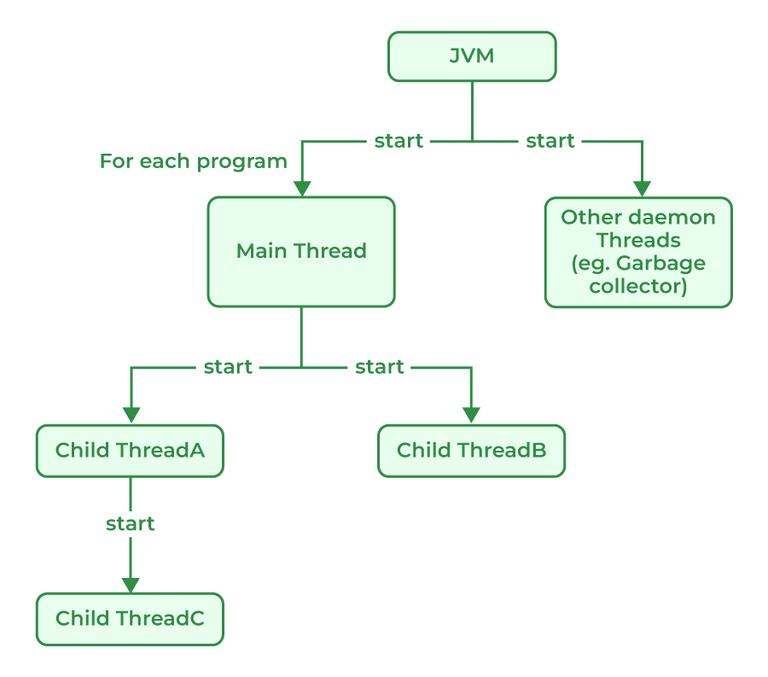
178. What is a daemon thread?
A daemon thread in Java is a low-priority thread that is used to perform background operations or tasks which are used to perform continuously. such as Garbage collection, Signal dispatches, Action listeners, etc. Daemon threads in Java have lower priority than user threads, which means they can only execute when no user threads are running. Daemon threads in Java are useful features that are required for background tasks that do not require explicit shutdown or finalization. It allows more efficient use of system resource and are used to simplify resources and can simplify long-running tasks.
179. What are the ways in which a thread can enter the waiting state?
Thread is a lightweight process that runs concurrently with the other thread inside a single process. Each thread can execute a different task and share the resources within a single process. Thread in Java can enter the waiting state in many different ways:
- Sleep() method Call: The sleep () method is used to pause the execution of the thread for a specific amount of time. While the thread is paused it goes into the waiting state.
- Wait() method: This method is used to wait a thread until the other thread signals it to wake up. Thread goes into the waiting state until it receives a notification from another thread.
- Join() method: Join() method can be used to wait for thread to finish the execution. Calling thread goes into the waiting state until the target thread is completed.
- Waiting for I/O operations: If the thread is waiting for Input/Output operation to complete, it goes into the waiting state until the operation is finished.
- Synchronization Issues: If there are any synchronization issues in a multi-threaded application, threads may go into the waiting state until the synchronization issues are resolved.
180. How does multi-threading take place on a computer with a single CPU?
On a single CPU, Java achieves multithreading using time-sharing (time-slicing), where the CPU rapidly switches between threads to create the illusion of parallel execution. The operating system manages thread scheduling and allocates small time slices to each thread.
To prevent issues like race conditions, Java provides synchronization and locking mechanisms. While this approach enables efficient multitasking, it only simulates parallelism on a single CPU, so performance gains are limited compared to multi-core systems.
181. What's the difference between the methods sleep() and wait()?
Sleep() | Wait() |
|---|---|
The sleep() method belongs to the thread class. | Wait() method belongs to the object class. |
Sleep does not release the lock that the current thread holds. | wait() release the lock which allows other threads to acquire it. |
This method is a static method. | This method is not a static method. |
| Sleep() does not throw an InterruptedException. | InterruptedException is shown if the thread is interrupted while waiting. |
Mainly used to delay a thread for some specific time duration. | Mainly used to pause a thread until notified by another thread. |
Sleep() Has Two Overloaded Methods:
| Wait() Has Three Overloaded Methods:
|
Java Interview Questions For Experienced
182. What are the different types of Thread Priorities in Java? And what is the default priority of a thread assigned by JVM?
Priorities in threads is a concept where every thread is having a priority which in layman’s language one can say every object is having priority here which is represented by numbers ranging from 1 to 10. There are different types of thread properties in Java mentioned below:
- MIN_PRIORITY
- MAX_PRIORITY
- NORM_PRIORITY
By default, the thread is assigned NORM_PRIORITY.
183. Why Garbage Collection is necessary in Java?
For Java, Garbage collection is necessary to avoid memory leaks which can cause the program to crash and become unstable. There is no way to avoid garbage collection in Java. Unlike C++, Garbage collection in Java helps programmers to focus on the development of the application instead of managing memory resources and worrying about memory leakage. Java Virtual Machine (JVM) automatically manages the memory periodically by running a garbage collector which frees up the unused memory in the application. Garbage collection makes Java memory efficient because it removes unreferenced objects from the heap memory.
184. What is the drawback of Garbage Collection?
Apart from many advantages, Garbage Collector has certain drawbacks mentioned below:
- The main drawback to Garbage collection is that it can cause pauses in an application's execution as it works to clear the memory which slows down the performance of the application.
- The Process of Garbage collection is non-deterministic which makes it difficult to predict when garbage collection occurs which causes unpredictable behavior in applications. For Example, if we write any program then it is hard for programmers to decide if the issue is caused by garbage collection or by any other factors in the program.
- Garbage collection can also increase memory usage if the program creates and discards a lot of short-lived objects.
185. Explain the difference between a minor, major, and full garbage collection.
The Java Virtual Machine (JVM) removes objects that are no longer in use using a garbage collector which periodically checks and removes these objects. There are different types of garbage collection in the JVM, each with different characteristics and performance implications. The main types of garbage collection are:
- Minor garbage collection: Also known as young generation garbage collection, this type of garbage collection is used to collect and reclaim memory that is used by short-lived objects (objects that are quickly created and discarded).
- Major garbage collection: Also known as old-generation garbage collection, this type of garbage collection is used to collect and reclaim memory that is used by long-lived objects (objects that survive multiple minor garbage collections and are promoted to the old generation).
- Full garbage collection: During full garbage collection, memories from all generations are collected and reclaimed, including memories of young and old. A full garbage collection normally takes longer to complete than a minor or major garbage collection which causes that app to pause temporarily..
186. What is a memory leak, and how does it affect garbage collection?
A memory leak in Java occurs when objects are no longer needed but still have active references, preventing the garbage collector from reclaiming memory. This often happens due to unclosed resources, unnecessary object creation, or retaining references longer than required.
As a result, unused objects accumulate in memory, negatively affecting garbage collection. This can lead to degraded performance or even application failure, making proper resource and reference management essential.
Example:
// Java Program to demonstrate memory leaks
import java.io.*;
import java.util.Vector;
class GFG {
    public static void main(String[] args)
    {
        Vector a = new Vector(21312312);
        Vector b = new Vector(2147412344);
        Vector c = new Vector(219944);
        System.out.println("Memory Leak in Java");
    }
}
Output:
Exception in thread "main" java.lang.OutOfMemoryError: Java heap space
    at java.base/java.util.Vector.<init>(Vector.java:142)
    at java.base/java.util.Vector.<init>(Vector.java:155)
    at GFG.main(GFG.java:9)
187. Name some classes present in java.util.regex package.
Regular Expressions or Regex in Java is an API used for searching and manipulating of strings in Java. It creates String patterns that can extract the data needed from the strings or can generalize a pattern.
There are 3 Classes present in java.util.regex mentioned below:
- Pattern Class: Can define patterns
- Matcher Class: Can perform match operations on text using patterns
- PatternSyntaxException Class: Can indicate a syntax error in a regular expression pattern.
Also, apart from the 3 classes package consists of a single interface MatchResult Interface which can be used for representing the result of a match operation.
188. Write a regular expression to validate a password. A password must start with an alphabet and followed by alphanumeric characters; Its length must be in between 8 to 20.
regex = “^(?=.*[0-9])(?=.*[a-z])(?=.*[A-Z])(?=.*[@#$%^&-+=()])(?=\\S+$).{8, 20}$”
Explanation:
- ^ used for starting character of the string.
- (?=.*[0-9]) used for a digit must occur at least once.
- (?=.*[a-z]) used for a lowercase alphabet must occur at least once.
- (?=.*[A-Z]) used for an upper case alphabet that must occur at least once in the substring.
- (?=.*[@#$%^&-+=()] used for a special character that must occur at least once.
- (?=\\S+$) white spaces don’t allow in the entire string.
- .{8, 20} used for at least 8 characters and at most 20 characters.
- $ used for the end of the string.
189. What is JDBC?
JDBC standard API is used to link Java applications and relational databases. It provides a collection of classes and interfaces that let programmers to use the Java programming language to communicate with the database. The classes and interface of JDBC allow the application to send requests which are made by users to the specified database. There are generally four components of JDBC by which it interacts with the database:
- JDBC API
- JDBC Driver manager
- JDBC Test Suite
- JDBC-ODBC Bridge Drivers
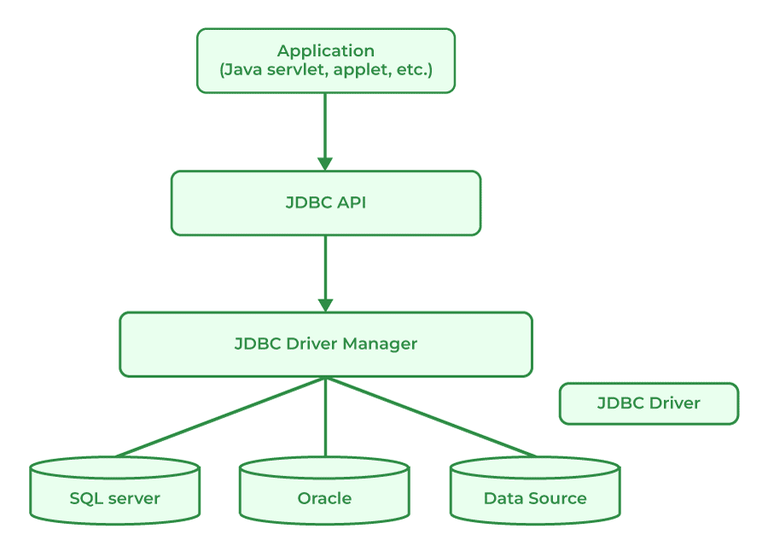
190. What is JDBC Driver?
JDBC Driver is a software component that is used to enable a Java application to interact with the database. JDBC provides the implementation of the JDBC API for a specific database management system, which allows it to connect the database, execute SQL statements and retrieve data. There are four types of JDBC drivers:
- JDBC-ODBC Bridge driver
- Native-API driver
- Network Protocol driver
- Thin driver
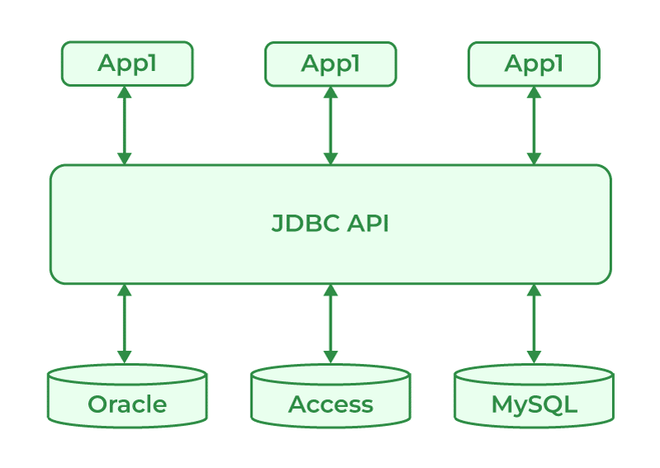
191. What are the steps to connect to the database in Java?
There are certain steps to connect the database and Java Program as mentioned below:
- Import the Packages
- Load the drivers using the forName() method
- Register the drivers using DriverManager
- Establish a connection using the Connection class object
- Create a statement
- Execute the query
- Close the connections
192. What are the JDBC API components?
JDBC API components provide various methods and interfaces for easy communication with the databases also it provides packages like java Se and java EE which provides the capability of write once run anywhere (WORA).
Syntax:
java.sql.*;
193. What is JDBC Connection interface?
Java database connectivity interface (JDBC) is a software component that allows Java applications to interact with databases. To enhance the connection, JDBC requires drivers for each database.
194. What does the JDBC ResultSet interface?
JDBC ResultSet interface is used to store the data from the database and use it in our Java Program. We can also use ResultSet to update the data using updateXXX() methods. ResultSet object points the cursor before the first row of the result data. Using the next() method, we can iterate through the ResultSet.
195. What is the JDBC Rowset?
A JDBC RowSet provides a way to store the data in tabular form. RowSet is an interface in java that can be used within the java.sql package. The connection between the RowSet object and the data source is maintained throughout its life cycle. RowSets are classified into five categories based on implementation mentioned below:
- JdbcRowSet
- CachedRowSet
- WebRowSet
- FilteredRowSet
- JoinRowSet
196. What is the role of the JDBC DriverManager class?
JDBC DriverManager class acts as an interface for users and Drivers. It is used in many ways as mentioned below:
- It is used to create a connection between a Java application and the database.
- Helps to keep track of the drivers that are available.
- It can help to establish a connection between a database and the appropriate drivers.
- It contains all the methods that can register and deregister the database driver classes.
- DriverManager.registerDriver() method can maintain the list of Driver classes that have registered themselves.
Java Difference Interview Questions
197. Differentiate between Iterable and Iterator.
Iterable | Iterator |
|---|---|
Iterable provides a way to iterate over a sequence of elements. | Iterator helps in iterating over a collection of elements sequentially. |
| iterator() method returns an Iterator. | hasNext() and next() methods are required. |
| remove() method is optional. | remove() method is required in the iterator. |
Examples are List, Queue, and Set. | Examples are ListIterator, Enumeration, and ArrayIterator. |
198. Differentiate between List and Set.
List | Set |
|---|---|
Ordered | Unordered |
List allows duplicates. | Set does not allow duplicate values. |
List is accessed by index. | Set is accessed by hashcode. |
Multiple null elements can be stored. | Null element can store only once. |
Examples are ArrayList, LinkedList, etc. | Examples are HashSet and TreeSet. LinkedHashSet etc. |
199. Differentiate between List and Map.
List | Map |
|---|---|
List interface allows duplicate elements. | Map does not allow duplicate elements. |
List maintains insertion order. | Map do not maintain insertion order. |
Multiple null elements can be stored. | The map allows a single null key at most and any number of null values. |
The list provides get() method to get the element at a specified index. | The map does not provide a get method to get the elements at a specified index. |
List is Implemented by ArrayList, etc. | Map is Implemented by HashMap, TreeMap, LinkedHashMap |
200. Differentiate between Queue and Stack.
Queue | Stack |
|---|---|
Queue data structure is used to store elements, and is used to perform operations like enqueue, dequeue from back or end of the queue. | Stack data structure is used to store elements, and is used to perform operations like push, pop from top of the stack. |
Queue data structure Implements FIFO order. | Stack data structure Implements LIFO order. |
Insertion and deletion in queues take place from the opposite ends of the list. Deletion takes place from the front of the list and insertion takes place at the rear of the list. | Insertion and deletion in stacks take place only from one end of the list called the top. |
Insert operation is called enqueue operation. | Insert operation is called Push operation. |
Queue is generally used to solve problems related to sequential processing. | Stack is generally used to solve problems related to recursion. |
201. Differentiate between PriorityQueue and TreeSet.
Priority Queue | TreeSet |
|---|---|
It uses Queue as an underlying data structure. | It uses a Set as an underlying data structure. |
This data structure allows duplicate elements | This data structure does not allow duplicate elements |
Priority Queue is Implemented by PriorityQueue class. | TreeSet is implemented by TreeSet class. |
PriorityQueue comes in JDK 1.5. | TreeSet comes in JDK 1.4. |
PriorityQueue<Integer> pq = new PriorityQueue<>(); | reeSet<Integer> ts = new TreeSet<>(); |
202. Differentiate between the Singly Linked List and Doubly Linked List.
Singly Linked List | Doubly Linked List |
|---|---|
Singly Linked List contain only two segments i.e, Data and Link. | Doubly Linked List contains three segments i.e, Data, and two pointers. |
Traversal in a singly linked list is possible in only a forward direction. | Traversal in a doubly linked list is only possible in both directions forward as well as backward. |
It uses less memory as every single node has only one pointer. | It requires more memory than a singly linked list as each node has two pointers. |
Easy to use and insert nodes at the beginning of the list. | Slightly more complex to use and easy to insert at the end of the list. |
Insertion and deletion at the head take O(1), but at any other position, they require traversal, making them O(n). | Insertion and deletion at the start or end take O(1) (if head and tail pointers are maintained). However, operations at arbitrary positions require O(n) time due to traversal. |
|
|


203. Differentiate between Failfast and Failsafe.
FailFast | FailSafe |
|---|---|
Failsfast fails immediately when it detects concurrent modification during the time of iteration. | Failsafe continues to iterate over the original collection and also creates a copy to modify. |
Failfast is generally used in single-threaded environments. | Failsafe is used in multithreaded environments. |
Failfast does not allow any modification while iteration. | Failsafe allows modification during the time of iteration. |
Failfast is fast compared to failsafe as it does not involve the copying of the collection. | Failsafe is generally slow compared to failfast. |
FailFast throws ConcurrentModificationException if the collection is modified during iteration. | FailSafe does not throws any exception but instead, it creates a copy of the collection to iterate. |
204. Differentiate between HashMap and TreeMap.
HashMap | TreeMap |
|---|---|
Hasmap uses a hashtable in order to store key-value pairs. | Treemap uses Red-black trees to store key-value pair. |
Hashmap does not maintain any specific order for key-value pairs. | Treemap maintains a natural ordering based on the keys. |
Order of iteration is not guaranteed in the hashmap. | Iteration is of sorted order based on keys. |
Hashmaps are faster for retrieval compared to Treemap. | Retrieval in Treemap is slower as it uses tree traversal to find keys. |
Hashmap is implemented by using an Array of linked list. | TreeMap is implemented using a Red-black Tree. |
Hashmap uses the equals() method of the Object class to compare keys. | TreeMap uses compareTo() method to compare keys. |
205. Differentiate between Queue and Deque.
Queue | Deque |
|---|---|
The queue is a linear Data structure that is used to store a collection of elements. | Deque also known as a Double-ended queue is also a linear data structure that stores a collection of elements with operations to remove and add from both ends. |
Elements in the queue can only be inserted at the end of the data structure. | Elements can be inserted from both ends of the data structure. |
Queue can be implemented using Array or Linked List. | Dequeue can be implemented using Circular Array or Doubly Linked List. |
Queues are generally used to implement a waiting list or task queue. | Deque is used to implement a stack or dequeuing elements from both ends. |
|
|


206. Differentiate between HashSet and TreeSet.
HashSet | TreeSet |
|---|---|
HashSet is unordered. | TreeSet is based on natural ordering. |
HashSet allows null elements. | TreeSet does not allow null elements. |
HashSet is Implemented by the HashSet class. | TreeSet is Implemented by TreeSet class. |
HashSet<String> hs = new HashSet<>(); | TreeSet<String> ts = new TreeSet<>(); |
