
Imagine trying to find a book in a library with millions of books. If there were only one enormous list of all books, it would be nearly impossible to manage. Computers face a similar challenge with virtual memory, mapping vast addresses to physical memory efficiently. In a typical paging system, memory is divided into pages and frames, and each process has a page table mapping virtual pages to physical frames. In multi-level paging:
- The page table is split into multiple levels: top-level tables point to lower-level tables, and only the lowest-level tables store the actual frame numbers.
- This hierarchy lets the operating system allocate page tables only when needed, saving memory and keeping large address spaces manageable.
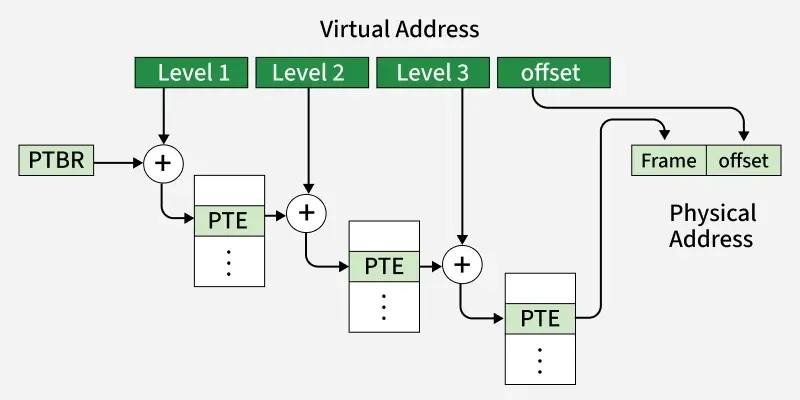
Working of Multi-Level Paging
Let’s break it down using a three-level page table as an example:
Step 1: Dividing the Virtual Address
A virtual address in a system is typically divided into multiple parts:
- Level 1 offset (P1): Indexes into the top-level page table.
- Level 2 offset (P2): Indexes into the second-level page table.
- Level 3 offset (P3): Indexes into the third-level page table, which stores the actual frame number.
- Page offset: Determines the exact location within the physical frame.
Think of this like navigating a city:
- P1 = City district
- P2 = Street within the district
- P3 = Building on that street
- Page offset = Specific room inside the building
You go level by level until you reach your exact destination.
Step 2: Traversing the Page Table
This process narrows down the search from the top-level table to the exact physical memory location.
- Start at the Page Table Base Register (PTBR), which stores the address of the top-level table.
- Use P1 to find the entry pointing to the second-level table.
- Use P2 to locate the entry in the second-level table, which points to the third-level table.
- Use P3 in the third-level table to find the physical frame number.
- Combine this frame number with the page offset to find the exact physical memory address.
Every step narrows down the search, much like moving from a city district to a specific room in a building.
Example with Numbers
Let’s consider a system with:
- Virtual address space: 46 bits
- Page size: 8 KB
- Page table entry (PTE) size: 4 bytes
Step 1: Number of Pages:
Number of pages = 246 / 213 = 233 pages
Step 2: Size of a One-Level Page Table:
Page table size=233 × 4 B = 235 B (much larger than 8 KB page)
Clearly, one-level paging won’t fit in memory efficiently, so we need multiple levels.
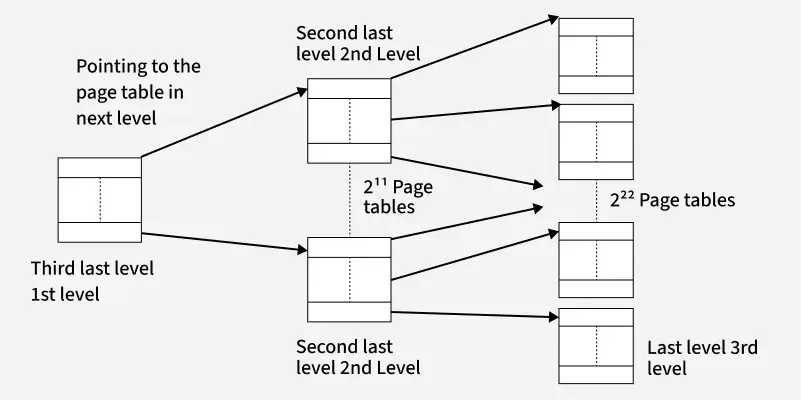
Step 3: Building Multiple Levels:
We are trying to store a page table for a very large virtual address space, but the table is too big to fit in a single page of memory. Here’s what happens:
Last-Level Table:
First, we calculate how many entries (or pages) the last-level table would need:
235 / 213 = 222 pages
This is too big to fit in one page, so we need to introduce another level above it.
Second-Last Level Table:
Each entry in this table points to a last-level table.
Each entry is 4 bytes (PTE size), so the size of the second-last level table is:
222 × 4 B = 224 B = 16 MB
This is still larger than one page (which is 8 KB in this example), so we need yet another level.
Third-Last Level Table
This level points to the second-last level tables.
We calculate the number of entries needed:
224 / 213 = 211 entries
Size of this third-last level table:
211 × 4 B = 213 B = 8 KB
Now it fits perfectly in one page, so the hierarchy works.
Conclusion: 3 levels of page tables are required for this system.
Memory Saved in MLP
Multi-level paging allocates memory dynamically:
- Suppose a process only uses a small portion of its virtual address space.
- Only the top-level table and the necessary lower-level tables are loaded into memory.
- Unused ranges of the virtual address space don’t require page tables at all, saving enormous amounts of memory.
In other words, the system only creates pages in the “library catalog” for books that exist, instead of cataloging every possible book.
Real-World Analogy
Think of multi-level paging like a multi-tiered filing system:
- Top-level Cabinet → contains drawers (top-level page table).
- Second-level Drawers → contain folders (second-level tables).
- Folders → contain documents (lowest-level tables with frame numbers).
You don’t need to open every drawer and folder—only the ones containing the files you need. This is far more efficient than having one gigantic drawer with all documents mixed together.
