
Access control is a security mechanism that defines who can access information, systems, or physical spaces. It ensures that only authorized people or processes get the right level of access, reducing security risks.
- Ensures only verified users can access resources
- Uses authentication + authorization to control permissions
- Protects both digital systems and physical spaces
- Supports security, compliance, and accountability
Components of Access Control
Access control systems typically include the following steps and components:
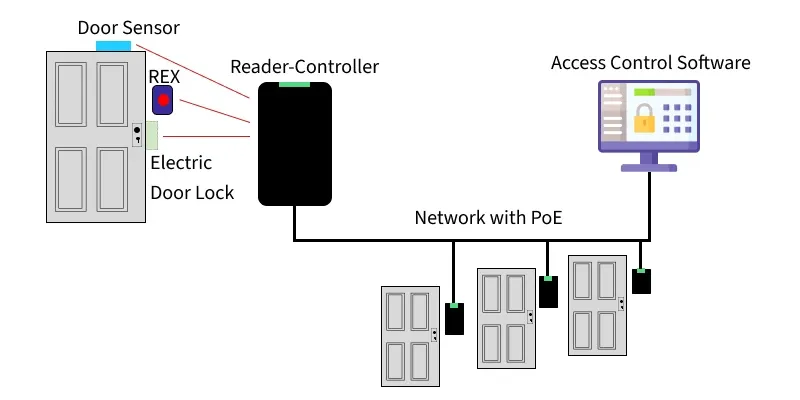
1. Authentication
Image Component: Reader/Controller (card reader or biometric device)
Function: Verifies the user's identity using a badge, keycard, PIN, or biometric data.
Answers: "Who are you?"
2. Authorization
Image Component: Access Control Software
Function: Checks if the authenticated user has permission to enter based on roles, rules, or schedules.
Answers: "What are you allowed to do?"
3. Access
Image Component: Electric Door Lock
Function: Grants access only when both authentication and authorization are approved.
4. Manage
Image Component: Access Control Software
Function: Administer users, update roles, add/remove access, and configure door schedules.
Note: PoE network connects and powers all components.
5. Audit
Image Component: Monitoring & Logging System
Function: Records all entry attempts, successful or failed showing date/time, user ID, and location for security and compliance.
Additional Image Features
- Door Sensor: Detects door open/close status
- REX (Request to Exit): Button allowing safe exit from inside
Here is the simulation of Access Control System
Note: Play the video together at the same time.
Types of Access Control
There are several types of access control models, each with its own rules and use cases. The most commonly used ones are MAC, DAC, RBAC, and ABAC.
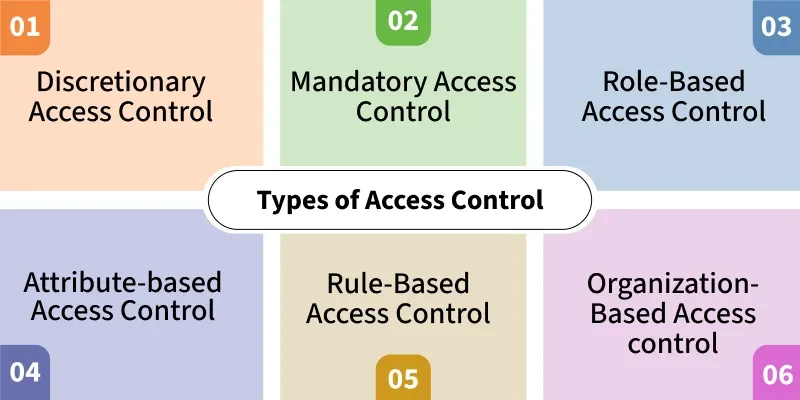
Here are some of most common access control types:
1. Discretionary Access Control (DAC)
Access is controlled by the owner of the resource.
- Owners decide who gets access
- Flexible but less secure
- Common in personal computers and small systems
2. Mandatory Access Control (MAC)
A central authority enforces access based on strict security levels.
- Used in high-security environments
- Users cannot change permissions
- Example: Military or government systems, SELinux
3. Role-Based Access Control (RBAC)
Users receive permissions based on their job roles.
- Simplifies large-scale permission management
- Reduces human error and misuse
- Example: HR role cannot create network accounts
4. Attribute-Based Access Control (ABAC)
Access decisions are based on multiple attributes (user, device, environment).
- Highly dynamic and flexible
- Evaluates policies using many attributes
- Useful in modern cloud and zero-trust systems
5. Rule-Based Access Control (Ru-BAC)
Access is granted based on predefined rules or conditions.
- Often time-based or context-based
- System automatically enforces rules
- Example: Students allowed lab access only during class hours
6. Organization-Based Access Control (Or-BAC)
Access policies are defined independently of the technical system.
- Focuses on organizational rules
- Separates policy design from implementation
- Useful for complex enterprise environments
Categories of Access Control
There are 2 main cetegories of access control:
1. Physical Access Control
Controls entry to physical spaces like buildings and rooms.
- Uses badges, keycards, locks, biometrics
- Protects hardware and physical assets
- Prevents unauthorized onsite access
2. Logical Access Control
Controls access to digital resources like networks, systems, and data.
- Uses passwords, MFA, firewalls, permissions
- Protects sensitive digital information
- Enforced through authentication and authorization
