
The Java Collections Framework is a unified architecture that provides a set of interfaces, classes, and algorithms for storing and manipulating groups of objects efficiently. Since it is widely used in Java applications, questions related to collections are frequently asked in interviews to assess a candidate's understanding of data structures and their practical usage.
- Covers core Collection Framework components such as List, Set, Queue, and Map.
- Helps understand the differences, use cases, and performance characteristics of various collection classes.
- Includes important concepts like iteration, sorting, synchronization, generics, and Stream API integration.
Java Collection Interview Questions For Freshers
1. What is Collection in Java?
A collection in Java refers to a group of objects treated as a single unit. The Java Collection Framework provides a set of interfaces and classes that help store, manipulate, and process groups of objects efficiently.
2. What is a Framework in Java?
A Java framework is a pre-built collection of classes and interfaces that provides a ready-made structure to develop applications. It defines a reusable architecture where developers can extend or use existing components instead of writing everything from scratch.
- Provides reusable architecture and predefined structure
- Reduces development time and effort
- Follows principles like inversion of control (IoC) and callbacks
Some Popular Java Frameworks:
- Spring Framework: Used for building enterprise-level applications with dependency injection and MVC support
- Hibernate: Used for object-relational mapping between Java objects and databases
- Struts: MVC-based framework for building web applications
- Google Web Toolkit: Used to build and optimize complex browser-based applications
- JavaServer Faces: Component-based framework for building user interfaces in Java web apps
3. What is the difference between Array and Collection in Java?
Arrays are a collection of similar-typed variables with a common name in Java. There are some differences between arrays in Java and C/C++. On the other hand, Collections are groups of individual objects that form a single entity known as the collection of objects.
Arrays | Collection |
|---|---|
| Arrays are fixed in size that is once we create an array we can not increase or decrease based on our requirements. | The collection is growable in nature and is based on our requirements. We can increase or decrease of size. |
| With respect to memory, Arrays are not recommended for use. | With respect to memory, collections are recommended for use. |
| With respect to performance, Arrays are recommended for use. | With respect to performance, collections are not recommended for use. |
| Arrays can hold only homogeneous data types elements. | Collection can hold both homogeneous and heterogeneous elements. |
For more information, refer to the article – Difference Between Arrays and Collections in Java
4. What are the various interfaces used in Java Collections Framework?
The collection is known as the root of the collection hierarchy. Collections represent groups of objects known as elements. The java platform does not provide any direct implementation of this interface but the Collection interface is being implemented by List and Set classes.
- Collection interface
- List interface
- Set interface
- Queue interface
- Deque interface
- Map interface
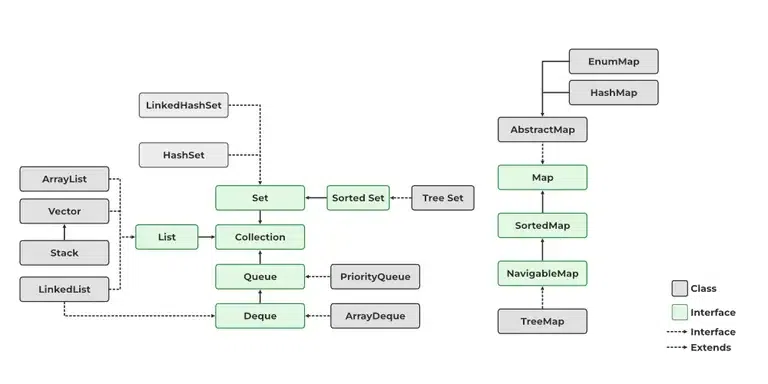
5. Explain the hierarchy of the Collection framework in Java.
The Java Collection Framework is a set of classes and interfaces in the java.util package that provides a standardized way to store and manipulate groups of objects. The Collection interface serves as the root interface, while Iterable enables traversal of collection elements.
- All major collection classes and interfaces are part of the java.util package.
- The Iterable interface allows collections to be traversed using iterators and enhanced for-loops.
6. What are the advantages of the collection Framework?
- Consistent API: Provides standard interfaces like List, Set, and Map with common methods.
- Reduces effort: No need to build data structures from scratch; ready-made classes are available.
- Better performance: Uses optimized implementations for faster and efficient data handling.
- Easy maintenance: Standard structure makes code easier to manage and extend.
7. What is ArrayList in Java?
ArrayList is a class in the java.util package that provides a dynamic array implementation in Java.
- Part of the Java Collection Framework
- Stores elements in insertion order
- Supports duplicate values

8. What is the difference between Collection and Collections?
| Collection | Collections |
|---|---|
| It is an interface. | It is a utility class. |
| It is used to represent a group of individual objects as a single unit. | It defines several utility methods that are used to operate on collection. |
| The Collection is an interface that contains a static method since java8. The Interface can also contain abstract and default methods. | It contains only static methods. |
For more information, refer to the article – Collection vs Collections in Java with Example
9. Difference between ArrayList and LinkedList in the java collection framework?

ArrayList | LinkedList |
|---|---|
| This class uses a dynamic array to store the elements in it. With the introduction of generics, this class supports the storage of all types of objects. | This class uses a doubly linked list to store the elements in it. Similar to the ArrayList, this class also supports the storage of all types of objects. |
| Manipulating ArrayList takes more time due to the internal implementation. Whenever we remove an element, internally, the array is traversed and the memory bits are shifted. | Manipulating LinkedList takes less time compared to ArrayList because, in a doubly-linked list, there is no concept of shifting the memory bits. The list is traversed and the reference link is changed. |
| This class implements a List interface. Therefore, this acts as a list. | This class implements both the List interface and the Deque interface. Therefore, it can act as a list and a deque. |
| This class works better when the application demands storing the data and accessing it. | This class works better when the application demands manipulation of the stored data. |
For more information, refer to the article – ArrayList vs LinkedList in Java
10. What is an iterator?
Iterator is an interface in Java used to traverse elements of a collection one by one. It provides a universal way to access and remove elements from Collection Framework classes such as List, Set, and Queue without exposing their internal structure.
Iterator allows sequential access to collection elements and supports safe element removal during iteration using the remove() method.
11. What is the difference between an Iterator and an Enumeration?
The major difference between Iterator and Enumeration is that Iterator can both traverse and remove elements from a collection, while Enumeration can only traverse elements. Additionally, Iterator works with the entire Collection Framework, whereas Enumeration is limited to legacy classes such as Vector and Hashtable.
| Iterator | Enumeration |
|---|---|
| Introduced in Collection Framework | Legacy cursor |
| Supports read and remove operations | Supports only read operations |
| Works with all collection classes | Mainly works with Vector and Hashtable |
Methods: hasNext(), next(), remove() | Methods: hasMoreElements(), nextElement() |
12. What is the difference between List and Set in Java
A major difference between a List and a Set is that a List can contain duplicate elements while a set contains only unique elements. The list is Ordered and maintains the order of the object to which they are added. The set is unordered.
Set implementations are HashSet, LinkedHashSet.
List | Set |
|---|---|
| The List is an indexed sequence. | The Set is a non-indexed sequence. |
| The list allows duplicate elements | The set doesn’t allow duplicate elements. |
| Elements by their position can be accessed. | Position access to elements is not allowed. |
| Multiple null elements can be stored. | Null elements can store only once. |
| List implementations are ArrayList, LinkedList, Vector, Stack |
13. What are the best practices for Java Collections Framework?
Following are some of the best practices while using Java Collections:
- Program to interfaces: Use List, Set, Map instead of concrete classes like ArrayList so implementation can be changed easily.
- Use Generics: Ensures type safety and avoids ClassCastException.
- Choose proper collection: Use ArrayList for fast access, LinkedList for frequent insert/delete, Set to avoid duplicates, Map for key-value data.
- Use immutable keys in Map: Helps avoid issues with hashCode() and equals().
- Prefer isEmpty() over size check: Improves readability and clarity.
- Use utility methods: Prefer Collections class for synchronized, read-only, or empty collections instead of custom implementations.
14. What is a priority queue in Java?
A Priority Queue in Java is a special type of queue where elements are processed based on their priority instead of First-In-First-Out (FIFO) order.
- It is implemented using a heap data structure and is part of the Java Collection Framework.
- Elements are ordered by natural ordering or a custom Comparator
- Highest (or lowest) priority element is always processed first
- Internally based on a priority heap

15. What is the difference between List, set, and map in java?
The major difference between List, Set, and Map is that a List stores elements in an ordered sequence and allows duplicates, a Set stores unique elements and does not allow duplicates, whereas a Map stores data as key-value pairs with unique keys.
| Feature | List | Set | Map |
|---|---|---|---|
| Stores Data As | Elements | Unique Elements | Key-Value Pairs |
| Duplicate Values | Allowed | Not Allowed | Values Allowed, Keys Not Allowed |
| Insertion Order | Maintained | Depends on Implementation | Depends on Implementation |
| Index-Based Access | Yes | No | No |
| Null Values | Allowed | Allowed (depends on implementation) | One null key and multiple null values (depends on implementation) |
| Common Implementations | ArrayList, LinkedList | HashSet, LinkedHashSet, TreeSet | HashMap, LinkedHashMap, TreeMap |
16. What is the difference between Queue and Stack?
The major difference between Queue and Stack is the order in which elements are processed. A Queue follows the FIFO (First In, First Out) principle, where the first inserted element is removed first, whereas a Stack follows the LIFO (Last In, First Out) principle, where the last inserted element is removed first.
| Feature | Queue | Stack |
|---|---|---|
| Principle | FIFO (First In, First Out) | LIFO (Last In, First Out) |
| Insertion Operation | offer() / add() | push() |
| Deletion Operation | poll() / remove() | pop() |
| Element Access | Front element first | Top element first |
| Common Implementations | LinkedList, PriorityQueue, ArrayDeque | Stack, ArrayDeque |
| Use Cases | Task scheduling, Message queues | Undo operations, Function call stack |
17. What is BlockingQueue in Java?
A BlockingQueue in Java is a thread-safe queue that is part of the Java concurrency utilities. It is used to handle producer–consumer problems where one thread produces data and another consumes it. It is introduced in Java 1.5 under the package java.util.concurrent.
Supports blocking operations:
- If the queue is full -> producer thread waits
- If the queue is empty -> consumer thread waits
- Does not allow null values (throws NullPointerException)
- Thread-safe by design
18. What is the hashCode()?
hashCode() is a method of the Object class that returns an integer value representing the memory-based identity or hash value of an object. It is primarily used by hash-based collections such as HashMap, HashSet, and Hashtable to store and retrieve objects efficiently.
Objects that are equal according to the equals() method must return the same hashCode(), but objects having the same hashCode() are not necessarily equal.

hashCode vs equals()
| hashCode() | equals() |
|---|---|
| Returns an integer hash value | Compares object contents |
| Used for fast searching and storage | Used for equality checking |
Returns int type | Returns boolean type |
| Commonly used by HashMap and HashSet | Used to determine object equality |
19. Distinguish between ArrayList and Vector in the Java Collection Framework.
The major difference between ArrayList and Vector is that ArrayList is not synchronized and is therefore faster, whereas Vector is synchronized, making it thread-safe but slower due to the overhead of synchronization.

| Feature | ArrayList | Vector |
|---|---|---|
| Synchronization | Not Synchronized | Synchronized |
| Thread Safety | Not Thread-Safe | Thread-Safe |
| Performance | Faster | Slower |
| Growth Rate | Increases by 50% of current size | Doubles its size by default |
| Introduced In | Collection Framework (Java 1.2) | Legacy Class (Java 1.0) |
| Recommended For | Single-threaded environments | Multi-threaded environments |
20. Differentiate between Iterator and ListIterator.
The major difference between Iterator and ListIterator is that Iterator can traverse elements only in the forward direction and works with all Collection Framework classes, whereas ListIterator can traverse elements in both forward and backward directions and is available only for List implementations.
| Feature | Iterator | ListIterator |
|---|---|---|
| Traversal Direction | Forward Only | Forward and Backward |
| Applicable To | All Collection Types | Only List Implementations |
| Element Modification | Can Remove Elements | Can Add, Remove, and Update Elements |
| Methods | hasNext(), next(), remove() | hasNext(), next(), hasPrevious(), previous(), add(), set(), remove() |
| Cursor Position Access | Not Available | Available using nextIndex() and previousIndex() |
21. What are the features of Java Hashmap?
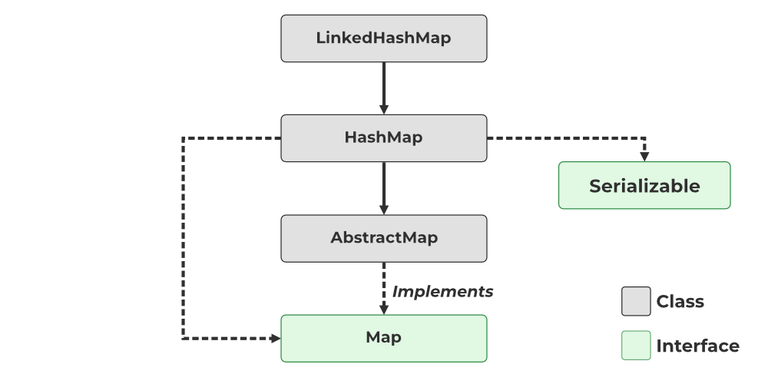
HashMap is a class in the Java Collection Framework that stores data in the form of key-value pairs. It uses a hashing mechanism to provide fast insertion, deletion, and retrieval of data. HashMap is a part of the java.util package and implements the Map interface.
Features of HashMap
- Stores data as key-value pairs.
- Keys must be unique, but duplicate values are allowed.
- Allows one null key and multiple null values.
- Does not maintain insertion order.
- Provides very fast insert, search, and delete operations (average O(1)).
- Uses hashCode() and equals() methods internally.
- Not synchronized, so it is not thread-safe.
22. What are Collection Interfaces?
Collection Interface is the root interface of the Java Collection Framework and is used to represent a group of objects as a single unit. It is present in the java.util package and is indirectly implemented by collection classes through subinterfaces such as List, Set, and Queue.
- Root interface of the Java Collection Framework.
- Represents a group of objects as a single unit.
- Present in the java.util package.
- Extended by subinterfaces such as List, Set, and Queue.
- Provides common methods like add(), remove(), contains(), size(), and clear().
The Hierarchy of Collection:

23. Explain the list interface.
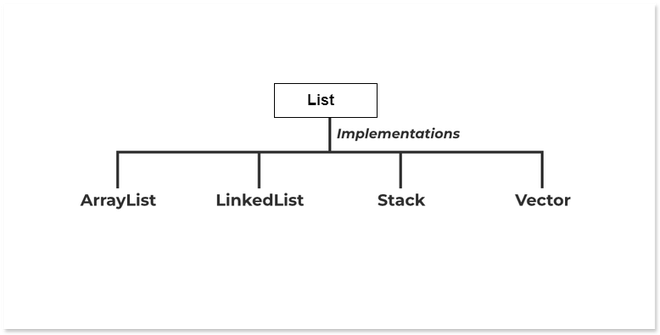
List is a subinterface of the Collection interface that stores elements in an ordered sequence. It allows duplicate elements and provides index-based access to store, retrieve, and manipulate elements.
- Maintains the insertion order of elements.
- Allows duplicate elements.
- Supports index-based access.
- Allows multiple null values.
The classes which implement the List interface are as follows:
- ArrayList
- LinkedList
- Vector
- Stack

24. Write a program to convert a given array into a collection with the asList() method.
To convert array-based data into Collection based we can use java.util.Arrays class. This class provides a static method asList(T… a) that converts the array into a Collection.
// Convert an Array into Collection in Java
// import java util library
import java.util.*;

// class for writing logic of the problem
public class ArrayToCollection {
    public static void main(String args[])
    {
        // array input
        String students[] = { "Kamlesh", "Abhay",
                              "Abhishek", "Shivansh" };

        // printing input elements for comparison
        System.out.println("Array input: "
                           + Arrays.toString(students));

        // converting array into Collection
        // with asList() function
        List studentList = Arrays.asList(students);

        // print converted elements
        System.out.println("Converted elements: "
                           + studentList);
    }
}
Output
Array input: [Kamlesh, Abhay, Abhishek, Shivansh]
Converted elements: [Kamlesh, Abhay, Abhishek, Shivansh]
25. Differentiate between HashSet and HashMap
The major difference between HashSet and HashMap is that HashSet stores only unique elements, whereas HashMap stores data in the form of key-value pairs with unique keys.
| Feature | HashSet | HashMap |
|---|---|---|
| Stores Data As | Objects/Elements | Key-Value Pairs |
| Duplicate Values | Not Allowed | Values Allowed |
| Duplicate Keys | Not Applicable | Not Allowed |
| Null Values | Allows One Null Element | Allows One Null Key and Multiple Null Values |
| Implements | Set Interface | Map Interface |
| Data Retrieval | Based on Element | Based on Key |
| Internal Structure | Uses HashMap Internally | Uses Hashing Mechanism |
26. Differentiate between HashSet and HashTable.
The major difference between HashSet and Hashtable is that HashSet is used to store unique elements, whereas Hashtable is used to store data in the form of key-value pairs and is synchronized (thread-safe).
| Feature | HashSet | Hashtable |
|---|---|---|
| Stores Data As | Unique Elements | Key-Value Pairs |
| Interface Implemented | Set | Map |
| Duplicate Elements/Keys | Not Allowed | Keys Not Allowed |
| Null Values | Allows One Null Element | Does Not Allow Null Key or Null Value |
| Synchronization | Not Synchronized | Synchronized |
| Thread Safety | Not Thread-Safe | Thread-Safe |
| Performance | Faster | Slower due to Synchronization |
27. What is the default size of the load factor in the hashing-based collection?
The default load factor of hashing-based collections such as HashMap and HashSet is 0.75 (75%).
Explanation: The load factor determines when the hash table should be resized. When the number of entries reaches 75% of the current capacity, the collection automatically increases its size (rehashing) to maintain efficient performance.
For more information, refer to the article – Load Factor in HashMap in Java with Examples
Java Collection Interview Questions For Experienced
28. What is the difference between Comparable and Comparator in Java?
The major difference between Comparable and Comparator is that Comparable is used to define the natural ordering of objects within the class itself, whereas Comparator is used to define custom sorting logic outside the class.
| Feature | Comparable | Comparator |
|---|---|---|
| Package | java.lang | java.util |
| Method | compareTo() | compare() |
| Sorting Logic | Defined inside the class | Defined in a separate class |
| Number of Sort Orders | Only one natural ordering | Multiple custom orderings possible |
| Modification Required | Requires modifying the target class | No modification to the target class |
| Interface Method Signature | compareTo(Object obj) | compare(Object o1, Object o2) |
29. What is the difference between fail-fast and failsafe?
The major difference between Fail-Fast and Fail-Safe is that a Fail-Fast iterator throws a ConcurrentModificationException if the collection is modified during iteration, whereas a Fail-Safe iterator works on a copy of the collection and does not throw an exception.
| Feature | Fail-Fast | Fail-Safe |
|---|---|---|
| Collection Modification During Iteration | Not Allowed | Allowed |
| Exception | Throws ConcurrentModificationException | Does Not Throw Exception |
| Works On | Original Collection | Copy (Clone) of Collection |
| Performance | Faster | Slightly Slower |
| Examples | ArrayList, HashMap, HashSet | ConcurrentHashMap, CopyOnWriteArrayList |
30. Write a program to iterate the list using the lambda expression.
Iteration can be done using alambda expression.
Syntax:
list_name.forEach(variable->{//block of code})
// Java Program to iterate over a List
// using forEach()

// Importing all classes of
// java.util method
import java.util.*;

// Class
class GFG {

    // Main driver method
    public static void main(String args[])
    {
        // Creating an ArrayList
        List<String> l = new ArrayList<String>();

        // Adding elements to the List
        // Custom inputs
        l.add("Geeks");
        l.add("for");
        l.add("Geeks");

        // Lambda expression printing all elements in a List
        l.forEach((temp) -> { System.out.println(temp); });
    }
}
Output
Geeks
for
Geeks
For more information, refer to the article – Iterate through List in Java
31. What is IdentityHashMap?
IdentityHashMap is a special implementation of the Map interface that compares keys using the == operator (reference equality) instead of the equals() method. This means two objects with the same content are treated as different keys if they are different object instances.
- Stores data in key-value pairs.
- Compares keys using == instead of equals().
- Allows null keys and null values.
- Part of the java.util package.
32. Write a program in Java to display the contents of a HashTable using enumeration.
The hashtable class implements a hash table, which maps keys to values. Any non-null object can be used as a key or as a value. To successfully store and retrieve objects from a hashtable, the objects used as keys must implement the hashCode method and the equals method. Below is the program to display the contents of a HashTable using enumeration:
import java.io.*;
import java.util.Enumeration;
import java.util.Hashtable;

public class GFG {
    public static void main(String[] args)
    {
        // Creating an empty hashtable
        Hashtable<Integer, String> hash
            = new Hashtable<Integer, String>();

        // Inserting key-value pairs into hash table using put() method
        hash.put(1, "Geeks");
        hash.put(2, "for");
        hash.put(3, "Geeks");

        // Now creating an Enumeration object to read elements
        Enumeration e = hash.elements();

        // Condition holds true till there is single key remaining

        // Printing elements of hashtable using enumeration
        while (e.hasMoreElements()) {

            // Printing the current element
            System.out.println(e.nextElement());
        }
    }
}
Output
Geeks
for
Geeks
33. Write a program in java to get the collection view of the values present in a HashMap.
Java's HashMap class has the java.util.HashMap.values() method for creating collections out of HashMap values. It basically returns a Collection view of HashMap values.
import java.util.*;

public class Hash_Map_Demo {
    public static void main(String[] args)
    {

        // Creating an empty HashMap
        HashMap<Integer, String> hash_map = new HashMap<Integer, String>();

        // Mapping string values to int keys
        hash_map.put(0, "Welcome");
        hash_map.put(1, "to");
        hash_map.put(2, "Geeks");
        hash_map.put(3, "4");
        hash_map.put(4, "Geeks");

        // Displaying the HashMap
        System.out.println("Initial Mappings are: " + hash_map);

        // Using values() to get a Collection view of the values in the map
        System.out.println("The collection is: " + hash_map.values());
    }
}
Output
Initial Mappings are: {0=Welcome, 1=to, 2=Geeks, 3=4, 4=Geeks}
The collection is: [Welcome, to, Geeks, 4, Geeks]
For more information, refer to the article – HashMap values() Method in Java
34. Write a program to join two ArrayList into one single ArrayList.
Given two ArrayLists in Java, our task is to join these ArrayLists.
import java.util.*;

public class GFG {
    public static void main(String args[])
    {

        ArrayList<String> list_1 = new ArrayList<String>();

        list_1.add("Geeks");
        list_1.add("For");
        list_1.add("ForGeeks");

        // Print the ArrayList 1
        System.out.println("ArrayList 1: " + list_1);

        ArrayList<String> list_2 = new ArrayList<String>();

        list_2.add("GeeksForGeeks");
        list_2.add("A computer portal");

        // Displaying the ArrayList 2
        System.out.println("ArrayList 2: " + list_2);

        // using Collection.addAll() method to join two
        // arraylist
        list_1.addAll(list_2);

        // Print the joined ArrayList
        System.out.println("Joined ArrayLists: " + list_1);
    }
}
Output
ArrayList 1: [Geeks, For, ForGeeks]
ArrayList 2: [GeeksForGeeks, A computer portal]
Joined ArrayLists: [Geeks, For, ForGeeks, GeeksForGeeks, A computer portal]
For more information, refer to the article – Join two ArrayLists in Java
35. How can you synchronize an ArrayList in Java?
Using the Collections.synchronizedList() method, we can synchronize our collections in Java. SynchronizedList() returns a synchronized (thread-safe) list backed by a selection.
import java.io.*;
import java.util.*;

class GFG {
    public static void main(String[] args)
    {
        // Non Synchronized ArrayList
        List<String> list = new ArrayList<String>();

        list.add("Eat");
        list.add("Coffee");
        list.add("Code");
        list.add("Sleep");
        list.add("Repeat");

        // Synchronizing ArrayList in Java
        list = Collections.synchronizedList(list);

        // we must use synchronize block to avoid non-deterministic behavior
        synchronized (list)
        {
            Iterator<String> it = list.iterator();
            while (it.hasNext()) {
                System.out.println(it.next());
            }
        }
    }
}
Output
Eat
Coffee
Code
Sleep
Repeat
36. What is a Properties Class in Java?
The Properties class is a subclass of Hashtable that stores data as key-value pairs, where both the key and value are strings. It is commonly used to read and write configuration settings from .properties files.
- It stores data in the format: key=value.
- It provides methods such as load(), store(), getProperty(), and setProperty().
- It is widely used for application configuration and retrieving system properties.
37. What will happen if you use HashMap in a multithreaded Java application?
HashMap is not thread-safe. If multiple threads access and modify a HashMap simultaneously without proper synchronization, it can lead to data inconsistency, race conditions, and unpredictable behavior. In some cases, the internal data structure of the HashMap may become corrupted, resulting in missing or incorrect entries.
For more information, refer to the article – How Does ConcurrentHashMap Achieve Thread-Safety in Java?
38. What will happen if two different keys of HashMap return the same hashcode()?
If two different keys in a HashMap return the same hash code, a collision occurs. HashMap handles this collision by storing both entries in the same bucket and then uses the equals() method to distinguish between the keys.
For more information, refer to the article – Internal Working of HashMap in Java
39. What is WeakHashMap?
WeakHashMap is a special implementation of the Map interface in which the keys are stored as weak references. If a key is no longer referenced anywhere else in the application, it becomes eligible for garbage collection, and the corresponding entry is automatically removed from the map.
- Stores data in key-value pairs.
- Keys are stored as weak references.
- Entries are automatically removed when keys are garbage collected.
For more information, refer to the article – Hashmap vs WeakHashMap in Java
40. What is UnsupportedOperationException?
UnsupportedOperationException is a runtime exception that is thrown when an operation is not supported by a collection or object. It commonly occurs when attempting to modify an unmodifiable collection, such as adding or removing elements from a read-only list.
Syntax:
public class UnsupportedOperationException extends RuntimeException
41. How to make a Collection Read-Only in Java?
A Collection can be made read-only (unmodifiable) by using the utility methods provided by the Collections class, such as Collections.unmodifiableList(), Collections.unmodifiableSet(), and Collections.unmodifiableMap(). After that, any modification attempt will throw an UnsupportedOperationException.
42. Difference between PriorityQueue and TreeSet in Java?
The major difference between PriorityQueue and TreeSet is that PriorityQueue maintains elements based on priority and allows duplicate elements, whereas TreeSet stores unique elements in sorted order and does not allow duplicates.
| Feature | PriorityQueue | TreeSet |
|---|---|---|
| Interface Implemented | Queue | Set |
| Ordering | Priority-Based | Sorted Order |
| Duplicate Elements | Allowed | Not Allowed |
| Null Elements | One Null Allowed (older versions), generally not recommended | Not Allowed |
| Data Structure | Heap | Red-Black Tree |
| Access to Elements | Highest/Lowest Priority Element | Sorted Traversal |
| Performance | O(log n) insertion/deletion | O(log n) insertion/deletion |
43. What is the diamond operator in Java?
The Diamond Operator (<>) was introduced in Java 7 to simplify the creation of generic objects. It allows the compiler to automatically infer the type parameters, reducing code verbosity and improving readability.
Syntax:
List<String> list = new ArrayList<>();
44. How TreeMap works in Java?
TreeMap is an implementation of the Map interface that stores data in key-value pairs and automatically keeps the keys in sorted order. Internally, TreeMap uses a Red-Black Tree data structure to store and manage entries.
How TreeMap Works?
- When a key-value pair is inserted, TreeMap places it in a Red-Black Tree.
- Keys are automatically sorted using their natural ordering or a custom Comparator.
- Searching, insertion, and deletion operations are performed by traversing the tree.
- Since it is based on a balanced tree, these operations take O(log n) time.

For more information, refer to the article – Internal Working of TreeMap in Java
45. List down ways to iterate over Map in java?
The HashMap class provides Java's Map interface by storing data in (Key, Value) pairs and accessing them by an index of another type. To use this class it is necessary to import java.util.HashMap package or its superclass.
There are numerous ways to iterate over HashMap of which 5 are listed below:
- Iterate through a HashMap EntrySet using Iterators.
- Iterate through HashMap KeySet using Iterator.
- Iterate HashMap using for-each loop.
- Iterating through a HashMap using Lambda Expressions.
- Loop through a HashMap using Stream API.
For more information, refer to the article – How to Iterate HashMap in Java
46. What is CopyOnWriteArrayList in Java?
CopyOnWriteArrayList is a thread-safe implementation of the List interface in which a new copy of the underlying array is created whenever an element is added, removed, or modified. This allows multiple threads to read the list safely without synchronization issues.
Important Features
- Thread-safe implementation of List.
- Allows concurrent read operations without locking.
- Creates a new copy of the array for every write operation.
- Prevents ConcurrentModificationException during iteration.

47. What is EnumMap in Java?
EnumMap is a specialized implementation of the Map interface designed specifically for use with enum keys. It stores key-value pairs where all keys must belong to a single enum type and provides better performance than HashMap for enum-based keys.
Syntax:
public class EnumMap<K extends Enum<K>,V> extends AbstractMap<K,V> implements Serializable, Cloneable
// K must extend Enum, which enforces the requirement that the keys must be of the specified enum type.
Parameters:
- Key object type
- Value object type

48. How does Hashmap internally Works?
HashMap internally works on the principle of hashing, where it stores data in the form of key-value pairs using an array of buckets. Each key’s hashCode() is used to find the bucket location, and the equals() method is used to handle collisions.
The internal workings of HashMap:
- When a key-value pair is inserted,
hashCode()of the key is calculated. - This hash value is converted into an index to find the correct bucket (array location).
- If no element exists, the entry is stored directly in that bucket.
- If a collision occurs (same bucket index), HashMap uses:
- A linked list (Java 7 and earlier)
- A linked list or Red-Black Tree (Java 8+) for better performance.
- During retrieval, HashMap again uses
hashCode()to locate the bucket andequals()to find the exact key.
49. Why iterator in hashmap is considered fail-fast?
fail-fast iterators immediately throw concurrent modification exceptions if any thread from outside attempts to modify the collection on which they are iterating. The fail-fast feature ensures that the iterator fails immediately if it detects that any modification of the collection will lead to anomalous behavior in the future.
Fail fast feature ensures that if iterator feels that modification of collection would result in anomalous behaviour at any point of time in future, it fails immediately.
Example:
import java.io.*;
import java.util.ArrayList;
import java.util.Iterator;

public class GFG {
    public static void main(String[] args)
    {
        ArrayList<Integer> arr = new ArrayList<>();
        arr.add(1);
        arr.add(2);
        arr.add(3);
        arr.add(4);
        arr.add(5);

        Iterator<Integer> it = arr.iterator();
        while (it.hasNext()) {
            if (it.next() == 2) {
                // will not throw Exception
                it.remove();
            }
        }

        System.out.println(arr);

        it = arr.iterator();
        while (it.hasNext()) {
            if (it.next() == 3) {
                // will throw Exception on
                // next call of next() method
                arr.remove(3);
            }
        }
    }
}
Output:
[1, 3, 4, 5]
Exception in thread "main" java.util.ConcurrentModificationException
at java.util.ArrayList$Itr.checkForComodification(ArrayList.java:901)
at java.util.ArrayList$Itr.next(ArrayList.java:851)
at FailFastExample.main(FailFastExample.java:28)
50. What is the differenece between interface and abstract class?
The major difference between an Interface and an Abstract Class is that an interface is used to achieve full abstraction (before Java 8) and defines only method declarations, whereas an abstract class can have both abstract and concrete methods with partial abstraction.
| Feature | Interface | Abstract Class |
|---|---|---|
| Keyword | interface | abstract class |
| Methods | Only abstract (Java 7), default & static (Java 8+) | Can have abstract + concrete methods |
| Variables | public static final (constants only) | Can have instance variables |
| Inheritance | Multiple inheritance supported | Single inheritance only |
| Constructor | Not allowed | Allowed |
| Access Modifiers | Methods are public by default | Can use any access modifier |
| Use Case | To achieve full abstraction | To share common code among related classes |
