
In modern web applications, external REST APIs are widely used to fetch and display data from third-party services. Spring MVC provides support for consuming REST APIs, processing JSON responses, and presenting the retrieved information on JSP pages.
- Spring MVC can communicate with external REST APIs and retrieve data in JSON format.
- JSON responses can be parsed to extract only the required information.
- Retrieved data can be displayed to users through JSP pages using the MVC architecture.
Open Source API
Open Source APIs are publicly available APIs that allow developers to access and use external data or services in their applications. These APIs typically return data in formats such as JSON or XML and can be integrated into web applications with minimal configuration.
- Open Source APIs provide access to real-time data from external services.
- They can be easily consumed in Spring MVC applications using HTTP requests.
Some commonly used Open Source APIs are:
| API Name | Description | URL |
|---|---|---|
| CoinGecko | Exchange rates | https://api.coingecko.com/api/v3/exchange_rates |
| ExchangeRate-API | Exchange rates | https://open.er-api.com/v6/latest/INR |
| Genderize.io | Prediction of gender based on name | https://api.genderize.io/?name=rachel |
| WeatherDB | To know about the weather | https://weatherdbi.herokuapp.com/data/weather/london |
| Zippopotamus | Zipcode information | https://api.zippopotam.us/IN/600028 |
There are still more open-source APIs available. Here we will be learning how to extract the zip code details using Spring MVC:
REST API: http://api.zippopotam.us/IN/<Required Pincode>
Example:
http://api.zippopotam.us/IN/600028
Output: JSON
{
"post code": "600028",
"country": "India",
"country abbreviation": "IN",
"places": [
{
"place name": "Fore Shore Estate",
"longitude": "80.2417",
"state": "Tamil Nadu",
"state abbreviation": "TN",
"latitude": "13.0206"
},
{
"place name": "Ramakrishnanagar",
"longitude": "80.2417",
"state": "Tamil Nadu",
"state abbreviation": "TN",
"latitude": "13.0206"
},
{
"place name": "R A Puram Colony",
"longitude": "80.2417",
"state": "Tamil Nadu",
"state abbreviation": "TN",
"latitude": "13.0206"
}
]
}
Steps to Implementat Retrieving Data from an OpenSource REST API Using Spring MVC
Follow these steps to retrieve ZIP code details from an external REST API and display the data on a JSP page using Spring MVC.
Step 1: Create a Maven Project
- Open STS IDE.
- Click File - New - Maven Project.
- Select Create a simple project (Select archetype ) and click Next.

Then Enter the following details:
- Group Id: com.gfg
- Artifact Id: zipCode_RestAPI
- Packaging: war
Click Finish.
Step 2: Add Required Dependencies
Add the following maven dependencies and plugin to your pom.xml file.
<project xmlns="https://maven.apache.org/POM/4.0.0"
    xmlns:xsi="https://www.w3.org/2001/XMLSchema-instance"
    xsi:schemaLocation="https://maven.apache.org/POM/4.0.0 https://maven.apache.org/xsd/maven-4.0.0.xsd">
    <modelVersion>4.0.0</modelVersion>
    <groupId>com.zipCode.zipCode_RestAPI</groupId>
    <artifactId>zipCode_RestAPI</artifactId>
    <packaging>war</packaging>
    <version>0.0.1-SNAPSHOT</version>
    <name>profileGenerator</name>
    <url>http://maven.apache.org</url>
    <properties>
        <failOnMissingWebXml>false</failOnMissingWebXml>
        <spring-version>5.1.0.RELEASE</spring-version>
    </properties>
    <dependencies>
        <!-- https://mvnrepository.com/artifact/org.springframework/spring-webmvc -->
        <dependency>
            <groupId>org.springframework</groupId>
            <artifactId>spring-webmvc</artifactId>
            <version>${spring-version}</version>
        </dependency>
        <dependency>
            <groupId>org.springframework</groupId>
            <artifactId>spring-test</artifactId>
            <version>${spring-version}</version>
        </dependency>

        <!-- JSTL Dependency -->
        <dependency>
            <groupId>javax.servlet.jsp.jstl</groupId>
            <artifactId>javax.servlet.jsp.jstl-api</artifactId>
            <version>1.2.1</version>
        </dependency>
        <dependency>
            <groupId>taglibs</groupId>
            <artifactId>standard</artifactId>
            <version>1.1.2</version>
        </dependency>

        <!-- Servlet Dependency -->
        <dependency>
            <groupId>javax.servlet</groupId>
            <artifactId>javax.servlet-api</artifactId>
            <version>3.1.0</version>
            <scope>provided</scope>
        </dependency>

        <!-- JSP Dependency -->
        <dependency>
            <groupId>javax.servlet.jsp</groupId>
            <artifactId>javax.servlet.jsp-api</artifactId>
            <version>2.3.1</version>
            <scope>provided</scope>
        </dependency>
        <dependency>
            <groupId>com.google.code.gson</groupId>
            <artifactId>gson</artifactId>
            <version>2.8.6</version>
        </dependency>
        <dependency>
            <groupId>commons-io</groupId>
            <artifactId>commons-io</artifactId>
            <version>2.5</version>
        </dependency>
        <dependency>
            <groupId>junit</groupId>
            <artifactId>junit</artifactId>
            <version>4.12</version>
            <scope>test</scope>
        </dependency>
    </dependencies>
    <build>
        <finalName>Zipcode</finalName>
        <sourceDirectory>src/main/java</sourceDirectory>
        <plugins>
            <plugin>
                <artifactId>maven-compiler-plugin</artifactId>
                <version>3.5.1</version>
                <configuration>
                    <source>1.8</source>
                    <target>1.8</target>
                </configuration>
            </plugin>
            <plugin>
  <groupId>org.apache.maven.plugins</groupId>
  <artifactId>maven-war-plugin</artifactId>
  <version>3.3.2</version>
</plugin>

      <plugin>
        <groupId>org.codehaus.mojo</groupId>
        <artifactId>tomcat-maven-plugin</artifactId>
        <version>1.0-beta-1</version>
      </plugin>
        </plugins>
    </build>
</project>
Step 3: Create JSP Page (index.jsp)
This page allows users to enter a ZIP code and sends an AJAX GET request to the Spring MVC controller. The retrieved REST API response is displayed dynamically without reloading the page
<!-- index.jsp -->

<input id="zipcode"
       type="text"
       placeholder="Enter zipcode here...">

<button onclick="loadData()">
    Find Area Details
</button>

<p><strong>Country :</strong>
    <span id="country"></span>
</p>

<p><strong>State :</strong>
    <span id="statename"></span>
</p>

<p><strong>Localities :</strong>
    <span id="associatedplaces"></span>
</p>

<p><strong>Latitude :</strong>
    <span id="associatedlatitude"></span>
</p>

<p><strong>Longitude :</strong>
    <span id="associatedlongitude"></span>
</p>

<script>

function loadData() {

    var zipCode =
            document.getElementById("zipcode").value;

    var xhttp = new XMLHttpRequest();

    xhttp.onreadystatechange = function() {

        if(this.readyState == 4 &&
           this.status == 200) {

            var jsonResponse =
                    JSON.parse(this.responseText);

            document.getElementById("country")
                    .innerHTML =
                    jsonResponse.country;

            document.getElementById("statename")
                    .innerHTML =
                    jsonResponse.statename;

            document.getElementById("associatedplaces")
                    .innerHTML =
                    jsonResponse.associatedplaces;

            document.getElementById("associatedlatitude")
                    .innerHTML =
                    jsonResponse.associatedlatitude;

            document.getElementById("associatedlongitude")
                    .innerHTML =
                    jsonResponse.associatedlongitude;
        }
    };

    xhttp.open(
            "GET",
            "getLocalityDetailsByZipCode?zipCode="
            + zipCode,
            true);

    xhttp.send();
}

</script>
Step 4: Configure Spring MVC
This configuration class enables Spring MVC and configures the JSP View Resolver.
// Java Program to Illustrate Application
// configuration Class

// Importing required classes
import org.springframework.context.annotation.Bean;
import org.springframework.context.annotation.ComponentScan;
import org.springframework.context.annotation.Configuration;
import org.springframework.web.servlet.config.annotation.EnableWebMvc;
import org.springframework.web.servlet.view.InternalResourceViewResolver;
import org.springframework.web.servlet.view.JstlView;

// Annotations
@Configuration
@EnableWebMvc
@ComponentScan(basePackages
               = { "com.zipCode.zipCode_RestAPI" })

// Class
public class AppConfig {

    @Bean public InternalResourceViewResolver resolver()
    {

        InternalResourceViewResolver resolver
            = new InternalResourceViewResolver();
        resolver.setViewClass(JstlView.class);
        resolver.setPrefix("/");
        resolver.setSuffix(".jsp");

        return resolver;
    }
}
Step 5: Configure Dispatcher Servlet
This class initializes Spring MVC and routes all incoming requests through the DispatcherServlet.
// Java Program to Illustrate
// SpringMvcDispatcherServletInitializer Class

// Importing required classes
import org.springframework.web.servlet.support.AbstractAnnotationConfigDispatcherServletInitializer;

// Class
public class SpringMvcDispatcherServletInitializer
    extends AbstractAnnotationConfigDispatcherServletInitializer {

    // Method 1
    @Override protected Class<?>[] getRootConfigClasses()
    {
        return null;
    }

    // Method 2
    @Override protected Class<?>[] getServletConfigClasses()
    {
        return new Class[] { AppConfig.class };
    }

    // Method 3
    @Override protected String[] getServletMappings()
    {
        return new String[] { "/" };
    }
}
Step 6: Create Controller (ZipCodeController.java)
This controller receives the zipcode from the JSP page, calls the external REST API, parses the JSON response, and returns the required data back to the browser.
package com.zipCode.zipCode_RestAPI;

import com.google.gson.Gson;
import com.google.gson.JsonArray;
import com.google.gson.JsonElement;
import com.google.gson.JsonObject;

import java.io.BufferedReader;
import java.io.IOException;
import java.io.InputStreamReader;
import java.net.HttpURLConnection;
import java.net.URL;
import java.util.ArrayList;
import java.util.Iterator;

import org.springframework.stereotype.Controller;
import org.springframework.web.bind.annotation.RequestMapping;
import org.springframework.web.bind.annotation.ResponseBody;

@Controller
public class ZipCodeController {

    @RequestMapping("/getLocalityDetailsByZipCode")
    public @ResponseBody JsonObject getLocalityDetailsByZipCode(String zipCode)
            throws IOException {

        JsonObject jsonObject = getLocalityDetailsByZip(zipCode);

        JsonObject finalJsonObject = new JsonObject();

        String country =
                jsonObject.get("country").toString()
                        .replaceAll("^\"|\"$", "");

        JsonArray jsonPlacesArray =
                jsonObject.get("places").getAsJsonArray();

        ArrayList<String> placesList = new ArrayList<>();
        ArrayList<String> stateList = new ArrayList<>();
        ArrayList<String> latitudeList = new ArrayList<>();
        ArrayList<String> longitudeList = new ArrayList<>();

        Iterator<JsonElement> objectIterator =
                jsonPlacesArray.iterator();

        while (objectIterator.hasNext()) {

            JsonObject jObj =
                    objectIterator.next().getAsJsonObject();

            placesList.add(
                    jObj.get("place name")
                            .toString()
                            .replaceAll("^\"|\"$", ""));

            stateList.add(
                    jObj.get("state")
                            .toString()
                            .replaceAll("^\"|\"$", ""));

            latitudeList.add(
                    jObj.get("latitude")
                            .toString()
                            .replaceAll("^\"|\"$", ""));

            longitudeList.add(
                    jObj.get("longitude")
                            .toString()
                            .replaceAll("^\"|\"$", ""));
        }

        finalJsonObject.addProperty("country", country);
        finalJsonObject.addProperty(
                "statename", stateList.get(0));
        finalJsonObject.addProperty(
                "associatedplaces", placesList.toString());
        finalJsonObject.addProperty(
                "associatedlatitude",
                latitudeList.toString());
        finalJsonObject.addProperty(
                "associatedlongitude",
                longitudeList.toString());

        return finalJsonObject;
    }

    private JsonObject getLocalityDetailsByZip(String zipCode)
            throws IOException {

        URL url =
                new URL("http://api.zippopotam.us/IN/" + zipCode);

        HttpURLConnection con =
                (HttpURLConnection) url.openConnection();

        con.setRequestMethod("GET");

        StringBuilder responseData = new StringBuilder();

        try (BufferedReader in =
                     new BufferedReader(
                             new InputStreamReader(
                                     con.getInputStream()))) {

            String line;

            while ((line = in.readLine()) != null) {
                responseData.append(line);
            }
        }

        return new Gson().fromJson(
                responseData.toString(),
                JsonObject.class);
    }
}
Step 7: Run the Application
- Right Click Project.
- Select Run As - Run on Server.
- Choose Apache Tomcat Server.
- Click Finish.
Open the browser and access:
http://localhost:8080/Zipcode/
Output:
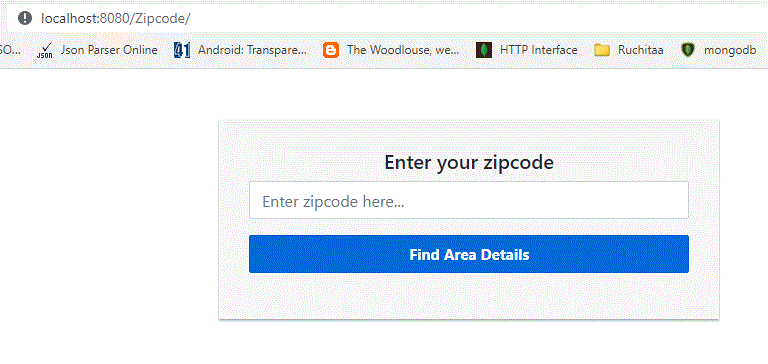
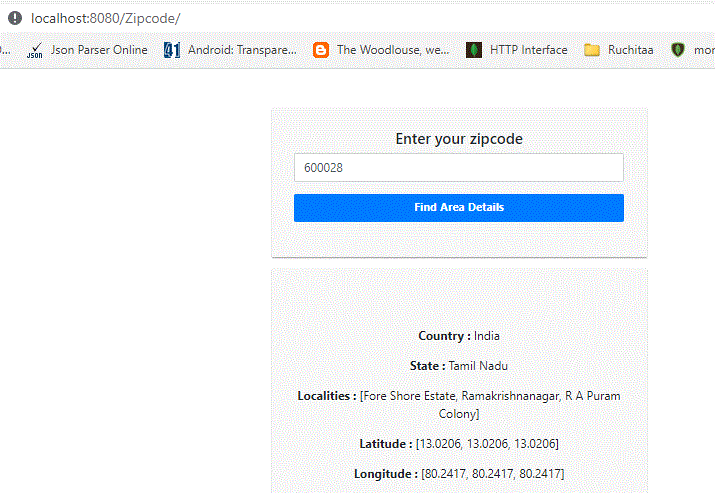
Enter a valid zipcode such as
600028
And click Find Area Details.
Output:
Explanation:
- User enters a zipcode in the JSP page and clicks Find Area Details.
- JavaScript sends a GET request to the Spring MVC controller.
- The controller invokes the external Zippopotamus REST API and retrieves JSON data.
- Spring MVC processes the response and returns the required information as JSON.
- JavaScript updates the JSP page and displays the country, state, latitude, longitude, and locality details without reloading the page.
