
Spring MVC is a web framework based on the Model-View-Controller (MVC) architectural pattern. It helps developers build scalable web applications by separating business logic, presentation, and data access layers. In this project, we will develop a Spring MVC application that connects to a MySQL database and allows users to search for doctor details using either the doctor's name or registration number.
- Uses Spring JDBC and MySQL for efficient database connectivity and data retrieval.
- Follows the MVC architecture with separate Model, Controller, DAO, and View layers.
- Allows users to search doctor information using doctor name or registration number.
Steps to Implements a Project for Finding Doctors Online with MySQL
Follow these steps to create a project for finding doctors online appointment System using Spring MVC.
Create Database Setup
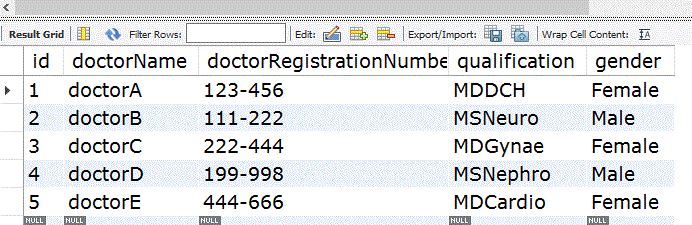
Create and populate the database before running the project.
DROP DATABASE IF EXISTS geeksforgeeks;
CREATE DATABASE geeksforgeeks;
USE geeksforgeeks;CREATE TABLE DoctorsDetails (
id INT(6) UNSIGNED NOT NULL AUTO_INCREMENT,
doctorName VARCHAR(50) NOT NULL,
doctorRegistrationNumber VARCHAR(10) NOT NULL,
qualification VARCHAR(30) NOT NULL,
gender VARCHAR(10),
PRIMARY KEY (id)
);INSERT INTO DoctorsDetails (doctorName, doctorRegistrationNumber, qualification, gender) VALUES
('doctorA', '123-456', 'MDDCH', 'Female'),
('doctorB', '111-222', 'MSNeuro', 'Male'),
('doctorC', '222-444', 'MDGynae', 'Female'),
('doctorD', '199-998', 'MSNephro', 'Male'),
('doctorE', '444-666', 'MDCardio', 'Female');SELECT * FROM DoctorsDetails;
Database Output
Step 1: Create Maven Project
- Create a Dynamic Web/Maven project
- Defines project structure and build configuration
Project Structure: The project structure for the Spring MVC application is as follows:

Step 2: Add Dependencies (pom.xml)
Add the required dependencies for Spring MVC, Spring JDBC, MySQL Connector, JSP support, and testing.
<?xml version="1.0" encoding="UTF-8"?>
<project xmlns="https://maven.apache.org/POM/4.0.0"
         xmlns:xsi="https://www.w3.org/2001/XMLSchema-instance"
         xsi:schemaLocation="https://maven.apache.org/POM/4.0.0 https://maven.apache.org/maven-v4_0_0.xsd">
   <modelVersion>4.0.0</modelVersion>
   <groupId>com.doctors</groupId>
   <artifactId>SpringMVCFindDoctorsOnline</artifactId>
   <packaging>war</packaging>
   <version>0.0.1-SNAPSHOT</version>

   <properties>
      <maven.compiler.source>1.8</maven.compiler.source>
      <maven.compiler.target>1.8</maven.compiler.target>
   </properties>

   <dependencies>
      <dependency>
         <groupId>org.springframework</groupId>
         <artifactId>spring-webmvc</artifactId>
         <version>5.1.1.RELEASE</version>
      </dependency>
      <dependency>
         <groupId>org.springframework</groupId>
         <artifactId>spring-jdbc</artifactId>
         <version>5.1.1.RELEASE</version>
      </dependency>
      <dependency>
         <groupId>mysql</groupId>
         <artifactId>mysql-connector-java</artifactId>
         <version>8.0.11</version>
      </dependency>
      <dependency>
         <groupId>javax.servlet</groupId>
         <artifactId>jstl</artifactId>
         <version>1.2</version>
      </dependency>
      <dependency>
         <groupId>org.apache.tomcat</groupId>
         <artifactId>tomcat-jasper</artifactId>
         <version>9.0.12</version>
      </dependency>
      <dependency>
         <groupId>junit</groupId>
         <artifactId>junit</artifactId>
         <version>4.12</version>
         <scope>test</scope>
      </dependency>
   </dependencies>

   <build>
      <finalName>SpringMVCFindDoctorsOnline</finalName>
      <plugins>
         <plugin>
            <groupId>org.apache.maven.plugins</groupId>
            <artifactId>maven-war-plugin</artifactId>
            <version>3.3.2</version>
         </plugin>
      </plugins>
   </build>
</project>
Step 3: Create Model Class (Doctor.java)
The model class represents a single doctor record stored in the database and Stores doctor information and Maps database data to Java objects and Transfers data between layers.
package com.doctors.beans;

public class Doctor {
    private int id;
    private String doctorName;
    private String doctorRegistrationNumber;
    private String qualification;
    private String gender;

    public int getId() { return id; }
    public void setId(int id) { this.id = id; }

    public String getDoctorName() { return doctorName; }
    public void setDoctorName(String doctorName) { this.doctorName = doctorName; }

    public String getDoctorRegistrationNumber() { return doctorRegistrationNumber; }
    public void setDoctorRegistrationNumber(String doctorRegistrationNumber) { this.doctorRegistrationNumber = doctorRegistrationNumber; }

    public String getQualification() { return qualification; }
    public void setQualification(String qualification) { this.qualification = qualification; }

    public String getGender() { return gender; }
    public void setGender(String gender) { this.gender = gender; }
}
Step 4: Create Controller (DoctorController.java)
The controller receives user requests, interacts with the DAO layer, and forwards results to the view and Displays the doctor search form it Accepts user inputand Searches doctor details in MySQL and Sends results to JSP pages.
package com.doctors.controllers;

import java.sql.SQLException;
import org.springframework.beans.factory.annotation.Autowired;
import org.springframework.stereotype.Controller;
import org.springframework.ui.Model;
import org.springframework.web.bind.annotation.*;
import org.springframework.web.servlet.ModelAndView;
import com.doctors.beans.Doctor;
import com.doctors.dao.DoctorDao;

@Controller
@SessionAttributes("doctor")
public class DoctorController {
    private final DoctorDao dao;

    @Autowired
    public DoctorController(DoctorDao dao) {
        this.dao = dao;
    }

    @ModelAttribute("doctor")
    public Doctor getDoctor() {
        return new Doctor();
    }

    @RequestMapping("/doctorsearchform")
    public String searchForm(Model model) {
        model.addAttribute("command", new Doctor());
        return "doctorsearchform";
    }

    @RequestMapping(value = "/checkDoctorsOnline", method = RequestMethod.POST)
    public ModelAndView checkDoctorsOnline(@ModelAttribute("doctor") Doctor doctor) {
        ModelAndView mav = new ModelAndView("welcome");
        try {
            Doctor result = null;
            if (doctor.getDoctorName() != null && !doctor.getDoctorName().isEmpty()) {
                result = dao.getDoctorsByName(doctor.getDoctorName());
            } else if (doctor.getDoctorRegistrationNumber() != null && !doctor.getDoctorRegistrationNumber().isEmpty()) {
                result = dao.getDoctorsByRegistrationNumber(doctor.getDoctorRegistrationNumber());
            }

            if (result != null) {
                mav.addObject("DoctorName", result.getDoctorName());
                mav.addObject("RegistrationNumber", result.getDoctorRegistrationNumber());
                mav.addObject("Gender", result.getGender());
                mav.addObject("Qualification", result.getQualification());
            } else {
                mav.addObject("DoctorName", "Not Found");
                mav.addObject("RegistrationNumber", "Not Available Online");
            }
        } catch (SQLException e) {
            e.printStackTrace();
        }
        return mav;
    }
}
Step 5: Create DAO Layer (DoctorDao.java)
The DAO layer is responsible for interacting with the MySQL database using JdbcTemplate to Executes SQL queries and Retrieves doctor records from the database and Converts database rows into Java objects.
package com.doctors.dao;

import java.sql.SQLException;
import org.springframework.jdbc.core.BeanPropertyRowMapper;
import org.springframework.jdbc.core.JdbcTemplate;
import com.doctors.beans.Doctor;

public class DoctorDao {
    private JdbcTemplate template;

    public void setTemplate(JdbcTemplate template) {
        this.template = template;
    }

    public Doctor getDoctorsByName(String doctorName) throws SQLException {
        String sql = "SELECT * FROM DoctorsDetails WHERE doctorName = ?";
        return template.queryForObject(sql, new Object[]{doctorName},
                new BeanPropertyRowMapper<>(Doctor.class));
    }

    public Doctor getDoctorsByRegistrationNumber(String registrationNumber) throws SQLException {
        String sql = "SELECT * FROM DoctorsDetails WHERE doctorRegistrationNumber = ?";
        return template.queryForObject(sql, new Object[]{registrationNumber},
                new BeanPropertyRowMapper<>(Doctor.class));
    }
}
Step 6: Configure Spring MVC and Database (spring-servlet.xml)
This configuration file acts as the central configuration for the application.
<?xml version="1.0" encoding="UTF-8"?>
<beans xmlns="http://www.springframework.org/schema/beans"
       xmlns:xsi="https://www.w3.org/2001/XMLSchema-instance"
       xmlns:context="http://www.springframework.org/schema/context"
       xmlns:mvc="http://www.springframework.org/schema/mvc"
       xsi:schemaLocation="
          http://www.springframework.org/schema/beans
          http://www.springframework.org/schema/beans/spring-beans.xsd
          http://www.springframework.org/schema/context
          http://www.springframework.org/schema/context/spring-context.xsd
          http://www.springframework.org/schema/mvc
          http://www.springframework.org/schema/mvc/spring-mvc.xsd">

   <context:component-scan base-package="com.doctors.controllers" />

   <bean class="org.springframework.web.servlet.view.InternalResourceViewResolver">
      <property name="prefix" value="/WEB-INF/jsp/" />
      <property name="suffix" value=".jsp" />
   </bean>

   <bean id="ds" class="org.springframework.jdbc.datasource.DriverManagerDataSource">
      <property name="driverClassName" value="com.mysql.cj.jdbc.Driver" />
      <property name="url" value="jdbc:mysql://localhost:3306/geeksforgeeks?serverTimezone=UTC" />
      <property name="username" value="root" />
      <property name="password" value="admin" />
   </bean>

   <bean id="jt" class="org.springframework.jdbc.core.JdbcTemplate">
      <property name="dataSource" ref="ds" />
   </bean>

   <bean id="dao" class="com.doctors.dao.DoctorDao">
      <property name="template" ref="jt" />
   </bean>
</beans>
Update database credentials (username, password) in spring-servlet.xml.
Step 7: Create JSP Views (indexPage.jsp)
Provides a link to open the doctor search page.
<center>
   <b><a href="doctorsearchform">Find Doctors Online</a></b>
</center>
We would be getting a page like below

On click of the "Find Doctors Online" link, we can get the below page
Step 8: Create JSP Page (doctorsearchform.jsp)
Allows users to search using doctor nameand registration number
<%@ taglib uri="http://www.springframework.org/tags/form" prefix="form" %>
<!DOCTYPE html>
<html>
<head>
   <meta charset="ISO-8859-1">
   <title>Find Doctors Online</title>
</head>
<body>
   <h2>Find Doctors Online</h2>
   <form:form method="post" action="/SpringMVCFindDoctorsOnline/checkDoctorsOnline">
      <table>
         <tr>
            <td>Doctor Name:</td>
            <td><form:input path="doctorName" /></td>
         </tr>
         <tr><td colspan="2" align="center">(or)</td></tr>
         <tr>
            <td>Registration Number:</td>
            <td><form:input path="doctorRegistrationNumber" /></td>
         </tr>
         <tr>
            <td></td>
            <td><input type="submit" value="Check Doctors Online" /></td>
         </tr>
      </table>
   </form:form>
</body>
</html>
Step 9: Create JSP Page(welcome.jsp)
Displays doctor information returned from the database.
<html>
<head><title>Doctor Details</title></head>
<body>
   <h2>Doctor Details</h2>
   <p><b>Name:</b> ${DoctorName}</p>
   <p><b>Registration Number:</b> ${RegistrationNumber}</p>
   <p><b>Qualification:</b> ${Qualification}</p>
   <p><b>Gender:</b> ${Gender}</p>
</body>
</html>
Step 10: Run the Application
- Right Click Project.
- Select Run As - Run on Server.
- Choose Apache Tomcat Server.
- Click Finish.
Open the browser and access:
http://localhost:8080/SpringMVCFindDoctorOnline/doctorsearchform
Output:
Open the application home page, click Find Doctors Online.
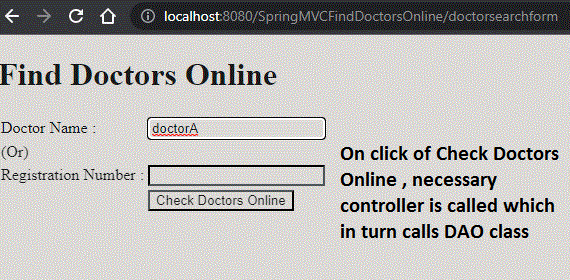
Enter a Doctor Name or Registration Number.
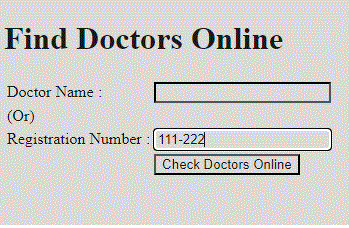
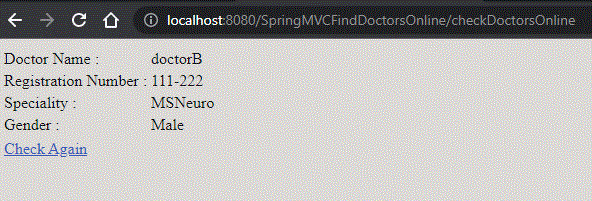
On submission, details will be fetched from MySQL and displayed on welcome.jsp.
Key Points
- DispatcherServlet handles all HTTP requests and responses.
- JdbcTemplate simplifies SQL operations without manual connection handling.
- ModelAttribute binds form data to the model.
- InternalResourceViewResolver maps logical view names to JSP files.
- Maven manages dependencies and builds the WAR for deployment on Tomcat.
