Spring MVC is a widely used framework for developing robust and maintainable Java web applications. Integrating Spring JDBC (JdbcTemplate) with MySQL simplifies database operations, while JUnit helps ensure the reliability of application components through automated testing.
- Uses Spring MVC, Spring JDBC (JdbcTemplate), MySQL, and JUnit.
- Follows the MVC architecture with Model, Controller, DAO, and View layers.
- Searches and displays employee details based on the selected location.
Steps to Implement Employee Search Based on Location Using Spring MVC
Follow the steps below to build an Employee Search application using Spring MVC, MySQL, and JUnit.
Step 1: Create Database Setup
Create the MySQL database and insert the sample employee records before running the application.
DROP DATABASE IF EXISTS test;
CREATE DATABASE test;
USE test;
DROP TABLE test.employeesdetails;
CREATE TABLE `employeesdetails` (
`id` int(6) unsigned NOT NULL,
`Name` varchar(50) DEFAULT NULL,
`AvailableDays` varchar(200) DEFAULT NULL,
`location` varchar(50) DEFAULT NULL,
`qualification` varchar(20) DEFAULT NULL,
`experience` int(11) DEFAULT NULL,
`gender` varchar(10) DEFAULT NULL,
PRIMARY KEY (`id`)
) ENGINE=InnoDB AUTO_INCREMENT=6 DEFAULT CHARSET=latin1;INSERT INTO `test`.`employeesdetails`
(`id`,`Name`,`AvailableDays`,`location`,`qualification`,
`experience`,`gender`) VALUES
(1,'EmployeeA','Monday,Tuesday,Friday','Location1','BE',5,'Female');INSERT INTO `test`.`employeesdetails`
(`id`,`Name`,`AvailableDays`,`location`,`qualification`,
`experience`,`gender`) VALUES
(2,'EmployeeB','Monday,Wednesday,Friday','Location1','MCA',3,'Female');INSERT INTO `test`.`employeesdetails`
(`id`,`Name`,`AvailableDays`,`location`,`qualification`,
`experience`,`gender`) VALUES
(3,'EmployeeC', 'Wednesday,Thursday','Location2','BE',5,'Female');INSERT INTO `test`.`employeesdetails`
(`id`,`Name`,`AvailableDays`,`location`,`qualification`,
`experience`,`gender`) VALUES
(4,'Employees','Saturday,Sunday','Location2','MBA',4,'Male');INSERT INTO `test`.`employeesdetails`
(`id`,`Name`,`AvailableDays`,`location`,`qualification`,
`experience`,`gender`) VALUES
(5,'EmployeeE','Tuesday,Thursday','Location2','MCA',3,'Female');INSERT INTO `test`.`employeesdetails`
(`id`,`Name`,`AvailableDays`,`location`,`qualification`,
`experience`,`gender`) VALUES
(6,'EmployeeA','Wednesday,Thursday','Location2','BE',5,'Female');SELECT * FROM test.employeesdetails;
Output:

Step 2: Create a Maven Project
- Open STS IDE.
- Click File - New - Maven Project.
- Select Create a simple project (Select archetype ) and click Next.

Then Enter the following details:
- Group Id: com.gfg
- Artifact Id: SpringMVCMultipleViewPage
- Packaging: war
Click Finish.
Before moving into the coding part let's have a look at the file structure in the below image.

Step 3: Add Required Dependencies
Add the following maven dependencies and plugin to your pom.xml file.
<?xml version="1.0" encoding="UTF-8"?>
<project xmlns="https://maven.apache.org/POM/4.0.0" xmlns:xsi="https://www.w3.org/2001/XMLSchema-instance"
         xsi:schemaLocation="https://maven.apache.org/POM/4.0.0
                             https://maven.apache.org/xsd/maven-4.0.0.xsd">
   <modelVersion>4.0.0</modelVersion>
   <groupId>com.employees</groupId>
   <artifactId>SpringMVCFindEmployee</artifactId>
   <packaging>war</packaging>
   <version>0.0.1-SNAPSHOT</version>
   <name>SpringMVCFindEmployee Maven Webapp</name>
   <url>http://maven.apache.org</url>
   <properties>
      <failOnMissingWebXml>false</failOnMissingWebXml>
      <spring-version>5.1.0.RELEASE</spring-version>
   </properties>
   <dependencies>
      <dependency>
         <groupId>junit</groupId>
         <artifactId>junit</artifactId>
         <version>4.12</version>
         <scope>test</scope>
      </dependency>
      <!-- https://mvnrepository.com/artifact/org.springframework/spring-webmvc -->
      <dependency>
         <groupId>org.mockito</groupId>
         <artifactId>mockito-all</artifactId>
         <version>1.9.5</version>
         <scope>test</scope>
      </dependency>
      <dependency>
         <groupId>org.springframework</groupId>
         <artifactId>spring-webmvc</artifactId>
         <version>${spring-version}</version>
      </dependency>
      <dependency>
         <groupId>org.springframework</groupId>
         <artifactId>spring-context</artifactId>
         <version>${spring-version}</version>
      </dependency>
      <dependency>
         <groupId>org.springframework</groupId>
         <artifactId>spring-test</artifactId>
         <version>${spring-version}</version>
      </dependency>
      <!-- https://mvnrepository.com/artifact/org.apache.tomcat/tomcat-jasper -->
      <dependency>
         <groupId>org.apache.tomcat</groupId>
         <artifactId>tomcat-jasper</artifactId>
         <version>9.0.12</version>
      </dependency>
      <!-- https://mvnrepository.com/artifact/javax.servlet/javax.servlet-api -->
      <dependency>
         <groupId>javax.servlet</groupId>
         <artifactId>javax.servlet-api</artifactId>
         <version>3.1.0</version>
         <scope>provided</scope>
      </dependency>
      <!-- https://mvnrepository.com/artifact/javax.servlet/jstl -->
      <dependency>
         <groupId>javax.servlet</groupId>
         <artifactId>jstl</artifactId>
         <version>1.2</version>
      </dependency>
      <!-- https://mvnrepository.com/artifact/mysql/mysql-connector-java -->
      <dependency>
         <groupId>mysql</groupId>
         <artifactId>mysql-connector-java</artifactId>
         <version>8.0.11</version>
      </dependency>
      <!-- https://mvnrepository.com/artifact/org.springframework/spring-jdbc -->
      <dependency>
         <groupId>org.springframework</groupId>
         <artifactId>spring-jdbc</artifactId>
         <version>${spring-version}</version>
      </dependency>
   </dependencies>
   <build>
      <finalName>SpringMVCFindEmployee</finalName>
      <sourceDirectory>src/main/java</sourceDirectory>
      <plugins>
         <plugin>
            <groupId>org.apache.maven.plugins</groupId>
            <artifactId>maven-compiler-plugin</artifactId>
            <version>3.5.1</version>
            <configuration>
               <source>1.8</source>
               <target>1.8</target>
            </configuration>
         </plugin>
         <!-- This should be added to overcome Could not initialize
               class org.apache.maven.plugin.war.util.WebappStructureSerializer -->
         <plugin>
            <groupId>org.apache.maven.plugins</groupId>
            <artifactId>maven-war-plugin</artifactId>
            <version>3.3.2</version>
         </plugin>
      </plugins>
   </build>
</project>
Step 4: Create Model Class (Employee.java)
The Employee class represents an employee stored in the MySQL database. It is responsible for:
- Storing employee information.
- Mapping database records to Java objects.
- Transferring data between the Controller, DAO, and View layers.
public class Employee {
    // All instance variables should
      // match with the columns present
      // in MySQL test.employeedetails table
    private int id;
    private String name;
    private float salary;
    private String availableDays;
    private String location;
    private String qualification;
    private int experience;
    private String gender;
    public String getLocation() {
        return location;
    }

    public void setLocation(String location) {
        this.location = location;
    }

    public String getQualification() {
        return qualification;
    }

    public void setQualification(String qualification) {
        this.qualification = qualification;
    }

    public int getExperience() {
        return experience;
    }

    public void setExperience(int experience) {
        this.experience = experience;
    }

    public String getGender() {
        return gender;
    }

    public void setGender(String gender) {
        this.gender = gender;
    }

    public int getId() {
        return id;
    }

    public void setId(int id) {
        this.id = id;
    }

    public String getName() {
        return name;
    }

    public void setName(String name) {
        this.name = name;
    }

    public float getSalary() {
        return salary;
    }

    public void setSalary(float salary) {
        this.salary = salary;
    }

    public String getAvailableDays() {
        return availableDays;
    }

    public void setAvailableDays(String availableDays) {
        this.availableDays = availableDays;
    }

}
Step 5: Create Controller (EmployeeController.java)
The controller receives HTTP requests, communicates with the DAO layer, and forwards employee information to the JSP view. Its responsibilities include:
- Displaying the employee search form and accepting user input.
- Searching employees using employee name and location.
- Checking employee availability and returning employee details to the JSP page.
import com.employees.beans.Employee;
import com.employees.dao.EmployeeDao;
import java.sql.SQLException;
import java.util.StringTokenizer;
import org.springframework.beans.factory.annotation.Autowired;
import org.springframework.stereotype.Controller;
import org.springframework.ui.Model;
import org.springframework.web.bind.annotation.ModelAttribute;
import org.springframework.web.bind.annotation.RequestMapping;
import org.springframework.web.bind.annotation.RequestMethod;
import org.springframework.web.bind.annotation.SessionAttributes;
import org.springframework.web.servlet.ModelAndView;

@Controller
@SessionAttributes("employee")
public class EmployeeController {
    @Autowired
    EmployeeDao dao;

    @Autowired public EmployeeController(EmployeeDao dao)
    {
        this.dao = dao;
    }

    @ModelAttribute("employee")
    public Employee getEmployee()
    {
        return new Employee();
    }

    // for searchform
    @RequestMapping("/employeesearchform")
    public String searchform(Model m)
    {
        m.addAttribute("command", new Employee());
        return "employeesearchform";
    }

    // It provides search of employees in model object
    @RequestMapping(value = "/searchEmployee",
                    method = RequestMethod.POST)
    public ModelAndView
    searchEmployee(@ModelAttribute("employee")
                   Employee employee)
    {

        ModelAndView mav = null;
        Employee employee1;
        try {
            employee1 = dao.getEmployeesByNameAndLocation(
                employee.getName(), employee.getLocation());
            mav = new ModelAndView("welcome");
            if (null != employee1) {
                System.out.println(
                    employee1.getId() + "..."
                    + employee1.getName() + ".."
                    + employee1.getAvailableDays()
                    + "..chosen location.."
                    + employee.getLocation());
                StringTokenizer st = new StringTokenizer(
                    employee1.getAvailableDays(), ",");
                boolean isAvailable = false;
                while (st.hasMoreTokens()) {
                    // System.out.println(st.nextToken());
                    // if
                    // (st.nextToken().equalsIgnoreCase(employee.getAvailableDays()))
                    // {
                    isAvailable = true;
                    break;
                    //}
                }

                mav.addObject("firstname",
                              employee1.getName());
                if (isAvailable) {
                    mav.addObject("availability",
                                  "Available on");
                }
                else {
                    mav.addObject("availability",
                                  "Not Available on");
                }
                mav.addObject("day",
                              employee1.getAvailableDays());
                mav.addObject("location",
                              employee.getLocation());
            }
            else {
                mav.addObject("firstname",
                              employee.getName());
                mav.addObject("availability",
                              "Not Available ");
                mav.addObject("location",
                              employee.getLocation());
            }
        }
        catch (SQLException e) {
            // TODO Auto-generated catch block
            e.printStackTrace();
        }

        return mav;
    }
}
Step 6: Create DAO Layer (EmployeeDao.java)
The DAO layer communicates with the MySQL database using JdbcTemplate. Its responsibilities include:
- Executing SQL queries and retrieving employee records.
- Mapping database rows to the Employee object.
import com.employees.beans.Employee;
import java.sql.SQLException;
import org.springframework.jdbc.core.BeanPropertyRowMapper;
import org.springframework.jdbc.core.JdbcTemplate;

public class EmployeeDao {
    // We can straight away write SQL queries related to
    // MySQL as we are using JdbcTemplate
    JdbcTemplate template;

    public void setTemplate(JdbcTemplate template)
    {
        this.template = template;
    }

    public Employee
    getEmployeesByNameAndLocation(String employeeName,
                                  String locationName)
        throws SQLException
    {
        String sql
            = "select * from employeesdetails where name=? and location = ?";
        return template.queryForObject(
            sql,
            new Object[] { employeeName, locationName },
            new BeanPropertyRowMapper<Employee>(
                Employee.class));
    }

    public Employee
    getEmployeesByGender(String gender,
                         String availabledays)
        throws SQLException
    {
        String sql
            = "select * from employeesdetails where gender=? and availabledays = ?";
        return template.queryForObject(
            sql, new Object[] { gender, availabledays },
            new BeanPropertyRowMapper<Employee>(
                Employee.class));
    }

    public Employee
    getEmployeesByQualification(String qualification,
                                String availabledays)
        throws SQLException
    {
        String sql
            = "select * from employeesdetails where qualification=? and availabledays = ?";
        return template.queryForObject(
            sql,
            new Object[] { qualification, availabledays },
            new BeanPropertyRowMapper<Employee>(
                Employee.class));
    }

    public Employee
    getEmployeesByExperience(int experienceInYears)
        throws SQLException
    {
        String sql
            = "select * from employeesdetails where experience=?";
        return template.queryForObject(
            sql, new Object[] { experienceInYears },
            new BeanPropertyRowMapper<Employee>(
                Employee.class));
    }
}
Step 7: Configure Spring MVC and Database (spring-servlet.xml)
The spring-servlet.xml file acts as the central configuration file for the application.
Note: Update the database username, password, and database name according to your MySQL configuration.
<?xml version="1.0" encoding="UTF-8"?>
<beans xmlns="http://www.springframework.org/schema/beans/"
       xmlns:context="http://www.springframework.org/schema/context/"
       xmlns:mvc="http://www.springframework.org/schema/mvc/"
       xmlns:xsi="https://www.w3.org/2001/XMLSchema-instance" xsi:schemaLocation="
                  http://www.springframework.org/schema/beans/
                  http://www.springframework.org/schema/beans//spring-beans.xsd
                  http://www.springframework.org/schema/context/
                  http://www.springframework.org/schema/context//spring-context.xsd
                  http://www.springframework.org/schema/mvc/
                  http://www.springframework.org/schema/mvc//spring-mvc.xsd">
   <context:component-scan base-package="com.employees.controllers" />
   <bean class="org.springframework.web.servlet.view.InternalResourceViewResolver">
      <property name="prefix" value="/WEB-INF/jsp/" />
      <property name="suffix" value=".jsp" />
   </bean>
   <bean id="ds" class="org.springframework.jdbc.datasource.DriverManagerDataSource">
      <property name="driverClassName" value="com.mysql.cj.jdbc.Driver" />
      <!-- As we are using test database, it is given as test here
           Modify it according to your database name useSSL=false
           is required to overcome SSL errors -->
      <property name="url" value="jdbc:mysql://localhost:3306/test?useSSL=false" />
      <property name="username" value="root" />
      <property name="password" value="*****" />
      <!--Specify correct password here -->
   </bean>
   <bean id="jt" class="org.springframework.jdbc.core.JdbcTemplate">
      <property name="dataSource" ref="ds" />
   </bean>
   <bean id="dao" class="com.employees.dao.EmployeeDao">
      <property name="template" ref="jt" />
   </bean>
</beans>
Step 8: Create Home Page (index.jsp)
This page acts as the application's home page and provides a link to open the employee search form.
// Beautify the code if required,
// This will provide a hyperlink and
// it will go to the employeesearchform.jsp
<center> <a href="employeesearchform">Search Employees By Location</a></center>
Step 9: Create Employee Search Form (employeesearchform.jsp)
This JSP page allows users to search employees using:
- Employee Name
- Location
<%@ taglib uri="http://www.springframework.org/tags/form" prefix="form"%>
<%@ taglib uri="http://www.oracle.com/technetwork/java/index.html" prefix="c"%>
<%@ page language="java" contentType="text/html; charset=ISO-8859-1" pageEncoding="ISO-8859-1" %>
<!DOCTYPE html PUBLIC "-//W3C//DTD HTML 4.01 Transitional//EN" "http://www.w3.org/TR/html4/loose.dtd">
<html>
   <head>
      <meta http-equiv="Content-Type" content="text/html; charset=ISO-8859-1">
      <title>Search Employees</title>
   </head>
   <body>
      <h1>Search Employees</h1>
      <form:form  method="post" action="/SpringMVCFindEmployee/searchEmployee"  >
         <table >
            <tr>
               <td>Employee Name : </td>
               <td>
                  <form:input path="name"/>
               </td>
            </tr>
            <tr>
               <td>Choose a Location : </td>
               <td>
                  <form:select path="location">
                     <form:option value="Location1" label="Location1"/>
                     <form:option value="Location2" label="Location2"/>
                  </form:select>
               </td>
            </tr>
            <tr>
               <td> </td>
               <td><input type="submit" value="Search" /></td>
            </tr>
         </table>
      </form:form>
   </body>
</html>
Step 10: Create Result Page (welcome.jsp)
The welcome.jsp page displays the employee details returned from the database.
<%@ page language="java" contentType="text/html; charset=ISO-8859-1" pageEncoding="ISO-8859-1" %>
<!DOCTYPE html PUBLIC "-//W3C//DTD HTML 4.01 Transitional//EN"
                        "http://www.w3.org/TR/html4/loose.dtd">
<html>
   <head>
      <meta http-equiv="Content-Type" content="text/html; charset=ISO-8859-1">
      <title>Welcome</title>
   </head>
   <body>
      <table>
         <tr>
            <td> Employee Name :</td>
            <td>${firstname}</td>
         </tr>
         <tr>
            <td> Availability :</td>
            <td>${availability} </td>
            <td>${day}</td>
            <td> at ${location}</td>
         </tr>
         <tr>
         </tr>
         <tr>
         </tr>
         <tr>
            <td><a href="employeesearchform">Search Again</a>
            </td>
         </tr>
      </table>
   </body>
</html>
Step 11: Run the Application
- Right-click the project.
- Select Run As - Run on Server.
- Choose Apache Tomcat Server.
- Click Finish.
Open the browser and access:
http://localhost:8080/SpringMVCFindEmployee/index.jsp
Output:

After entering details, the output is shown via

Step 12: Test the Application Using MockMvc and JUnit
To verify that the application works correctly, we can write unit test cases using JUnit and Spring MockMvc. These tests validate the controller behavior and ensure that employee details are correctly retrieved from the MySQL database.
EmployeeControllerTest.java
import static org.springframework.test.web.servlet.request.MockMvcRequestBuilders.get;
import static org.springframework.test.web.servlet.result.MockMvcResultMatchers.status;

import org.junit.Assert;
import org.junit.Before;
import org.junit.Test;
import org.junit.runner.RunWith;
import org.mockito.InjectMocks;
import org.mockito.MockitoAnnotations;
import org.springframework.beans.factory.annotation.Autowired;
import org.springframework.test.context.ContextConfiguration;
import org.springframework.test.context.junit4.SpringJUnit4ClassRunner;
import org.springframework.test.context.web.WebAppConfiguration;
import org.springframework.test.web.servlet.MockMvc;
import org.springframework.test.web.servlet.setup.MockMvcBuilders;
import org.springframework.web.context.WebApplicationContext;

import com.employees.beans.Employee;
import com.employees.controllers.EmployeeController;
import com.employees.dao.EmployeeDao;

@ContextConfiguration(locations = { "file:src/main/webapp/WEB-INF/spring-servlet.xml" })
@RunWith(SpringJUnit4ClassRunner.class)
@WebAppConfiguration
public class EmployeeControllerTest {

    @InjectMocks
    private EmployeeController employeeController;

    private MockMvc mockMvc;

    @Autowired
    private EmployeeDao dao;

    @Autowired
    WebApplicationContext webApplicationContext;


    @Before
    public void setup() {
        MockitoAnnotations.initMocks(this);
        this.mockMvc = MockMvcBuilders.standaloneSetup(employeeController).build();

    }

    @Test
    // 404 error thrown when coming from invalid resources
    public void testCreateSearchEmployeesPageFormInvalidUser() throws Exception {
        this.mockMvc.perform(get("/"))
        .andExpect(status().isNotFound());
    }

      @Test
      // positive testcase
      public void testSearchEmployeesByNameAndCheckAvailability() throws Exception {
          Employee employee = new Employee();
          employee.setName("EmployeeA");
          employee.setLocation("Location1");
          employee = dao.getEmployeesByNameAndLocation(employee.getName(),employee.getLocation());
          Assert.assertEquals(1, employee.getId());
          Assert.assertEquals("Monday,Tuesday,Friday", employee.getAvailableDays());
      }

      @Test
      // Negative testcase
      public void testSearchEmployeesByNameAndCheckAvailabilityWithNotEqualsValues() throws Exception {
          Employee employee = new Employee();
          employee.setName("EmployeeA");
          employee.setLocation("Location2");
          employee = dao.getEmployeesByNameAndLocation(employee.getName(),employee.getLocation());
          Assert.assertNotEquals(10, employee.getId());
          Assert.assertNotEquals("Tuesday,Thursday", employee.getAvailableDays());
      }

      @Test
      //Negative  testcase i.e. Given gender as Male and available days as Saturday
      public void testSearchEmployeesByGender() throws Exception {
          Employee employee = new Employee();
          employee.setGender("Male");
          employee.setAvailableDays("Saturday,Sunday");
          employee = dao.getEmployeesByGender(employee.getGender(),employee.getAvailableDays());
          Assert.assertEquals(4, employee.getId());
          Assert.assertNotEquals("EmployeeB", employee.getName());
          Assert.assertNotEquals(1, employee.getExperience());
      }

      @Test
      // Negative  testcase i.e. Given gender as Male and available days as Saturday
      public void testSearchEmployeesByGenderWithCorrectResults() throws Exception {
          Employee employee = new Employee();
          employee.setGender("Male");
          employee.setAvailableDays("Saturday,Sunday");
          employee = dao.getEmployeesByGender(employee.getGender(),employee.getAvailableDays());
          Assert.assertEquals(4, employee.getId());
          Assert.assertNotEquals("EmployeeB", employee.getName());
          Assert.assertNotEquals(1, employee.getExperience());
      }

      @Test
      // Negative  testcase i.e. giving experience as 4 years and checking
      // as the name of the doctor to be DoctorE instead of DoctorD
      public void testSearchEmployeesByExperience() throws Exception {
          Employee employee = new Employee();
          employee.setExperience(4);
          employee = dao.getEmployeesByExperience(employee.getExperience());
          Assert.assertEquals(4, employee.getId());
          Assert.assertNotEquals("EmployeeF", employee.getName());
      }

      @Test
      public void testSearchEmployeesByQualification() throws Exception {
          Employee employee = new Employee();
          employee.setQualification("MBA");
          employee.setAvailableDays("Saturday,Sunday");
          employee = dao.getEmployeesByQualification(employee.getQualification(),employee.getAvailableDays());
          Assert.assertEquals(4, employee.getId());
          Assert.assertEquals("EmployeeD", employee.getName());
          Assert.assertNotEquals(15, employee.getExperience());
      }

}
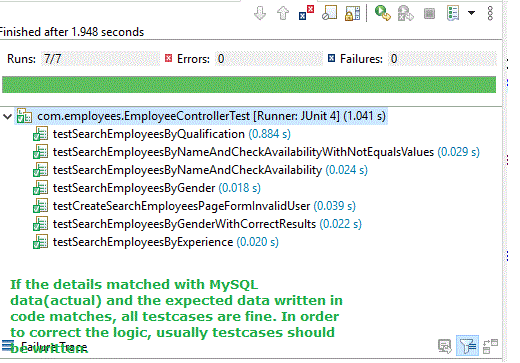
Step 13: Run the Test Cases
- Right-click EmployeeControllerTest.java.
- Select Run As - JUnit Test.
- Wait for all test cases to execute.
If all assertions pass successfully, a green bar appears in the JUnit view, indicating that all test cases have passed. On executing the test cases, we can see the below output