
Checksum and file integrity commands in Linux are used to verify whether files have been altered, corrupted, or tampered with. These commands generate hash or checksum values based on file content, allowing users to compare and confirm file integrity during transfers, backups, or security checks.
These commands are mainly used to:
- Verify file integrity after download or transfer
- Detect accidental or malicious file changes
- Ensure data consistency in backups
- Validate files using checksum values
Below are the commonly used Checksum and File Integrity Commands in Linux
1. md5sum
The md5sum command generates and verifies an MD5 hash value for files.
- Produces a 128-bit hash value
- Commonly used to verify downloaded files
- Detects file content changes
Syntax:
md5sum file_nameExample:
md5sum sample.txt- This generates an MD5 checksum for sample.txt.
Output:

2. cksum
The cksum command calculates a CRC checksum along with the file size.
- Displays checksum and file size
- Useful for detecting transmission errors
- Works across different systems
Syntax:
cksum file_nameExample:
cksum sample.txt- This displays the CRC checksum and size of sample.txt.
Output:

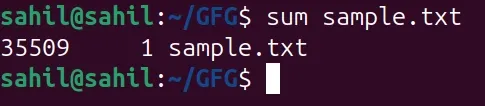
3. sum
The sum command calculates a simple checksum for files.
- Provides basic integrity verification
- Less secure than md5sum
- Mainly used for quick checks
Syntax:
sum file_nameExample:
sum sample.txt- This generates a basic checksum value for sample.txt.
Output:
How Checksums Work in Linux
- A checksum is a fixed-length value generated from the contents of a file
- Linux calculates this value using a checksum algorithm like MD5 or CRC
- If the file changes even slightly, the checksum value also changes
- By comparing checksums, users can verify whether a file remains unchanged
When to Use Checksum Commands
Checksum commands are used whenever you need to verify that a file has not been altered, corrupted, or tampered with during download, transfer, backup, or storage.
After Downloading Files to Verify They Are Not Corrupted
- Download the file and compare its checksum with the official one:
md5sum software.zip- If the generated hash matches the official hash, the file is safe to use.
Following File Transfers Between Systems or Networks
- Generate checksum before transfer:
md5sum file.txt- Generate checksum after transfer on the destination system and compare both outputs.
- Matching values confirm the file was transferred correctly.
After Restoring Files From Backups
- Check checksum of the backup file:
cksum backup.tar- Run the same command after restoring and verify the checksum remains unchanged.
During Security Audits to Detect Unauthorized File Changes
- Save checksum of important files:
md5sum /etc/passwd > passwd.hash- Later, recheck:
md5sum -c passwd.hash- Any mismatch indicates the file was modified.
