
Package management tools automate software installation, removal, and updates on Linux systems. On Red Hat-based distributions, DNF, YUM, Zypper, RPM, and PackageKit handle dependencies and maintain system consistency.
- DNF is the modern successor to YUM with improved performance and faster operations
- YUM provides automatic dependency resolution and plugin support for complex installations
- Zypper uses advanced SAT solver technology and includes system rollback capabilities
- RPM handles individual package files with verification and integrity checking
- PackageKit offers a unified interface across package systems with GUI support
1. DNF Package Manager:
Updating Package Repositories:
Make sure your system has the most recent information about available packages before installing or updating any packages. To update the package repositories, use this command:
sudo dnf update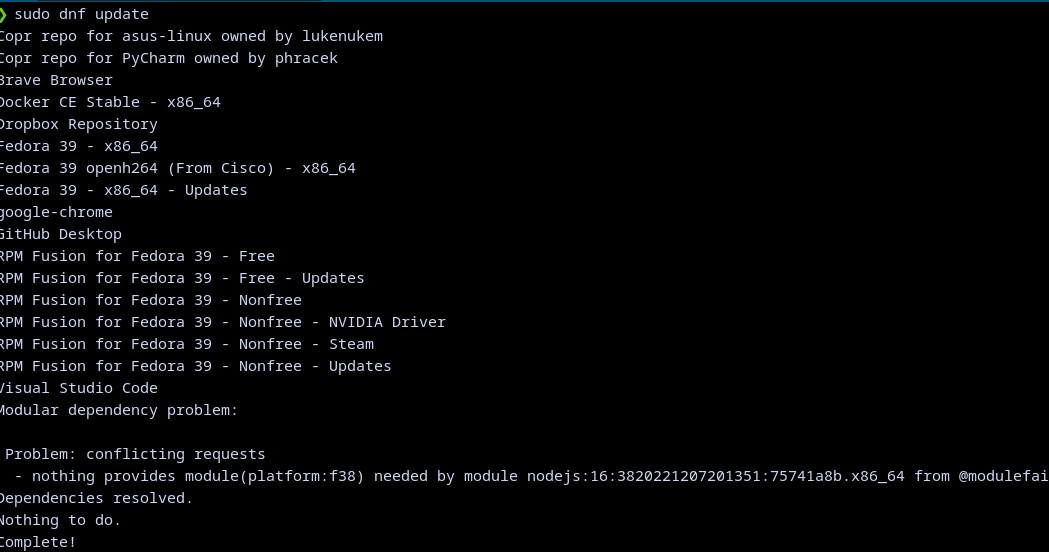
If there is something to be updated you would be asked whether you want to upgrade it or not
Installing Packages:
To install a package, use the install command followed by the package name:
sudo dnf install packageName
Removing Packages:
To remove a package, use the remove command:
sudo dnf remove packageNameListing Installed Packages:
To list all installed packages, you can use:
dnf list installedThis will give a list of all installed programs
.png)
Checking Information about a Package:
To get detailed information about a package, use:
dnf info packageName.png)
Upgrading Packages:
To upgrade all installed packages to their latest versions, use:
sudo dnf upgrade(1)(1).png)
If there is something to be upgraded you would be asked whether you want to upgrade it or not
Installing Software Groups:
dnf allows you to install groups of related packages. For instance, to install the Development Tools group:
sudo dnf groupinstall "Development Tools".png)
Enabling and Disabling Repositories:
You can enable or disable repositories in the /etc/yum.repos.d/ directory. Use a text editor to modify the .repo files.
Cleaning the Package Cache:
To free up disk space, you can clean the package cache using:
sudo dnf clean all
Installing RPM Files:
If you have an RPM file, you can install it directly using dnf:
sudo dnf install /path/to/package.rpm
2. YUM(Yellowdog Updater Modified) Package Manager :
On Red Hat-based systems, YUM is a high-level package management application that makes software package installation, upgrading, and removal easier. Important characteristics consist of:
Dependency Resolution: YUM takes care of package dependencies on its own, making sure that all necessary parts are installed.
Support for Plugins: YUM has support for a number of plugins that provide featuresSearch for a package:
like version locking and other package security checks to improve its functionality.
Repositories: YUM accesses a large number of software packages by interacting with software repositories to download and install programs.
Update all packages:
sudo yum updateInstall a package:
sudo yum install [package_name]Remove a package:
sudo yum remove [package_name]Search for a package:
sudo yum search [search_term]3. Zypper Package Manager :
Zypper is SUSE Linux Enterprise's and openSUSE's default package manager. While it is related to YUM, it has unique characteristics of its own:
SAT Solver: Zypper uses a sophisticated SAT (Satisfiability) solver to resolve dependencies, resulting in optimal package installations.
Rollback Capabilities: Zypper makes it simpler to recover from problematic upgrades or installations by enabling users to roll back system modifications.
Repo Management: Zypper handles software repositories to download and install packages, much as YUM.
Update all packages:
sudo zypper updateInstall a package:
sudo zypper install [package_name]Remove a package:
sudo zypper remove [package_name]Search for a package:
sudo zypper search [search_term]4. RPM (RPM Package Manager):
RPM is a lower-level package management technology that can be used for managing, building, and installing specific software packages. Some important aspects of RPM are:
Package Format: RPM packages include configuration files, scripts, and built binaries that are needed for installation.
Verification: To make sure that installed packages have not been tampered with, RPM may confirm their integrity and validity.
Package maintainers utilize spec files to specify the proper way to build and install software packages.
Install an RPM package:
sudo rpm -i [package_file.rpm]Remove an RPM package:
sudo rpm -e [package_name]Query installed packages:
rpm -qaVerify an installed package:
rpm -V [package_name]5. PackageKit:
A higher-level abstraction called PackageKit seeks to give various package management systems a consistent interface. Among its attributes are:
PackageKit's Abstraction Layer enables applications to communicate with disparate systems through a single interface by abstracting the underlying package management mechanisms.
Easily navigable graphical user interface (GUI): PackageKit frequently includes a GUI that makes package management tasks easier for end users.
Plugin System: PackageKit can be customized to meet different needs by adding plugins that expand its capability.
Update all packages:
sudo pkcon refresh force -c -1Install a package:
sudo pkcon install [package_name]Remove a package:
sudo pkcon remove [package_name]Search for a package:
sudo pkcon search name [search_term]To sum up, Red Hat-based Linux systems depend heavily on YUM, Zypper, RPM, and PackageKit for software package management. The Linux distribution being used, system requirements, and user preferences all play a role in the tool selection process.You can use these commands to handle packages on Linux systems running Red Hat more efficiently. To prevent unforeseen repercussions, always use these commands carefully, especially when installing or deleting packages.
