
Printing and media commands in Linux are used to manage audio playback, sound settings, printing services, removable media, and screen capturing. These commands are especially useful for handling multimedia tasks and printer-related services directly from the terminal.
Printing and media commands are mainly used to:
- Control system audio and sound devices
- Play audio and MIDI files
- Manage printing services and print jobs
- Handle removable media and take screenshots
Below are the commonly used Printing and Media Commands in Linux
1. amixer
The amixer command is used to control sound settings for ALSA (Advanced Linux Sound Architecture).
- Adjusts volume levels
- Manages audio controls
- Works with sound cards
Syntax:
amixerExample:
amixer set Master 10%
- This sets the system master volume to 10%.
2. aplay
The aplay command is used to play audio files from the terminal using ALSA.
- Plays WAV audio files
- Useful for testing sound output
- Supports multiple sound devices
Syntax:
aplay file_name.wavExample:
aplay sound.wav- This plays the audio file sound.wav.
3. aplaymidi
aplaymidi command in Linux is used to play standard MIDI(Musical Instrument Digital Interface) files, by sending the content of a MIDI file to an ALSA(Advanced Linux Sound Architecture) MIDI port, sound renderer like timidity or a hardware MIDI device is required to play MIDI files.
- Plays MIDI music files
- Uses available MIDI devices
- Useful for music testing
Syntax:
aplaymidi [options] [MIDIfile]Example:
aplaymidi -h- This is used to show all the options and syntax of the command.
4. cupsd
The cupsd command is the scheduler service for CUPS (Common UNIX Printing System).
- Manages print jobs
- Controls printer services
- Runs as a background service
Syntax:
cupsdExample:
systemctl status cups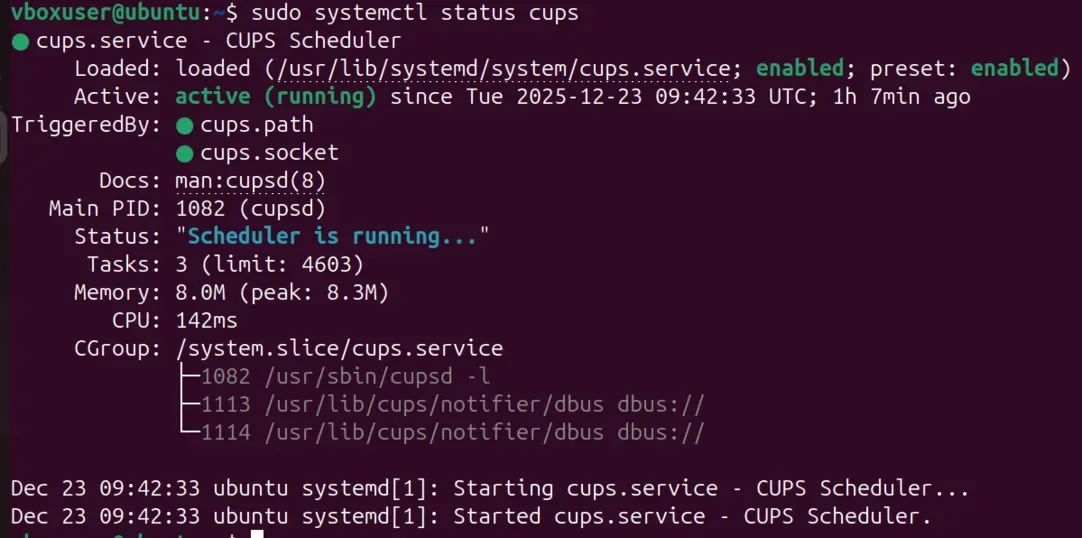
- This checks the status of the CUPS printing service.
5. eject
The eject command is used to safely remove removable media such as CDs, DVDs, or USB drives.
- Ejects removable devices
- Prevents data corruption
- Useful for external media
Syntax:
eject device_nameExample:
eject /dev/cdrom- This ejects the CD/DVD drive.
6. import
The import command is used to capture screenshots in Linux (part of ImageMagick).
- Captures full screen or selected area
- Saves screenshots as image files
- Useful for documentation
Syntax:
import file_name.pngExample:
import -adjoin sample.png
This allows you to join multiple images into a single multi-image file. It’s particularly useful when you want to combine screenshots into one output.
