
Semantic labeling is the process of assigning meaningful, human-readable labels to groups of similar data, particularly words or text. In the context of natural language processing (NLP), semantic labeling involves analyzing the meanings (semantics) of words to label clusters automatically. This becomes especially useful in scenarios like topic modeling, text classification, and sentiment analysis, where manual labeling may be time-consuming and subjective. By knowing techniques like word embeddings and clustering, R helps us to automate this labeling process, making it easier to summarize and analyze large volumes of textual data.
What Is Semantics?
In the context of text analysis, semantics refers to the meaning behind words. Words that are semantically related share a similar context or meaning. For example, "dog" and "cat" are semantically related because they both belong to the category of animals.
Techniques for Automatic Labeling in R
- Word Embeddings: A word embedding model translates words into vectors of numbers based on their meanings. Models like Word2Vec or GloVe map words into a semantic space where similar words are closer together.
- Clustering: Once we have the semantic representations of words, clustering algorithms (like k-means) can group words that are similar based on their meaning.
- Label Generation: After clustering, we generate a label for each cluster, typically by identifying a representative word from each group.
Approach
- First we'll use a sample dataset containing a collection of words or short phrases.
- Then apply a clustering algorithm to group similar words together.
- Next use a semantic analysis technique to understand the meaning of the words in each cluster.
- Now, automatically generate a label for each cluster that best represents the group of words.
Now we implement step by step to perform automatic semantic labeling using word embeddings and clustering in R Programming Language.
Step 1: Install and Load Required Packages
First install and load the required packages.
# Install and load necessary packages
install.packages("text2vec")
install.packages("clustertend")
install.packages("tm")

library(text2vec)
library(clustertend)
library(tm)
Step 2: Load the Word Data
Next, we’ll create a sample dataset of words that we want to cluster and label.
# Sample words data
words <- c("dog", "cat", "wolf", "tiger", "lion", "car", "bus", "train", "bicycle",
                                                        "elephant", "rhino", "plane")
Step 3: Tokenize the Words into a List
The itoken() function needs a list of tokenized words to work.
# Tokenize the words into a list
tokens_list <- list(words)
it <- itoken(tokens_list, progressbar = FALSE)
Step 4: Create Vocabulary and Vectorizer
Next, we create a vocabulary from the tokenized words and initialize a vectorizer.
# Create vocabulary and vectorizer
vocab <- create_vocabulary(it)
vectorizer <- vocab_vectorizer(vocab)
Step 5: Create the Term Co-occurrence Matrix (TCM)
Next, create_tcm() function, which considers the context of words based on a "skip-grams window" .
# Create TCM (Term Co-occurrence Matrix)
tcm <- create_tcm(it, vectorizer, skip_grams_window = 5)
Step 6: Verify the TCM
Now verify the TCM.
# Check if TCM was created correctly
if (nrow(tcm) == 0) {
  stop("TCM has 0 rows, check tokenization and vocabulary creation steps.")
}
Step 7: Fit Word Embeddings Using Global Vectors
Now, we fit the word embeddings model using the GlobalVectors function.
# Fit word embeddings using GlobalVectors model
word_vector <- GlobalVectors$new(rank = 50, x_max = 10)
word_embeddings <- word_vector$fit_transform(tcm, n_iter = 10)
Output:
INFO  [09:54:14.209] epoch 1, loss 0.1263
INFO  [09:54:14.254] epoch 2, loss 0.0771
INFO  [09:54:14.311] epoch 3, loss 0.0520
INFO  [09:54:14.355] epoch 4, loss 0.0373
INFO  [09:54:14.364] epoch 5, loss 0.0278
INFO  [09:54:14.372] epoch 6, loss 0.0213
INFO  [09:54:14.386] epoch 7, loss 0.0167
INFO  [09:54:14.400] epoch 8, loss 0.0132
INFO  [09:54:14.411] epoch 9, loss 0.0106
INFO  [09:54:14.423] epoch 10, loss 0.0085
Step 8: Perform Clustering on the Word Embeddings
Once the words are converted into vectors.
# Perform clustering
dist_matrix <- dist(word_embeddings)
word_clusters <- hclust(dist_matrix, method = "ward.D2")
plot(word_clusters) # Visualize the dendrogram to see how words are clustered
Output:
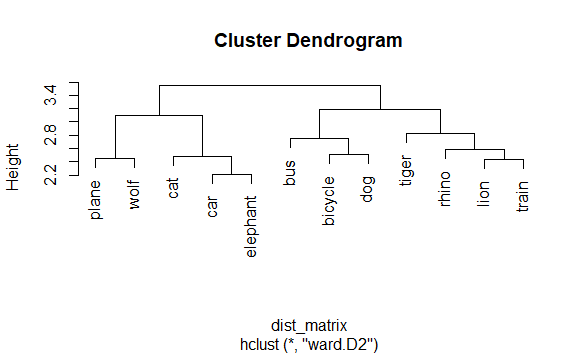
Step 9: Cut the Dendrogram into Clusters
Now cut the dendogram into clusters.
# Cut tree into 3 clusters
clusters <- cutree(word_clusters, k = 3)
print(clusters) # View which words belong to which cluster
Output:
 bicycle      bus      car      cat      dog elephant     lion    plane    rhino    tiger    train
       1        2        3        3        3        1        3        2        2        2        1
    wolf
       3
Step 10: Automatically Label Each Cluster
To assign a label to each cluster, we compute the centroid of each cluster and find the word closest to the centroid.
# Automatically label clusters with additional checks
cluster_labels <- sapply(unique(clusters), function(cluster) {
  cluster_words <- words[clusters == cluster]

  # If the cluster has only one word, use it as the label directly
  if (length(cluster_words) == 1) {
    return(cluster_words[1])
  }

  # Extract the word embeddings for the current cluster
  cluster_vectors <- word_embeddings[clusters == cluster, , drop = FALSE]

  # Check for NA or infinite values in embeddings
  if (any(is.na(cluster_vectors)) || any(is.infinite(cluster_vectors))) {
    warning("Cluster contains NA or infinite values in embeddings")
    return(NA)
  }

  # Calculate the centroid of the cluster
  centroid <- colMeans(cluster_vectors, na.rm = TRUE)

  # Calculate distances from the centroid to each word in the cluster
  distances <- apply(cluster_vectors, 1, function(vec) sum((vec - centroid)^2))

  # Find the index of the word closest to the centroid
  label_index <- which.min(distances)

  # Return the word closest to the centroid
  return(cluster_words[label_index])
})

# Print the final labels
print(cluster_labels)
Output:
[1] "dog" "train" "wolf" Applications
- Topic Modeling: Automatically labeling clusters can help identify common themes or topics in large sets of documents or text data. For instance, you can group similar words and label the clusters with relevant topics, making it easier to organize and analyze text data.
- Text Classification: In scenarios where you need to classify text into different categories (e.g., spam vs. not spam), semantic labeling can group similar words together and automatically label them based on their meanings. This can make the classification process more accurate and efficient.
- Sentiment Analysis: When analyzing customer reviews, for example, semantic labeling can help group words that represent similar sentiments (positive or negative) and automatically label them, aiding in summarizing customer feedback.
- Search Optimization: Semantic labeling can improve search engines by grouping related search terms and labeling them effectively, providing more relevant results to users.
- Data Summarization: When dealing with large volumes of text data, labeling clusters based on meaning helps in summarizing the data and extracting key information quickly.
Conclusion
Semantic labeling makes it easier to handle large sets of text data by automatically assigning meaningful labels to word clusters. Here, we showed how to use R to automate this process through word embeddings and clustering. The steps provided help group similar words based on their meanings and label each cluster by choosing a representative word. This approach can be extended to more complex tasks like topic modeling or text classification, saving time and reducing manual effort in text analysis.
