
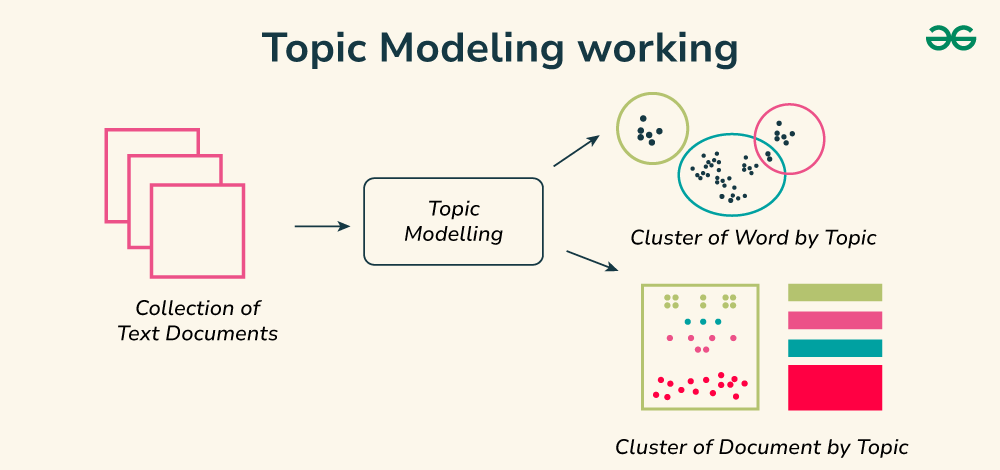
Topic modeling is a way to automatically find hidden themes or topics in a large collection of text. With NLTK you can do the first important step which is cleaning and preparing the text. NLTK helps you tokenize words, remove stopwords and lemmatize or stem words so they’re in their simplest form. Once the text is ready you can pass it to a topic modeling tool like Gensim’s LDA to discover what the main topics are.
Implementation
Step 1: Install and Download Necessary Libraries
- This step imports necessary libraries for text processing and topic modeling and downloads essential NLTK resources like tokenizers, stopwords and the WordNet lemmatizer to support text cleaning and normalization.
import pandas as pd
import nltk
from nltk.corpus import stopwords
from nltk.tokenize import word_tokenize
from nltk.stem import WordNetLemmatizer
from gensim import corpora, models

nltk.download('punkt')
nltk.download('stopwords')
nltk.download('wordnet')
nltk.download('punkt_tab')
Output:
Step 2: Load Dataset
- This step loads the CSV file, selects only the text column and takes a random sample of 5,000 tweets.
- You can download the Sentiment140 dataset with 1.6 million tweets from Kaggle.
- Sampling makes processing and testing faster while maintaining a representative subset of the data.
df = pd.read_csv('training.1600000.processed.noemoticon.csv.zip',
                 encoding='latin-1',
                 names=['target', 'ids', 'date', 'flag', 'user', 'text'])

df = df[['text']].sample(5000, random_state=42)
print(df.head(3))
Output:

Step 3: Preprocess the Data
- This step defines a function to lowercase, tokenize, remove stopwords and non alphabetic tokens and lemmatize each word.
- It then applies this function to each tweet creating a new column with clean token lists for further analysis.
stop_words = set(stopwords.words('english'))
lemmatizer = WordNetLemmatizer()

def preprocess(text):
    tokens = word_tokenize(text.lower())
    tokens = [w for w in tokens if w.isalpha()]
    tokens = [w for w in tokens if w not in stop_words]
    tokens = [lemmatizer.lemmatize(w) for w in tokens]
    return tokens

df['tokens'] = df['text'].apply(preprocess)
print(df['tokens'].head(3))
Output:

Step 4: Create a dictionary and corpus for Gensim LDA
- This step builds a Gensim dictionary mapping unique tokens to IDs and converts each tweet into a bag of words representation.
- This prepares the text data in the format needed for training topic models like LDA.
dictionary = corpora.Dictionary(df['tokens'])
corpus = [dictionary.doc2bow(tokens) for tokens in df['tokens']]

print("Sample bag-of-words for first doc:", corpus[0])
Output:
Sample bag-of-words for first doc: [(0, 1), (1, 1), (2, 1), (3, 1)]
Step 5: Train LDA model
- This step trains a Gensim LDA topic model on the prepared corpus and dictionary specifying the number of topics and training passes.
- It then prints the top words for each topic helping you interpret the themes found in the tweets.
lda_model = models.LdaModel(corpus=corpus,
                            id2word=dictionary,
                            num_topics=5,
                            passes=10,
                            random_state=42)

topics = lda_model.print_topics(num_words=5)
for topic in topics:
    print(topic)
Output:

Step 6: Get dominant topic for each tweet
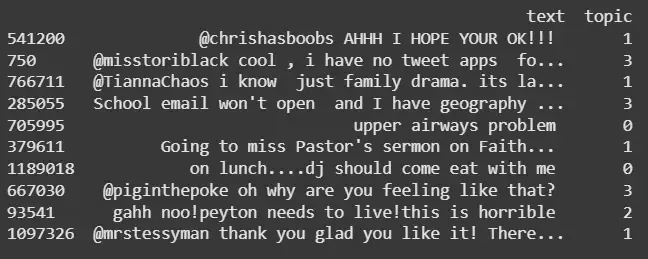
- This step defines a function to find the most likely topic for each tweet based on its bag of words representation.
- It applies this function to all tweets and adds a new column with the dominant topic label helping categorize the data by themes.
def get_topic(doc_bow):
    topics = lda_model.get_document_topics(doc_bow)
    topics = sorted(topics, key=lambda x: -x[1])
    return topics[0][0] if topics else None

df['topic'] = [get_topic(bow) for bow in corpus]
print(df[['text', 'topic']].head(10))
Output:
You can download the source code from here- NLTK for Topic Modeling
Related Articles:
