
Wav2Vec2 is a self-supervised learning model designed for speech recognition. It learns meaningful representations directly from raw audio using large amounts of unlabeled data, and can later be fine-tuned for tasks such as transcription with minimal labeled data.
- Learns speech patterns and features directly from raw audio
- Builds a general understanding of spoken language that can be reused across tasks
- Requires less labeled data due to self-supervised pre-training
- Represents audio as discretized vector embeddings (speech units) for efficient processing
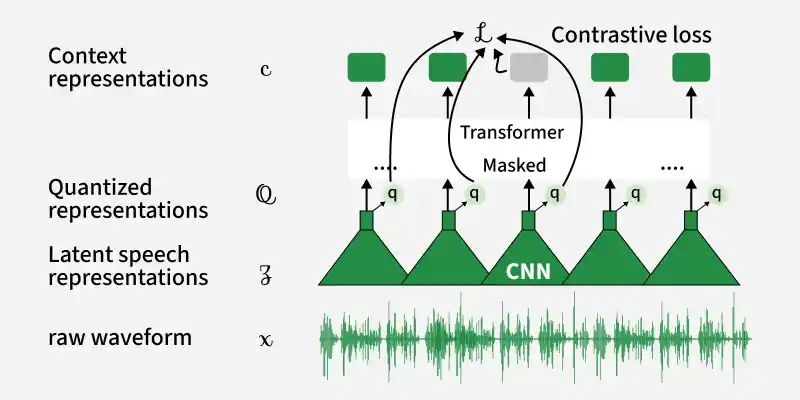
Architecture of Wav2Vec2 Model
1. Feature encoder
The feature encoder is the first component of Wav2Vec2 that processes raw audio input. It takes the audio waveform and converts it into a sequence of meaningful features.
- Takes raw audio as input
- Uses convolution layers to extract important patterns from sound
- Converts continuous audio into compact feature representations
- Reduces the length of the audio sequence while preserving useful information

2. Transformer Encoder (Context Network)
The Transformer encoder builds a deeper understanding of the extracted audio features by analyzing their relationships over time.
- Takes features from the feature encoder as input
- Learns context by understanding how different parts of speech relate to each other
- Uses attention mechanisms to focus on important parts of the audio
- Produces context-aware representations of the speech
3. Quantization module
The quantization module converts continuous audio features into discrete representations that act like speech units.
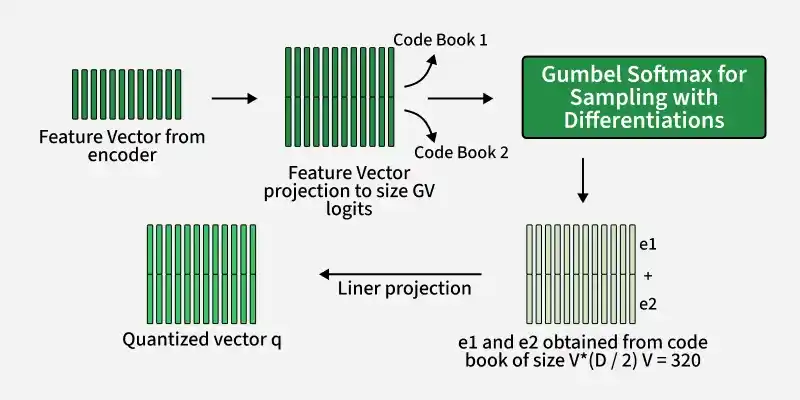
- Takes features from the feature encoder
- Converts them into a limited set of representative vectors (discrete units)
- Helps the model learn structured and reusable representations of speech
- Provides target representations used during training
Implementation
Step1: Install Libraries
Installs all required libraries for audio processing and model usage
!pip install transformers datasets torch -q
Step2: Import Libraries
- datasets: to load sample audio
- transformers: to load Wav2Vec2 model
- torch: for model execution
import torch
from datasets import load_dataset, Audio
from transformers import Wav2Vec2Processor, Wav2Vec2ForCTC
Step3: Loading Dataset and Preprocessing
Loading Minds 14 dataset and split the dataset in 80:20 ratio.
dataset = load_dataset(
    "hf-internal-testing/librispeech_asr_dummy",
    "clean",
    split="validation"
)

dataset = dataset.cast_column("audio", Audio(sampling_rate=16000))
Step4: Load Lightweight Wav2Vec2 Model
- Uses smaller base model (faster than large models)
- processor handles preprocessing and decoding
processor = Wav2Vec2Processor.from_pretrained("facebook/wav2vec2-base")
model = Wav2Vec2ForCTC.from_pretrained("facebook/wav2vec2-base")
Output:

Step5: Select an Audio Sample
Extracts raw audio from dataset
sample = dataset[0]

audio_input = sample["audio"]["array"]
Step 6: Convert Audio to Model Input
- Converts audio to model understandable format
- Adds necessary padding and normalization
inputs = processor(
    audio_input,
    sampling_rate=16000,
    return_tensors="pt"
)
Step 7: Run the Model
- Model processes audio
- Outputs raw predictions (logits)
with torch.no_grad():
    logits = model(**inputs).logits
Step 8: Decode Output to Text
- Converts model output to readable text
- Shows comparison with actual transcription
predicted_ids = torch.argmax(logits, dim=-1)

transcription = processor.batch_decode(predicted_ids)

print("Predicted Text:", transcription[0])
print("Actual Text:", sample["text"])
Output:

Download full code from here
Applications
- Converts speech into text for applications like voice typing, transcription and subtitles
- Powers virtual assistants and voice controlled systems by understanding spoken commands
- Used in call center analytics to analyze customer conversations
- Supports multilingual speech processing and translation systems
- Helps in accessibility tools such as speech to text for hearing impaired users
- Useful in media, education and research for processing large amounts of audio data
Limitations
- Requires fine tuning to perform accurate speech recognition, pre-trained models alone are not sufficient
- Performance may drop with noisy audio, strong accents or unclear speech
- Large model size leads to higher computational and memory requirements
- Needs good quality audio input for best results
- May not generalize well to specialized domains without domain specific training
- Real time deployment can be challenging due to processing latency
