
Word2Vec is a technique for learning word embeddings. It is based on the principle that words that appear in similar contexts tend to have similar meanings. For example, the words "king" and "queen" may often appear in similar contexts, and Word2Vec will represent them as vectors that are close to each other in the vector space. Word2Vec operates on two primary models:
- Continuous Bag of Words (CBOW): Predicts the target word (center word) from its context words (surrounding words).
- Skip-gram: Predicts the context words from the target word (center word).
Gensim is an open-source Python library specifically designed for unsupervised topic modelling and NLP tasks. It excels at handling large text corpora and includes several efficient algorithms, such as Latent Dirichlet Allocation (LDA), Latent Semantic Indexing (LSI) and Word2Vec.
Implementation
Step 1: Installing and Setting Up Gensim for Word2Vec
Before starting, make sure you have Python and the necessary libraries installed. To install Gensim, you can use the following command:
!pip install gensim
!pip install nltk
Step 2: Preprocessing Data for Word2Vec Models
Word2Vec requires large datasets of text to be effective, and preprocessing is a crucial step to ensure the model performs well. Preprocessing typically involves the following steps:
- Tokenization: Splitting sentences into individual words.
- Lowercasing: Converting all words to lowercase to avoid treating "Apple" and "apple" as different words.
- Removing Stopwords: Filtering out common words like "the", "is", and "in".
- Lemmatization/Stemming: Reducing words to their base or root forms.
Here is an example of how to preprocess a text dataset:
import nltk
from nltk.corpus import stopwords
from nltk.tokenize import word_tokenize

nltk.download('punkt_tab')
nltk.download('stopwords')

def preprocess_text(text):
    stop_words = set(stopwords.words('english'))
    tokens = word_tokenize(text.lower())
    tokens = [word for word in tokens if word.isalpha() and word not in stop_words]
    return tokens
Output:

Step 3: Training Word2Vec Models with Gensim
Now that your data is preprocessed, you can start training your Word2Vec model using Gensim. The basic syntax for training a Word2Vec model is as follows:
def preprocess_text(text):
    stop_words = set(stopwords.words('english'))
    tokens = word_tokenize(text.lower())
    tokens = [word for word in tokens if word.isalpha() and word not in stop_words]
    return tokens

sentences = [
    "The quick brown fox jumps over the lazy dog.",
    "Artificial intelligence is transforming the world we live in.",
    "Deep learning techniques have greatly improved image recognition.",
    "Natural language processing allows computers to understand human language.",
    "Data science combines statistics, computer science, and domain knowledge.",
    "The weather is nice today, perfect for a walk in the park.",
    "Cats are often seen as independent and curious creatures.",
    "The stock market fluctuates based on various economic indicators.",
    "Exploring new cuisines can be an exciting culinary adventure.",
    "Machine learning algorithms can learn from data and make predictions.",
    "The king and the queen rule the kingdom.",
    "A cat is a common household pet."
    "a man and a woman married each other"
]
preprocessed_sentences = [preprocess_text(sentence) for sentence in sentences]
model = Word2Vec(sentences=preprocessed_sentences, vector_size=100, window=5, min_count=1, workers=4, sg=1)
model.save("word2vec.model")
Output:

Step 4: Evaluate the Word2Vec Model
You can evaluate the model by checking word similarities and performing analogy tasks:
try:
    similarity_cat_dog = model.wv.similarity('fox', 'dog')
    print(f"Similarity between 'cat' and 'dog': {similarity_cat_dog:.4f}")
except KeyError as e:
    print(f"KeyError: {e}")

try:
    similar_words_cat = model.wv.most_similar('language', topn=3)
    print("Most similar words to 'cat':", similar_words_cat)
except KeyError as e:
    print(f"KeyError: {e}")

try:
    analogy_result = model.wv.most_similar(positive=['language', 'processing'], negative=['man'], topn=1)
    print("Analogy result for 'king - man + woman':", analogy_result)
except KeyError as e:
    print(f"KeyError: {e}")
Output:

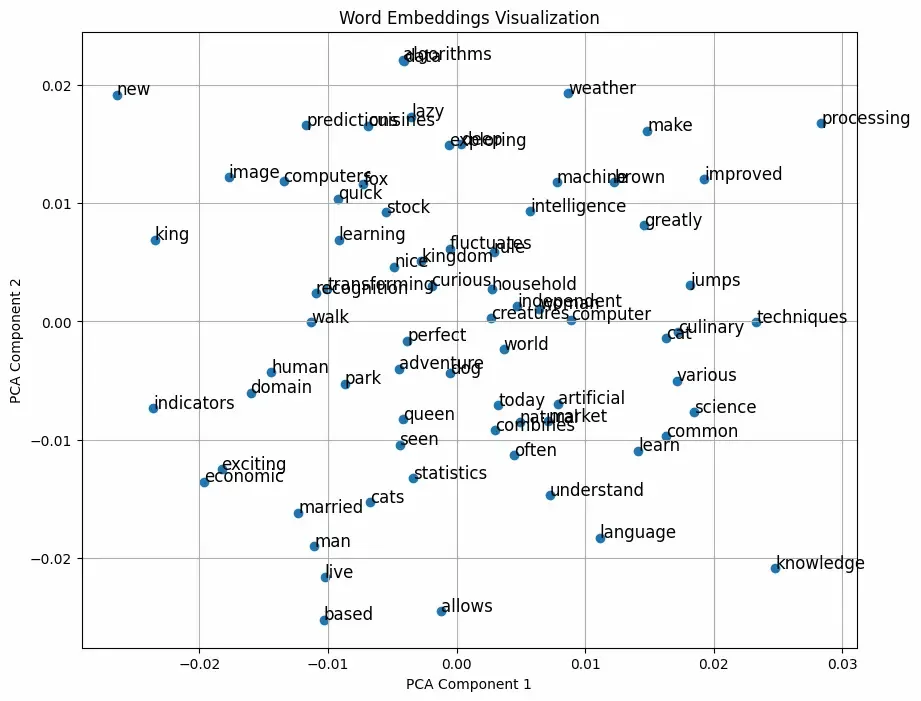
Step 5: Visualize Word Embeddings
To visualize the word embeddings, we will reduce their dimensionality using PCA:
import matplotlib.pyplot as plt
from nltk.corpus import stopwords
from nltk.tokenize import word_tokenize
from gensim.models import Word2Vec
from sklearn.decomposition import PCA
word_vectors = model.wv[model.wv.index_to_key]
pca = PCA(n_components=2)
result = pca.fit_transform(word_vectors)

plt.figure(figsize=(10, 8))
plt.scatter(result[:, 0], result[:, 1])

words = list(model.wv.index_to_key)
for i, word in enumerate(words):
    plt.annotate(word, xy=(result[i, 0], result[i, 1]), fontsize=12)

plt.title("Word Embeddings Visualization")
plt.xlabel("PCA Component 1")
plt.ylabel("PCA Component 2")
plt.grid()
plt.show()
Output:
Step 6 Fine-Tuning the Word2Vec Model with Gensim
Fine-tuning can be done in various ways, including adjusting hyperparameters and re-training the model. Here's how you can implement fine-tuning in this context:
- Adjust Hyperparameters: Change parameters such as vector_size, window, and min_count based on your understanding of the data and requirements.
- Use More Data: If available, you can add more sentences to improve the quality of the learned embeddings.
- Training on the Same or New Data: Re-train the model using the same or an expanded dataset.
additional_sentences = [
    "Learning from data is essential for making informed decisions.",
    "The world of finance is complex and ever-changing.",
    "Understanding consumer behavior is critical for business success.",
    "Physics and mathematics are foundational to engineering.",
    "Artificial intelligence can enhance productivity and efficiency."
]

additional_preprocessed = [preprocess_text(sentence) for sentence in additional_sentences]
model.build_vocab(additional_preprocessed, update=True)
model.train(additional_preprocessed, total_examples=model.corpus_count, epochs=model.epochs)
model.save("word2vec_fine_tuned.model")
Step 7: Evaluate the Model
Now we will evaluate our model by checking the similarity score between related terms ,Note that this may still be low because we used a very small corpus to train model.
similarity_artificial_intelligence = model.wv.similarity('artificial', 'intelligence')
print("Similarity between 'artificial' and 'intelligence':", similarity_artificial_intelligence)

similar_words_machine = model.wv.most_similar('machine', topn=3)
print("Most similar words to 'machine':", similar_words_machine)

analogy_result = model.wv.most_similar(positive=['machine', 'learning'], negative=['data'], topn=1)
print("Analogy result for 'machine + learning - data':", analogy_result)
Output:

Explanation of the Fine-Tuning Steps:
- Build Vocabulary: We call model.build_vocab(additional_preprocessed, update=True) to update the existing vocabulary of the Word2Vec model with new words from additional training sentences.
- Continue Training: The model is then trained again using the additional sentences with model.train(), which updates the word vectors based on the new data.
- Save Fine-Tuned Model: After fine-tuning, the model is saved as "word2vec_fine_tuned.model".
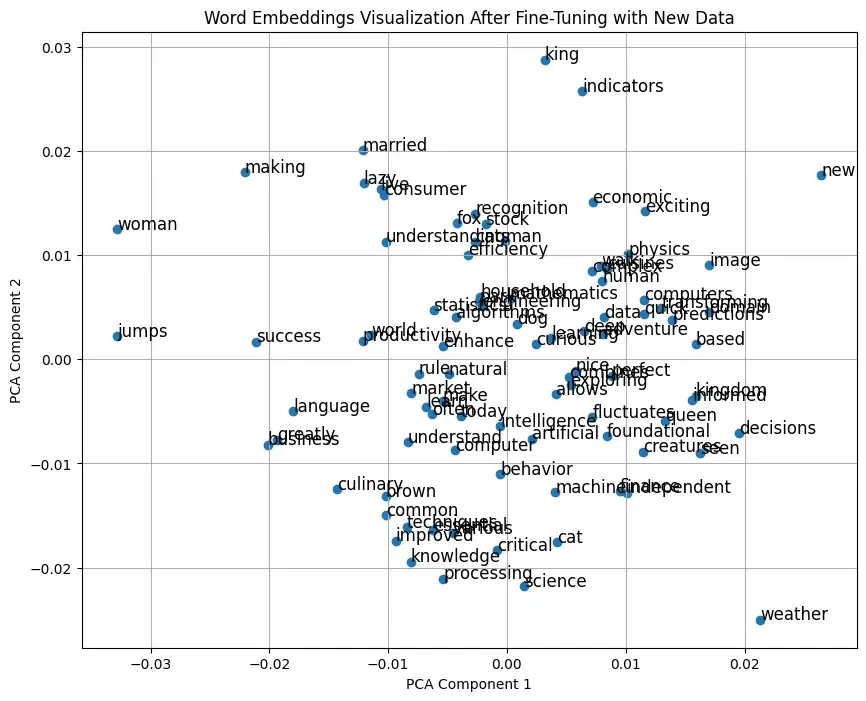
- Evaluation and Visualization: Similarity checks, analogy tasks, and visualization steps remain unchanged but will now reflect the adjustments made through fine-tuning.
Step 8: Visualize Word Embeddings
word_vectors = model.wv[model.wv.index_to_key]
pca = PCA(n_components=2)
result = pca.fit_transform(word_vectors)

plt.figure(figsize=(10, 8))
plt.scatter(result[:, 0], result[:, 1])

words = list(model.wv.index_to_key)
for i, word in enumerate(words):
    plt.annotate(word, xy=(result[i, 0], result[i, 1]), fontsize=12)

plt.title("Word Embeddings Visualization After Fine-Tuning with New Data")
plt.xlabel("PCA Component 1")
plt.ylabel("PCA Component 2")
plt.grid()
plt.show()
Output:
Applications
- Text classification: Word2Vec embeddings can be used as input features for machine learning models.
- Sentiment analysis: Word embeddings help models capture the underlying sentiment in text.
- Recommendation systems: Word2Vec can be used to recommend similar items by finding related words or phrases.
- Document similarity: Embeddings allow for the comparison of documents by calculating vector distances between them.
