
In a Pandas DataFrame, a single column may contain multiple pieces of information—like full names, addresses, or codes—that are easier to work with when separated into individual columns.
This article demonstrates how to efficiently split a text column into two or more columns using Pandas.
Sample DataFrame
import pandas as pd

df = pd.DataFrame({
    'Name': ['John Larter', 'Robert Junior', 'Jonny Depp'],
    'Age': [32, 34, 36]
})
print(df)
Output
            Name  Age
0    John Larter   32
1  Robert Junior   34
2     Jonny Depp   36
Method 1: Using str.split()
df[['First', 'Last']] = df.Name.str.split(expand=True)
print(df)
Output
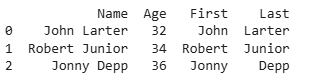
Explanation:
- str.split(): splits each string into a list.
- expand=True: converts the list into separate columns.
- Column names First and Last are assigned explicitly.
Method 2: Using a Custom Delimiter
df[['First','Last']] = df.Name.str.split("_",expand=True)
Output
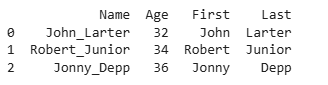
Explanation:
- df.Name: selects the Name column.
- .str.split("_"): splits each string in the column at the underscore _.
- expand=True: converts the resulting list into separate columns instead of a list.
Method 3: Using apply() with pd.Series
df[['First', 'Last']] = df.Name.apply(lambda x: pd.Series(str(x).split("_")))
print(df)
Output
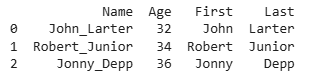
Explanation:
- df.Name: accesses the Name column of the DataFrame.
- apply(lambda x: ...): applies a function to each element of the column.
- str(x).split("_"): converts the element to a string (if not already) and splits it at _.
- pd.Series(...): converts the resulting list into a Series, so each part becomes a separate column.
