
Acceptance Testing is the final phase of software testing performed to determine whether a system meets the required business and user requirements. It is carried out after system testing and before the software is released to end users. This testing ensures that the application is ready for production use.
- It validates the software against business requirements and user needs.
- It is performed to check whether the system is ready for delivery.
- It acts as a final approval step before software deployment.
Example: Online Shopping Application acceptance testing verifies that a customer can successfully search for a product, add it to the cart, complete the payment, and place an order. This ensures the application meets user requirements before deployment.
Types of Acceptance Testing
Acceptance Testing can be classified into different types based on the purpose and stakeholders involved. These types help ensure that the software meets user expectations, business requirements, contractual obligations, and regulatory standards before release.
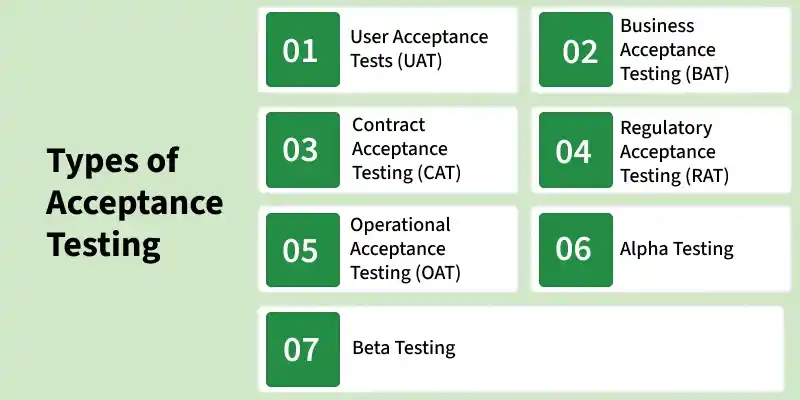
- User Acceptance Testing (UAT): Performed by end users to verify that the software meets their requirements and works correctly in real-world scenarios.
- Business Acceptance Testing (BAT): Conducted to ensure that the software supports business processes and fulfills organizational goals and objectives.
- Contract Acceptance Testing (CAT): Verifies that the software complies with all requirements, terms, and conditions specified in the contract.
- Regulatory Acceptance Testing (RAT): Checks whether the software meets legal, regulatory, and industry standards before deployment.
- Operational Acceptance Testing (OAT): Validates the software's operational readiness, including security, backup, recovery, and maintenance procedures.
- Alpha Testing: Performed by developers or internal testers in a controlled environment to identify defects before releasing the software to external users.
- Beta Testing: Conducted by a limited group of real users in a real-world environment to gather feedback and identify any remaining issues.
Architecture of Acceptance Testing
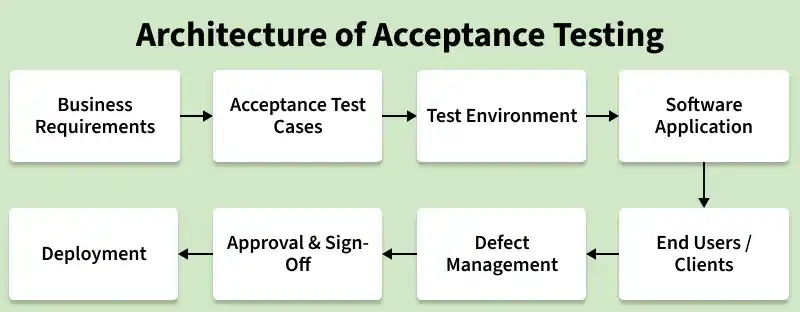
The Architecture of Acceptance Testing illustrates how users, the test environment, and the software application interact during the acceptance testing process to validate business requirements before deployment.
Components of Acceptance Testing Architecture
- Business Requirements: Define the user needs and acceptance criteria that the software must satisfy.
- Acceptance Test Cases: Test scenarios created based on business requirements to validate system functionality.
- Test Environment: A production-like environment where acceptance testing is performed.
- Software Application: The system under test that is evaluated against the acceptance criteria.
- End Users/Clients: Execute acceptance test cases and provide feedback on the software.
- Defect Management: Records and tracks issues identified during acceptance testing.
- Approval & Sign-Off: Final confirmation from stakeholders that the software is ready for deployment.
Workflow for Acceptance Testing
- Review Requirements: Understand business requirements, user stories, and acceptance criteria to ensure the software meets user expectations.
- Plan Test Scenarios: Identify real-world use cases and prepare acceptance test cases based on business needs.
- Prepare Test Environment: Set up a production-like environment with the required test data for accurate testing.
- Execute Tests: Run acceptance test cases and verify that the software behaves as expected.
- Evaluate and Sign-Off: Review test results, resolve issues if any, and obtain final approval from stakeholders.
Advantages of Acceptance Testing
- Ensures the software meets user requirements and business expectations.
- Helps identify issues before the software is released to production.
- Increases customer confidence and satisfaction with the product.
- Reduces the risk of failures in the live environment.
- Verifies that the system is ready for deployment and real-world use.
- Improves the overall quality and reliability of the software.
- Provides final validation before product delivery.
- Helps ensure successful implementation of business processes.
Tools Used for Acceptance Testing
- JIRA: Used for tracking defects and managing acceptance testing activities.
- TestRail: Helps create and manage acceptance test cases efficiently.
- HP ALM (Quality Center): Supports test planning, execution, and defect tracking.
- Selenium: Automates web application acceptance testing.
- UFT (Unified Functional Testing): Used for automated functional and acceptance testing.
- Zephyr: Provides test management and reporting for acceptance testing.
- Cucumber: Enables writing acceptance tests in simple, readable language.
Limitations of Acceptance Testing
- It is time-consuming and may delay the software release.
- Requires active participation from users or clients.
- May not detect all technical or code-level defects.
- Testing results can vary based on user experience and feedback.
- Late identification of issues can increase fixing costs.
- Requires a realistic test environment for accurate results.
- Limited test coverage compared to other testing levels.
- Success depends heavily on the quality of test cases and user involvement.
