Edge detection is a technique used in image processing to identify regions where intensity changes sharply. These sharp variations correspond to object boundaries and are typically detected using first-order derivative-based methods.
An edge is formed where there is a sharp change in intensity, which appears as local maxima or minima in the output.
Prewitt Operator
Prewitt operator is used for edge detection in images. It identifies both horizontal (x-axis) and vertical (y-axis) edges by detecting sudden changes in pixel intensities using a first-order derivative mask.
The operator follows basic mask properties:
- Higher weights increase edge detection strength
- Opposite signs (+ and −) are used in the mask
- Sum of all mask values is zero
It uses two masks:
- Prewitt Operator [X-axis] = [ -1 0 1; -1 0 1; -1 0 1]
- Prewitt Operator [Y-axis] = [-1 -1 -1; 0 0 0; 1 1 1]
Steps:
- Read the image.
- Convert into grayscale if it is colored.
- Convert into the double format.
- Define the mask or filter.
- Detect the edges along X-axis.
- Detect the edges along Y-axis.
- Combine the edges detected along the X and Y axes.
- Display all the images.
Imtool() is a MATLAB function used to display images, taking the image and intensity range as inputs. An empty range means the full intensity range is used.
 % MATLAB code for prewitt
 % operator edge detection
 k=imread("logo.png");
 k=rgb2gray(k);
 k1=double(k);
 p_msk=[-1 0 1; -1 0 1; -1 0 1];
 kx=conv2(k1, p_msk, 'same');
 ky=conv2(k1, p_msk', 'same');
 ked=sqrt(kx.^2 + ky.^2);

 % display the images.
 imtool(k,[]);

 % display the edge detection along x-axis.
 imtool(abs(kx), []);

 % display the edge detection along y-axis.
 imtool(abs(ky),[]);

 % display the full edge detection.
 imtool(abs(ked),[]);
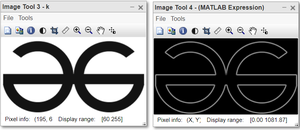
Output:
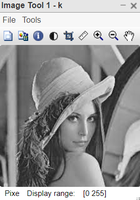
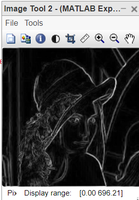
Scharr Operator
The Scharr operator is a filtering method used to detect and highlight edges by computing image gradients using the first derivative. It is similar to the Sobel operator but provides better rotational symmetry and improved accuracy for edge detection.
It works by emphasizing intensity changes in both horizontal and vertical directions using convolution masks. The operator uses two kernels:
- X-axis: [-3 0 3; -10 0 10; -3 0 3]
- Y-axis: [3 10 3; 0 0 0; -3 -10 -3]
Example:
%Scharr operator -> edge detection
 k=imread("logo.png");
 k=rgb2gray(k);
 k1=double(k);
 s_msk=[-3 0 3; -10 0 10; -3 0 3];
 kx=conv2(k1, s_msk, 'same');
 ky=conv2(k1, s_msk', 'same');
 ked=sqrt(kx.^2 + ky.^2);
 %display the images.
 imtool(k,[]);
 %display the edge detection along x-axis.
 imtool(abs(kx), []);
 %display the edge detection along y-axis.
 imtool(abs(ky),[]);
 %display the full edge detection.
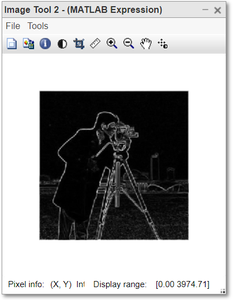
 imtool(abs(ked),[]);
Output:
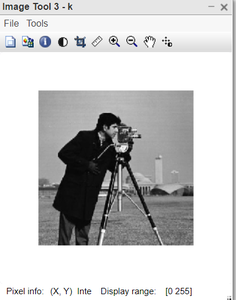
Sobel Operator
Sobel operator is used for edge detection by computing image gradients in both horizontal and vertical directions. It highlights regions of strong intensity change, which correspond to edges. It detects two types of edges:
- Horizontal edges
- Vertical edges
Unlike simpler operators, Sobel uses weighted masks that give more importance to central pixels, making it more robust to noise. The kernels used are:
- Sobel-X: [-1 0 1; -2 0 2; -1 0 1]
- Sobel-Y: [-1 -2 -1; 0 0 0; 1 2 1]
Example:
% MATLAB code for Sobel operator
% edge detection
 k=imread("logo.png");
 k=rgb2gray(k);
 k1=double(k);
 s_msk=[-1 0 1; -2 0 2; -1 0 1];
 kx=conv2(k1, s_msk, 'same');
 ky=conv2(k1, s_msk', 'same');
 ked=sqrt(kx.^2 + ky.^2);

 %display the images.
 imtool(k,[]);

 %display the edge detection along x-axis.
 imtool(abs(kx), []);

 %display the edge detection along y-axis.
 imtool(abs(ky),[]);

 %display the full edge detection.
 imtool(abs(ked),[]);
Output: