
Top-N analysis in SQL refers to the technique of limiting the number of rows returned from a dataset after sorting the data by a specific column, which helps retrieve either the smallest or largest values in a table. It’s an efficient way to identify key data points such as top performers or highest sales. In this article, we will explain how to perform Top-N queries in SQL to extract specific records for analysis.
Top-N Queries in SQL
Top-N queries are designed to simplify retrieving a fixed number of rows, which can be particularly useful for highlighting key records like top-selling products or best-performing agents. Top-N queries help save time and reduce complexity by efficiently selecting specific records for further analysis. This technique is commonly applied in scenarios like finding top products, best-selling agents, or least performing students based on a condition.
For example, using Top-N analysis we can perform the following types of queries:
- The top five products that have had the maximum sales in the last two months.
- The top three agents who sold the maximum policies.
- The least two students who scored minimum marks in end semester exams.
Syntax
SELECT [column_list], ROWNUM
FROM (
    SELECT [column_list]
    FROM table_name
    ORDER BY Top-N_column
)
WHERE ROWNUM <= N;
Key Terms
- [column_list]: List of columns to be selected.
- ROWNUM: Pseudo-column that assigns a unique row number to each result.
- ORDER BY: Sorts the result set by one or more columns.
- Top-N_column: Column used for ordering (e.g., salary, sales).
- <=: Compares to limit rows, returning only those with
ROWNUMless than or equal toN.
Example Queries for Top-N Analysis
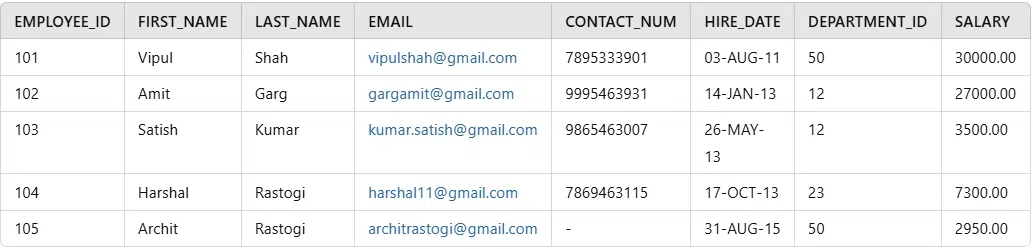
Let’s explore how to perform Top-N analysis using SQL with examples based on the Employee table. The following steps will guide us on how to apply this analysis to various scenarios, helping us retrieve the top or bottom N values based on specific criteria.
1. Create Employee Table
CREATE TABLE Employee (
    employee_id INT PRIMARY KEY,
    first_name VARCHAR(50),
    last_name VARCHAR(50),
    email VARCHAR(100),
    contact_num VARCHAR(15),
    hire_date DATE,
    department_id INT,
    salary DECIMAL(10, 2)
);
2. Insert Data into Employee Table
INSERT INTO Employee (employee_id, first_name, last_name, email, contact_num, hire_date, department_id, salary)
VALUES
(101, 'Vipul', 'Shah', 'vipulshah@gmail.com', '7895333901', TO_DATE('03-AUG-11', 'DD-MON-YY'), 50, 30000.00),
(102, 'Amit', 'Garg', 'gargamit@gmail.com', '9995463931', TO_DATE('14-JAN-13', 'DD-MON-YY'), 12, 27000.00),
(103, 'Satish', 'Kumar', 'kumar.satish@gmail.com', '9865463007', TO_DATE('26-MAY-13', 'DD-MON-YY'), 12, 3500.00),
(104, 'Harshal', 'Rastogi', 'harshal11@gmail.com', '7869463115', TO_DATE('17-OCT-13', 'DD-MON-YY'), 23, 7300.00),
(105, 'Archit', 'Rastogi', 'architrastogi@gmail.com', '-', TO_DATE('31-AUG-15', 'DD-MON-YY'), 50, 2950.00);
3. View the data from the Employee table
SELECT * FROM Employee;Output
Example 1: Top 3 Employees with the Lowest Salaries
Here, the inner query sorts the employees by their salary in ascending order, while the outer query uses ROWNUM to limit the results to the first 3 rows. The RANK column is assigned sequential numbers to indicate the ranking.
Query:
SELECT ROWNUM as RANK, first_name, last_name, employee_id, salary
FROM (SELECT salary, first_name, last_name, employee_id
      FROM Employee
      ORDER BY salary)
WHERE ROWNUM<=3;
Output

Explanation:
In the above SQL statement, the required fields are displayed for employees with top 3 lowest salaries. The result is displayed in increasing order of their salaries.
Example 2: Top 3 Employees with the Earliest Hire Dates
In this Example, ORDER BY hire_date orders the employees by their hire date, and ROWNUM limits the result to the top 3.
Query:
SELECT ROWNUM as RANK, first_name, employee_id, hire_date
FROM (SELECT first_name, employee_id, hire_date
      FROM Employee
      ORDER BY hire_date)
WHERE ROWNUM<=3;
Output
| RANK | FIRST_NAME | EMPLOYEE_ID | HIRE_DATE |
|---|---|---|---|
| 1 | Vipul | 101 | 03-AUG-11 |
| 2 | Amit | 102 | 14-JAN-13 |
| 3 | Satish | 103 | 26-MAY-13 |
Explanation:
In the above SQL statement, the required fields are displayed for those 3 employees who were hired earliest. The result is displayed in increasing order of their hire date.
Different styles for using Top-N analysis
1. Inline View and ROWNUM
The classic Top-N style query uses an ordered inline view to force the data into the correct order which then finally uses the ROWNUM check to limit the data returned.
Example
SELECT first_name, last_name
FROM (SELECT first_name, last_name
      FROM Employee
      ORDER BY salary DESC)
WHERE ROWNUM<=4;
Output
| FIRST_NAME | LAST_NAME |
|---|---|
| Vipul | Shah |
| Amit | Garg |
| Harshal | - |
| Satish | Kumar |
Explanation:
This query will return the top 4 highest-paid employees, sorted in descending order by salary. The altering is done by ORDER BY clause
2. Nested Inline View and ROWNUM
This method can be useful for paging through data, particularly in web reports where you might want to retrieve specific pages of results.
Example
SELECT employee_id, first_name, salary
FROM   (SELECT employee_id, first_name, salary, rownum AS rnum
        FROM   (SELECT employee_id, first_name, salary
                FROM Employee
                ORDER BY salary)
        WHERE rownum<=4)
WHERE  rnum>=2;
Output
| EMPLOYEE_ID | FIRST_NAME | SALARY |
|---|---|---|
| 103 | Satish | 3500 |
| 104 | Harshal | 7300 |
| 102 | Amit | 27000 |
Explanation:
The inner query first orders the employees by salary and limits them to the top 4. The outer query filters out the first result, returning only rows 2, 3, and 4. This query will return the second, third, and fourth highest-paid employees from the ordered result.
3. Using RANK function
The RANK() function assigns a unique rank to each distinct value, which is useful when we need to handle duplicates in your data.
Example
SELECT dpartment_id, first_name
FROM (SELECT dpartment_id, first_name,
      RANK() OVER (ORDER BY dpartment_id DESC) AS rnum
      FROM Employee)
WHERE rnum<=3;
Output
| DEPARTMENT_ID | FIRST_NAME |
|---|---|
| 50 | Vipul |
| 50 | Archit |
| 23 | Harshal |
Explanation:
In the above SQL statement, RANK() function also acts as a virtual field whose value is restricted at the end. RANK() function doesn't give us the top N rows or the top N distinct values. The number of rows returned is dependent on the number of duplicates in the data.
4. Using DENSE_RANK function
The DENSE_RANK analytic function is similar to RANK() function. The difference is that the ranks are compacted due to which there are no gaps.
Example
SELECT dpartment_id, first_name
FROM (SELECT dpartment_id, first_name,
      DENSE_RANK() OVER (ORDER BY dpartment_id DESC) AS rnum
      FROM Employee)
WHERE rnum<=3;
Output
| DPARTMENT_ID | FIRST_NAME |
|---|---|
| 50 | Vipul |
| 50 | Archit |
| 23 | Harshal |
12 | Amit |
12 | Satish |
Explanation:
The DENSE_RANK() function assigns ranks to employees but ensures that if there are ties, no gaps occur in the ranking sequence. This query will return the top 3 employees in departments with no gaps in the ranking sequence.
5. Using ROW_NUMBER function
The ROW_NUMBER analytic function is similar to ROWNUM virtual column but like all analytic functions its action can be limited to a specific output of data based on the order of data.
Example
SELECT dpartment_id, first_name
FROM (SELECT dpartment_id, first_name,
      ROW_NUMBER() OVER (ORDER BY dpartment_id DESC) AS rnum
      FROM Employee)
WHERE rnum<=4;
Output
| DPARTMENT_ID | FIRST_NAME |
|---|---|
| 50 | Vipul |
| 50 | Archit |
| 23 | Harshal |
| 12 | Amit |
Explanation:
The ROW_NUMBER() function assigns a unique row number, and the query filters out all rows except the top 4. This query will return the top 4 employees based on their department_id, ensuring a unique row number even with duplicates.
Conclusion
Top-N analysis in SQL is a valuable technique for retrieving the smallest or largest values from ordered datasets, helping streamline data analysis and decision-making processes. By utilizing various methods like ROWNUM, RANK(), DENSE_RANK(), and ROW_NUMBER(), we can efficiently filter and retrieve the most relevant data from our tables for reporting and further analysis.
