一、 实现效果
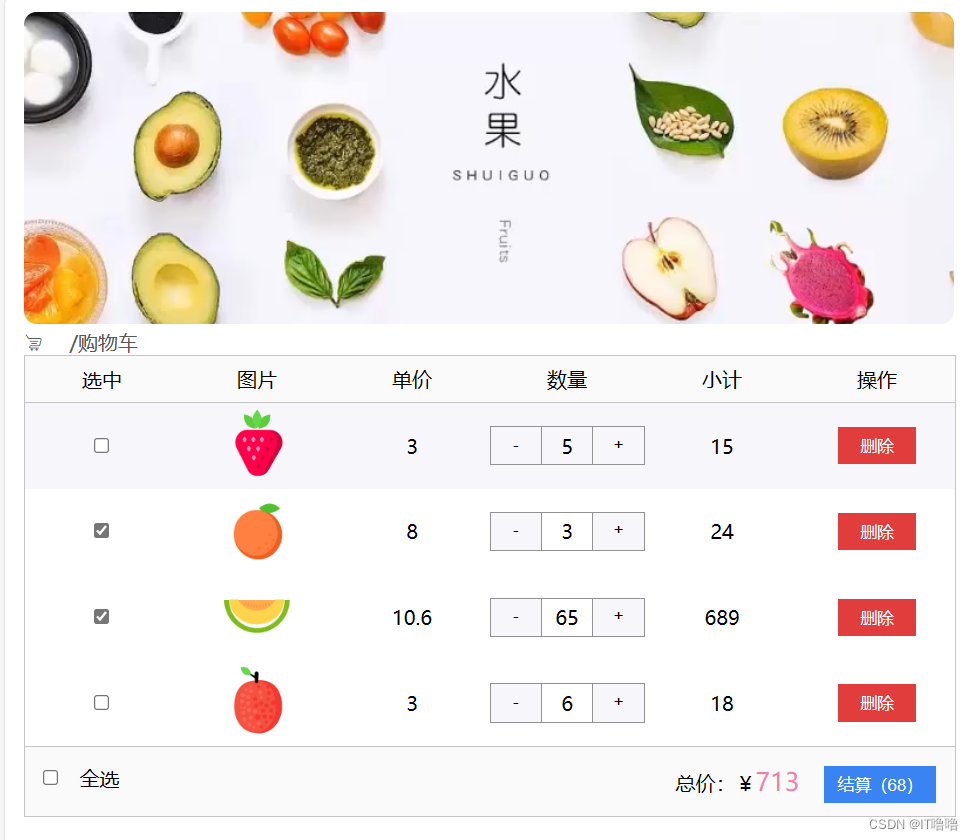
二、 代码
<!DOCTYPE html>
<html lang="en">
<head>
<meta charset="UTF-8">
<meta name="viewport" content="width=device-width, initial-scale=1.0">
<title>Document</title>
<!-- 引入图标链接 -->
<link rel="stylesheet" href="http://at.alicdn.com/t/c/font_4423522_ts2wis9l2le.css">
<style>
* {
margin: 0;
padding: 0;
list-style: none;
outline: none;
}
width: 50vw;
padding: 2vh 1vw;
}
.banner {
img {
width: 100%;
border-radius: 10px;
}
}
.breakCrumb {
font-size: 16px;
color: rgb(87, 87, 87);
}
/* 空车 */
.emptyCart {
margin: 8vh auto;
text-align: center;
font-size: 36px;
color: rgb(183, 183, 183);
i {
font-size: 36px;
}
}
.container {
width: 100%;
text-align: center;
border: 1px solid rgb(196, 196, 196);
/* 标题 */
.thead {
display: flex;
width: 100%;
height: 5vh;
border-bottom: 1px solid rgb(196, 196, 196);
line-height: 5vh;
background-color:
* {
flex: 1;
}
}
/* 实车 */
.tbody {
li {
display: flex;
width: 100%;
* {
flex: 1;
margin: auto;
}
img {
width: 8.7vh;
}
.num {
display: flex;
justify-content: space-between;
border-top: 1px solid rgb(146, 146, 146);
border-bottom: 1px solid rgb(146, 146, 146);
span {
display: inline-block;
width: 4vh;
}
button {
width: 4vh;
height: 4vh;
border: none;
border-left: 1px solid rgb(146, 146, 146);
border-right: 1px solid rgb(146, 146, 146);
background-color:
}
}
.delBtn {
width: 50%;
height: 4vh;
border: none;
background-color: rgb(225, 61, 61);
color: white;
}
}
li:hover {
background-color:
}
}
/* 底部 */
.tfoot {
height: 3.5vh;
padding: 2vh 1vw;
border-top: 1px solid rgb(196, 196, 196);
display: flex;
justify-content: space-between;
background-color:
span {
font-size: 20px;
color:
}
button {
width: 6vw;
height: 4vh;
background-color:
color: white;
border: none;
}
}
}
</style>
</head>
<!-- 1. 减号按钮禁用:当数字小于1时disabled -->
<!-- 2. 全选功能:必须所有复选框选中全选框才显示被选中状态使用every -->
<!-- 基于全选的布尔值,让每一项的复选框同步状态用froEach-->
<!-- 3. 数据存储本地:使用watch转Json后存入本地,使用localStorage.setItem -->
<!-- 4. 页面渲染的数据不能写死,要从本地获取,使用localStorage.getItem,记得使用JSON.parse()转换JSON格式回字符串 -->
<!-- 5. 当用户不小心将本地缓存清了,则会出现页面崩掉完全不渲染的情况,为此我们可以为fruitList加一个默认数据,即创建一个新数组fruitArr,里面放入默认数据即可 -->
<body>
<div id="instance">
<!-- 顶部 -->
<div class="banner">
<img src="./demo14/topPic.png">
</div>
<!-- 面包屑 -->
<div class="breakCrumb">
<i class="iconfont">&
 /购物车
</div>
<!-- 空车 -->
<div class="emptyCart" v-if="fruitList.length==0">
<i class="iconfont">&
</div>
<!-- 实车 -->
<div class="container" v-else>
<!-- 标题 -->
<div>
<ul class="thead">
<li v-for="(item,index) in tabList">{{item}}</li>
</ul>
</div>
<!-- 每一项 -->
<ul class="tbody">
<li v-for="(item,index) in fruitList" :key="item.id" class="listSpan">
<div> <input type="checkbox" v-model="item.isCheck"></div>
<div><img :src="item.icon"></div>
<div><span>{{item.price}}</span></div>
<div class="num">
<button :disabled="item.num<=1" @click="sub(item.id)">-</button>
<span> {{item.num}}</span>
<button @click="add(item.id)">+</button>
</div>
<div>{{item.num*item.price}}</div>
<div> <button @click="del(item.id)" class="delBtn">删除</button></div>
</li>
</ul>
<!-- 底部 -->
<div class="tfoot">
<div> <input type="checkbox" v-model="isAll"> 全选</div>
<div>总价:¥<span>{{totalPrice}} </span><button>结算({{totalCount}})</button></div>
</div>
</div>
</div>
<script src="https://cdn.jsdelivr.net/npm/vue@2/dist/vue.js"></script>
<script>
const fruitArr = [{ id: 1, icon: './demo14/菠萝.png', isCheck: true, num: 1, price: 1 },
{ id: 2, icon: './demo14/草莓.png', isCheck: false, num: 5, price: 3 },
{ id: 3, icon: './demo14/橙子.png', isCheck: false, num: 3, price: 8 },
{ id: 4, icon: './demo14/哈密瓜.png', isCheck: true, num: 65, price: 10.6 },
{ id: 5, icon: './demo14/荔枝.png', isCheck: false, num: 6, price: 3 },
{ id: 6, icon: './demo14/桃子.png', isCheck: true, num: 14, price: 5 }
]
const instance = new Vue({
el: '#instance',
data: {
tabList: [
'选中', '图片', '单价', '数量', '小计', '操作'
],
fruitList: JSON.parse(localStorage.getItem('list') || fruitArr
)
},
methods: {
del(id) {
this.fruitList = this.fruitList.filter(item => item.id != id)
},
sub(id) {
const fruit = this.fruitList.find(item => item.id == id)
fruit.num--
},
add(id) {
const fruit = this.fruitList.find(item => item.id == id)
fruit.num++
}
},
computed: {
isAll: {
get() { return this.fruitList.every(item => item.isCheck) },
// 此时value是复选框的布尔值
set(value) {
this.fruitList.forEach(item => item.isCheck = value)
}
},
// 统计商品数量
totalCount() {
return this.fruitList.reduce((sum, item) => {
if (item.isCheck) {
return sum + item.num
}
else {
return sum
}
}, 0)
},
// 统计总金额
totalPrice() {
return this.fruitList.reduce((sum, item) => {
if (item.isCheck) {
return sum + item.num * item.price
}
else {
return sum
}
}, 0)
}
},
watch: {
fruitList: {
deep: true,
handler(newValue) {
localStorage.setItem('list', JSON.stringify(newValue))
}
}
}
})
</script>
</body>
</html>
三、总结
3.1 关于HTML结构
- 正文内容谨记thead、tbody、tfoot结构;
- top与container之间的一些琐碎结构可以用面包屑表示breakCrumb;
- 阿里图标渲染平时练习使用unicode最简便;
- 列表渲染时使用flex布局,最好每个资源都用div包着,结构更清晰;
- 复选框是
<input type="checkbox" v-model="">;
多选框是<input type="radio" v-model="">;
两者v-model绑定的都是布尔值,在数据中不要用字符串包装布尔值。
3.2 关于CSS样式
- flex布局下,想要每个子元素平均分配空间,可以给每个子元素加上
flex:1;,这样子空间不会根据子元素内容占据而改变分配规则,就是最直接的平均分配空间。但通过jusify-content平均分配的空间会根据元素内容大小而改变分配的空间大小。 - flex布局下可以通过给元素加
margon:auto;实现水平垂直居中分布。
3.3 关于Vue语法
- 计算属性是需要像data结合双大括号使用的,但不需要在后面加小括号;
- 简单的加减乘除运算可以不用计算属性,直接在{{}}内用表达式得出就可以;
- 监听器监听数据变化后就要对数据重新存储,数组fruitList也是一种对象,其监听器语法和笔记里面的语法一样;
3.4 关于JS语法
- 本地存储数据:
localStorage.setItem(key,value),key表示存储的键名,value表示存储的值; - JSON转换字符串:
JSON.stringify() - 字符串转换JSON:
JSON.parse()
参考以下代码:
watch: {
        fruitList: {
          deep: true,
          handler(newValue) {
            localStorage.setItem('list', JSON.stringify(newValue))
          }
        }
      }
- 数组方法reduce函数:可以将数组中的所有元素一次处理,并将结果累计返回;
数组.reduce(回调函数,初始值)
参考以下代码:
totalCount() {
          return this.fruitList.reduce((sum, item) => {
            if (item.isCheck) {
              return sum + item.num
            }
            else {
              return sum
            }
          }, 0)
        },
- 数组方法forEach函数:可以对数组每一个元素判断是否符合指定条件(该条件是一个函数),如果全部符合返回true,否则返回false;
数组.forEach(函数)
参考以下代码:
set(value) {
            this.fruitList.forEach(item => item.isCheck = value)
          }
- 数组方法every函数:可以对数组每一个元素执行一次提供的函数;
数组.every(函数)
参考以下代码:
get() { return this.fruitList.every(item => item.isCheck) },
- 数组方法find函数:可以筛选出符合条件(条件是一个函数)的元素并返回,找不到则返回undefined;
数组.find(函数)
参考以下代码:
add(id) {
          const fruit = this.fruitList.find(item => item.id == id)
          fruit.num++  // 是修改数据数组,不知是渲染的页面
        }
3.5 关于功能
- 加减按钮注意控制上小限禁用;
参考以下代码:
<button :disabled="item.num<=1" @click="sub(item.id)">-</button>
- 全选复选框控制每一项的复选框,使用数组的foreach函数;
- 每一项的复选框选中或未选中决定全选复选框,使用every函数;
- 因为数据需要持久化存储,那么数量的加减不能++或–就结束,需要对数据数组进行修改,可以使用find函数寻找指定水果后,对其数量进行加减;
- 当用户不小心将本地缓存清了,则会出现页面崩掉完全不渲染的情况,为此我们可以为fruitList加一个默认数据,即创建一个新数组,里面放入默认数据即可;
参考以下代码:
    const fruitArr = [{ id: 1, icon: './demo14/菠萝.png', isCheck: true, num: 1, price: 1 },
    { id: 2, icon: './demo14/草莓.png', isCheck: false, num: 5, price: 3 },
    { id: 3, icon: './demo14/橙子.png', isCheck: false, num: 3, price: 8 },
    { id: 4, icon: './demo14/哈密瓜.png', isCheck: true, num: 65, price: 10.6 },
    { id: 5, icon: './demo14/荔枝.png', isCheck: false, num: 6, price: 3 },
    { id: 6, icon: './demo14/桃子.png', isCheck: true, num: 14, price: 5 }
    ]
    const instance = new Vue({
      el: '#instance',
      data: {
        fruitList: JSON.parse(localStorage.getItem('list')
        ) || fruitArr
      }
      )}





 扫一扫
扫一扫


 1117
1117

 被折叠的 条评论
为什么被折叠?
被折叠的 条评论
为什么被折叠?
 到【灌水乐园】发言





