


背景:Autodl 租用两张2*3090显卡 试图每张卡单独跑一个实验 报错无效设备编号
py代码中使用
idx_GPU = 1
device = torch.device("cuda:{}".format(idx_GPU) if torch.cuda.is_available() else "cpu")
指定使用第二张卡运行第二个实验
报错:Traceback (most recent call last): File "/root/autodl-tmp/app/my_train_1.py", line 229, in <module> torch.cuda.set_device(1) File "/root/miniconda3/envs/segexp/lib/python3.9/site-packages/torch/cuda/__init__.py", line 569, in set_device torch._C._cuda_setDevice(device) torch.AcceleratorError: CUDA error: invalid device ordinal CUDA kernel errors might be asynchronously reported at some other API call, so the stacktrace below might be incorrect. For debugging consider passing CUDA_LAUNCH_BLOCKING=1 Compile with TORCH_USE_CUDA_DSA to enable device-side assertions.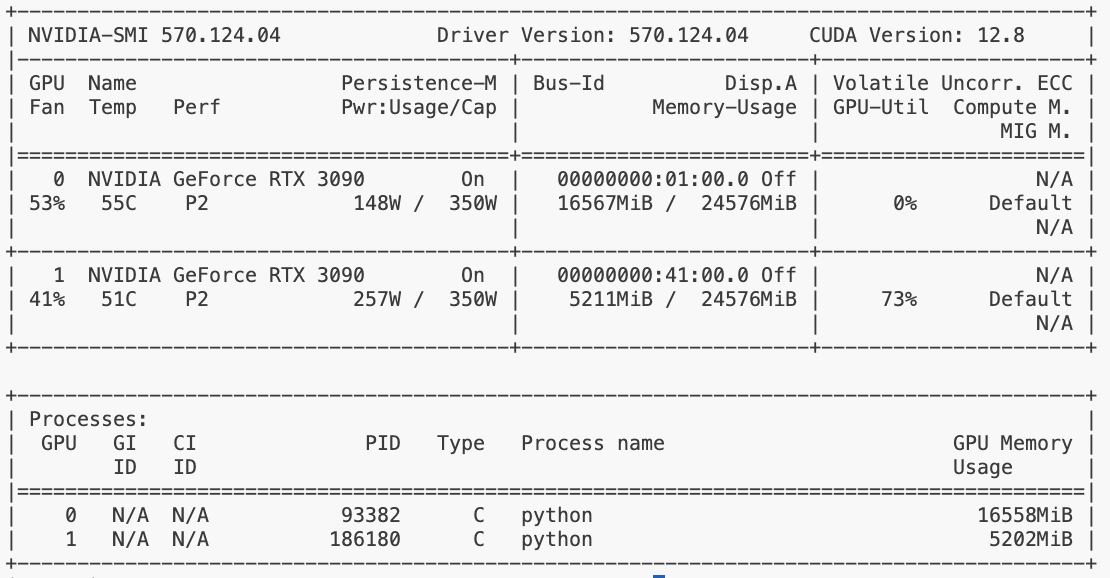
后截的图,当时gpu0占用,gpu1空闲
解决方案:
step1:设置可见显卡,方案ab任选一种
【方案a:cmd运行:
export CUDA_VISIBLE_DEVICES=1
】
【方案b:py代码开头添加一下内容
import os

os.environ["CUDA_VISIBLE_DEVICES"] = "1"
】
step2: 划重点!!!⬇️
step1后,程序默认使用实际物理显卡编号为1的卡,也是可见的唯一一块显卡;
但是从这时起,程序中看到的显卡编号从0开始,但对应的物理显卡仍然是刚才设置的那个。
例如上面设置后,程序看到的0号显卡,实际就是物理上的1号显卡。
所以使用cuda:0代码指定使用物理第二张卡提供算力
idx_GPU = 0

device = torch.device("cuda:{}".format(idx_GPU) if torch.cuda.is_available() else "cpu")
最后cmd运行写好的脚本:
python /root/autodl-tmp/app/my_train_1.py
就可以实现了!





 扫一扫
扫一扫


 1万+
1万+

 被折叠的 条评论
为什么被折叠?
被折叠的 条评论
为什么被折叠?
 到【灌水乐园】发言





