


之前我们发布了文章(公司小型出口局域网如何搭建? SNAT不同配置与实现方法-CSDN博客),今天我们来看一下如何实现内外网用户同时通过公网地址访问内部服务器
一 组网说明
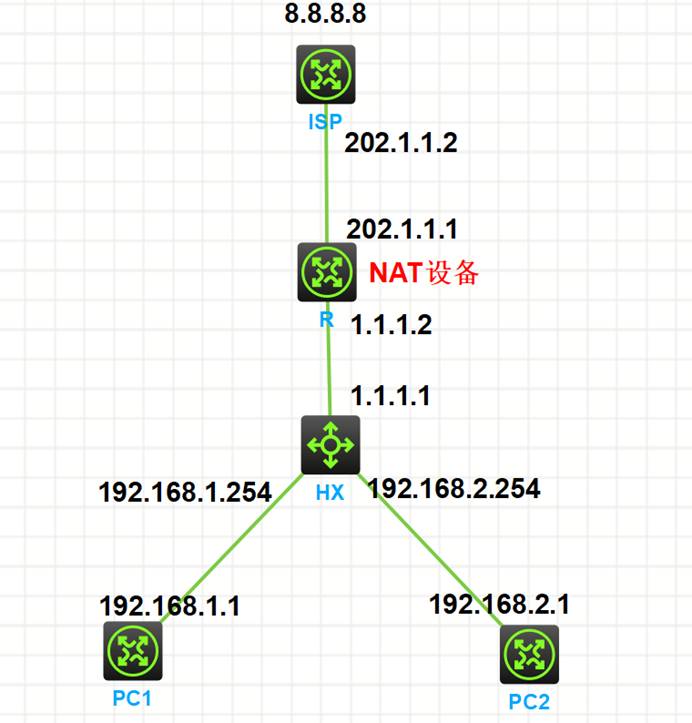
如上图:PC1、PC2属于内网网段,客户申请了运营商互联网线路用于上网。出口设备需要NAT设备进行地址转换(这里使用SNAT)实现内部网络访问互联网需求。
主要用到技术包括、vlan、地址、静态路由、SNAT等技术。
二 设备配置
2.1 ISP设备配置
sysname ISP
#
ip unreachables enable
ip ttl-expires enable
#
lldp global enable
#
interface LoopBack0
ip address 8.8.8.8 255.255.255.255
#
interface GigabitEthernet0/0
port link-mode route
combo enable copper
ip address 202.1.1.2 255.255.255.0
#
2.2 出口路由器R-SNAT+DNAT(NAT Server)配置
sysname R
#
ip unreachables enable
ip ttl-expires enable
#
lldp global enable
#
interface GigabitEthernet0/0
port link-mode route
combo enable copper
ip address 202.1.1.1 255.255.255.0
nat outbound //连接运营商互联网接口配置NAT
nat server protocol tcp global 202.1.1.222 2323 inside 192.168.2.1 23
#
interface GigabitEthernet0/1
port link-mode route
combo enable copper
ip address 1.1.1.2 255.255.255.252
#
ip route-static 0.0.0.0 0 202.1.1.2
ip route-static 192.168.0.0 16 1.1.1.1
#
2.3 核心交换机HX配置
sysname HX
#
ip unreachables enable
ip ttl-expires enable
#
lldp global enable
#
vlan 10 //VLAN配置
#
vlan 20
#
stp global enable
#
interface Vlan-interface10 //VLAN接口地址配置
ip address 192.168.1.254 255.255.255.0
#
interface Vlan-interface20
ip address 192.168.2.254 255.255.255.0
#
interface GigabitEthernet1/0/1
port link-mode route
combo enable fiber
ip address 1.1.1.1 255.255.255.252
#
interface GigabitEthernet1/0/2
port link-mode bridge
port access vlan 10
combo enable fiber
#
interface GigabitEthernet1/0/3
port link-mode bridge
port access vlan 20
combo enable fiber
#
ip route-static 0.0.0.0 0 1.1.1.2 //路由配置
#
2.4 PC1配置
sysname PC1
#
ip unreachables enable
ip ttl-expires enable
#
lldp global enable
#
interface GigabitEthernet0/0
port link-mode route
combo enable copper
ip address 192.168.1.1 255.255.255.0
#
ip route-static 0.0.0.0 0 192.168.1.254
#
2.5 Telnet-Server配置
sysname Telnet-Server
#
ip unreachables enable
ip ttl-expires enable
#
lldp global enable
#
interface GigabitEthernet0/0
port link-mode route
combo enable copper
ip address 192.168.2.1 255.255.255.0
#
ip route-static 0.0.0.0 0 192.168.2.254
#
三 业务测试
3.1 PC1访问互联网测试
<PC1>ping 8.8.8.8
Ping 8.8.8.8 (8.8.8.8): 56 data bytes, press CTRL+C to break
56 bytes from 8.8.8.8: icmp_seq=0 ttl=253 time=1.000 ms
56 bytes from 8.8.8.8: icmp_seq=1 ttl=253 time=2.000 ms
56 bytes from 8.8.8.8: icmp_seq=2 ttl=253 time=2.000 ms
<PC1>
<PC1>tracert 8.8.8.8
traceroute to 8.8.8.8 (8.8.8.8), 30 hops at most, 40 bytes each packet, press CTRL+C to break
1 192.168.1.254 (192.168.1.254) 1.000 ms 0.000 ms 1.000 ms
2 1.1.1.2 (1.1.1.2) 1.000 ms 1.000 ms 1.000 ms
3 202.1.1.2 (202.1.1.2) 1.000 ms 1.000 ms 0.000 ms
<PC1>
3.2 Telnet-Server访问互联网测试
<Telnet-Server>ping 8.8.8.8
Ping 8.8.8.8 (8.8.8.8): 56 data bytes, press CTRL+C to break
56 bytes from 8.8.8.8: icmp_seq=0 ttl=253 time=1.324 ms
56 bytes from 8.8.8.8: icmp_seq=1 ttl=253 time=1.055 ms
56 bytes from 8.8.8.8: icmp_seq=2 ttl=253 time=1.430 ms
<Telnet-Server>
<Telnet-Server>tracert 8.8.8.8
traceroute to 8.8.8.8 (8.8.8.8), 30 hops at most, 40 bytes each packet, press CTRL+C to break
1 192.168.2.254 (192.168.2.254) 0.758 ms 0.550 ms 0.362 ms
2 1.1.1.2 (1.1.1.2) 0.570 ms 1.839 ms 0.648 ms
3 202.1.1.2 (202.1.1.2) 1.777 ms 0.658 ms 0.299 ms
<Telnet-Server>
3.3 互联网用户通过公网地址访问内部服务器
<ISP>telnet 202.1.1.222 2323 source ip 8.8.8.8
Trying 202.1.1.222 ...
Press CTRL+K to abort
Connected to 202.1.1.222 ...
******************************************************************************
* Copyright (c) 2004-2021 New H3C Technologies Co., Ltd. All rights reserved.*
* Without the owner's prior written consent, *
* no decompiling or reverse-engineering shall be allowed. *
******************************************************************************
<Telnet-Server>
四 出口路由器R-NAT会话查看
4.1 PC1访问互联网SNAT会话查看
<PC1>ping 8.8.8.8
Ping 8.8.8.8 (8.8.8.8): 56 data bytes, press CTRL+C to break
56 bytes from 8.8.8.8: icmp_seq=0 ttl=253 time=1.000 ms
56 bytes from 8.8.8.8: icmp_seq=1 ttl=253 time=2.000 ms
56 bytes from 8.8.8.8: icmp_seq=2 ttl=253 time=2.000 ms
<PC1>
<R>
<R>dis nat session brief
Slot 0:
Protocol Source IP/port Destination IP/port Global IP/port
ICMP 192.168.1.1/10982 8.8.8.8/2048 202.1.1.1/0
<R>terminal monitor
The current terminal is enabled to display logs.
<R>terminal debugging
The current terminal is enabled to display debugging logs.
<R>
<R>debugging nat packet
<R>*Jun 7 17:15:49:526 2026 R NAT/7/COMMON:
PACKET: (GigabitEthernet0/0-out-config) Protocol: ICMP
192.168.1.1:10986 - 8.8.8.8: 2048(VPN: 0) ------>
202.1.1.1: 12 - 8.8.8.8: 2048(VPN: 0)
*Jun 7 17:15:49:526 2026 R NAT/7/COMMON:
PACKET: (GigabitEthernet0/0-in-session) Protocol: ICMP 回包为会话包
8.8.8.8: 12 - 202.1.1.1: 0(VPN: 0) ------>
8.8.8.8:10986 - 192.168.1.1: 0(VPN: 0)
<R>
4.2 互联网用户通过公网DNAT访问内部服务器会话查看
#
interface GigabitEthernet0/0
port link-mode route
combo enable copper
ip address 202.1.1.1 255.255.255.0
nat server protocol tcp global 202.1.1.222 2323 inside 192.168.2.1 23
<ISP>telnet 202.1.1.222 2323 source ip 8.8.8.8
Trying 202.1.1.222 ...
Press CTRL+K to abort
Connected to 202.1.1.222 ...
******************************************************************************
* Copyright (c) 2004-2021 New H3C Technologies Co., Ltd. All rights reserved.*
* Without the owner's prior written consent, *
* no decompiling or reverse-engineering shall be allowed. *
******************************************************************************
<Telnet-Server>
<R>terminal monitor
The current terminal is enabled to display logs.
<R>terminal debugging
The current terminal is enabled to display debugging logs.
<R>
<R>debugging nat packet
<R>*Jun 8 22:04:46:963 2026 R NAT/7/COMMON:
PACKET: (GigabitEthernet0/0-in-config) Protocol: TCP
8.8.8.8:10369 - 202.1.1.222: 2323(VPN: 0) ------>
8.8.8.8:10369 - 192.168.2.1: 23(VPN: 0)
*Jun 8 22:04:46:964 2026 R NAT/7/COMMON:
PACKET: (GigabitEthernet0/0-out-session) Protocol: TCP 回包为会话包
192.168.2.1: 23 - 8.8.8.8:10369(VPN: 0) ------>
202.1.1.222: 2323 - 8.8.8.8:10369(VPN: 0)
<R>
五 内网用户通过公网地址访问内部服务器
5.1 方法1-nat Server+内网NAT配置方式
5.1.1 出口路由器R设备内网接口配置
#
acl advanced 3000
description NeiWang-NAT
rule 5 permit ip source 192.168.0.0 0.0.255.255 destination 192.168.0.0 0.0.255.255
#
interface GigabitEthernet0/1
port link-mode route
combo enable copper
ip address 1.1.1.2 255.255.255.252
nat outbound 3000
nat server protocol tcp global 202.1.1.222 2323 inside 192.168.2.1 23
#
5.1.2 内网PC通过互联网访问内部服务器测试
<R>terminal monitor
The current terminal is enabled to display logs.
<R>terminal debugging
The current terminal is enabled to display debugging logs.
<R>
<R>debugging nat packet
<PC1>telnet 202.1.1.222 2323
Trying 202.1.1.222 ...
Press CTRL+K to abort
Connected to 202.1.1.222 ...
******************************************************************************
* Copyright (c) 2004-2021 New H3C Technologies Co., Ltd. All rights reserved.*
* Without the owner's prior written consent, *
* no decompiling or reverse-engineering shall be allowed. *
******************************************************************************
<Telnet-Server>
会话数据包都在内网接口往返
<R>*Jun 8 22:13:03:033 2026 R NAT/7/COMMON:
PACKET: (GigabitEthernet0/1-in-config) Protocol: TCP
192.168.1.1:56065 - 202.1.1.222: 2323(VPN: 0) ------>
192.168.1.1:56065 - 192.168.2.1: 23(VPN: 0)
*Jun 8 22:13:03:033 2026 R NAT/7/COMMON:
PACKET: (GigabitEthernet0/1-out-config) Protocol: TCP
192.168.1.1:56065 - 192.168.2.1: 23(VPN: 0) ------>
1.1.1.2: 1024 - 192.168.2.1: 23(VPN: 0)
*Jun 8 22:13:03:033 2026 R NAT/7/COMMON: 回包为会话包
PACKET: (GigabitEthernet0/1-in-session) Protocol: TCP
192.168.2.1: 23 - 1.1.1.2: 1024(VPN: 0) ------>
192.168.2.1: 23 - 192.168.1.1:56065(VPN: 0)
*Jun 8 22:13:03:033 2026 R NAT/7/COMMON:
PACKET: (GigabitEthernet0/1-out-session) Protocol: TCP
192.168.2.1: 23 - 192.168.1.1:56065(VPN: 0) ------>
202.1.1.222: 2323 - 192.168.1.1:56065(VPN: 0)
<R>
5.2 方法2- nat hairpin enable配置方式
5.2.1 nat hairpin enable设备内网接口配置
#
interface GigabitEthernet0/1
port link-mode route
combo enable copper
ip address 1.1.1.2 255.255.255.252
nat hairpin enable
#
5.2.2 内网PC通过互联网访问内部服务器测试
<R>terminal monitor
The current terminal is enabled to display logs.
<R>terminal debugging
The current terminal is enabled to display debugging logs.
<R>
<R>debugging nat packet
<PC1>telnet 202.1.1.222 2323
Trying 202.1.1.222 ...
Press CTRL+K to abort
Connected to 202.1.1.222 ...
******************************************************************************
* Copyright (c) 2004-2021 New H3C Technologies Co., Ltd. All rights reserved.*
* Without the owner's prior written consent, *
* no decompiling or reverse-engineering shall be allowed. *
******************************************************************************
<Telnet-Server>
会话数据包先在外网接口出去,再返回到内部接口
<R>*Jun 8 22:21:51:254 2026 R NAT/7/COMMON:
PACKET: (GigabitEthernet0/0-out-config) Protocol: TCP
192.168.1.1:56067 - 202.1.1.222: 2323(VPN: 0) ------>
202.1.1.11: 1026 - 202.1.1.222: 2323(VPN: 0)
*Jun 8 22:21:51:254 2026 R NAT/7/COMMON:
PACKET: (GigabitEthernet0/1-in-config) Protocol: TCP
202.1.1.11: 1026 - 202.1.1.222: 2323(VPN: 0) ------>
202.1.1.11: 1026 - 192.168.2.1: 23(VPN: 0)
*Jun 8 22:21:51:255 2026 R NAT/7/COMMON:
PACKET: (GigabitEthernet0/1-in-session) Protocol: TCP 回包为会话包
192.168.2.1: 23 - 202.1.1.11: 1026(VPN: 0) ------>
202.1.1.222: 2323 - 202.1.1.11: 1026(VPN: 0)
*Jun 8 22:21:51:255 2026 R NAT/7/COMMON:
PACKET: (GigabitEthernet0/1-out-session) Protocol: TCP
202.1.1.222: 2323 - 202.1.1.11: 1026(VPN: 0) ------>
202.1.1.222: 2323 - 192.168.1.1:56067(VPN: 0)
<R>





 扫一扫
扫一扫


 2万+
2万+

 被折叠的 条评论
为什么被折叠?
被折叠的 条评论
为什么被折叠?
 到【灌水乐园】发言





