




一、在图片绘制矩形,并将矩形映射到图片
.h文件
#include <QtWidgets/QWidget>
#include "ui_MyDrawImage.h"
#include <QPaintEvent>
#include <QImage>

class MyDrawImage : public QWidget
{
    Q_OBJECT

public:
    MyDrawImage(QWidget *parent = Q_NULLPTR);


protected:
	void paintEvent(QPaintEvent *event);
	void mousePressEvent(QMouseEvent *event) override;
	void mouseMoveEvent(QMouseEvent *event) override;
	void mouseReleaseEvent(QMouseEvent *event) override;
private:
    Ui::MyDrawImageClass ui;

	QImage	m_Image;
	QRect   m_tmpRect;					// 当前rect对象
	QPointF	m_pointPress;
	QList<QRect>            m_listRect; // 历史rect容器
};
.cpp
#include "MyDrawImage.h"
#include <QPainter>
#include <QRect>
#include <QPixmap>

MyDrawImage::MyDrawImage(QWidget *parent)
    : QWidget(parent)
{
    ui.setupUi(this);
	m_Image.load("./1.jpeg");
}

void MyDrawImage::paintEvent(QPaintEvent *event)
{
	Q_UNUSED(event);
	QPainter painter(this);

	//获取当前窗口与图片的比值
	float fRatioX = this->width()*1.0 / m_Image.width();
	float fRatioY = this->height()*1.0 / m_Image.height();
	float fRatioRes = qMin(fRatioX, fRatioY);

	//计算新的Rect
	int width = m_Image.width() * fRatioRes;
	int height = m_Image.height() * fRatioRes;
	int startX = (this->width() - width) / 2;
	int startY = (this->height() - height) / 2;

	// 绘制图像
	QRect picRect(startX, startY, width, height);
	painter.drawImage(picRect, m_Image);

	if (!m_tmpRect.isEmpty())
	{
		painter.setPen(Qt::red);

		// \绘制单个矩形
		//qreal recWidth = m_tmpRect.width() * fRatioRes;
		//qreal recHeight = m_tmpRect.height() * fRatioRes;
		//qreal recStartX = m_tmpRect.x()*fRatioRes + startX;
		//qreal recStartY = m_tmpRect.y()*fRatioRes + startY;
		//QRectF rect(recStartX, recStartY, recWidth, recHeight);
		//painter.drawRect(rect);

		// 遍历绘制历史rect对象
		foreach(const QRect &rect, m_listRect)
		{
			qreal recWidth = rect.width() * fRatioRes;
			qreal recHeight = rect.height() * fRatioRes;
			qreal recStartX = rect.x()*fRatioRes + startX;
			qreal recStartY = rect.y()*fRatioRes + startY;
			QRectF drawRect(recStartX, recStartY, recWidth, recHeight);
			painter.drawRect(drawRect);
		}
	}
}

void MyDrawImage::mousePressEvent(QMouseEvent *event)
{
	if (event->button() == Qt::LeftButton)
	{
		//获取点坐标
		QPoint startPos = event->pos();

		//获取当前窗口与图片的比值
		qreal fRatioX = this->width()*1.0 / m_Image.width();
		qreal fRatioY = this->height()*1.0 / m_Image.height();
		qreal fRatioRes = qMin(fRatioX, fRatioY);

		qreal imgWidth = m_Image.width() * fRatioRes;
		qreal imgHeight = m_Image.height() * fRatioRes;
		qreal startX = (this->width() - imgWidth) / 2;
		qreal startY = (this->height() - imgHeight) / 2;

		QPointF point;
		point.setX((startPos.x() - startX) / fRatioRes);
		point.setY((startPos.y() - startY) / fRatioRes);

		m_pointPress = point;
	}
}
void MyDrawImage::mouseMoveEvent(QMouseEvent *event)
{

}
void MyDrawImage::mouseReleaseEvent(QMouseEvent *event)
{
	if (event->button() == Qt::LeftButton)
	{
		QPoint p = event->pos();
		qreal fRatioX = this->width()*1.0 / m_Image.width();
		qreal fRatioY = this->height()*1.0 / m_Image.height();
		qreal fRatioRes = qMin(fRatioX, fRatioY);

		qreal imgWidth = m_Image.width() * fRatioRes;
		qreal imgHeight = m_Image.height() * fRatioRes;
		qreal startX = (this->width() - imgWidth) / 2;
		qreal startY = (this->height() - imgHeight) / 2;

		QPointF point;
		point.setX((p.x() - startX) / fRatioRes);
		point.setY((p.y() - startY) / fRatioRes);
		qreal w = point.x() - m_pointPress.x();
		qreal h = point.y() - m_pointPress.y();

		m_tmpRect.setX(m_pointPress.x());
		m_tmpRect.setY(m_pointPress.y());
		m_tmpRect.setWidth(w);
		m_tmpRect.setHeight(h);

		//绘制多个增加存储容器
		m_listRect.append(m_tmpRect);
	}
	update();
}
结果显示:
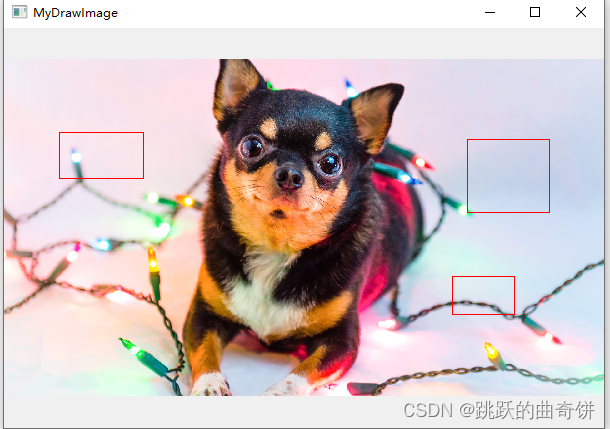
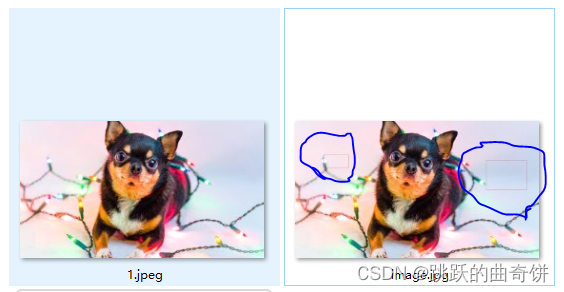
但是现在保存图片的,绘制的矩形并没有在图片上,我们需要矩形坐标将矩形映射到图片像素(即需要修改图片像素)
修改代码如下:
void MyDrawImage::paintEvent(QPaintEvent *event)
{
	Q_UNUSED(event);
	QPainter painter(this);

	//获取当前窗口与图片的比值
	float fRatioX = this->width()*1.0 / m_Image.width();
	float fRatioY = this->height()*1.0 / m_Image.height();
	float fRatioRes = qMin(fRatioX, fRatioY);

	//计算新的Rect
	int width = m_Image.width() * fRatioRes;
	int height = m_Image.height() * fRatioRes;
	int startX = (this->width() - width) / 2;
	int startY = (this->height() - height) / 2;

	// 绘制图像
	QRect picRect(startX, startY, width, height);
	painter.drawImage(picRect, m_Image);


	if (!m_tmpRect.isEmpty())
	{
		painter.setPen(Qt::red);

		// \绘制单个矩形
		//qreal recWidth = m_tmpRect.width() * fRatioRes;
		//qreal recHeight = m_tmpRect.height() * fRatioRes;
		//qreal recStartX = m_tmpRect.x()*fRatioRes + startX;
		//qreal recStartY = m_tmpRect.y()*fRatioRes + startY;
		//QRectF rect(recStartX, recStartY, recWidth, recHeight);
		//painter.drawRect(rect);

		//\ 将绘制的矩形框映射到图像对应像素位置
		foreach(const QRect &rect, m_listRect)
		{
			for (int x = 0; x < m_Image.width(); x++)
			{
				for (int y = 0; y < m_Image.height(); y++)
				{
					int endX = rect.x() + rect.width();
					int endY = rect.y() + rect.height();
					if (x >= rect.x() && x <= endX)
					{
						m_Image.setPixel(x, rect.y(), qRgb(255, 0, 0));
						m_Image.setPixel(x, endY, qRgb(255, 0, 0));
					}
					if (y >= rect.y() && y <= endY)
					{
						m_Image.setPixel(rect.x(), y, qRgb(255, 0, 0));
						m_Image.setPixel(endX, y, qRgb(255, 0, 0));
					}
				}
			}
		}

		// 遍历绘制历史rect对象
		foreach(const QRect &rect, m_listRect)
		{
			qreal recWidth = rect.width() * fRatioRes;
			qreal recHeight = rect.height() * fRatioRes;
			qreal recStartX = rect.x()*fRatioRes + startX;
			qreal recStartY = rect.y()*fRatioRes + startY;
			QRectF drawRect(recStartX, recStartY, recWidth, recHeight);
			painter.drawRect(drawRect);
		}

	}
}
测试:
connect(ui.pushButton, &QPushButton::clicked, this, [this]( bool clicked) {
		m_Image.save("./image.jpg", "JPEG");
	});





 扫一扫
扫一扫


关于Qt绘制图片的记录,绘制矩形&spm=1001.2101.3001.5002&articleId=135250255&d=1&t=3&u=648d7c200c4a4c61a6081ba5236da8ba)
 5109
5109

 被折叠的 条评论
为什么被折叠?
被折叠的 条评论
为什么被折叠?
 到【灌水乐园】发言





