YouTube is one of the largest platforms for video sharing and social engagement. In 2026, the YouTube Data API v3 remains the safest structured data source. But quota limits push many developers toward web scraping alternatives.
This guide covers scraping YouTube search results, channel metadata, video data, comments, and Shorts in Python. It uses the hidden /youtubei/ APIs and JSON embedded in script tags, so you don't need a headless browser.
Key Takeaways
- YouTube embeds full video metadata in
ytInitialPlayerResponse. A regex + json.loads pulls it with onlyrequests - YouTube's internal
/youtubei/v1/endpoints return the same JSON the frontend uses: search, channel videos, comments, and more - Use yt-dlp for quick metadata, comment, and transcript extraction without any API key
- Transcripts are available via yt-dlp subtitle metadata, signed caption URLs, or the
youtube-transcript-apilibrary - Parse JSON API responses with jmespath and jsonpath-ng to handle deeply nested YouTube data
- Use Scrapfly's ASP layer for production scraping: it handles proxy rotation and anti-bot fingerprinting so you don't get blocked
Quick-Start: YouTube Scraper in Python
Before we get into full scraper builds, here's the fastest way to pull a video title, view count, and channel name from YouTube. It uses only the Python standard library plus requests. No API key, no browser, no Scrapfly account required.
import re
import json
import requests

VIDEO_URL = "https://www.youtube.com/watch?v=dQw4w9WgXcQ"

response = requests.get(
    VIDEO_URL,
    headers={
        "User-Agent": "Mozilla/5.0 (Windows NT 10.0; Win64; x64) AppleWebKit/537.36 (KHTML, like Gecko) Chrome/131.0.0.0 Safari/537.36",
        "Accept-Language": "en-US,en;q=0.9",
    },
)

match = re.search(r"var ytInitialPlayerResponse\s*=\s*({.+?});\s*var", response.text, re.DOTALL)
data = json.loads(match.group(1))
details = data["videoDetails"]

print(details["title"])      # video title
print(details["viewCount"])  # view count as string
print(details["author"])     # channel name
YouTube embeds all video metadata in a ytInitialPlayerResponse JSON object in the page's HTML. A regex pulls that JSON block out, and json.loads gives you a Python dict you can query directly. The videoDetails key holds the core fields: title, view count, channel name, description, and more.
This works for any public video. For larger crawls, use the API and parsing patterns below so you can handle pagination, comments, transcripts, and blocking.
Why Scrape YouTube?
Scraping YouTube lets you collect video, channel, comment, and transcript data that the public page already shows.
Competitive Analysis
Scraping YouTube lets content creators pull engagement data about competitors or their target audience, which sharpens content strategy and decision-making.
Sentiment Analysis
YouTube comments and transcripts give you a useful training corpus. Use comments for sentiment analysis models. Use transcripts for RAG applications.
SEO and Keyword Research
Search trends shift fast. Scraping YouTube gives you a practical way to track trending topics and keywords as they emerge.
For similar use cases, refer to our web scraping use cases pages.
YouTube Data API vs. Web Scraping
YouTube data can come from the official API, yt-dlp, hidden frontend APIs, or browser automation. Each option gives you a different mix of quota, fields, and blocking risk.
| Approach | Speed | Quota / Limits | Data richness | Anti-bot risk | Best for |
|---|---|---|---|---|---|
| YouTube Data API v3 | Fast | 10K units/day | Structured, limited fields | None | Small-scale, structured data |
| yt-dlp | Fast | None | Metadata, comments, subtitles | Medium | Bulk metadata, no API key needed |
| Hidden API scraping | Fast | None | Full access to any visible data | Medium-High | Scaled extraction, search, comments |
| Browser automation | Slow | None | Full access | High | JS-heavy content, infinite scroll |
| Scrapfly | Fast | Per plan | Full access + anti-bot bypass | Low | Production-scale, all the above |
The YouTube Data API is the cleanest choice at low volume. The 10,000-unit daily quota goes fast: a videos.list request costs 1 unit, but search.list costs 100. One deep search session can burn a day's quota in minutes.
yt-dlp works well when you already have video URLs and want metadata, comments, or subtitles. It needs no credentials and handles rate limiting itself. The tradeoff is less control over which fields you extract.
The hidden API approach, calling YouTube's internal /youtubei/v1/ endpoints directly, is the most flexible. You get the same data YouTube's own frontend uses: full search results, channel video listings, comment threads, and more. There's no quota, but YouTube's anti-bot detection makes scaling harder without proper proxy and header handling. That's where Scrapfly's ASP layer fits in.
Prerequisites
Before we start building our YouTube scraping tool, let's explore the tools required and explain a few technical concepts we'll use.
Setup
To web scrape YouTube, we'll be using a few Python community packages:
- scrapfly-sdk: To request YouTube pages without getting blocked and retrieve their HTML sources.
- parsel: To parse HTML documents using XPath and CSS selectors.
- jsonpath-ng: To find deeply nested objects from JSON documents.
- loguru: To monitor and log the scraper output.
- asyncio: To run the scraper code asynchronously, which increases scraping speed.
To install all the packages above, use the pip command below:
pip install "scrapfly-sdk[all]" jsonpath-ng loguruNote that asyncio ships with Python, and parsel comes with the scrapfly-sdk. You don't need to install either separately.
Technical Concepts
In this guide, we'll use two web scraping idioms. Let's briefly explore them.
Hidden Data Scraping
Hidden data scraping involves extracting data from script tags found in HTML documents. These hidden data are often JSON, making them a great alternative to the common HTML parsing approach.
Hidden web data is often found on SPAs built using JavaScript. When a browser requests a page, it dynamically renders this hidden data into the DOM.
To further explain this approach, let's find hidden data on this mock product page. Press the F12 key and search the selector //script[@id='reviews-data']. Upon this, you will identify the below script tag:
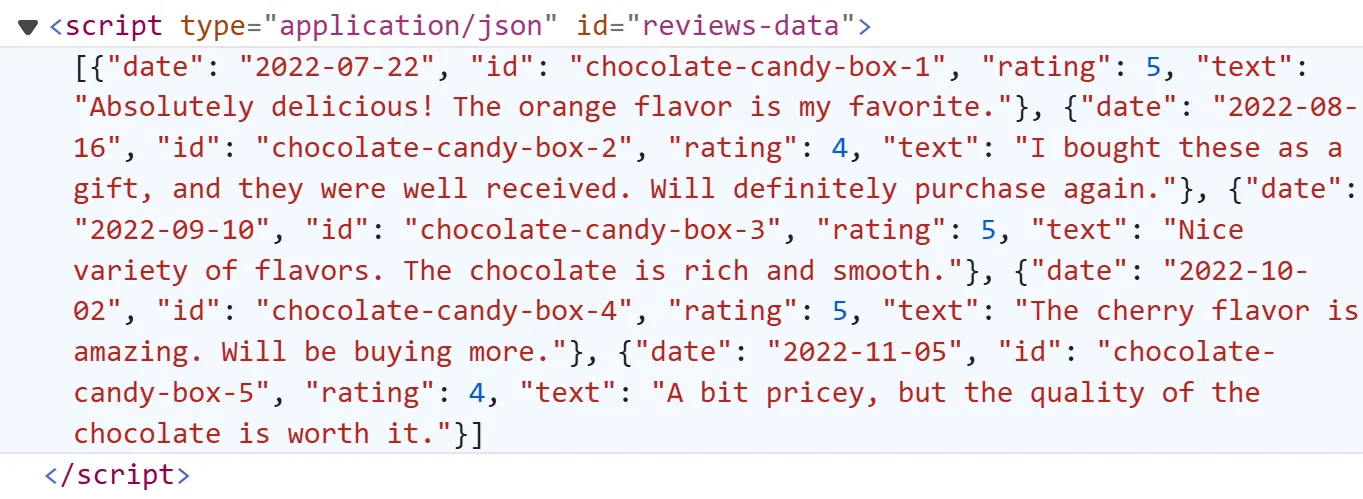
The review data exists in that tag. So instead of parsing the DOM, we can extract it as JSON directly.
Hidden API Scraping
Most modern web page applications rely on APIs to retrieve the required data and then render it into HTML. The hidden API scraping approach represents extracting the responses of these APIs or calling them directly.
Here's how to spot one in practice:
- Go to web-scraping.dev/testimonials
- Open the browser tools by pressing the
F12key - Head over the
Networktab and filter byFetch/XHRrequests - Load more reviews by scrolling down the page
- Upon following the above steps, you will identify the below captured request:
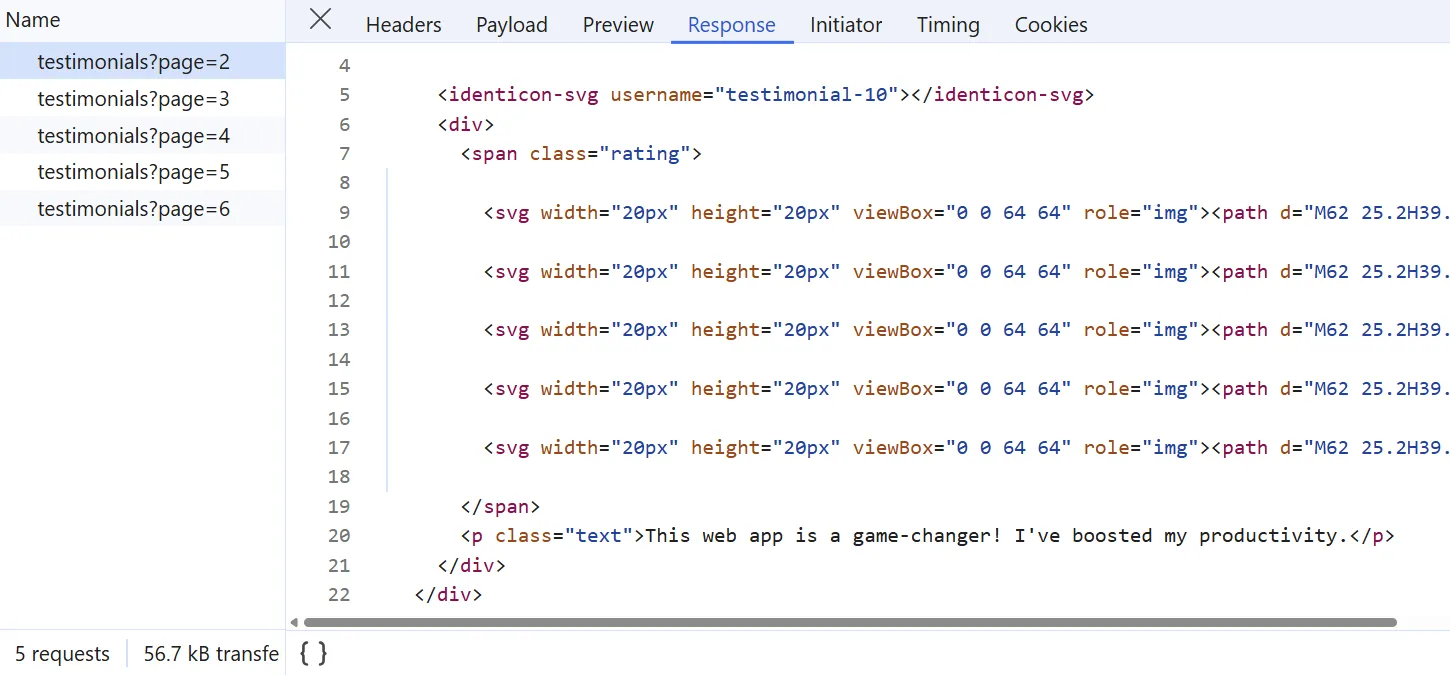
We can replicate the above XHR request to directly retrieve the pagination data instead of scrolling using a headless browser.
How to Scrape YouTube Search?
Let's start building the scraper with a search feature. YouTube's search system covers channels, videos, and Shorts with a wide range of filter options.
YouTube search results come from the private YouTube API. To find it, run a search like Python videos. Then watch the Fetch/XHR calls in the browser developer tools.
You'll spot the XHR request below:
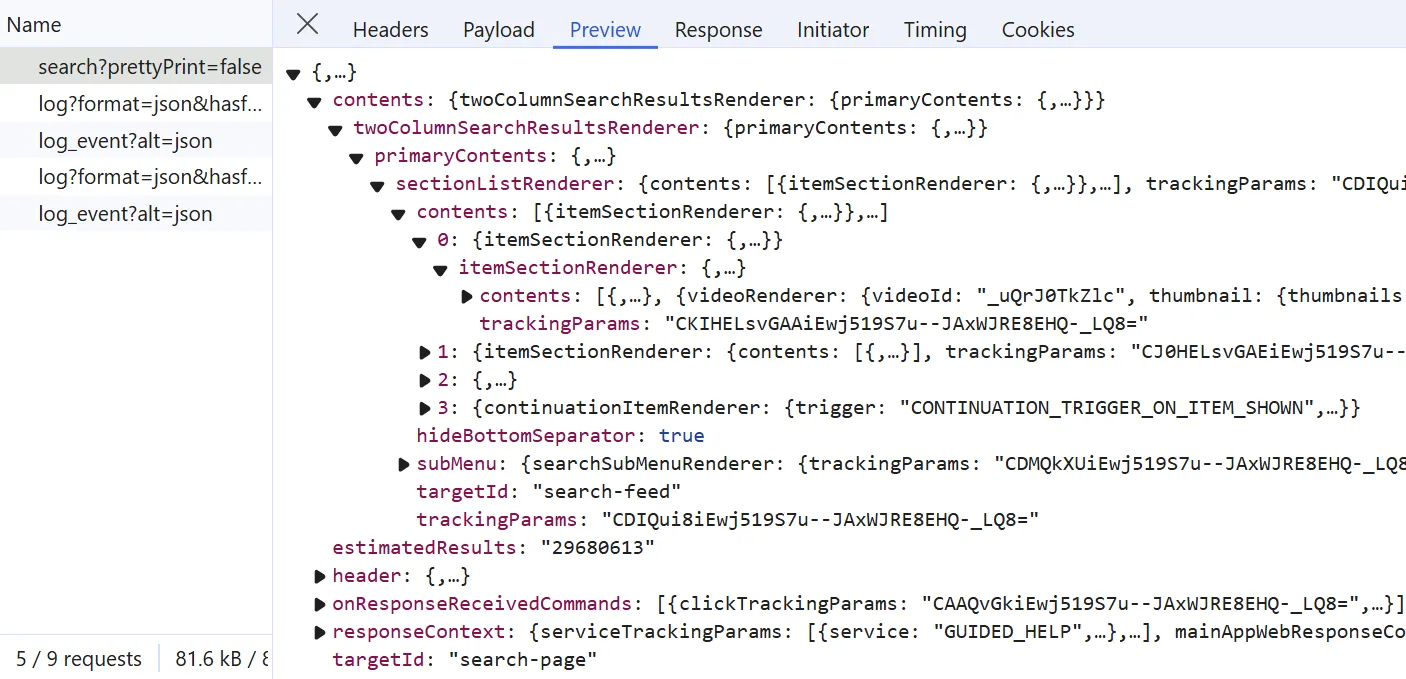
To scrape YouTube search directly in JSON, replicate the XHR request above. First, import the HTTP request details into Python. Use the cURL to Python tool or Postman.
After importing the request details, let's write a utility function to create the required payload and request the YouTube API endpoint:
async def call_youtube_api(
    base_url: str,
    continuation_token: str = None,
    search_query: str = None,
    search_params: str = None,
) -> List[Dict]:
    """call the YouTube comments API for continuation or search queries"""
    payload = {
        "context": {
            "client": {
                "hl": "en",
                "gl": "US",
                "remoteHost": "",
                "deviceMake": "",
                "deviceModel": "",
                "visitorData": "",
                "userAgent": "",
                "clientName": "WEB",
                "clientVersion": "2.20260404.01.00",
                "osName": "",
                "osVersion": "",
                "originalUrl": "",
                "platform": "DESKTOP",
                "clientFormFactor": "UNKNOWN_FORM_FACTOR",
                "configInfo": {"appInstallData": ""},
                "userInterfaceTheme": "USER_INTERFACE_THEME_DARK",
                "timeZone": "",
                "browserName": "",
                "browserVersion": "",
                "acceptHeader": "text/html,application/xhtml+xml,application/xml;q=0.9,image/avif,image/webp,image/apng,*/*;q=0.8,application/signed-exchange;v=b3;q=0.7",
                "deviceExperimentId": "",
                "screenWidthPoints": None,
                "screenHeightPoints": None,
                "screenPixelDensity": None,
                "screenDensityFloat": None,
                "utcOffsetMinutes": None,
                "connectionType": "CONN_CELLULAR_4G",
                "memoryTotalKbytes": "8000000",
                "mainAppWebInfo": {
                    "graftUrl": "",
                    "pwaInstallabilityStatus": "PWA_INSTALLABILITY_STATUS_UNKNOWN",
                    "webDisplayMode": "WEB_DISPLAY_MODE_BROWSER",
                    "isWebNativeShareAvailable": True,
                },
            },
            "user": {"lockedSafetyMode": False},
            "request": {
                "useSsl": True,
                "internalExperimentFlags": [],
                "consistencyTokenJars": [],
            },
            "clickTracking": {"clickTrackingParams": ""},
        }
    }

    if search_query is not None:
        payload["query"] = search_query
        payload["params"] = search_params

    if continuation_token is not None:
        payload["continuation"] = continuation_token

    response = await SCRAPFLY.async_scrape(
        ScrapeConfig(
            base_url,
            method="POST",
            body=json.dumps(payload),
                        proxy_pool="public_residential_pool",
            **BASE_CONFIG,
            headers={"content-type": "application/json"},
        )
    )
    return response
Above, we define a call_youtube_api function to replicate the hidden API call. It manipulates the base URL and the payload to support the different endpoints we'll cover in this guide.
Since we have the required HTTP details, let's use the call_youtube_api function to crawl YouTube search pages:
import json
import asyncio
import jmespath

from jsonpath_ng.ext import parse
from typing import Dict, List
from loguru import logger as log
from scrapfly import ScrapeConfig, ScrapflyClient, ScrapeApiResponse

SCRAPFLY = ScrapflyClient(key="Your Scrapfly API key")

BASE_CONFIG = {
    # bypass youtube scraper blocking
    "asp": True,
    # set the proxy country to US
    "country": "US",
}

jp_all = lambda query, data: [match.value for match in parse(query).find(data)]
jp_first = lambda query, data: (
    parse(query).find(data)[0].value if parse(query).find(data) else None
)

async def call_youtube_api(
    base_url: str,
    continuation_token: str = None,
    search_query: str = None,
    search_params: str = None,
) -> List[Dict]:
    """call the YouTube comments API for continuation or search queries"""
    # previous function definition

def parse_search_response(response: ScrapeApiResponse) -> List[Dict]:
    """parse search results from the YouTube API response"""
    results = []
    data = json.loads(response.content)
    search_boxes = jp_all("$..videoRenderer", data)
    for i in search_boxes:
        if "videoId" not in i:
            continue
        result = jmespath.search(
            """{
            id: videoId,
            title: title.runs[0].text,
            description: detailedMetadataSnippets[0].snippetText.runs[0].text,
            publishedTime: publishedTimeText.simpleText,
            videoLength: lengthText.simpleText,
            viewCount: viewCountText.simpleText,
            videoBadges: badges[].metadataBadgeRenderer.label,
            channelBadges: ownerBadges[].metadataBadgeRenderer.accessibilityData.label,
            viewCount: shortViewCountText.simpleText,
            videoThumbnails: thumbnail.thumbnails,
            channelThumbnails: channelThumbnailSupportedRenderers.channelThumbnailWithLinkRenderer.thumbnail.thumbnails
            }""",
            i,
        )
        result["url"] = f"https://youtu.be/{result['id']}"
        results.append(result)

    return {
        "videos": results,
        "continuationToken": jp_first("$..continuationCommand.token", data),
    }

async def scrape_search(
    search_query: str, max_scrape_pages: int = None, search_params: str = None
) -> List[Dict]:
    """scrape search results from YouTube search query"""
    cursor = 0
    search_data = []
    response = await call_youtube_api(
        base_url="https://www.youtube.com/youtubei/v1/search?prettyPrint=false",
        search_query=search_query,
        search_params=search_params,
    )
    data = parse_search_response(response)
    search_data.extend(data["videos"])
    continuation_token = data["continuationToken"]

    while continuation_token and (
        cursor < max_scrape_pages if max_scrape_pages else True
    ):
        cursor += 1
        log.info(f"scraping search page with index {cursor}")
        response = await call_youtube_api(
            base_url="https://www.youtube.com/youtubei/v1/search?prettyPrint=false",
            continuation_token=continuation_token,  # use the continuation token after the first page
        )
        data = parse_search_response(response)
        search_data.extend(data["videos"])
        continuation_token = data["continuationToken"]

    log.success(f"scraped {len(search_data)} video for the query {search_query}")
    return search_data
Run the code
async def run():
    search_data = await scrape_search(
        search_query="python",
        # params are the additional search query filter
        # to get the search query param string, apply filters on the web app and copy the sp value
        search_params="EgQIAxAB", # filter by video results only
        max_scrape_pages=2
    )

    with open("search_results.json", "w") as f:
        json.dump(search_data, f, indent=2)

if __name__ == "__main__":
    asyncio.run(run())
The scrape_search function wraps the crawling logic. Here's the flow:
- Send a request to the YouTube API for the first page of results.
- Use
parse_search_responseto extract the video data and the pagination parameters for the next page. - Use the returned
continuationTokenas the cursor.
The loop repeats until the page limit kicks in. Here's a sample of the output:
Example output
[
  {
    "id": "HCgJoSuICAk",
    "title": "Why I Always Do This In Python",
    "description": "This channel has grown big through the past couple of years, and one of the most frequent comments I get is: \"why do you ...",
    "publishedTime": "5 days ago",
    "videoLength": "6:10",
    "viewCount": "13K views",
    "videoBadges": [
      "New",
      "4K"
    ],
    "channelBadges": [
      "Verified"
    ],
    "videoThumbnails": [
      {
        "url": "https://i.ytimg.com/vi/HCgJoSuICAk/hq720.jpg?sqp=-oaymwEcCOgCEMoBSFXyq4qpAw4IARUAAIhCGAFwAcABBg==&rs=AOn4CLDDqar63TPg1IRDBq2jJ0N1zlCXlw",
        "width": 360,
        "height": 202
      },
      {
        "url": "https://i.ytimg.com/vi/HCgJoSuICAk/hq720.jpg?sqp=-oaymwEcCNAFEJQDSFXyq4qpAw4IARUAAIhCGAFwAcABBg==&rs=AOn4CLCMjnC306bclMUn9vJTbsX3M_0S7A",
        "width": 720,
        "height": 404
      }
    ],
    "channelThumbnails": [
      {
        "url": "https://yt3.ggpht.com/Youvw32wKJ5n4OJv3IXESEtEZnPdF49rXnpxKeLCpXB0yM3oda0ICnTGff00pWi1ZZm90x6AXw=s68-c-k-c0x00ffffff-no-rj",
        "width": 68,
        "height": 68
      }
    ],
    "url": "https://youtu.be/HCgJoSuICAk"
  },
  ....
]
The extracted search results show video data only. To get other data types, change the search_params value, which you can pull from the search URL:

How to Scrape YouTube Channels?
In this section, we'll explore scraping YouTube channel metadata, which represents general information about the channel. The easiest way to retrieve this data on the browser is using the dedicated channel info view:
Clicking that view triggers an XHR call that returns the channel data as JSON, which the page then renders:
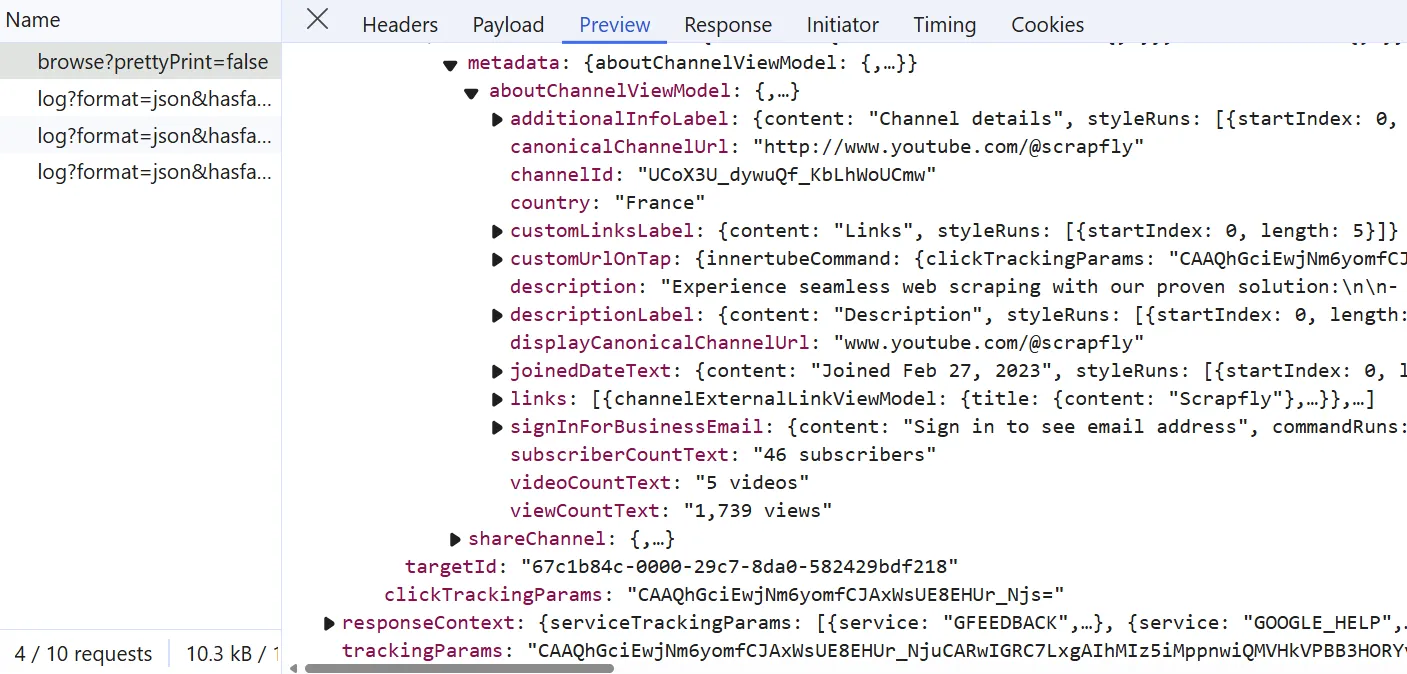
Let's replicate the above XHR call within our YouTube scraper to extract the channel metadata:
import json
import asyncio
import jmespath

from jsonpath_ng.ext import parse
from typing import Dict, List
from loguru import logger as log
from scrapfly import ScrapeConfig, ScrapflyClient, ScrapeApiResponse

SCRAPFLY = ScrapflyClient(key="Your Scrapfly API key")

BASE_CONFIG = {
    # bypass youtube web scraping blocking
    "asp": True,
    # set the proxy country to US
    "country": "US",
}

jp_first = lambda query, data: (
    parse(query).find(data)[0].value if parse(query).find(data) else None
)

async def call_youtube_api(
    base_url: str,
    continuation_token: str = None,
    search_query: str = None,
    search_params: str = None,
) -> List[Dict]:
    """call the YouTube comments API for continuation or search queries"""
    # previous function definition

def parse_channel(response: ScrapeApiResponse) -> Dict:
    """parse channel metadata from YouTube channel page"""
    _xhr_calls = response.scrape_result["browser_data"]["xhr_call"]
    info_call = [c for c in _xhr_calls if "youtube.com/youtubei/v1/browse" in c["url"]]
    data = json.loads(info_call[0]["response"]["body"]) if info_call else None

    metadata = jp_first("$..aboutChannelViewModel", data)
    links = []
    if "links" in metadata:
        for i in metadata["links"]:
            i = i["channelExternalLinkViewModel"]
            links.append(
                {
                    "title": i["title"]["content"],
                    "url": i["link"]["content"],
                    "favicon": i["favicon"],
                }
            )
    result = jmespath.search(
        """{
        description: description,
        url: displayCanonicalChannelUrl,
        subscriberCount: subscriberCountText,
        videoCount: videoCountText,
        viewCount: viewCountText,
        joinedDate: joinedDateText.content,
        country: country
        }""",
        metadata,
    )
    result["links"] = links
    return result

async def scrape_channel(channel_ids: List[str]) -> List[Dict]:
    """scrape channel metadata from YouTube channel pages"""
    to_scrape = [
        ScrapeConfig(
            f"https://www.youtube.com/@{channel_id}",
            proxy_pool="public_residential_pool",
            **BASE_CONFIG,
            render_js=True,
            wait_for_selector="//yt-description-preview-view-model//button",
            js_scenario=[
                # click on the "show more" button to load the full description
                {
                    "click": {
                        "selector": "//yt-description-preview-view-model//button",
                        "ignore_if_not_visible": False,
                        "timeout": 10000,
                    }
                },
                {
                    "wait_for_selector": {
                        "selector": "//yt-formatted-string[@title='About']",
                        "timeout": 10000,
                    }
                },
            ],
        )
        for channel_id in channel_ids
    ]
    data = []
    log.info(f"scraping {len(to_scrape)} channels")
    async for response in SCRAPFLY.concurrent_scrape(to_scrape):
        channel_data = parse_channel(response)
        data.append(channel_data)
    log.success(f"scraped {len(data)} cahnnel info")
    return data
Run the code
async def run():
    channel_metadata = await scrape_channel(
        channel_ids=[
            "scrapfly"
        ]
    )

    with open("channel_metadata.json", "w") as f:
        json.dump(channel_metadata, f, indent=2)

if __name__ == "__main__":
    asyncio.run(run())
Above, we rely on the XHR call responsible for fetching the channel metadata. However, instead of calling the API endpoint directly, we follow another approach explained in the below steps:
- Simulate a click action using the headless browser to trigger the metadata XHR call.
- Extract the XHR call response and parse it using the
parse_channelfunction.
Below is an example output of the results retrieved:
Example output
{
  "description": "Experience seamless web scraping with our proven solution:\n\n- Automatic Proxy Rotation\n- Bypass anti-bot solutions\n- Managed Headless Browsers\n\nScale up your workload effortlessly without infrastructure concerns.\n\nEliminate the need for tedious tasks like proxy management, handling headless browsers, and bypassing blocking protection.\n\nOur state-of-the-art solution unifies the entire toolchain, enabling effortless scraping of any target.\n\nWe've assisted numerous clients across various industries, including real estate, e-commerce, human resources, competitive intelligence, news, stock market, and travel. Let us help you achieve your web scraping goals today.\n",
  "url": "www.youtube.com/@scrapfly",
  "subscriberCount": "46 subscribers",
  "videoCount": "5 videos",
  "viewCount": "1,739 views",
  "joinedDate": "Joined Feb 27, 2023",
  "country": "France",
  "links": [
    {
      "title": "Scrapfly",
      "url": "scrapfly.io",
      "favicon": {
        "sources": [
          ....
          {
            "url": "https://encrypted-tbn0.gstatic.com/favicon-tbn?q=tbn:ANd9GcSWG5xRzHtD8-SZbZPg8eIF8OwayBiVysCB1PvRfgiPtaXqMPAhNQc5y2KWf4hkWfVLRubHP87K5MYwXz1dIWQOKLgl0Ow4aEi5TWtyAVMIfUA",
            "width": 256,
            "height": 256
          }
        ]
      }
    },
    ....
  ]
}
Scraping Channel Videos
Now that our YouTube scraper is able to extract channel metadata. Let's scrape channel video data. To do this, yet we'll rely on another hidden YouTube API. But first, let's inspect it by navigating to any YouTube channel and then scrolling down to load more video data:
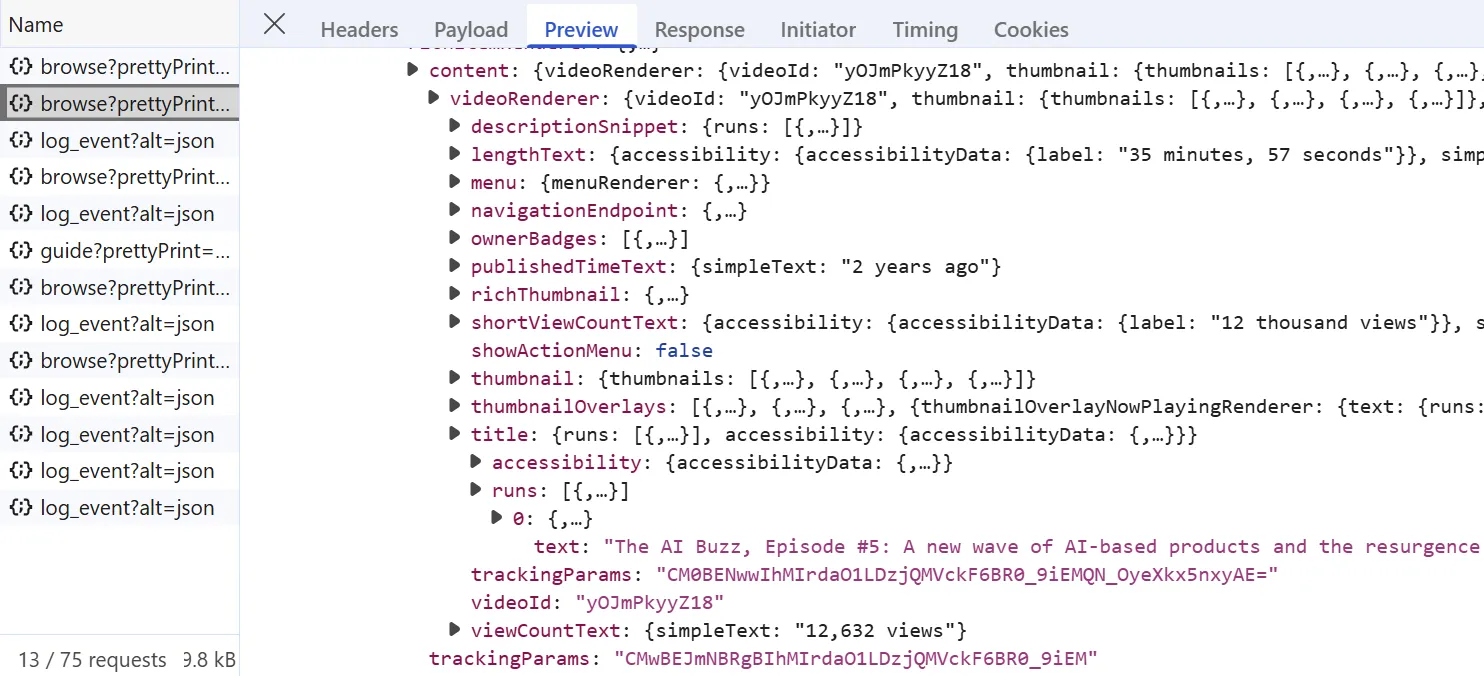
To scrape the channel video data, let's replicate the above API call while manipulating its payload for pagination:
import re
import json
import asyncio
import jmespath

from jsonpath_ng.ext import parse
from typing import Dict, List, Literal
from loguru import logger as log
from scrapfly import ScrapeConfig, ScrapflyClient, ScrapeApiResponse

SCRAPFLY = ScrapflyClient(key="Your Scrapfly API key")

BASE_CONFIG = {
    # bypass youtube scraping blocking
    "asp": True,
    # set the proxy country to US
    "country": "US",
}

jp_all = lambda query, data: [match.value for match in parse(query).find(data)]
jp_first = lambda query, data: (
    parse(query).find(data)[0].value if parse(query).find(data) else None
)

def parse_video_api(response: ScrapeApiResponse) -> Dict:
    """parse video data from YouTube API response"""
    parsed_videos = []
    data = json.loads(response.content)
    continuation_tokens = jp_all("$..continuationCommand.token", data)
    # first API response includes indexing data
    videos = jp_all("$..reloadContinuationItemsCommand.continuationItems", data)
    videos = videos[-1] if len(videos) > 1 else jp_first("$..continuationItems", data)
    for i in videos:
        if "richItemRenderer" not in i:
            continue
        result = jmespath.search(
            """{
            videoId: videoId,
            title: title.runs[0].text,
            description: descriptionSnippet.runs[0].text,
            publishedTime: publishedTimeText.simpleText,
            lengthText: lengthText.simpleText,
            viewCount: viewCountText.simpleText,
            thumbnails: thumbnail.thumbnails
            }""",
            i["richItemRenderer"]["content"]["videoRenderer"],
        )
        result["url"] = f"https://youtu.be/{result['videoId']}"
        parsed_videos.append(result)

    return {
        "videos": parsed_videos,
        "continuationToken": continuation_tokens[-1] if continuation_tokens else None,
    }

def parse_yt_initial_data(response: ScrapeApiResponse) -> Dict:
    """parse ytInitialData script from YouTube pages"""
    selector = response.selector
    data = selector.xpath("//script[contains(text(),'ytInitialData')]/text()").get()
    data = json.loads(
        re.search(r"var ytInitialData = ({.*});", data, re.DOTALL).group(1)
    )
    return data

async def scrape_channel_videos(
    channel_id: str,
    sort_by: Literal["Latest", "Popular", "Oldest"] = "Latest",
    max_scrape_pages: int = None,
) -> List[Dict]:
    """scrape video metadata from YouTube channel page"""
    # 1. extract the continuation token from the HTML to call the API
    response = await SCRAPFLY.async_scrape(
        ScrapeConfig(
            f"https://www.youtube.com/@{channel_id}/videos",
            proxy_pool="public_residential_pool",
            **BASE_CONFIG,
        )
    )
    initial_script_data = parse_yt_initial_data(response)
    chip_view_models = jp_all("$..chipViewModel", initial_script_data)

    # there are different continuation tokens based on the sorting order
    continuation_token = next(
        jp_first("$..continuationCommand.token", chip["tapCommand"])
        for chip in chip_view_models
        if chip.get("text") == sort_by
    )

    # 2. call the API to get the video data
    videos = []
    cursor = 0

    while continuation_token and (
        cursor < max_scrape_pages if max_scrape_pages else True
    ):
        cursor += 1
        log.info(f"scraping video page with index {cursor}")
        try:
            response = await call_youtube_api(
                base_url="https://www.youtube.com/youtubei/v1/browse?key=yt_web",
                continuation_token=continuation_token,
            )
        except NameError:
            log.error("call_youtube_api isn't defined. You can define it from the earlier snippet.")
            break

        data = parse_video_api(response)
        videos.extend(data["videos"])
        continuation_token = data["continuationToken"]

    log.success(f"scraped {len(videos)} video for the channel {channel_id}")
    return videos
Run the code
async def run():
    channel_videos = await scrape_channel_videos(
        channel_id="statquest", sort_by="Latest", max_scrape_pages=2
    )
    with open("channel_videos.json", "w", encoding="utf-8") as file:
        json.dump(channel_videos, file, indent=2, ensure_ascii=False)

if __name__ == "__main__":
    asyncio.run(run())
The snippet above covers a few steps. Here's the execution flow:
- Send a request to
youtube.com/@<channel_id>/videosto get the page HTML containing the first batch of videos. - Parse the HTML with
parse_yt_initial_datato extract thecontinuation_tokensfor the hidden API. - Loop until you hit the result cap or the page limit.
- Call the hidden YouTube API with
call_youtube_api, then refine the response withparse_video_api.
Below is an example output of the results extracted by the above YouTube scraping code:
Example output
[
  {
    "videoId": "qPN_XZcJf_s",
    "title": "Reinforcement Learning with Human Feedback (RLHF), Clearly Explained!!!",
    "description": "Generative Large Language Models, like ChatGPT and DeepSeek, are trained on massive text based datasets, like the entire Wikipedia. However, this training alone fails to teach the models how...",
    "publishedTime": "1 month ago",
    "lengthText": "18:02",
    "viewCount": "16,768 views",
    "thumbnails": [
      {
        "url": "https://i.ytimg.com/vi/qPN_XZcJf_s/hqdefault.jpg?sqp=-oaymwEmCKgBEF5IWvKriqkDGQgBFQAAiEIYAdgBAeIBCggYEAIYBjgBQAE=&rs=AOn4CLDAK3Xw9Hx1bJ5O-gBxKUlKaenEdA",
        "width": 168,
        "height": 94
      },
      ....
    ],
    "url": "https://youtu.be/qPN_XZcJf_s"
  },
  ....
]
So far, we have been able to crawl YouTube for video data from channels and search pages. Next, let's scrape the YouTube video pages themselves!
How to Scrape YouTube Videos?
YouTube embeds video metadata as JSON in script tags. To find them, run the XPath selector //script[contains(text(),'ytInitialPlayerResponse')]/text() in the browser developer tools:
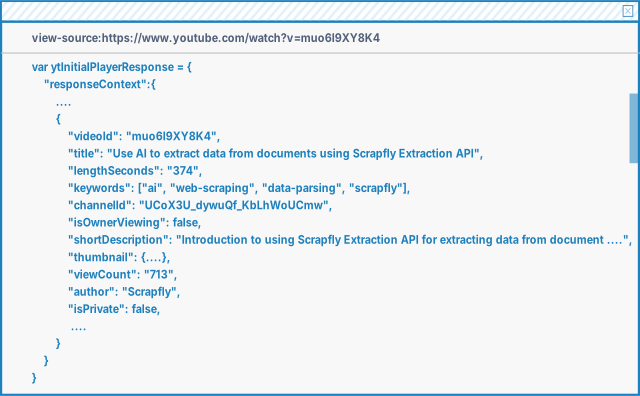
As illustrated in the above image, the script tag contains the full video metadata. Let's update our YouTube scraper to extract them:
import re
import json
import asyncio

from jsonpath_ng.ext import parse
from typing import Dict, List
from loguru import logger as log
from scrapfly import ScrapeConfig, ScrapflyClient, ScrapeApiResponse

SCRAPFLY = ScrapflyClient(key="Your Scrapfly API key")

BASE_CONFIG = {
    # bypass youtube.com web scraping blocking
    "asp": True,
    # set the proxy country to US
    "country": "US",
}

jp_all = lambda query, data: [match.value for match in parse(query).find(data)]
jp_first = lambda query, data: (
    parse(query).find(data)[0].value if parse(query).find(data) else None
)

def convert_to_number(value):
    if value is None:
        return None

    value = value.strip().upper().replace(",", "")

    if value.endswith("K"):
        return int(float(value[:-1]) * 1_000)

    elif value.endswith("M"):
        return int(float(value[:-1]) * 1_000_000)

    else:
        return int(float(value))

def parse_video_details(response: ScrapeApiResponse) -> Dict:
    """parse video metadata from YouTube video page"""
    selector = response.selector
    video_details = selector.xpath(
        "//script[contains(text(),'ytInitialPlayerResponse')]/text()"
    ).get()
    video_details = json.loads(video_details.split(" = ")[1].split(";var")[0]).get(
        "videoDetails"
    )
    return video_details

def parse_yt_initial_data(response: ScrapeApiResponse) -> Dict:
    """parse ytInitialData script from YouTube pages"""
    selector = response.selector
    data = selector.xpath("//script[contains(text(),'ytInitialData')]/text()").get()
    data = json.loads(
        re.search(r"var ytInitialData = ({.*});", data, re.DOTALL).group(1)
    )
    return data

def parse_video(response: ScrapeApiResponse) -> Dict:
    """parse video metadata from YouTube video page"""
    video_details = parse_video_details(response)
    content_details = parse_yt_initial_data(response)

    likes = [
        i["title"]
        for i in jp_all("$..buttonViewModel", content_details)
        if "iconName" in i and i["iconName"] == "LIKE"
    ]
    channel_id = jp_first(
        "$..channelEndpoint.browseEndpoint.canonicalBaseUrl", content_details
    )
    verified = jp_all(
        "$..videoOwnerRenderer..badges[0].metadataBadgeRenderer", content_details
    )

    result = {
        "video": {
            "videoId": video_details.get("videoId"),
            "title": video_details.get("title"),
            "publishingDate": jp_first("$..dateText.simpleText", content_details),
            "lengthSeconds": convert_to_number(video_details.get("lengthSeconds")),
            "keywords": video_details.get("keywords"),
            "description": video_details.get("shortDescription"),
            "thumbnail": video_details.get("thumbnail").get("thumbnails"),
            "stats": {
                "viewCount": convert_to_number(video_details.get("viewCount")),
                "likeCount": convert_to_number(likes[0]) if likes else None,
                "commentCount": convert_to_number(
                    jp_first("$..contextualInfo.runs[0].text", content_details)
                ),
            },
        },
        "channel": {
            "name": video_details.get("author"),
            "identifierId": video_details.get("channelId"),
            "id": channel_id.replace("/", "") if channel_id else None,
                        "verified": any(i.get("tooltip") == "Verified" for i in verified),
            "channelUrl": (
                f"https://www.youtube.com{channel_id}" if channel_id else None
            ),
            "subscriberCount": jp_first(
                "$..subscriberCountText.simpleText", content_details
            ),
            "thumbnails": jp_first(
                "$..engagementPanelSectionListRenderer..channelThumbnail.thumbnails",
                content_details,
            ),
        },
        "commentContinuationToken": jp_first(
            "$..continuationCommand.token", content_details
        ),
    }

    return result

async def scrape_video(ids: List[str]) -> List[Dict]:
    """scrape video metadata from YouTube videos"""
    data = []
    to_scrape = [
        ScrapeConfig(f"https://youtu.be/{video_id}", proxy_pool="public_residential_pool", **BASE_CONFIG)
        for video_id in ids
    ]
    log.info(f"scraping {len(to_scrape)} video metadata from video pages")
    async for response in SCRAPFLY.concurrent_scrape(to_scrape):
        post_data = parse_video(response)
        data.append(post_data)
    log.success(f"scraped {len(data)} video metadata from video pages")
    return data
Run the code
async def run():
    video_data = await scrape_video(
        ids = [
            "1Y-XvvWlyzk",
            "muo6I9XY8K4",
            "y7FbFJ4jOW8"
        ]
    )
    with open("videos.json", "w", encoding="utf-8") as file:
        json.dump(video_data, file, indent=2, ensure_ascii=False)

if __name__ == "__main__":
    asyncio.run(run())
The scrape_video function takes a list of video IDs, builds a scraping list, and requests all video page URLs concurrently. The parse_video function then extracts video and channel metadata from the HTML using parse_video_details and parse_yt_initial_data.
Here's what the extracted video data looks like:
Example output
[
  {
    "video": {
      "videoId": "y7FbFJ4jOW8",
      "title": "Intro to Web Scraping using ScrapFly SDK and Python",
      "publishingDate": "Jul 17, 2024",
      "lengthSeconds": 994,
      "keywords": null,
      "description": "https://scrapfly.io/ \nhttps://scrapfly.io/docs/sdk/python\n\nThe code used in the video:\nhttps://github.com/scrapfly/sdk-demo\n\nFor more web scraping tutorials, see our blog:\n• Scraping with Python and BeautifulSoup\nhttps://scrapfly.io/blog/web-scraping-with-python-beautifulsoup/\n• Parsing HTML with XPath\nhttps://scrapfly.io/blog/posts/parsing-html-with-xpath\n• Parsing HTML with CSS selectors\nhttps://scrapfly.io/blog/posts/parsing-html-with-css\n\nSections:\n00:00 introduction\n00:14 setup \n00:25 Use Overview\n01:25 HTML parser\n01:55 Cache feature\n02:09 Debug feature\n02:26 Request options\n03:00 Anti Scraping Blocking bypass\n03:24 Proxies\n03:50 Cloud Web Browsers\n04:31 Browser Control\n04:50 Extraction API\n08:09 Screenshot API\n10:18 Example Project Overview\n10:46 Setup\n11:32 Scraping Yelp Business Pages\n12:23 Parsing Business Pages\n13:26 Example Scrape Run\n14:04 Scraping Yelp Search\n14:49 Parsing Search Pages\n15:22 Example Scrape Run\n15:48 Summary",
      "thumbnail": [
        {
          "url": "https://i.ytimg.com/vi/y7FbFJ4jOW8/hqdefault.jpg?sqp=-oaymwEmCKgBEF5IWvKriqkDGQgBFQAAiEIYAdgBAeIBCggYEAIYBjgBQAE=&rs=AOn4CLAgJcecyotc-ZtaflbigMDrbCBdIg",
          "width": 168,
          "height": 94
        },
        ....
      ],
      "stats": {
        "viewCount": 2032,
        "likeCount": 24,
        "commentCount": 2
      }
    },
    "channel": {
      "name": "Scrapfly",
      "identifierId": "UCoX3U_dywuQf_KbLhWoUCmw",
      "id": "@scrapfly",
      "verified": false,
      "channelUrl": "https://www.youtube.com/@scrapfly",
      "subscriberCount": "72 subscribers",
      "thumbnails": [
        {
          "url": "https://yt3.ggpht.com/vZaW8h45pjSWX0AEif82ImzhIhb5vMk9fz3j3S8PNaGhXr5F4qoHp9veDrL8bmCFr25D__fq=s88-c-k-c0x00ffffff-no-rj"
        }
      ]
    },
    "commentContinuationToken": "Eg0SC3k3RmJGSjRqT1c4GAYyJSIRIgt5N0ZiRko0ak9XODAAeAJCEGNvbW1lbnRzLXNlY3Rpb24%3D"
  }
]
In the JSON dataset above, our YouTube scraper has successfully extracted the metadata for both the video and related channels. Additionally, we have the key commentContinuationToken that we'll use for the video comment scraping. Let's see it in action in the following section!
Scraping Video Comments
To scrape YouTube comments, we'll call the hidden comments API. To find it, open the browser developer tools on any YouTube video page and scroll down to load more comments. You'll see an XHR call like the one below:
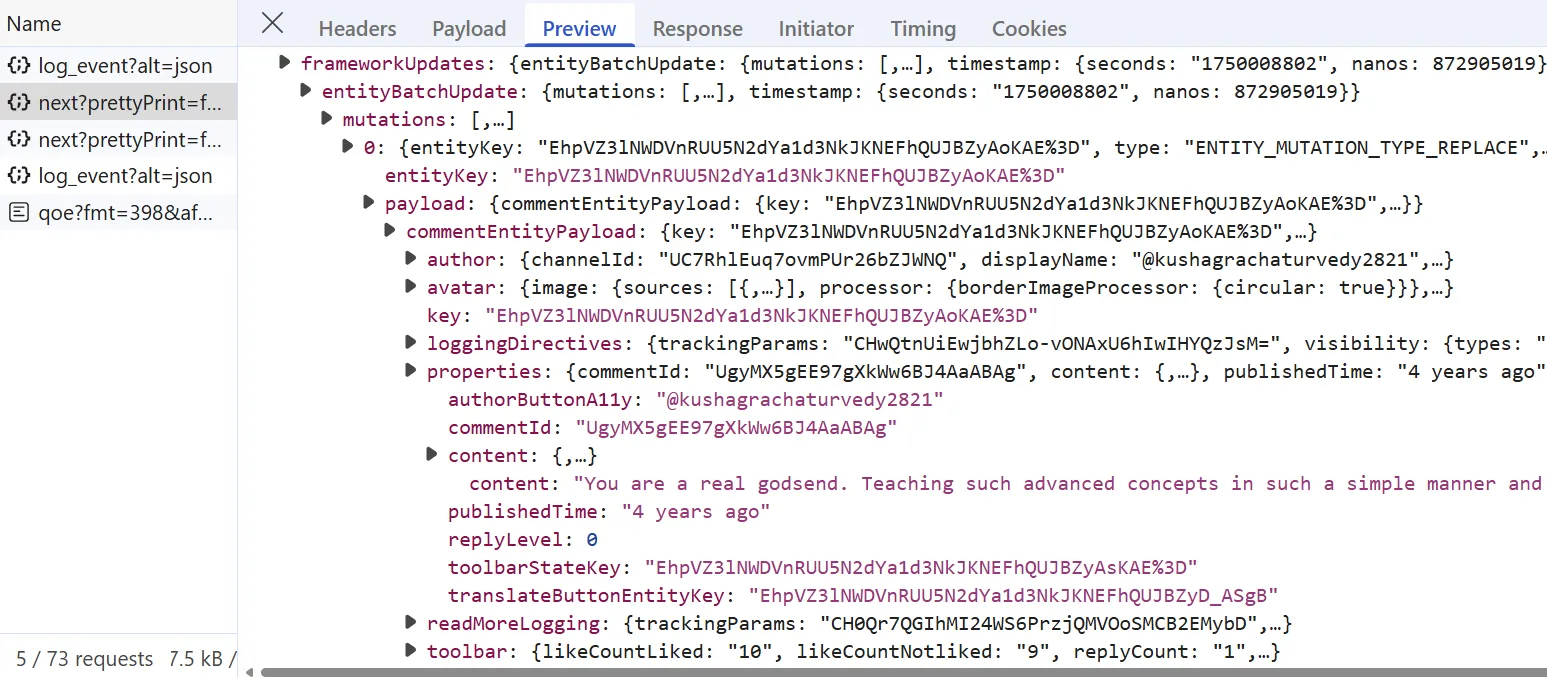
To scrape video comments, we'll replicate the above XHR call:
import re
import json
import asyncio
import jmespath

from jsonpath_ng.ext import parse
from typing import Dict, List
from loguru import logger as log
from scrapfly import ScrapeConfig, ScrapflyClient, ScrapeApiResponse

SCRAPFLY = ScrapflyClient(key="Your Scrapfly API key")

BASE_CONFIG = {
    # bypass youtube.com web scraping blocking
    "asp": True,
    # set the proxy country to US
    "country": "US",
}

jp_all = lambda query, data: [match.value for match in parse(query).find(data)]
jp_first = lambda query, data: (
    parse(query).find(data)[0].value if parse(query).find(data) else None
)

def parse_comments_api(response: ScrapeApiResponse) -> List[Dict]:
    """parse comments API response for comment data"""
    parsed_comments = []
    data = json.loads(response.content)
    continuation_tokens = jp_all("$..continuationCommand.token", data)
    comments = jp_all("$..commentEntityPayload", data)
    for comment in comments:
        result = jmespath.search(
            """{
                comment: {
                    id: properties.commentId,
                    text: properties.content.content,
                    publishedTime: properties.publishedTime
                },
                author: {
                    id: author.channelId,
                    displayName: author.displayName,
                    avatarThumbnail: author.avatarThumbnailUrl,
                    isVerified: author.isVerified,
                    isCurrentUser: author.isVerified,
                    isCreator: author.isVerified
                },
                stats: {
                    likeCount: toolbar.likeCountLiked,
                    replyCount: toolbar.replyCount
                }
            }""",
            comment,
        )
        parsed_comments.append(result)

    return {
        "comments": parsed_comments,
        "continuationToken": continuation_tokens[-1] if continuation_tokens else None,
    }

async def scrape_comments(video_id: str, max_scrape_pages=None) -> List[Dict]:
    """scraper comments from a YouTube video"""
    comments = []
    cursor = 0
    log.info(f"scraping video page for the comments continuation token")

    try:
        video_data = await scrape_video([video_id])
    except NameError:
        log.error("scrape_video function is not defined. You can define it from the earlier snippet.")
        return

    continuation_token = video_data[0].get("commentContinuationToken")

    while continuation_token and (
        cursor < max_scrape_pages if max_scrape_pages else True
    ):
        cursor += 1
        log.info(f"scraping comments page with index {cursor}")

        try:
            response = await call_youtube_api(
                base_url="https://www.youtube.com/youtubei/v1/next?prettyPrint=false",
                continuation_token=continuation_token,
            )
        except NameError:
            log.error("call_youtube_api function is not defined. You can define it from the search scraping section.")
            return

        data = parse_comments_api(response)
        comments.extend(data["comments"])
        continuation_token = data["continuationToken"]

    log.success(f"scraped {len(comments)} comments for the video {video_id}")
    return comments
To call the hidden comments API, we first need the commentContinuationToken. The comment scraper starts by getting that token via scrape_video, then uses it to call the YouTube API. The parse_comments_api function parses each API response.
Below is an example output of the data extracted:
Example output
[
  {
    "comment": {
      "id": "UgxdoHZn3pilg4Sa9Pp4AaABAg",
      "text": "NOTE 1: The StatQuest PCA Study Guide is available! https://app.gumroad.com/statquest\nNOTE 2: A lot of people ask about how, in 3-D, the 3rd PC can be perpendicular to both PC1 and PC2. Regardless of the number of dimensions, all principal components are perpendicular to each other. If that sounds insane, consider a 2-d graph, the x and y axes are perpendicular to each other. Now consider a 3-d graph, the x, y and z axes are all perpendicular to each other. Now consider a 4-d graph..... etc.\nNOTE 3: A lot of people ask about the covariance matrix. There are two ways to do PCA: 1) The old way, which applies eigen-decomposition to the covariance matrix and 2) The new way, which applies singular value decomposition to the raw data. This video describes the new way, which is preferred because, from a computational stand point, it is more stable.\nNOTE 4: A lot of people ask how fitting this line is different from Linear Regression. In Linear Regression we are trying to maintain a relationship between a value on the x-axis, and the value it would predict on the y-axis. In other words, the x-axis is used to predict values on the y-axis. This is why we use the vertical distance to measure error - because that tells us how far off our prediction is for the true value. In PCA, no such relationship exists, so we minimize the perpendicular distances between the data and the line.\nNOTE 5: A lot of people wonder why we divide the sums of the squares by n-1 instead of n. To be honest, in this context, you can probably use 'n' or 'n-1'. 'n-1' is traditionally used because it prevents us from underestimating the variance - in other words, it's related to how statistics are calculated. If you want to learn more, see: https://youtu.be/vikkiwjQqfU https://youtu.be/SzZ6GpcfoQY and https://youtu.be/sHRBg6BhKjI (the last video specifically addresses the 'n' vs 'n-1' thing, but the first two give background that you need to understand first).\n\nSupport StatQuest by buying my books The StatQuest Illustrated Guide to Machine Learning, The StatQuest Illustrated Guide to Neural Networks and AI, or a Study Guide or Merch!!! https://statquest.org/statquest-store/",
      "publishedTime": "5 years ago (edited)"
    },
    "author": {
      "id": "UCtYLUTtgS3k1Fg4y5tAhLbw",
      "displayName": "@statquest",
      "avatarThumbnail": "https://yt3.ggpht.com/Lzc9YzCKTkcA1My5A5pbsqaEtOoGc0ncWpCJiOQs2-0win3Tjf5XxmDFEYUiVM9jOTuhMjGs=s88-c-k-c0x00ffffff-no-rj",
      "isVerified": true,
      "isCurrentUser": true,
      "isCreator": true
    },
    "stats": {
      "likeCount": "145",
      "replyCount": "12"
    }
  },
  ....
]
Scraping YouTube Shorts
YouTube Shorts use a different UI and media player than regular videos. The same hidden data extraction from script tags works for both.
That means we can reuse our previous parsing logic used while scraping YouTube videos:
import json
import asyncio

from typing import Dict, List
from loguru import logger as log
from scrapfly import ScrapeConfig, ScrapflyClient, ScrapeApiResponse

SCRAPFLY = ScrapflyClient(key="Your Scrapfly API key")

BASE_CONFIG = {
    # bypass youtube.com web scraping blocking
    "asp": True,
    # set the proxy country to US
    "country": "US",
}

def parse_video_details(response: ScrapeApiResponse) -> Dict:
    """parse video metadata from YouTube video page"""
    selector = response.selector
    video_details = selector.xpath(
        "//script[contains(text(),'ytInitialPlayerResponse')]/text()"
    ).get()
    video_details = json.loads(video_details.split(" = ")[1].split(";var")[0]).get(
        "videoDetails"
    )
    return video_details

async def scrape_shorts(ids: List[str]) -> List[Dict]:
    """scrape metadata from YouTube shorts"""
    to_scrape = [
        ScrapeConfig(
            f"https://youtu.be/{short_id}",
            proxy_pool="public_residential_pool",
            **BASE_CONFIG,
        )
        for short_id in ids
    ]

    data = []
    log.info(f"scraping {len(to_scrape)} short video metadata from video pages")

    async for response in SCRAPFLY.concurrent_scrape(to_scrape):
        post_data = parse_video_details(response)
        post_data["thumbnail"] = post_data["thumbnail"]["thumbnails"]
        data.append(post_data)

    log.success(f"scraped {len(data)} video metadata from short pages")
    return data
Run the code
async def run():
    shorts_data = await scrape_shorts(
        ids=[
            "rZ2qqtNPSBk"
        ]
    )
    with open("shorts.json", "w", encoding="utf-8") as file:
        json.dump(shorts_data, file, indent=2, ensure_ascii=False)

if __name__ == "__main__":
    asyncio.run(run())
The Shorts scraper requests each short URL and parses the same ytInitialPlayerResponse object as regular videos.
Below is an example output of the results we got:
Example output
[
  {
    "videoId": "rZ2qqtNPSBk",
    "title": "How to find background requests a website makes",
    "lengthSeconds": "44",
    "channelId": "UCoX3U_dywuQf_KbLhWoUCmw",
    "isOwnerViewing": false,
    "shortDescription": "Every website can make background request to download more data and here's how to use chrome developer tools to find this. #webdevelopment #webdev #webscraping #security",
    "isCrawlable": false,
    "thumbnail": [
      {
        "url": "https://i.ytimg.com/vi/rZ2qqtNPSBk/hq2.jpg?sqp=-oaymwFACKgBEF5IWvKriqkDMwgBFQAAiEIYANgBAeIBCggYEAIYBjgBQAHwAQH4AbYIgAKAD4oCDAgAEAEYTCBaKGUwDw==&rs=AOn4CLC6GXzeWJmX1-m1SioWIHI1f2sy2Q",
        "width": 168,
        "height": 94
      },
      ....
    ],
    "allowRatings": true,
    "viewCount": "8",
    "author": "Scrapfly",
    "isPrivate": false,
    "isUnpluggedCorpus": false,
    "isLiveContent": false
  }
]
Scraping YouTube with yt-dlp
yt-dlp is a community fork of youtube-dl with a broader feature set and regular updates. It doesn't need an API key, handles rate limiting itself, and can pull video metadata, comments, and subtitles in one call. Use it when you have a list of video URLs and need results quickly.
Install it with:
pip install yt-dlpVideo Metadata with yt-dlp
Pass download=False to extract_info to pull metadata without downloading any video files:
import yt_dlp

ydl_opts = {
    "quiet": True,
    "no_warnings": True,
}

with yt_dlp.YoutubeDL(ydl_opts) as ydl:
    info = ydl.extract_info(
        "https://www.youtube.com/watch?v=dQw4w9WgXcQ",
        download=False,
    )

print(info.get("title"))
print(info.get("view_count"))
print(info.get("uploader"))
print(info.get("upload_date"))   # YYYYMMDD string
print(info.get("like_count"))
print(info.get("description"))
extract_info returns a flat dict with over 100 fields: title, view count, like count, upload date, tags, thumbnails, formats, and more. The download=False flag keeps it metadata-only. yt-dlp writes no video file to disk.
Comments with yt-dlp
Set the getcomments option to True and cap results with max_comments via extractor_args:
import yt_dlp

ydl_opts = {
    "quiet": True,
    "getcomments": True,
    "extractor_args": {
        "youtube": {
            "comment_sort": ["top"],
            "max_comments": ["100"],
        }
    },
}

with yt_dlp.YoutubeDL(ydl_opts) as ydl:
    info = ydl.extract_info(
        "https://www.youtube.com/watch?v=dQw4w9WgXcQ",
        download=False,
    )

for comment in (info.get("comments") or [])[:5]:
    print(comment.get("author"), ":", comment.get("text")[:120])
yt-dlp puts comments in a flat list under the comments key. Each entry includes the author name, comment text, like count, publish timestamp, and comment ID. The comment_sort value "top" puts the highest-engagement comments first.
yt-dlp paginates comments internally. For deep extraction across thousands of videos at scale, the hidden API approach above gives more control over request timing and proxy rotation.
YouTube Transcripts
Transcripts are useful for search indexes, summaries, sentiment analysis, and RAG pipelines. Two approaches work: yt-dlp subtitle extraction and the youtube-transcript-api library.
yt-dlp approach
yt-dlp can list and download subtitles in multiple formats. Use writesubtitles for manually uploaded captions and writeautomaticsub for auto-generated ones:
import requests
import yt_dlp

ydl_opts = {
    "quiet": True,
    "skip_download": True,
    "writesubtitles": True,        # manually uploaded captions
    "writeautomaticsub": True,     # auto-generated captions
    "subtitleslangs": ["en"],
    "subtitlesformat": "json3",
}

with yt_dlp.YoutubeDL(ydl_opts) as ydl:
    info = ydl.extract_info(
        "https://www.youtube.com/watch?v=dQw4w9WgXcQ",
        download=False,
    )

# list available subtitle tracks
manual = info.get("subtitles", {})
auto = info.get("automatic_captions", {})
print("Manual captions:", list(manual.keys()))
print("Auto-generated:", list(auto.keys()))

# get the English json3 URL and fetch the text
en_tracks = manual.get("en") or auto.get("en") or []
json3_url = next((t["url"] for t in en_tracks if t.get("ext") == "json3"), None)
if json3_url:
    raw = requests.get(json3_url).json()
    transcript = " ".join(
        seg["utf8"]
        for event in raw.get("events", [])
        for seg in event.get("segs", [])
        if seg.get("utf8")
    )
    print(transcript[:500])
The signed json3_url from yt-dlp is what makes the fetch work. YouTube no longer serves transcripts from a plain api/timedtext?lang=en&v=ID URL without signed parameters. You must generate the URL through yt-dlp or another extractor.
Direct timedtext URL
If you want to call YouTube's caption endpoint directly, first extract a signed timedtext URL from the subtitle metadata. Then request that URL with your normal HTTP client:
import requests
import yt_dlp

video_url = "https://www.youtube.com/watch?v=dQw4w9WgXcQ"

with yt_dlp.YoutubeDL({"quiet": True, "skip_download": True}) as ydl:
    info = ydl.extract_info(video_url, download=False)

tracks = (
    info.get("subtitles", {}).get("en")
    or info.get("automatic_captions", {}).get("en")
    or []
)
timedtext_url = next((track["url"] for track in tracks if track.get("ext") == "json3"), None)

if timedtext_url:
    caption_data = requests.get(timedtext_url).json()
    transcript = " ".join(
        segment["utf8"]
        for event in caption_data.get("events", [])
        for segment in event.get("segs", [])
        if segment.get("utf8")
    )
    print(transcript[:500])
Manual captions and automatic captions can have different languages. Check both subtitles and automatic_captions before deciding a video has no transcript.
youtube-transcript-api shortcut
If you only need transcripts, the youtube-transcript-api library keeps the code short:
pip install youtube-transcript-apiThen call:
from youtube_transcript_api import YouTubeTranscriptApi

api = YouTubeTranscriptApi()
fetched = api.fetch("dQw4w9WgXcQ")

print("language:", fetched.language_code)
print("snippet count:", len(fetched.snippets))

transcript = " ".join(s.text for s in fetched.snippets)
print(transcript[:500])
The library returns a FetchedTranscript object with timestamped snippets, the language code, and whether the captions are auto-generated. It defaults to English but accepts a languages=["en", "es", ...] argument to fall back across languages in priority order.
Pick yt-dlp when you're already extracting other metadata in the same script and want to avoid an extra dependency. Pick youtube-transcript-api when transcripts are all you need.
Transcript text also fits the sentiment analysis and RAG use cases mentioned earlier. You can pass raw comment or transcript text into an embedding pipeline with little cleanup.
Avoiding YouTube Blocks With Scrapfly
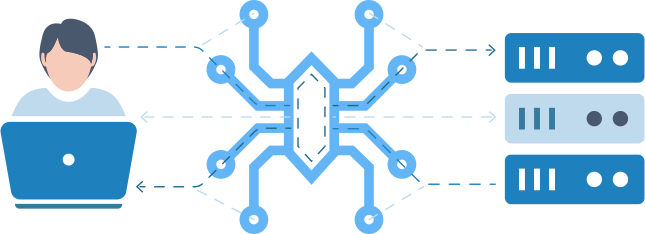
Here's how to use to bypass YouTube web scraping blocking. All we have to do is enable the anti-scraping protection bypass (asp=True) and select a proxy country:
# standard web scraping code
import httpx
from parsel import Selector

response = httpx.get("some youtube.com URL")
selector = Selector(response.text)

# in Scrapfly becomes this:
from scrapfly import ScrapeConfig, ScrapflyClient

# replaces your HTTP client (httpx in this case)
scrapfly = ScrapflyClient(key="Your Scrapfly API key")

response = scrapfly.scrape(ScrapeConfig(
    url="web page URL",
    asp=True, # turn on anti scraping protection to bypass blocking
    country="US", # set the proxy location to a specific country
    proxy_pool="public_residential_pool", # select a proxy pool
    render_js=True # render JavaScript with a headless browser when needed
))

# use the built in Parsel selector
selector = response.selector
# access the HTML content
html = response.scrape_result['content']
Learn more about Web Scraping API and how it works.
Power your scraping with Scrapfly
Forget about getting blocked. Scrapfly handles anti-bot bypasses, browser rendering, and proxy rotation so you can focus on the data.
FAQ
Are there public APIs for YouTube?
Yes. The public YouTube Data API v3 covers videos, channels, playlists, comments, captions, and search. Start with the official YouTube API documentation if your use case fits its quota and field limits.
What are the limitations of YouTube API?
The YouTube Data API uses a daily quota system. A default project gets 10,000 units per day. Expensive methods such as search.list can use 100 units per call. You also need to create a Google Cloud project, turn on the API, and manage API keys.
How do you scrape YouTube transcripts?
Use yt-dlp with writesubtitles=True and subtitleslangs=["en"], extract the signed timedtext URL, or use the youtube-transcript-api library for a short one-call workflow.
What is the best YouTube scraper tool?
For quick one-off jobs, yt-dlp needs little setup. For production scraping, Scrapfly's ASP layer handles proxy rotation and browser fingerprints so YouTube keeps returning HTML and JSON.
Can I scrape YouTube for sentiment analysis?
Yes. YouTube comments and transcripts work well for sentiment analysis, topic clustering, and RAG workflows.
Is it legal to scrape YouTube?
YouTube's Terms of Service restrict automated access, so check the terms before scraping. In the United States, public data scraping is not automatically a CFAA violation after hiQ v. LinkedIn. Scraping can still raise contract, privacy, and copyright issues. The legal disclaimer below covers the general limits.
How do you scrape YouTube without API access?
Use hidden data extraction from ytInitialPlayerResponse and ytInitialData, or call YouTube's internal /youtubei/v1/ endpoints. The search, channel, video, and comment sections above show both approaches in Python.
Summary
In this guide, we covered how to scrape YouTube data from multiple sources:
- Search pages for video search results
- Channel pages for channel and video metadata
- Video pages, Shorts, comment threads, and transcripts
Two core approaches run throughout: calling YouTube's internal /youtubei/v1/ APIs directly and extracting JSON embedded in script tags. Both return structured data without a headless browser, which keeps requests fast and light.
For batch jobs, yt-dlp extracts metadata, comments, and subtitles without an API key. For production scraping across thousands of videos, Scrapfly's ASP and residential proxy pool handle YouTube's anti-bot layer.
Legal Disclaimer and Precautions
This tutorial covers popular web scraping techniques for education. Interacting with public servers requires diligence and respect:
- Do not scrape at rates that could damage the website.
- Do not scrape data that's not available publicly.
- Do not store PII of EU citizens protected by GDPR.
- Do not repurpose entire public datasets which can be illegal in some countries.
Scrapfly does not offer legal advice but these are good general rules to follow. For more you should consult a lawyer.