
CORS (Cross-Origin Resource Sharing) is a security feature that prevents web applications from making requests to a different domain without permission. When a frontend application (e.g., http://localhost:3000) tries to access a backend service (e.g., http://localhost:8080), the browser sends a preflight OPTIONS request to ensure that the request is allowed. If Spring Security isn't configured to handle these preflight requests correctly, it can block them and result in HTTP 401 Unauthorized errors.
To resolve this, you need to configure Spring Security to explicitly permit CORS preflight requests. This involves setting up CORS configurations in Spring Security to handle OPTIONS requests properly and ensure that cross-origin requests are allowed.
Implementation to Fix 401 Error Due to CORS Preflights in a Spring Boot Project
Step 1: Create a New Spring Boot Project
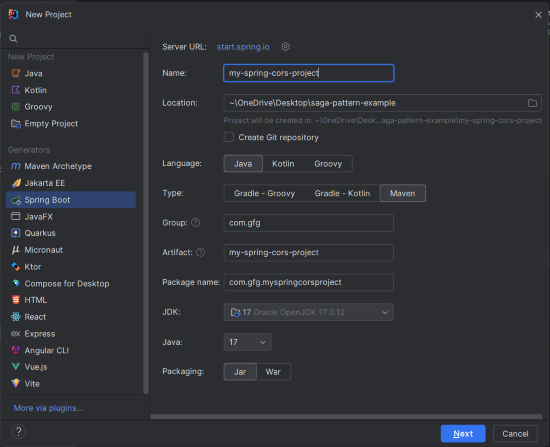
Create a new Spring Boot project using IntelliJ IDEA with the following options:
- Name:
my-spring-cors-project - Language: Java
- Type: Maven
- Packaging: Jar
Click on the Next button.
Step 2: Add Dependencies
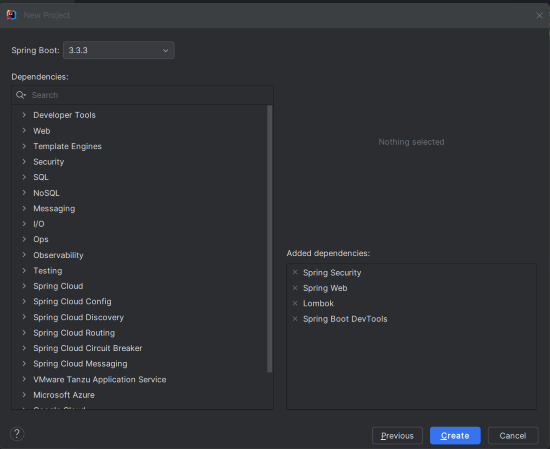
Add the following dependencies to the Spring Boot project:
- Spring Security
- Spring Web
- Lombok
- Spring Boot DevTools
Click on the Create button.
Project Structure
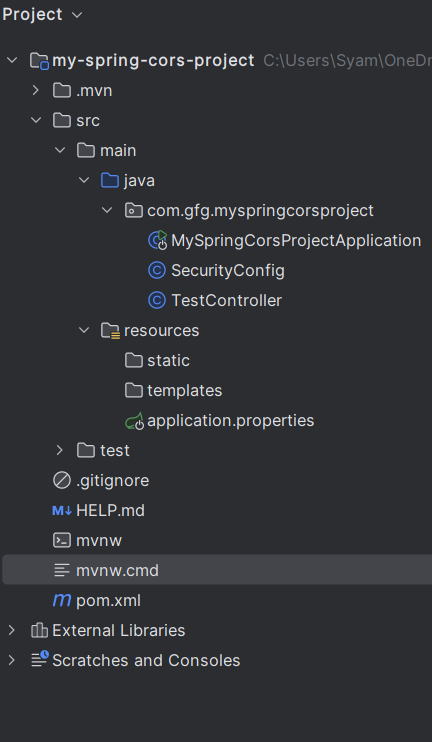
After successfully creating the project, the folder structure will look like the below image:
Step 3: Configure Application Properties
In src/main/resources/application.properties, add the following properties:
spring.application.name=my-spring-cors-project
server.port=8080
Step 4: Create the SecurityConfig Class
Create the SecurityConfig class to configure Spring Security to handle CORS preflight requests.
SecurityConfig.java
package com.gfg.myspringcorsproject;

import org.springframework.context.annotation.Bean;
import org.springframework.context.annotation.Configuration;
import org.springframework.security.config.annotation.web.builders.HttpSecurity;
import org.springframework.security.config.annotation.web.configuration.EnableWebSecurity;
import org.springframework.security.web.SecurityFilterChain;
import org.springframework.web.cors.CorsConfiguration;
import org.springframework.web.cors.UrlBasedCorsConfigurationSource;
import org.springframework.web.filter.CorsFilter;

@Configuration
@EnableWebSecurity
public class SecurityConfig {

    // Bean to configure Spring Security
    @Bean
    public SecurityFilterChain securityFilterChain(HttpSecurity http) throws Exception {
        http.cors() // Enable CORS
            .and()
            .csrf().disable() // Disable CSRF for simplicity
            .authorizeRequests()
            .requestMatchers("/api/test").permitAll() // Allow access to /api/test without authentication
            .anyRequest().authenticated(); // Require authentication for all other requests

        return http.build();
    }

    // Bean to configure CORS settings
    @Bean
    public CorsFilter corsFilter() {
        CorsConfiguration config = new CorsConfiguration();
        config.addAllowedOrigin("http://localhost:3000"); // Allow the frontend application
        config.addAllowedMethod("*"); // Allow all HTTP methods
        config.addAllowedHeader("*"); // Allow all headers
        config.setAllowCredentials(true); // Allow credentials (cookies, authorization headers)

        UrlBasedCorsConfigurationSource source = new UrlBasedCorsConfigurationSource();
        source.registerCorsConfiguration("/**", config);
        return new CorsFilter(source);
    }
}
Explaination:
securityFilterChain: Configures Spring Security to enable CORS and disable CSRF protection. The/api/testendpoint is allowed without authentication, while all other requests require authentication.corsFilter: Defines CORS settings, allowing all methods, headers, and credentials fromhttp://localhost:3000.
Step 5: Create the TestController Class
Create the TestController class with a simple REST endpoint to test CORS handling.
TestController.java
package com.gfg.myspringcorsproject;

import org.springframework.web.bind.annotation.GetMapping;
import org.springframework.web.bind.annotation.RequestMapping;
import org.springframework.web.bind.annotation.RestController;

@RestController
@RequestMapping("/api")
public class TestController {

    // Endpoint to test CORS configuration
    @GetMapping("/test")
    public String testEndpoint() {
        return "CORS is configured correctly!";
    }
}
Provides a simple GET endpoint /api/test that returns a confirmation message indicating that CORS is configured correctly.
Step 6: Main Class
The main class is the entry point of the Spring Boot application and does not require changes.
MySpringCorsProjectApplication.java:
package com.gfg.myspringcorsproject;

import org.springframework.boot.SpringApplication;
import org.springframework.boot.autoconfigure.SpringBootApplication;

@SpringBootApplication
public class MySpringCorsProjectApplication {

    public static void main(String[] args) {
        SpringApplication.run(MySpringCorsProjectApplication.class, args);
    }
}
pom.xml file:
<?xml version="1.0" encoding="UTF-8"?>
<project xmlns="https://maven.apache.org/POM/4.0.0" xmlns:xsi="https://www.w3.org/2001/XMLSchema-instance"
         xsi:schemaLocation="https://maven.apache.org/POM/4.0.0 https://maven.apache.org/xsd/maven-4.0.0.xsd">
    <modelVersion>4.0.0</modelVersion>
    <parent>
        <groupId>org.springframework.boot</groupId>
        <artifactId>spring-boot-starter-parent</artifactId>
        <version>3.3.3</version>
        <relativePath/> <!-- lookup parent from repository -->
    </parent>
    <groupId>com.gfg</groupId>
    <artifactId>my-spring-cors-project</artifactId>
    <version>0.0.1-SNAPSHOT</version>
    <name>my-spring-cors-project</name>
    <description>my-spring-cors-project</description>
    <url/>
    <licenses>
        <license/>
    </licenses>
    <developers>
        <developer/>
    </developers>
    <scm>
        <connection/>
        <developerConnection/>
        <tag/>
        <url/>
    </scm>
    <properties>
        <java.version>17</java.version>
    </properties>
    <dependencies>
        <dependency>
            <groupId>org.springframework.boot</groupId>
            <artifactId>spring-boot-starter-security</artifactId>
        </dependency>
        <dependency>
            <groupId>org.springframework.boot</groupId>
            <artifactId>spring-boot-starter-web</artifactId>
        </dependency>

        <dependency>
            <groupId>org.springframework.boot</groupId>
            <artifactId>spring-boot-devtools</artifactId>
            <scope>runtime</scope>
            <optional>true</optional>
        </dependency>
        <dependency>
            <groupId>org.projectlombok</groupId>
            <artifactId>lombok</artifactId>
            <optional>true</optional>
        </dependency>
        <dependency>
            <groupId>org.springframework.boot</groupId>
            <artifactId>spring-boot-starter-test</artifactId>
            <scope>test</scope>
        </dependency>
        <dependency>
            <groupId>org.springframework.security</groupId>
            <artifactId>spring-security-test</artifactId>
            <scope>test</scope>
        </dependency>
    </dependencies>

    <build>
        <plugins>
            <plugin>
                <groupId>org.springframework.boot</groupId>
                <artifactId>spring-boot-maven-plugin</artifactId>
                <configuration>
                    <excludes>
                        <exclude>
                            <groupId>org.projectlombok</groupId>
                            <artifactId>lombok</artifactId>
                        </exclude>
                    </excludes>
                </configuration>
            </plugin>
        </plugins>
    </build>

</project>
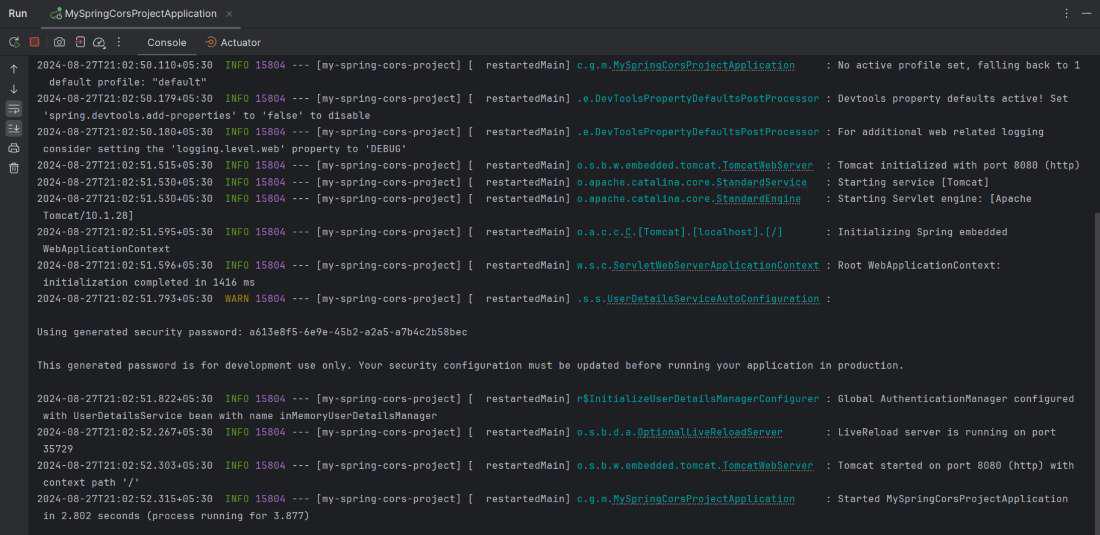
Step 7: Run the Application
Run the application on port 8080. Ensure it starts without errors.
Step 8: Testing the CORS Configuration
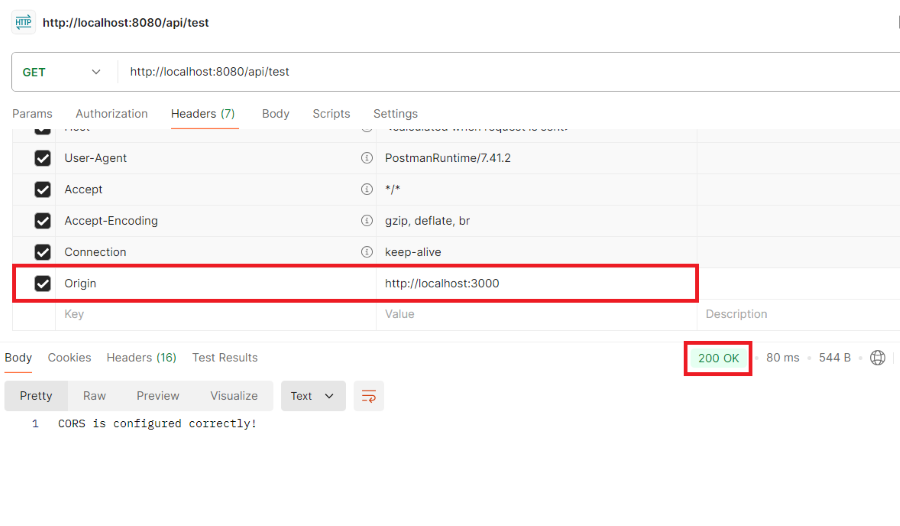
Open the postman tool to send the GET request to the backend endpoint to check if CORS preflight handling is configured correctly.
Choose the following options:
- method: GET
- URL: http://localhost:8080/api/test
- Headers: Origin: http:localhost:3000
Click on the Send button.
Result: We should see the response HTTP 200 OK indicating that the CORS preflight request has been allowed and shows the response message "CORS is configured correctly!" from the backend.
This example project demonstrates the how to implement and test the CORS preflight handling using Spring Boot and Spring Security. By correctly configuring the CORS in securityConfig.java and using the simple test endpoints, we can ensure that the cross-origin requests are managed securing, avoiding the common issues like HTTP 401 errors.
