
Injecting values into static fields in Spring Boot is a common challenge for developers working with dependency injection. Since static fields are tied to the class rather than an instance, Spring’s IoC container cannot easily inject them. This article will walk you through best practices for injecting static fields in Spring Boot using various techniques like @PostConstruct, setter methods, and ApplicationContext. Whether you are a beginner or an experienced developer, you will find a practical example for injecting static fields in this article.
How to Inject Values into Static Fields in Spring Boot
In the Spring Framework, dependency injection (DI) is typically applied to instance-level fields or methods, where the Spring IoC container manages the lifecycle and dependencies of the individual bean instances. However, injecting into static fields is more complex due to the nature of static members in Java.
Static Fields and Spring IoC
Instance Fields vs. Static Fields
- Instance Fields: Instance fields belong to a specific instance of a class. Spring beans are objects created and managed by the Spring container, allowing easy injection of values into these instance fields at runtime.
- Static Fields: Static fields, on the other hand, belong to the class itself, not to any instance of the class. They are shared among all instances and are initialized when the class is loaded. This means that Spring's typical bean-based injection does not work because static fields are initialized outside the context of any specific bean.
Why Static Fields Are Problematic for Dependency Injection
- Timing of Initialization: Static fields are initialized when the class is loaded, long before the Spring IoC container has the chance to inject dependencies. Thus, static fields exist outside of the lifecycle that Spring typically controls.
- Lack of Bean Context: Static fields are not tied to any instance of the bean, so Spring's container cannot directly manage them. In typical Spring DI, dependencies are injected when the object is instantiated, but static fields don't belong to any instance.
Despite these challenges, there are multiple ways to inject values into static fields, which may require some manual handling or workarounds. Below are the most common methods:
Methods to Inject Values into Static Fields
1. Setter Injection
In setter injection, a non-static method can be used to assign values to static fields. The idea is simple: inject the value into a non-static field or method and then set the static field inside that method.
Example:
@Component
public class StaticFieldInjector {

    private static String staticValue;

    private String value; // Non-static field for injection

    @Value("${example.property}")
    public void setValue(String value) {
        this.value = value;
        StaticFieldInjector.staticValue = value; // Assigning to static field
    }

    public static String getStaticValue() {
        return staticValue;
    }
}
How it works:
- The
@Valueannotation injects the property value into the non-staticvaluefield. - In the setter method (
setValue), the injected value is assigned to the static fieldstaticValue. - This method ensures the static field is initialized with the value after Spring’s dependency injection completes.
2. Using @PostConstruct Annotation
@PostConstruct is a lifecycle callback annotation in Spring that is executed after the dependency injection is complete and the bean has been initialized. It can be used to assign the injected values to the static fields after Spring finishes its DI process.
Example:
@Component
public class StaticFieldInjector {

    private String value; // Non-static field for injection

    @Value("${example.property}")
    private String injectedValue;

    private static String staticValue;

    @PostConstruct
    public void init() {
        staticValue = injectedValue; // Assigning to static field
    }

    public static String getStaticValue() {
        return staticValue;
    }
}
How it works:
- The
@Valueannotation injects the value into theinjectedValuefield. - The
@PostConstructmethodinit()is called after all the dependencies have been injected. - Inside the
init()method, the static field is assigned the value from the non-static fieldinjectedValue.
3. Using ApplicationContext to Manually Fetch Beans
Another method involves accessing the Spring ApplicationContext directly. This gives you more control over beans and can be used to inject the static fields manually at runtime.
Example:
@Component
public class StaticFieldInjector implements ApplicationContextAware {

    private static ApplicationContext context;

    @Value("${example.property}")
    private String value;

    @Override
    public void setApplicationContext(ApplicationContext applicationContext) {
        context = applicationContext; // Storing ApplicationContext in a static field
    }

    public static String getStaticValue() {
        StaticFieldInjector bean = context.getBean(StaticFieldInjector.class);
        return bean.value; // Retrieving injected value
    }
}
How it works:
- The class implements
ApplicationContextAwareto gain access to Spring’sApplicationContext. - The
setApplicationContextmethod is called by Spring, allowing the context to be stored in a static field. - The static method
getStaticValue()retrieves the current bean instance from theApplicationContextand returns the injected value.
Example Project: Injecting a Value into a Static Field in Spring
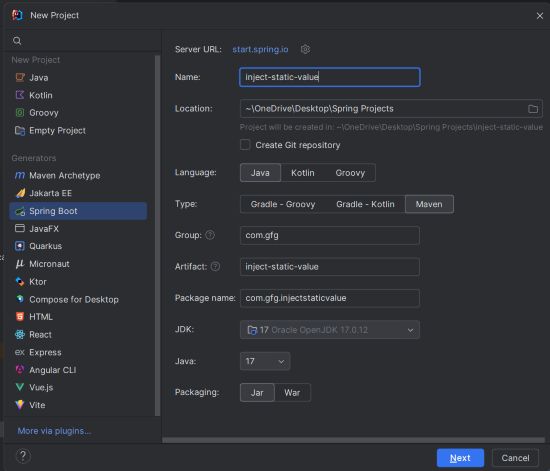
Step 1: Create the New Spring Boot Project
Create a new Spring Boot project using IntelliJ IDEA with the following options:
- Name:
inject-static-value - Language: Java
- Type: Maven
- Packaging: Jar
Click on the Next button.
Step 2: Add the Dependencies
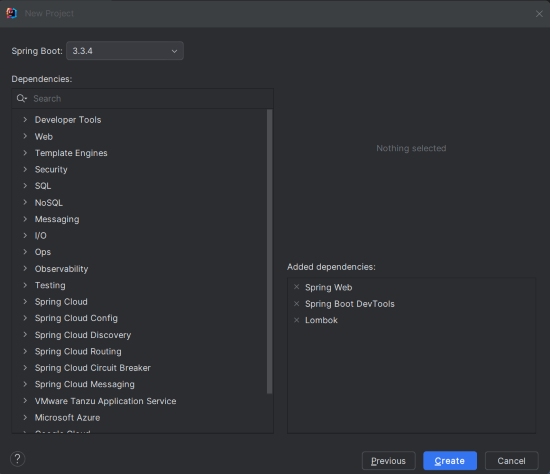
Add the following dependencies to the Spring Boot project:
- Spring Web
- Spring Boot DevTools
- Lombok
Click on the Create button.
Project Structure
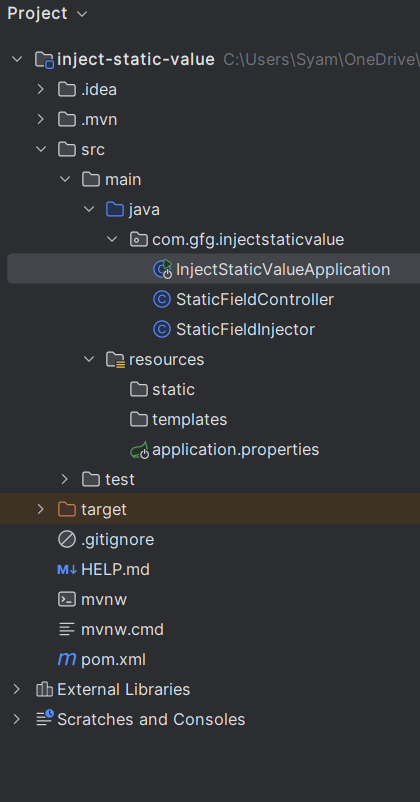
After creating the project successfully, the folder structure will look like the below image:
Step 3: Configure Application Properties
spring.application.name=inject-static-value
example.property=Hello Static Field
Step 4: Create the StaticFieldInjector Class
Create the StaticFieldInjector class. Use @PostConstruct for the initialization logic after the dependency injection. This will assign values to static fields after the bean creation of the Spring Boot application.
StaticFieldInjector.java
package com.gfg.injectstaticvalue;

import jakarta.annotation.PostConstruct;
import org.springframework.beans.factory.annotation.Value;
import org.springframework.context.ApplicationContext;
import org.springframework.context.ApplicationContextAware;
import org.springframework.stereotype.Component;

@Component
public class StaticFieldInjector implements ApplicationContextAware {

    private static String staticValue;
    private String value;

    @Value("${example.property}")
    private String injectedValue;

    @PostConstruct
    public void init() {
        staticValue = injectedValue; // Assigning to static field
    }

    public static String getStaticValue() {
        return staticValue;
    }

    @Override
    public void setApplicationContext(ApplicationContext applicationContext) {
        // Additional logic if required
    }
}
Step 5: Create the StaticFieldController Class
Create the StaticFieldController class, which exposes a simple GET endpoint that triggers the retrieval of the injected static field value in the Spring Boot application.
StaticFieldController.java
package com.gfg.injectstaticvalue;

import org.springframework.web.bind.annotation.GetMapping;
import org.springframework.web.bind.annotation.RequestMapping;
import org.springframework.web.bind.annotation.RestController;

@RestController
@RequestMapping("/api/static-value")
public class StaticFieldController {

    @GetMapping("/get")
    public String getStaticValue() {
        return "Injected Static Value: " + StaticFieldInjector.getStaticValue();
    }
}
@GetMapping("/get"): This method is exposed as a GET HTTP method at the /get endpoint. When this endpoint is called, it returns the static field value retrieved from StaticFieldInjector.
Step 6: Main Class
No changes are required in the main class.
InjectStaticValueApplication.java
package com.gfg.injectstaticvalue;

import org.springframework.boot.SpringApplication;
import org.springframework.boot.autoconfigure.SpringBootApplication;

@SpringBootApplication
public class InjectStaticValueApplication {

    public static void main(String[] args) {
        SpringApplication.run(InjectStaticValueApplication.class, args);
    }
}
pom.xml File:
<?xml version="1.0" encoding="UTF-8"?>
<project xmlns="https://maven.apache.org/POM/4.0.0" xmlns:xsi="https://www.w3.org/2001/XMLSchema-instance"
         xsi:schemaLocation="https://maven.apache.org/POM/4.0.0 https://maven.apache.org/xsd/maven-4.0.0.xsd">
    <modelVersion>4.0.0</modelVersion>
    <parent>
        <groupId>org.springframework.boot</groupId>
        <artifactId>spring-boot-starter-parent</artifactId>
        <version>3.3.4</version>
        <relativePath/> <!-- lookup parent from repository -->
    </parent>
    <groupId>com.gfg</groupId>
    <artifactId>inject-static-value</artifactId>
    <version>0.0.1-SNAPSHOT</version>
    <name>inject-static-value</name>
    <description>inject-static-value</description>
    <url/>
    <licenses>
        <license/>
    </licenses>
    <developers>
        <developer/>
    </developers>
    <scm>
        <connection/>
        <developerConnection/>
        <tag/>
        <url/>
    </scm>
    <properties>
        <java.version>17</java.version>
    </properties>
    <dependencies>
        <dependency>
            <groupId>org.springframework.boot</groupId>
            <artifactId>spring-boot-starter-web</artifactId>
        </dependency>

        <dependency>
            <groupId>org.springframework.boot</groupId>
            <artifactId>spring-boot-devtools</artifactId>
            <scope>runtime</scope>
            <optional>true</optional>
        </dependency>
        <dependency>
            <groupId>org.projectlombok</groupId>
            <artifactId>lombok</artifactId>
            <optional>true</optional>
        </dependency>
        <dependency>
            <groupId>org.springframework.boot</groupId>
            <artifactId>spring-boot-starter-test</artifactId>
            <scope>test</scope>
        </dependency>
    </dependencies>

    <build>
        <plugins>
            <plugin>
                <groupId>org.springframework.boot</groupId>
                <artifactId>spring-boot-maven-plugin</artifactId>
                <configuration>
                    <excludes>
                        <exclude>
                            <groupId>org.projectlombok</groupId>
                            <artifactId>lombok</artifactId>
                        </exclude>
                    </excludes>
                </configuration>
            </plugin>
        </plugins>
    </build>

</project>
Step 7: Run the Application
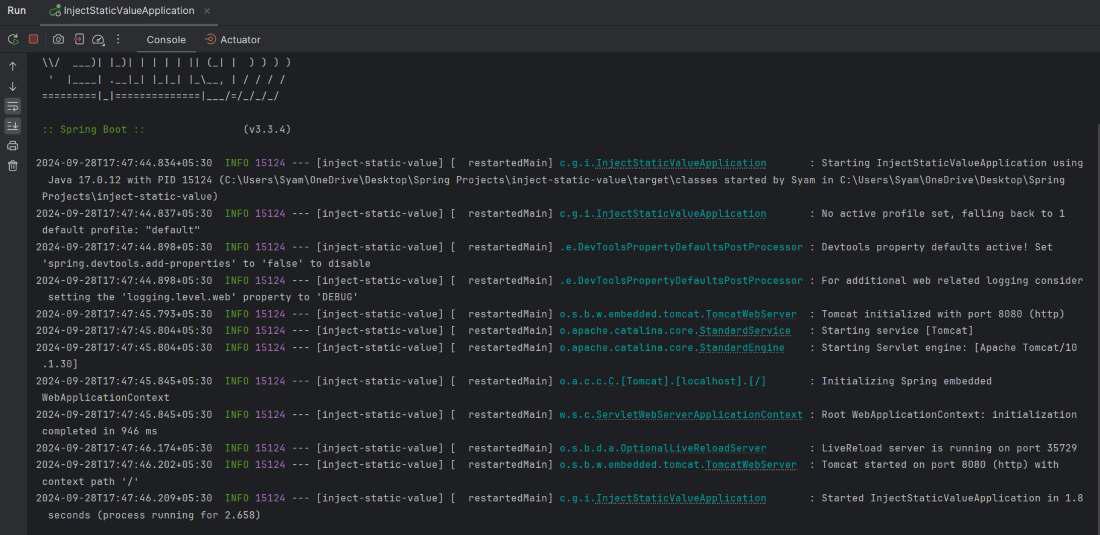
Now, run the spring boot application and it will start at port 8080.
Step 8: Testing the Application
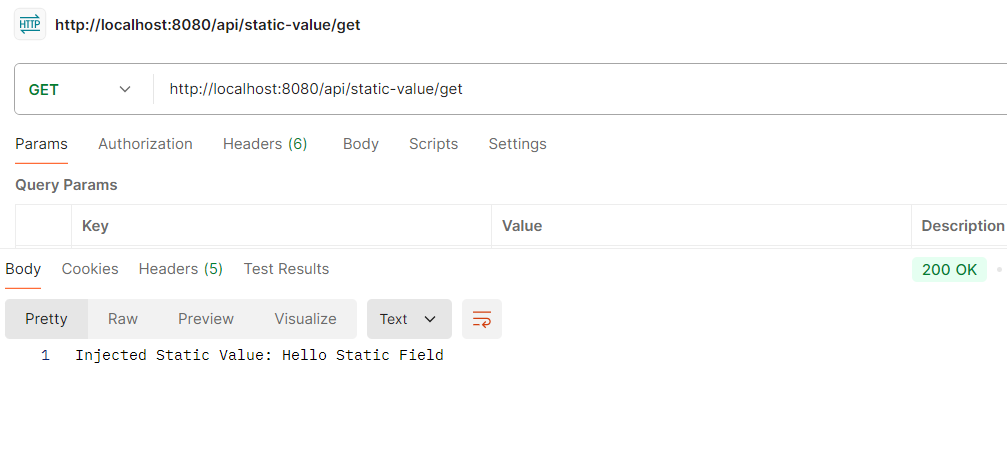
Use Postman tool to call the below endpoint:
GET http://localhost:8080/api/static-value/getOutput:
Injecting values into static fields in Spring Boot can be achieved through various methods like setter injection, @PostConstruct, and directly accessing the ApplicationContext. Each method has its advantages and can be chosen based on the specific use case.
By following this article, we can effectively manage static fields in our Spring Boot applications while adhering to best practices for dependency injection. This approach not only helps maintain clean code but also leverages Spring's powerful dependency injection capabilities.
