
JPA Cascading Operations allow actions on a parent entity to automatically apply to its related child entities. This helps maintain consistency and reduces the need for manual handling of associated objects.
- Automatically propagates operations like persist, merge, remove, refresh, and detach to related entities
- Supports multiple cascade types (PERSIST, MERGE, REMOVE, REFRESH, DETACH, ALL) for flexible control
- Ensures data consistency and prevents orphan or mismatched records
Real-world example: In an Order and OrderItems system, when an order is saved or deleted, all its associated items are automatically persisted or removed using cascading, ensuring the database stays consistent without extra code.
Cascade operations
- CascadeType.ALL: The ALL cascade type can propagate all operations, like the PERSIST, MERGE, REMOVE, REFRESH, and DETACH to the child entities of the JPA application.
- CascadeType.PERSIST: The PERSIST cascade type can propagate the persist operations when the parent entity is persisted and the operation cascades to the child entities.
- CascadeType.MERGE: The MERGE cascade type can propagate the merge operation and its parent entity is merged the operation cascades to its child entities of the JPA application.
- CascadeType.REMOVE: It propagates the remove operation, so when a parent entity is deleted, all its associated child entities are also automatically deleted.
- CascadeType.REFRESH: The REFRESH cascade type can propagates the refresh operation when the parent entity is refreshed when the operation cascades to its the child entities of the JPA application.
Steps to Implement Cascade operations
- Define Entities & Relationships: Use @Entity, @OneToMany, @ManyToOne, and mappedBy to properly map associations between entities.
- Configure Cascading: Set the cascade attribute (e.g., CascadeType.ALL) to control how operations propagate from parent to child.
- Execute & Verify: Perform operations on the parent entity and observe automatic changes in child entities to ensure consistency.
Project Implementation of the Cascade Operations in JPA
This section demonstrates how to implement cascade operations in JPA .
Step 1: Create JPA Project
Create a Maven-based project in IntelliJ IDEA named ->jpa-cascade-operations-demo
- Use Maven to manage dependencies and build configuration easily.
- Keep proper project structure (src/main/java, resources) for JPA setup.
Step 2: Add Required Dependencies
- Add dependencies like Hibernate, MySQL connector, JAXB, and JUnit in
pom.xml. - Add the following dependencies into the JPA project
Dependencies:
<dependency>
            <groupId>org.hibernate.orm</groupId>
            <artifactId>hibernate-core</artifactId>
            <version>6.0.2.Final</version>
        </dependency>
        <dependency>
            <groupId>org.glassfish.jaxb</groupId>
            <artifactId>jaxb-runtime</artifactId>
            <version>3.0.2</version>
        </dependency>
        <dependency>
            <groupId>org.junit.jupiter</groupId>
            <artifactId>junit-jupiter-api</artifactId>
            <version>${junit.version}</version>
            <scope>test</scope>
        </dependency>
        <dependency>
            <groupId>org.junit.jupiter</groupId>
            <artifactId>junit-jupiter-engine</artifactId>
            <version>${junit.version}</version>
            <scope>test</scope>
        </dependency>
        <dependency>
            <groupId>mysql</groupId>
            <artifactId>mysql-connector-java</artifactId>
            <version>8.0.28</version>
        </dependency><dependency>
            <groupId>org.hibernate.orm</groupId>
            <artifactId>hibernate-core</artifactId>
            <version>6.0.2.Final</version>
        </dependency>
        <dependency>
            <groupId>org.glassfish.jaxb</groupId>
            <artifactId>jaxb-runtime</artifactId>
            <version>3.0.2</version>
        </dependency>
        <dependency>
            <groupId>org.junit.jupiter</groupId>
            <artifactId>junit-jupiter-api</artifactId>
            <version>${junit.version}</version>
            <scope>test</scope>
        </dependency>
        <dependency>
            <groupId>org.junit.jupiter</groupId>
            <artifactId>junit-jupiter-engine</artifactId>
            <version>${junit.version}</version>
            <scope>test</scope>
        </dependency>
        <dependency>
            <groupId>mysql</groupId>
            <artifactId>mysql-connector-java</artifactId>
            <version>8.0.28</version>
        </dependency>
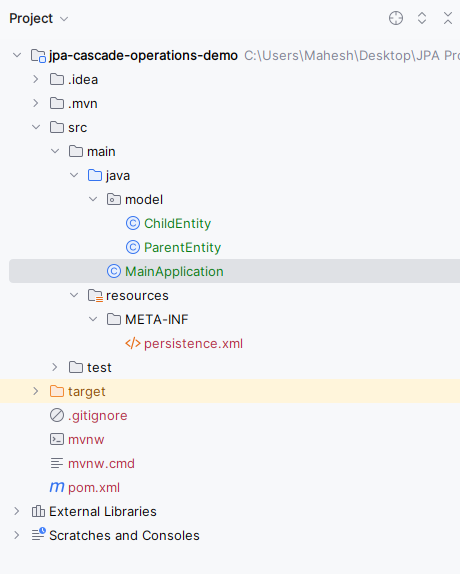
Now the project structure will look like the below image:
Step 3: Configure persistence.xml
Define database configuration and persistence unit.
- persistence-unit acts as a configuration block for entity management.
- Properties like hibernate.hbm2ddl.auto=update automatically create/update tables.
<?xml version="1.0" encoding="UTF-8" standalone="yes"?>
<persistence xmlns="https://jakarta.ee/xml/ns/persistence/"
             xmlns:xsi="https://www.w3.org/2001/XMLSchema-instance"
             xsi:schemaLocation="https://jakarta.ee/xml/ns/persistence/ https://jakarta.ee/xml/ns/persistence//persistence_3_0.xsd"
             version="3.0">
    <persistence-unit name="persistence_unit_name">
        <class>model.ParentEntity</class>
        <class>model.ChildEntity</class>

        <properties>
            <property name="javax.persistence.jdbc.url" value="jdbc:mysql://localhost:3306/example"/>
            <property name="javax.persistence.jdbc.user" value="root"/>
            <property name="javax.persistence.jdbc.password" value=""/>
            <property name="javax.persistence.jdbc.driver" value="com.mysql.jdbc.Driver"/>
            <property name="hibernate.dialect" value="org.hibernate.dialect.MySQL5Dialect"/>
            <property name="hibernate.hbm2ddl.auto" value="update"/>
        </properties>
    </persistence-unit>
</persistence>
Step 4: Create Parent Entity
Define a parent class with @OneToMany relationship and cascading.
- cascade = CascadeType.ALL ensures all operations propagate to child entities.
- mappedBy indicates that the child entity owns the relationship.
Go to src > main > java > model > ParentEntity and write the below code file.
package model;

import jakarta.persistence.*;

import java.util.ArrayList;
import java.util.List;

@Entity
public class ParentEntity {
    @Id
    @GeneratedValue(strategy = GenerationType.IDENTITY)
    private Long id;

    @OneToMany(mappedBy = "parent", cascade = CascadeType.ALL)
    private List<ChildEntity> children = new ArrayList<>();

    // Getter and Setter methods

    public Long getId() {
        return id;
    }

    public void setId(Long id) {
        this.id = id;
    }

    public List<ChildEntity> getChildren() {
        return children;
    }

    public void setChildren(List<ChildEntity> children) {
        this.children = children;
    }


    @Override
    public String toString() {
        return "ParentEntity{" +
                "id=" + id +
                '}';
    }
}
Step 5: Create Child Entity
Define a child class with @ManyToOne relationship.
- Child entity holds the foreign key and owns the relationship.
- Proper mapping ensures bidirectional association between parent and child.
Go to src > main > java > model > ChildEntity and write the below code file.
package model;

import jakarta.persistence.*;

@Entity
public class ChildEntity {
    @Id
    @GeneratedValue(strategy = GenerationType.IDENTITY)
    private Long id;

    @ManyToOne
    private ParentEntity parent;

    // Getter and Setter methods

    public Long getId() {
        return id;
    }

    public void setId(Long id) {
        this.id = id;
    }

    public ParentEntity getParent() {
        return parent;
    }

    public void setParent(ParentEntity parent) {
        this.parent = parent;
    }

    @Override
    public String toString() {
        return "ChildEntity{" +
                "id=" + id +
                '}';
    }
}
Step 6: Create Main Application Class
Write logic to perform persistence operations.
- EntityManager is used to interact with the persistence context.
- EntityTransaction ensures operations are executed atomically.
Go to src > main > java > MainApplication and enter the below code.
import jakarta.persistence.*;
import model.ChildEntity;
import model.ParentEntity;

import java.util.List;


public class MainApplication {
    public static void main(String[] args) {
        EntityManagerFactory entityManagerFactory = Persistence.createEntityManagerFactory("persistence_unit_name");
        EntityManager entityManager = entityManagerFactory.createEntityManager();
        EntityTransaction transaction = entityManager.getTransaction();

        try {
            transaction.begin();

            // Create Parent Entity with Children
            ParentEntity parent = new ParentEntity();
            ChildEntity child1 = new ChildEntity();
            ChildEntity child2 = new ChildEntity();
            parent.getChildren().add(child1);
            parent.getChildren().add(child2);
            child1.setParent(parent);
            child2.setParent(parent);

            // Persist Parent (Cascades to Children)
            entityManager.persist(parent);

            transaction.commit();

            // Print Parent and Child tables data
            printParentAndChildData(entityManager);

        } catch (Exception e) {
            if (transaction.isActive())
                transaction.rollback();
            e.printStackTrace();
        } finally {
            entityManager.close();
            entityManagerFactory.close();
        }
    }

    private static void printParentAndChildData(EntityManager entityManager) {
        System.out.println("Parent Table:");
        Query parentQuery = entityManager.createQuery("SELECT p FROM ParentEntity p");
        List<ParentEntity> parents = parentQuery.getResultList();
        for (ParentEntity parent : parents) {
            System.out.println(parent);
        }

        System.out.println("\nChild Table:");
        Query childQuery = entityManager.createQuery("SELECT c FROM ChildEntity c");
        List<ChildEntity> children = childQuery.getResultList();
        for (ChildEntity child : children) {
            System.out.println(child);
        }
    }
}
Step 7: Run the Application
Execute the project and observe console output and database tables.
- Both Parent and Child records should be inserted automatically.
- Confirms correct implementation of cascade operations.
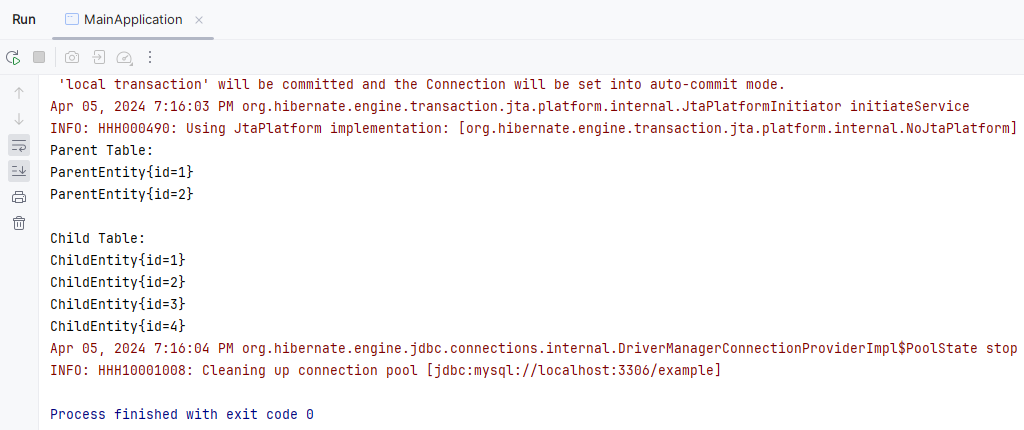
If we follow the above steps, then we can successfully demonstrate the cascading operations of the JPA application.
