Updating an entity refers to modifying one or more attributes of an already persisted entity object and synchronizing these changes back to the database. Once the entity is updated, JPA ensures the data consistency automatically when a transaction is committed.
Steps to Update an Entity in JPA
1. Retrieving the Entity
Before updating, you must fetch the entity from the database. This is done using the EntityManager.find() method, which retrieves the entity instance based on its primary key.
EntityManager entityManager = entityManagerFactory.createEntityManager();
EntityTransaction transaction = entityManager.getTransaction();
transaction.begin();

// Fetching the entity by ID
Employee employee = entityManager.find(Employee.class, 1L);

transaction.commit();
entityManager.close();
2. Modifying the Attributes
Once retrieved, modify the entity’s properties using setter methods.
employee.setSalary(5000);
employee.setDepartment("IT");
3. Persisting the Changes
To save the modifications, the updated entity must be merged into the persistence context. JPA tracks the changes (using dirty checking) and updates the corresponding database record upon transaction commit.
EntityManager entityManager = entityManagerFactory.createEntityManager();
EntityTransaction transaction = entityManager.getTransaction();
transaction.begin();

// Merge the updated entity
entityManager.merge(employee);

transaction.commit();
entityManager.close();
Note: If the entity is managed, changes are automatically synchronized without explicitly calling merge().
Key JPA Concepts Involved
- Dirty Checking: Automatically detects modified fields in managed entities and synchronizes them with the database at commit time.
- Entity States: An entity can be new, managed, detached, or removed. Updates occur only when the entity is in the managed state.
- JPQL Updates: JPA also supports bulk updates using JPQL for batch processing.
- Optimistic Locking: Prevents concurrent update conflicts by ensuring data integrity during simultaneous transactions.
Project: Updating an Entity in JPA
Step 1: Create a Maven Project
Create a Maven project named jpa-update-entity-demo using IntelliJ IDEA or Eclipse.
Step 2: Add Dependencies (pom.xml)
<dependencies>
    <dependency>
        <groupId>org.hibernate.orm</groupId>
        <artifactId>hibernate-core</artifactId>
        <version>6.0.2.Final</version>
    </dependency>
    <dependency>
        <groupId>org.glassfish.jaxb</groupId>
        <artifactId>jaxb-runtime</artifactId>
        <version>3.0.2</version>
    </dependency>
    <dependency>
        <groupId>mysql</groupId>
        <artifactId>mysql-connector-java</artifactId>
        <version>8.0.28</version>
    </dependency>
</dependencies>
Step 3: Configure persistence.xml
File: src/main/resources/META-INF/persistence.xml
<?xml version="1.0" encoding="UTF-8"?>
<persistence xmlns="https://jakarta.ee/xml/ns/persistence/"
             xmlns:xsi="https://www.w3.org/2001/XMLSchema-instance"
             xsi:schemaLocation="https://jakarta.ee/xml/ns/persistence/
                                 https://jakarta.ee/xml/ns/persistence/persistence_3_0.xsd"
             version="3.0">

    <persistence-unit name="EmployeePU">
        <class>model.Employee</class>
        <properties>
            <property name="javax.persistence.jdbc.url" value="jdbc:mysql://localhost:3306/example"/>
            <property name="javax.persistence.jdbc.user" value="root"/>
            <property name="javax.persistence.jdbc.password" value=""/>
            <property name="javax.persistence.jdbc.driver" value="com.mysql.cj.jdbc.Driver"/>
            <property name="hibernate.dialect" value="org.hibernate.dialect.MySQL8Dialect"/>
            <property name="hibernate.hbm2ddl.auto" value="update"/>
        </properties>
    </persistence-unit>
</persistence>
Step 4: Create Entity Class (Employee.java)
Package: model
package model;

import jakarta.persistence.*;

@Entity
@Table(name = "employees")
public class Employee {

    @Id
    @GeneratedValue(strategy = GenerationType.IDENTITY)
    private Long id;

    private String name;
    private double salary;
    private String department;

    // Getters and setters
    public Long getId() { return id; }
    public void setId(Long id) { this.id = id; }

    public String getName() { return name; }
    public void setName(String name) { this.name = name; }

    public double getSalary() { return salary; }
    public void setSalary(double salary) { this.salary = salary; }

    public String getDepartment() { return department; }
    public void setDepartment(String department) { this.department = department; }
}
Step 5: Create Repository Class (EmployeeRepository.java)
EmployeeRepository:
package repository;

import jakarta.persistence.*;
import model.Employee;

public class EmployeeRepository {

    private final EntityManagerFactory entityManagerFactory =
            Persistence.createEntityManagerFactory("EmployeePU");

    public void saveEmployee(Employee employee) {
        EntityManager em = entityManagerFactory.createEntityManager();
        EntityTransaction tx = em.getTransaction();
        tx.begin();
        em.persist(employee);
        tx.commit();
        em.close();
    }

    public Employee findEmployeeById(Long id) {
        EntityManager em = entityManagerFactory.createEntityManager();
        Employee emp = em.find(Employee.class, id);
        em.close();
        return emp;
    }

    public void updateEmployee(Employee employee) {
        EntityManager em = entityManagerFactory.createEntityManager();
        EntityTransaction tx = em.getTransaction();
        tx.begin();
        em.merge(employee);
        tx.commit();
        em.close();
    }
}
Step 6: Main Application
MainApplication.java:
import model.Employee;
import repository.EmployeeRepository;

public class MainApplication {
    public static void main(String[] args) {

        EmployeeRepository repository = new EmployeeRepository();

        // Step 1: Save a new employee
        Employee emp = new Employee();
        emp.setName("John Doe");
        emp.setSalary(5000);
        emp.setDepartment("IT");
        repository.saveEmployee(emp);
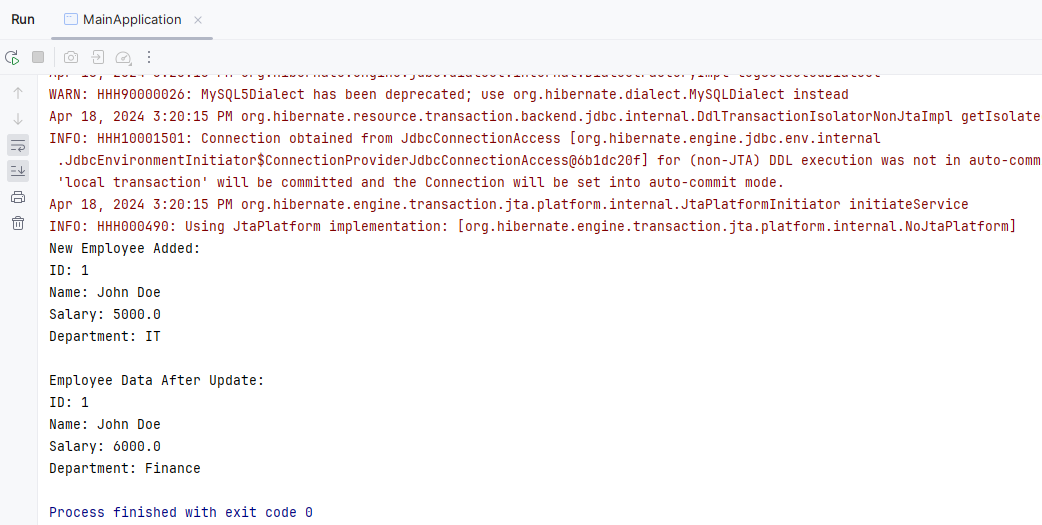
        System.out.println("New Employee Added:");
        printEmployee(emp);

        // Step 2: Retrieve and update the employee
        Employee existing = repository.findEmployeeById(emp.getId());
        if (existing != null) {
            existing.setSalary(6000);
            existing.setDepartment("Finance");
            repository.updateEmployee(existing);
            System.out.println("\nAfter Update:");
            printEmployee(existing);
        }
    }

    private static void printEmployee(Employee e) {
        System.out.println("ID: " + e.getId());
        System.out.println("Name: " + e.getName());
        System.out.println("Salary: " + e.getSalary());
        System.out.println("Department: " + e.getDepartment());
    }
}
Output: