
In a Spring application, integration tests help validate the complete interaction between different components like services, repositories, and controllers. Sometimes, it can be essential to override specific Spring beans during integration testing to simulate particular behaviors or provide mock implementations. This allows developers to isolate and test specific parts of the application without relying on external systems like databases or third-party services.
In this article, we will learn how to Override Spring Beans in Integration Test.
Prerequisites:
- Basic knowledge of the Java and Spring Boot.
- Familiarity with JUnit testing.
- Basic understanding of the mocking libraries like Mockito for creating the mock beans.
- JDK and IntelliJ IDEA installed in your system.
Override Spring Beans in Integration Test
Integration testing in Spring can often be done using the @SpringBootTest annotation, which loads the entire application context. Sometimes, it may be necessary to override a bean in this context to mock certain dependencies or provide test-specific implementations. The common approaches for this are:
- Using
@MockBean: The most straightforward way to replace a bean with a mock version. - Using
@TestConfiguration: Define a separate configuration class to provide test-specific beans. - Using
@Primarywith@Profile: Create a test profile and use the@Primaryannotation to replace the bean during testing.
Example:
Let's assume we have a UserService that interacts with a UserRepository.
UserService Implementation:
@Service
public class UserService {
    private final UserRepository userRepository;

    public UserService(UserRepository userRepository) {
        this.userRepository = userRepository;
    }

    public List<User> getAllUsers() {
        return userRepository.findAll();
    }
}
Now, lets write the integration test for the UserService where we override the UserRepository bean with the mock.
@SpringBootTest
public class UserServiceIntegrationTest {

    @MockBean
    private UserRepository userRepository;

    @Autowired
    private UserService userService;

    @Test
    public void testGetAllUsers() {
        // Given
        User mockUser = new User(1L, "Sweta", "sweta@example.com");
        when(userRepository.findAll()).thenReturn(Collections.singletonList(mockUser));

        // When
        List<User> users = userService.getAllUsers();

        // Then
        assertEquals(1, users.size());
        assertEquals("Sweta", users.get(0).getName());
    }
}
In this example:
- @MockBean: The
@MockBeanannotation replaces theUserRepositorybean in the application context with a mock instance. - Mock Behavior: The behavior of the mock is defined using
when(...).thenReturn(...), simulating the repository returning a list of users. - Assertions: The output of
userService.getAllUsers()is validated to ensure it returns the mocked data.
Project Implementation to Override Spring Beans in Integration Test
Create an example project that demonstrates how to override the Spring beans in the integration tests. We will create one Spring Boot application that includes the user management service. In this project, we will use the JUnit for testing and Mockito for mocking dependencies.
Functionality:
- The UserService retrieves the list of users from a UserRepository.
- The integration test overrides the UserRepository using the @MockBean.
Step 1: Create a New Spring Boot Project
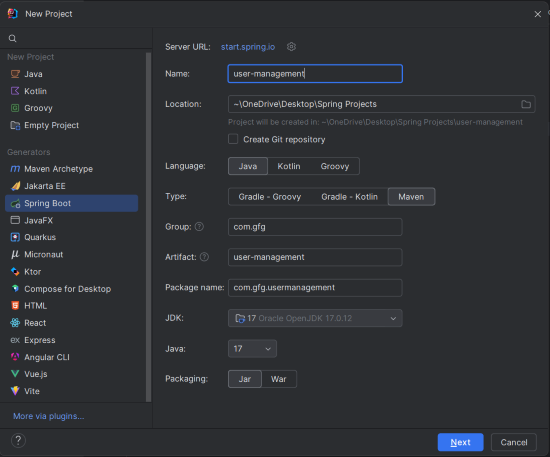
Create a new Spring Boot Project using IntelliJ IDEA with the following options:
- Name: user-management
- Language: Java
- Type: Maven
- Packaging: Jar
Click on the Next button.
Step 2: Add the Dependencies
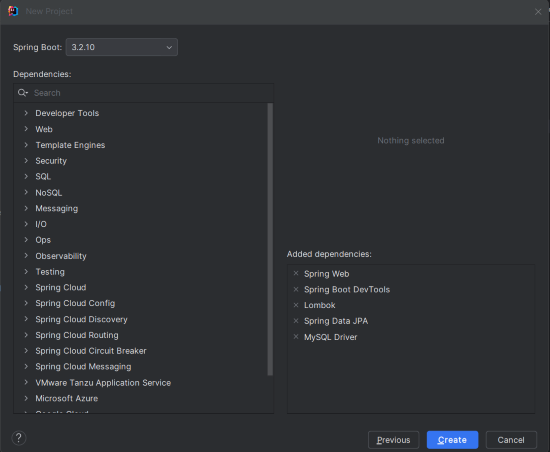
Add the following dependencies into the Spring Boot Project.
- Spring Web
- Spring Boot DevTools
- Lombok
- Spring Data JPA
- MySQL Driver
Click on the Create button.
Project Structure
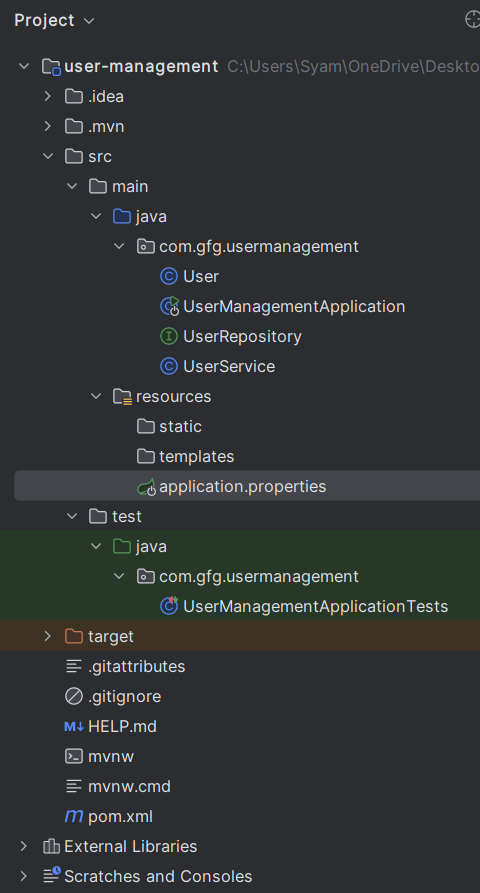
After project creation done, set the folder structure like below image:
Step 3: Configure Application Properties
spring.application.name=user-management
spring.datasource.url=jdbc:mysql://localhost:3306/demo
spring.datasource.username=root
spring.datasource.password=mypassword
spring.jpa.show-sql=true
spring.jpa.hibernate.ddl-auto=update
Step 4: Create the User Class
package com.gfg.usermanagement;

import jakarta.persistence.Entity;
import jakarta.persistence.GeneratedValue;
import jakarta.persistence.GenerationType;
import jakarta.persistence.Id;
import lombok.AllArgsConstructor;
import lombok.Data;
import lombok.NoArgsConstructor;

@Entity
@AllArgsConstructor
@NoArgsConstructor
@Data
public class User {
    @Id
    @GeneratedValue(strategy = GenerationType.IDENTITY)
    private Long id;
    private String name;
    private String email;
}
Step 5: Create the UserRepository Interface
package com.gfg.usermanagement;

import java.util.List;

public interface UserRepository {
    List<User> findAll();
}
Step 6: Create the UserService Class
package com.gfg.usermanagement;

import org.springframework.stereotype.Service;
import java.util.List;

@Service
public class UserService {
    private final UserRepository userRepository;

    public UserService(UserRepository userRepository) {
        this.userRepository = userRepository;
    }

    public List<User> getAllUsers() {
        return userRepository.findAll();
    }
}
Step 7: Create UserManagementApplicationTests.java
This is the integration test class where we can override the UserRepository bean using the @MockBean.
package com.gfg.usermanagement;

import org.junit.jupiter.api.Test;
import org.springframework.beans.factory.annotation.Autowired;
import org.springframework.boot.test.autoconfigure.web.servlet.AutoConfigureMockMvc;
import org.springframework.boot.test.context.SpringBootTest;
import org.springframework.boot.test.mock.mockito.MockBean;

import java.util.Collections;
import java.util.List;

import static org.junit.jupiter.api.Assertions.assertEquals;
import static org.mockito.Mockito.when;

@SpringBootTest
@AutoConfigureMockMvc
class UserManagementApplicationTests {

    @Test
    void contextLoads() {
    }


    @MockBean
    private UserRepository userRepository;

    @Autowired
    private UserService userService;

    @Test
    public void testGetAllUsers() {

        User mockUser = new User(1L, "Sweta", "sweta@example.com");
        when(userRepository.findAll()).thenReturn(Collections.singletonList(mockUser));

        List<User> users = userService.getAllUsers();

        assertEquals(1, users.size());
        assertEquals("Sweta", users.get(0).getName());
        assertEquals("sweta@example.com", users.get(0).getEmail());
    }

}
Step 8: Run the Tests
To run the tests, use the following maven command:
mvn testOutput:

This indicates that the beans were successfully overridden in the test context, and the test cases passed.
This example project demonstrates how to override the Spring beans in the integration tests using the @MockBean. By mocking the UserRepository, we isolate and test the UserService without the relying on the actual database, ensuring that our tests are both reliable and efficient.
