In Servlet doGet() and doPost(), both are methods of the HttpServlet class. These methods are used to handle client requests, proceed with those requests, and generate corresponding responses.
- doGet() method is used for retrieving data from the server.
- doPost() method is used for sending data to the server.
doGet()
This method does not provide security because the values are shown in the URL bar. By using a GET request, we can send only Character Data (ASCII) and we cannot send Binary Data like Images.
- It is less secure for sensitive data .
- It is used for Displaying data.
- Used for sending small amounts of data.
public void doGet(HttpServletRequest req,HttpServletResponse resp) throws ServletException,IOException{
    PrintWriter out = resp.getWriter();
    String mess = req.getParameter("mess");
    out.println(mess);
}
doPost()
This method provide more security as compare to doGet(). By using POST request we can send both Binary and Character Data to the Server.
- It is more secure for sensitive data.
- POST requires more server-side processing, so it's slightly slower
- Use large amount of data.
@Override
public void doPost(HttpServletRequest req, HttpServletResponse res)
        throws Exception {

    String username = req.getParameter("username");
    String password = req.getParameter("password");

    response.setContentType("text/html");
    PrintWriter out = res.getWriter();

    if (username.equals("vishnu") && password.equals("vishnu123")) {
        out.println("<h3>Welcome to user page</h3>");
        System.out.println("welcome");
    } else {
        out.println("<h2>Please enter correct details</h2>");
        System.out.println("Login failed");
    }
}
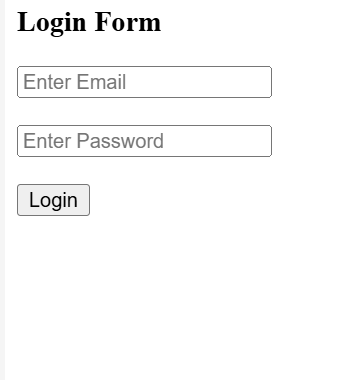
Example: We will create a simple form to get the details from user like below:
Step-by-Step Implementation: Servlet Login Page
- Create an HTML form to take the input data from the user.
- Create a Servlet for handling http get and post request.
Step 1: Create Project
- Create a Dynamic Web Application in Eclipse
- Project structure:
YourProjectName/
└── WebContent/
└── User.html
Step 2: Create HTML Form
- Create a login form to collect user input
- Takes email and password from user
- Sends data to servlet using POST method
<!DOCTYPE html>
<html>
<head>
    <title>Servlet Login Form</title>
</head>
<body>

    <h3>Login Form</h3>
    <form action="myLogin" method="post">
        <label>User Email:</label><br>
        <input type="text" name="username" placeholder="Enter Email" required><br><br>

        <label> Enter password:</label><br>
        <input type="password" name="password" placeholder="Enter Password" required><br><br>

        <input type="submit" value="Login">
    </form>

</body>
</html>
Step 3: Create the Servlet (FirstDemo.java)
- Create servlet class inside
srcfolder - Handle request and validate user credentials
package com.servlet;

import java.io.IOException;
import java.io.PrintWriter;

import jakarta.servlet.ServletException;
import jakarta.servlet.annotation.WebServlet;
import jakarta.servlet.http.HttpServlet;
import jakarta.servlet.http.HttpServletRequest;
import jakarta.servlet.http.HttpServletResponse;

@WebServlet("/myLogin")
public class FirstDemo extends HttpServlet {

    protected void doPost(HttpServletRequest request, HttpServletResponse response)
            throws ServletException, IOException {

        response.setContentType("text/html");
        PrintWriter out = response.getWriter();

        String email = request.getParameter("username");
        String password = request.getParameter("password");

        if (email.equals("admin@gmail.com") && password.equals("admin123")) {
            out.print("<html><body>");
            out.print("<h2>login successfull </h2>");
            out.print("Email " + email + "<br/>");
            out.print("Password: " + password + "<br/>");
            out.print("</body></html>");
        } else {
            out.print("<html><body>");
            out.print("<h3>failed</h3>");
            out.print("<p>Enter correct  user details.</p>");
            out.print("</body></html>");
        }
    }

    protected void doGet(HttpServletRequest request, HttpServletResponse response)
            throws ServletException, IOException {
        response.sendRedirect("User.html");
    }
}
Explanation:
- Here, we have used the @WebServlet annotation to map URL requests to the servlet.
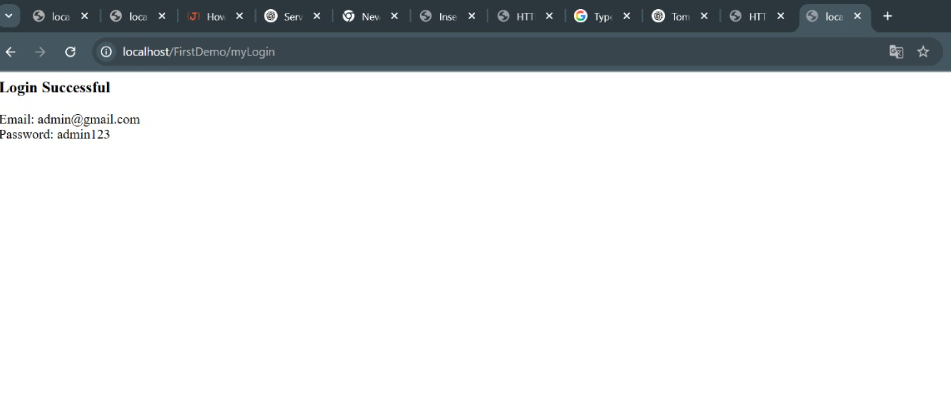
- When the user clicks Login, the form data is sent to the server.
- Once the form page is submitted, the 'doPost()' method of the Servlet class will be invoked.
- doPost() method is called automatically when the server receives a POST request because in html page method type is post.
- Inside doPost, method read the input using request.getparameter() and this method match the attribute in the form.
- And then compare the credentials provided by you.
- and then generate the response according to our credentials
- Suppose if we provide the user email and password then we have to show a message on the browser
Step 4: Run the Application
- Right-click project -> Run on Server
- Open browser and run:
http://localhost:8080/FirstDemo/myLogin