PostgreSQL’s JSONB data type allows developers to store and query JSON (JavaScript Object Notation) data in a structured binary format. Unlike JSON, which stores data as plain text, JSONB stores it in a decomposed binary form enabling faster indexing, efficient querying, and better performance when working with semi-structured data.
In this article, you’ll learn how to configure a Spring Boot application to store, retrieve, and query JSONB data using JPA (Java Persistence API).
Prerequisites:
- Basic knowledge of Spring Boot and JPA
- PostgreSQL installed and running
- PostgreSQL driver dependency added in pom.xml
- Maven for dependency management
Understanding PostgreSQL JSONB
PostgreSQL provides two types for storing JSON data:
1. JSON: Stores JSON data as plain text. Parsing is required for each query, which can slow down performance.
2. JSONB: Stores JSON data in a binary format. Provides faster access, indexing, and querying capabilities.
Advantages of JSONB
- Efficient indexing: Supports GIN and BTREE indexes for fast JSON queries.
- Flexible data structure: Supports nested JSON objects and arrays, ideal for dynamic data models.
- Rich query support: PostgreSQL provides operators and functions to search, extract, and compare JSON fields efficiently.
Why Use JSONB with Spring Boot and JPA
In many modern applications, data structures evolve dynamically or differ across records. Common use cases include:
- E-commerce systems: Products with variable attributes (color, size, specifications).
- Logging systems: Logs with variable structures depending on the event type.
- API integrations: Storing JSON responses from external APIs.
Using JSONB allows developers to store this semi-structured data efficiently without compromising relational integrity. With Spring Boot + JPA, JSONB fields can be mapped directly to Java objects for easy manipulation.
Implementation: Storing JSONB Data in PostgreSQL Using Spring Boot and JPA
Step 1: Create a New Spring Boot Project
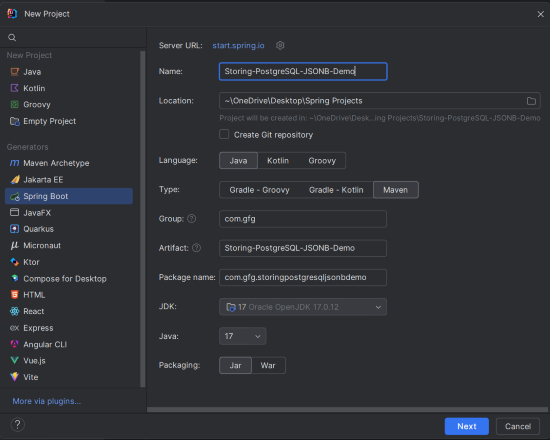
Create a new project using IntelliJ IDEA or Spring Initializr with the following options:
- Name: Storing-PostgreSQL-JSONB-Demo
- Language: Java
- Type: Maven
- Packaging: Jar
Step 2: Add the Dependencies
Include the following dependencies in your pom.xml:
<dependencies>
    <dependency>
        <groupId>org.springframework.boot</groupId>
        <artifactId>spring-boot-starter-data-jpa</artifactId>
    </dependency>
    <dependency>
        <groupId>org.springframework.boot</groupId>
        <artifactId>spring-boot-starter-web</artifactId>
    </dependency>
    <dependency>
        <groupId>org.postgresql</groupId>
        <artifactId>postgresql</artifactId>
        <version>42.7.4</version>
    </dependency>
    <dependency>
        <groupId>org.projectlombok</groupId>
        <artifactId>lombok</artifactId>
        <optional>true</optional>
    </dependency>
    <dependency>
        <groupId>org.springframework.boot</groupId>
        <artifactId>spring-boot-devtools</artifactId>
        <scope>runtime</scope>
        <optional>true</optional>
    </dependency>
</dependencies>
Project Structure
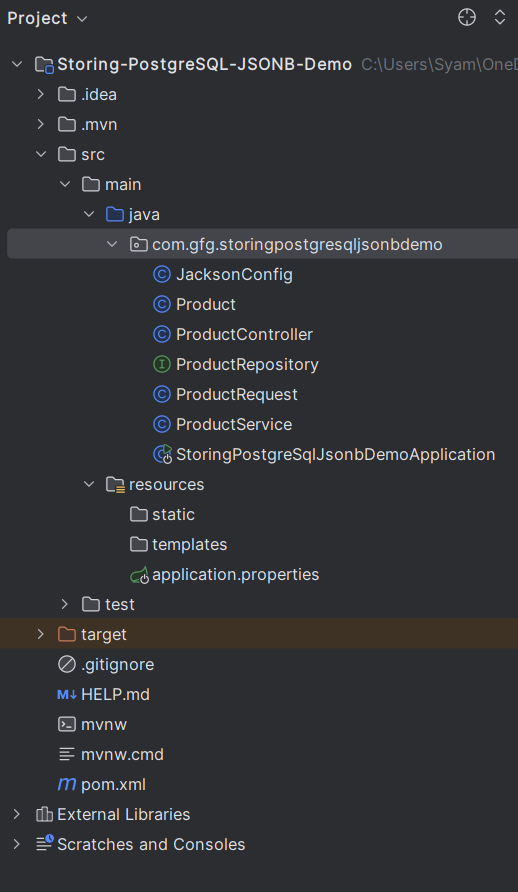
After the project creation done successfully, the project folder structure will look like the below image:
Step 3: Configure Database Connection
Add PostgreSQL configuration in the application.properties file:
spring.application.name=Storing-PostgreSQL-JSONB-Demo
spring.datasource.url=jdbc:postgresql://localhost:5432/exampledb
spring.datasource.username=postgres
spring.datasource.password=mypassword
spring.jpa.hibernate.ddl-auto=update
spring.jpa.properties.hibernate.dialect=org.hibernate.dialect.PostgreSQLDialect
Step 4: Create the Product Entity
package com.gfg.storingpostgresqljsonbdemo;

import com.fasterxml.jackson.annotation.JsonIgnoreProperties;
import com.fasterxml.jackson.databind.JsonNode;
import jakarta.persistence.*;
import lombok.AllArgsConstructor;
import lombok.Data;
import lombok.NoArgsConstructor;

@Data
@Entity
@Table(name = "products")
@JsonIgnoreProperties(ignoreUnknown = true)
@AllArgsConstructor
@NoArgsConstructor
public class Product {

    @Id
    @GeneratedValue(strategy = GenerationType.IDENTITY)
    private Long id;

    private String name;

    @Column(columnDefinition = "jsonb")
    private JsonNode attributes;
}
- @Column(columnDefinition = "jsonb") maps the field to a PostgreSQL JSONB column.
- JsonNode (from Jackson) is used to represent JSON data in Java.
Step 5: Create the Repository
package com.gfg.storingpostgresqljsonbdemo;

import org.springframework.data.jpa.repository.JpaRepository;
import org.springframework.stereotype.Repository;

@Repository
public interface ProductRepository
    extends JpaRepository<Product, Long> {
}
This interface provides CRUD operations for the Product entity.
Step 6: Configure Jackson ObjectMapper
package com.gfg.storingpostgresqljsonbdemo;

import com.fasterxml.jackson.databind.ObjectMapper;
import org.springframework.context.annotation.Bean;
import org.springframework.context.annotation.Configuration;

@Configuration
public class JacksonConfig {

    @Bean public ObjectMapper objectMapper()
    {
        return new ObjectMapper();
    }
}
The ObjectMapper bean handles JSON parsing and conversion.
Step 7: Create the ProductRequest DTO
package com.gfg.storingpostgresqljsonbdemo;

import com.fasterxml.jackson.databind.JsonNode;
import lombok.AllArgsConstructor;
import lombok.Data;
import lombok.NoArgsConstructor;

@Data
@AllArgsConstructor
@NoArgsConstructor
class ProductRequest {
    private String name;
    private JsonNode attributes;
}
This DTO class represents incoming JSON data for creating new products.
Step 8: Create the ProductService Class
package com.gfg.storingpostgresqljsonbdemo;

import com.fasterxml.jackson.databind.JsonNode;
import com.fasterxml.jackson.databind.ObjectMapper;
import java.io.IOException;
import java.util.Optional;
import org.springframework.stereotype.Service;

@Service
public class ProductService {

    private final ProductRepository productRepository;
    private final ObjectMapper objectMapper;

    public ProductService(
        ProductRepository productRepository,
        ObjectMapper objectMapper)
    {
        this.productRepository = productRepository;
        this.objectMapper = objectMapper;
    }

    public Product saveProduct(ProductRequest request)
        throws IOException
    {
        Product product = new Product();
        product.setName(request.getName());
        JsonNode jsonNode = objectMapper.readTree(
            request.getAttributes().toString());
        product.setAttributes(jsonNode);
        return productRepository.save(product);
    }

    public Optional<Product> getProduct(Long id)
    {
        return productRepository.findById(id);
    }
}
- Converts JSON attributes into JsonNode and saves them to PostgreSQL as JSONB.
- Supports retrieving products by ID.
Step 9: Create the ProductController
package com.gfg.storingpostgresqljsonbdemo;

import org.springframework.http.HttpStatus;
import org.springframework.http.ResponseEntity;
import org.springframework.web.bind.annotation.*;

@RestController
@RequestMapping("/products")
public class ProductController {

    private final ProductService productService;

    public ProductController(ProductService productService)
    {
        this.productService = productService;
    }

    @PostMapping
    public ResponseEntity<String>
    createProduct(@RequestBody ProductRequest request)
    {
        try {
            productService.saveProduct(request);
            return ResponseEntity.status(HttpStatus.CREATED)
                .body("Product created successfully");
        }
        catch (Exception e) {
            return ResponseEntity
                .status(HttpStatus.INTERNAL_SERVER_ERROR)
                .body("Failed to create product");
        }
    }

    @GetMapping("/{id}")
    public ResponseEntity<Product>
    getProduct(@PathVariable Long id)
    {
        return productService.getProduct(id)
            .map(ResponseEntity::ok)
            .orElse(ResponseEntity.notFound().build());
    }
}
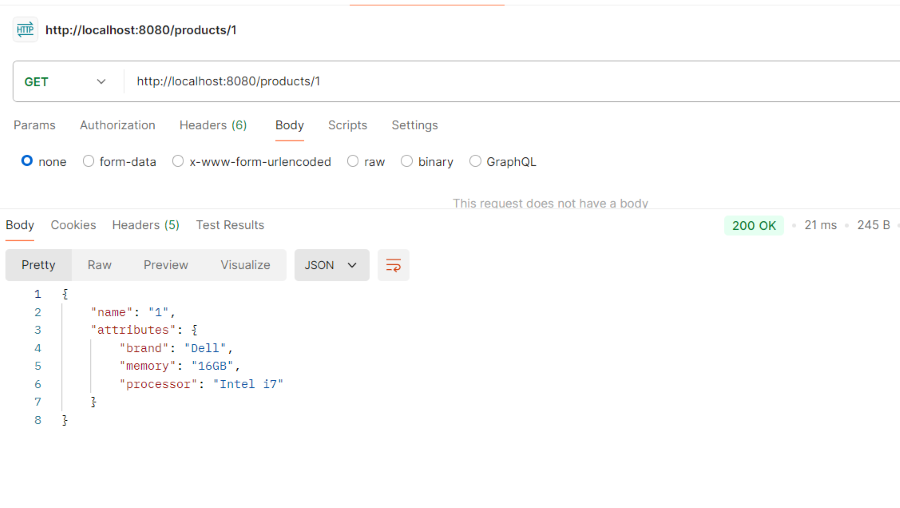
- POST /products: Create a product with JSONB attributes.
- GET /products/{id}: Retrieve a product by ID.
Step 10: Main Application class
No changes are required in the main class.
package com.gfg.storingpostgresqljsonbdemo;

import org.springframework.boot.SpringApplication;
import org.springframework.boot.autoconfigure.SpringBootApplication;

@SpringBootApplication
public class StoringPostgreSQLJsonBDemoApplication {
    public static void main(String[] args)
    {
        SpringApplication.run(
            StoringPostgreSQLJsonBDemoApplication.class,
            args);
    }
}
Step 11: Run the Application
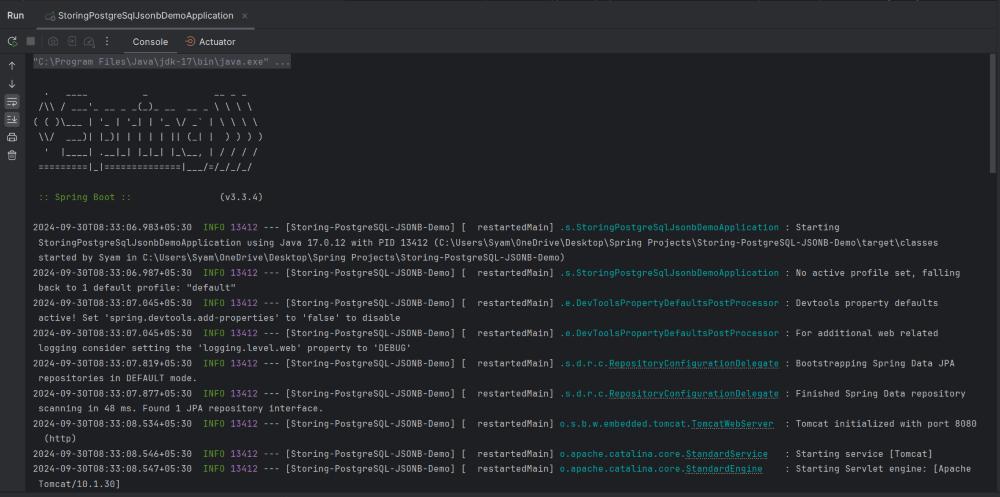
Start the application and ensure your PostgreSQL database (exampledb) is running.
Step 12: Testing the Application
Use Postman or any REST client.
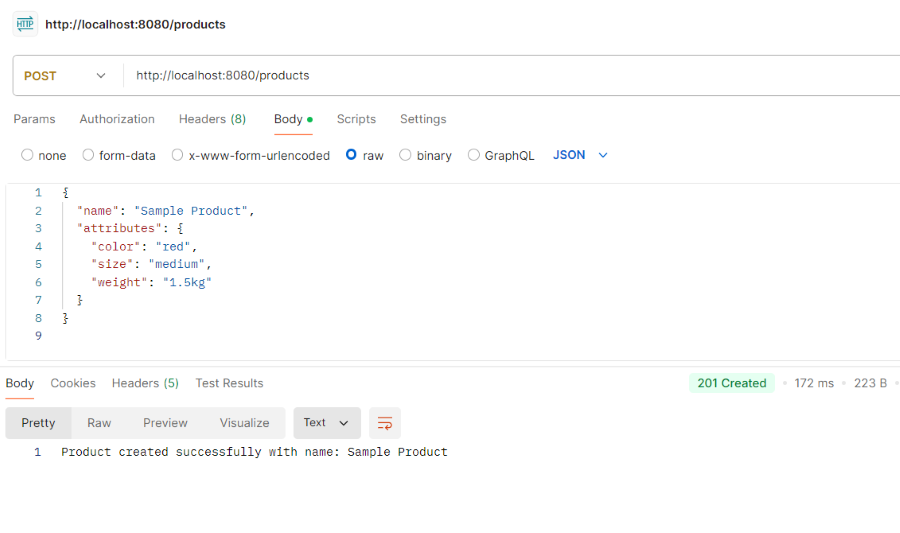
1. Create the Product
POST: http://localhost:8080/products
Response:
2. Get the Product By ID
GET: http://localhost:8080/products/{id}
Replace {id} with the ID of the product you created.
Response: