
MySQL provides the WHERE clause to filter records based on specified conditions. It is useful for retrieving or modifying only the required data from a table.
- It filters data based on specified conditions.
- It is used with SELECT, UPDATE, and DELETE statements.
- It supports comparison operators like =, !=, >, <, >=, <=.
- It allows logical operators such as AND, OR, and NOT.
- It helps in working with specific data instead of the entire table.
Syntax:
SELECT column1, column2, ...
FROM table_name
WHERE condition;
Parameters:
- SELECT: Specifies the columns to be retrieved from the table.
- column1, column2, ...: Represents the list of specific columns to retrieve. Use
*to select all columns. - table_name: Name of the table from which the data is selected.
- WHERE: Filters records based on specified conditions.
Operators in WHERE Clause
The following operators can be used in the WHERE clause:
Operator | Description |
|---|---|
| = | Equal |
| > | Greater than |
| < | Less than |
| >= | Greater than or equal |
| <= | Less than or equal |
| <> | Not equal. Note: In some versions of SQL this operator may be written as != |
| BETWEEN | Between a certain range |
| LIKE | Search for a pattern |
| IN | To specify multiple possible values for a column |
Demo MySQL Database
To understand the MySQL WHERE clause, we will create and work with the following table.
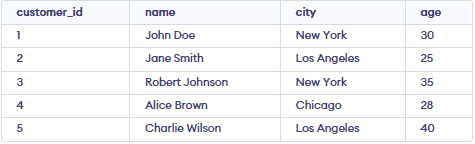
Working with WHERE Clause
Let's see some examples of where clause and understand it's working in MySQL :
Example 1: Filtering by a Single Condition
Let's find out the records of all those customers who live in "New York".
SELECT * FROM customers WHERE city = 'New York';Output:

Example 2: WHERE Clause with AND Operator
Let's find out all those customers who live in 'Los Angeles' with ages less than 30.
Query:
SELECT * FROM customers WHERE city = 'Los Angeles' AND age < 30;Output:

Example 3: WHERE Clause with OR Operator
Let's find out all customers who either live in 'New York' or their age greater than 35.
Query:
SELECT * FROM customers WHERE city = 'New York' OR age > 35;Output:

Example 4: WHERE Clause with Comparison Operators
Let's find out all customers who are older than 30 years.
Query:
SELECT * FROM customers WHERE age > 30;Output

Example 5: WHERE Clause with LIKE Operator
Let's find out all customers whose names start with the "J" letter.
Query:
SELECT * FROM customers WHERE name LIKE 'J%';Output:

Example 6: WHERE Clause with IN Clause
Let's find out all the customers whose city name is NewYork, Chicago.
Query:
SELECT * FROM customers WHERE city IN ('New York', 'Chicago');
Example 7: WHERE Clause with ORDER BY Clause
Let's find out all records of customers who belong to "NewYork" but the condition is the records must be in descending order by age.
Query:
SELECT * FROM customers WHERE city = 'New York' ORDER BY age DESC;Output:

