
Creating APIs in Next.js is not always smooth database queries can fail, APIs may not respond, or invalid data might slip through. Without proper error handling, these issues can crash your app or frustrate users. Using try/catch ensures your API routes stay stable, predictable.
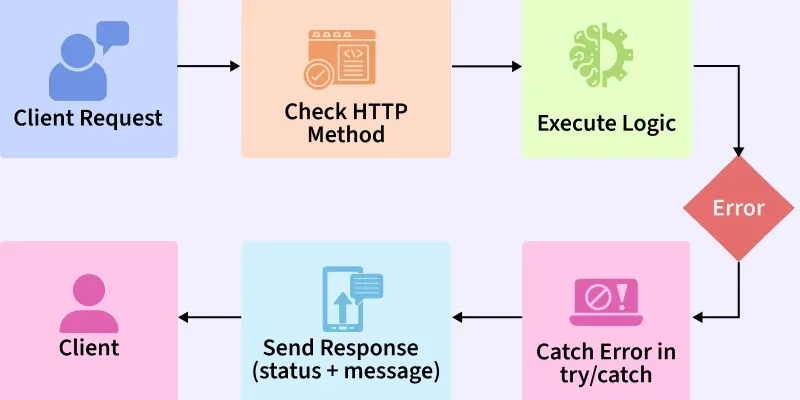
- Catch errors before they crash your app.
- Send clear, consistent error messages.
- Keep your APIs reliable and easy to debug.
Why Use Try/Catch for Error Handling?
JavaScript try/catch block allows you to catch errors that occur during code execution and handle them gracefully.
- Prevents server crashes.
- Sends meaningful error messages to the client.
- Helps with debugging during development.
- Improves user experience.
Example: Handling Basic Errors in a API Route
Here’s a simple Next.js API route (pages/api/user.js) that demonstrates error handling with try/catch:
// pages/api/user.js
export default async function handler(req, res) {
  try {
    if (req.method !== "GET") {
      return res.status(405).json({ error: "Method Not Allowed" });
    }

    // Simulating database call
    const user = { id: 1, name: "Aman Joshi" };

    if (!user) {
      throw new Error("User not found");
    }

    res.status(200).json(user);
  } catch (error) {
    console.error("API Error:", error.message);
    res.status(500).json({ error: error.message || "Internal Server Error" });
  }
}
- Check if request method is
GET, else return405. - Simulate a database call with a fake user object.
- Throw error if user is missing (
"User not found"). - Catch errors log them and return
500 Internal Server Error.
Async Error Handling with Try/Catch
Many API routes involve asynchronous calls (e.g., database queries). try/catch works perfectly with async/await.
Example with async database call:
// pages/api/user/[id].js
import { getUserById } from "../../../lib/db";

export default async function handler(req, res) {
  try {
    const { id } = req.query;

    if (req.method !== "GET") {
      return res.status(405).json({ success: false, message: "Method not allowed" });
    }

    const user = await getUserById(id);

    if (!user) {
      return res.status(404).json({ success: false, message: "User not found" });
    }

    res.status(200).json({ success: true, data: user });
  } catch (error) {
    console.error("API Error:", error);
    res.status(500).json({ success: false, message: "Internal Server Error" });
  }
}
async/awaitis used for database operations.- Each possible failure (method mismatch, missing user, database failure) is handled.
- Errors are logged for debugging.
Custom Error Classes
Instead of throwing plain errors, define a reusable error class:
// utils/AppError.js
export class AppError extends Error {
  constructor(message, statusCode) {
    super(message);
    this.statusCode = statusCode;
  }
}
- Defines a custom error class with
statusCode. - Throws cleaner, descriptive errors.
- Improves maintainability in large apps.
Structured Error Handling
For complex APIs, you might want to create a centralized error handler.
// utils/errorHandler.js
export const handleApiError = (res, error) => {
  const statusCode = error.statusCode || 500;
  const message = error.message || "Internal Server Error";
  res.status(statusCode).json({ success: false, message });
};
//Using API route
import { handleApiError } from "../../../utils/errorHandler";

export default async function handler(req, res) {
  try {
    // Your logic here
  } catch (error) {
    handleApiError(res, error);
  }
}
- Reusable across multiple API routes
- Keeps code clean and consistent
- Easy to update error responses globally
Handling External API Errors
If your route depends on an external API, things can fail due to network issues or bad responses. Let’s handle that:
// pages/api/posts.js
export default async function handler(req, res) {
  try {
    const response = await fetch("https://jsonplaceholder.typicode.com/posts");

    if (!response.ok) {
      throw new Error("Failed to fetch posts");
    }

    const data = await response.json();
    res.status(200).json(data);
  } catch (error) {
    console.error("API Fetch Error:", error);
    res.status(500).json({ error: error.message });
  }
}
- Checks if the external API response is successful using response.ok.
- Throws a custom error if the fetch fails, caught in the catch block.
- Logs the error for debugging and returns a 500 status with the error message.
- Ensures the API route remains stable by handling errors gracefully.
Input Validation Errors
Invalid request data can crash your API if unchecked. Use libraries like Zod for validation:
import { z } from "zod";

const userSchema = z.object({
  name: z.string().min(1, "Name is required"),
  email: z.string().email("Invalid email"),
});

export default async function handler(req, res) {
  try {
    const body = userSchema.parse(req.body); // validates body

    // save to DB (safe now)
    res.status(200).json({ success: true, data: body });
  } catch (error) {
    res.status(400).json({ success: false, message: error.errors || "Invalid input" });
  }
}
- Validates input with Zod schema
- Rejects invalid data before DB call
- Returns clear validation error messages
Error handling in Next.js APIs is not just about preventing crashes—it’s about making APIs predictable, debuggable, and user-friendly. By combining try/catch, validation, structured error classes, and best practices, you can build APIs that are stable, secure, and production-ready.
