
Server-Side Rendering (SSR) in Next.js is a technique where HTML is generated on the server for every incoming request, ensuring users receive fully rendered pages instantly.
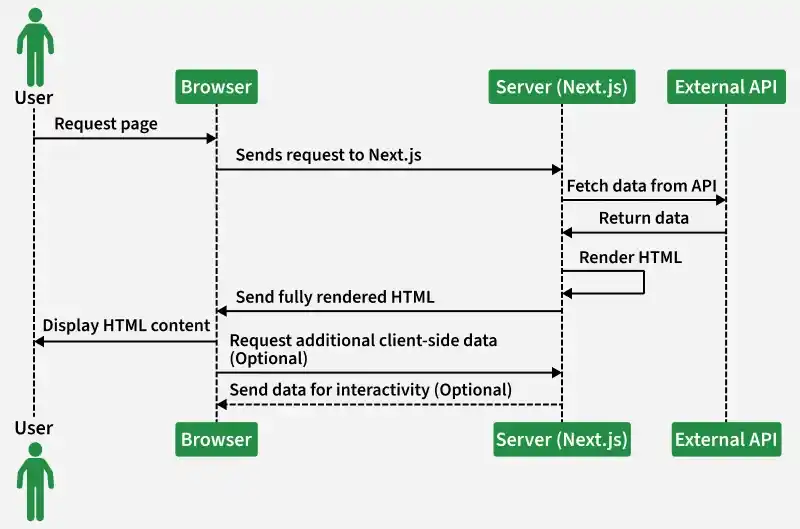
- SSR (dynamic rendering) generates a fresh page on each request, making it ideal for dynamic or frequently changing data.
- It uses an async function called getServerSideProps, which runs on every request.
- This ensures up-to-date content is delivered to users and improves SEO and initial load performance.
Syntax:
export default function Page({ data }) {
    return <>YOU CAN DISPLAY YOUR DATA ACCORDINGLY</>;
}
export async function getServerSideProps() {
    // Your code
    const data = [];

    // Passing data to the Page using props
    return {
        props: { data },
    };
}
Note: In place of data you can take any other name of the variable. Also, you can pass multiple props by separating them with commas ",".
Below is the Step by Step Implementation
Step 1: Create NextJS Application: You can create a new NextJs project using the below command:
npx create-next-app gfgProject Structure:
So, right now we have a Next Js application named my-awesome-app whose directory structure is shown in the image below:

Step 2: So, let us create a page with endpoint as "/users" by creating a "users.js" in our "pages" folder and then fetching the users from a dummy API and then showing that data in that endpoint.
Dummy api used:
https://jsonplaceholder.typicode.com/usersCreate a users.js file.

Step 3: Add the following code to the "pages/users.js" file:
// Inside "pages/users.js"

export default function Users( {data} ){
    return (
        <div>
            <h1>List of Users</h1>
            <ul>
                {data.map((user,index)=>{
                 return <li key={index}>Id : {user.id} ,
                     Name : {user.name} , Email : {user.email}
                 </li>
                })}
            </ul>
        </div>
    )
}

export async function getServerSideProps() {

    // Fetching data
    const res = await fetch(
    'https://jsonplaceholder.typicode.com/users');
    const data = await res.json() ;

    // Passing data to the Product Page using props
    return {
        props : {data}
    }
}
Step to run the application: Using either of the given 2 commands start the dev server:
npm run devOr
yarn run devOutput: And now go to the "http://localhost:3000/users" to get the output.

