
Dynamically @BeforeTest ensures the output directory gets prepared before test execution at some point, using the Output directory at that specific instance for storing the report and so helps manage effectively.
How TestNG Output Directory Works?
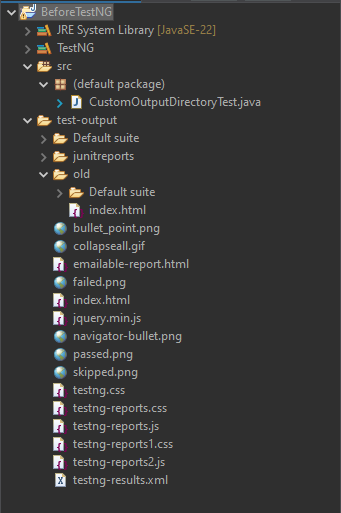
By default, report and log files will appear in the test-output folder under your project root directory. Chances are good that we'll want to create another output directory anyhow, both as a way of collecting all test reports in one place and as something to feed them into some CI/CD pipeline.
Step 1: Set Up Your Test Class
In your test class, use the @BeforeTest annotation to set the output directory path before any test methods are executed.
Step 2: Define a Custom Directory Path
Within the @BeforeTest method, use System.setProperty to set a custom output directory path. This allows you to specify where your test output files will be stored.
Step 3: Access the Output Directory Path in Tests
If you need to access the directory path in your test code, you can retrieve it using System.getProperty.
import org.testng.annotations.BeforeTest;
import org.testng.annotations.Test;
import java.text.SimpleDateFormat;
import java.util.Date;

public class CustomOutputDirectoryTest {

    @BeforeTest
    public void setOutputDirectory() {
        // Step 2: Define a custom directory path
        String timestamp = new SimpleDateFormat("yyyyMMdd_HHmmss").format(new Date());
        String outputDirectory = "test-output/" + timestamp;

        // Set the system property for the output directory
        System.setProperty("outputDir", outputDirectory);

        System.out.println("Output directory set to: " + outputDirectory);
    }

    @Test
    public void exampleTest1() {
        // Optional: Access the directory path in a test
        String outputDir = System.getProperty("outputDir");
        System.out.println("Running exampleTest1 with output directory: " + outputDir);
        // Your test logic here
    }

    @Test
    public void exampleTest2() {
        // Optional: Access the directory path in another test
        String outputDir = System.getProperty("outputDir");
        System.out.println("Running exampleTest2 with output directory: " + outputDir);
        // Your test logic here
    }
}
@BeoreTest Method
- This method sets the output directory before any tests run.
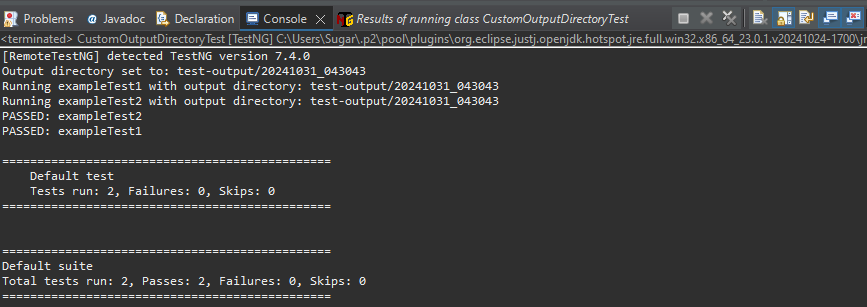
- We use a timestamp in the path to create unique directories for each test run (e.g.,
test-output/20241031_123456). - The directory path is saved using
System.setProperty("outputDir", outputDirectory), so it can be accessed anywhere in the code.
@Test Methods
- These are sample test methods that print the custom output directory path.
- The tests could save logs or results to the output directory.
Output
Conclusion
Using the @BeforeTest, which configures the directory for the output in TestNG, allows for more dynamic configurations of output, ensuring test results can all be saved in unique directory names each time the output is made.
This in turn helps better organize test runs, as it makes different outputs from various environments, or cycles, easier to manage and review.
