
Integrating JMeter with Jenkins is a powerful way to enhance CI/CD pipelines by automating performance testing. JMeter, a widely used tool for load testing and performance analysis, can be seamlessly integrated with Jenkins, an open-source automation server, to ensure that your applications are reliable and perform optimally. By combining these tools, you can streamline your testing process, improve software quality, and deliver robust applications that meet user expectations.
Apache Jmeter is a popular open-source testing tool widely used for performance testing, load testing, and functional testing of web applications and other services. whereas, Jenkins is an open-source automation server that can be used along with these tools to easily automate the testing process.
Table of Content
Why Integrate Jmeter with Jenkins?
There are many benefits if you integrate the Jmeter with the Jenkins software, following are some of the benefits of integrating the Jmeter with Jenkins:
- Automated Testing: If we integrate the Jmeter with the Jenkins software, we can easily automate the entire testing process and it will be triggered automatically with each code commit.
- Scalability: Jenkins' powerful build pipeline capabilities allow for executing Jmeter tests in various environments. Jenkins allows for the creation of robust build pipelines that can execute Jmeter tests across multiple environments, enabling scalable performance testing.
- Consistency: Automated execution of Jmeter scripts also makes sure that there is consistency in testing.
- Better Reporting: Jenkins can calculate and display test results which can help us to provide more insights into application performance over time.
Prerequisites
The following prerequisites are required for the integration of Jmeter with Jenkins:
- Apache Jmeter: It will be used for creating and executing performance test scripts.
- Jenkins: An open-source automation server that will manage the build and deployment pipelines, and execute Jmeter tests as part of the CI/CD process.
Steps to Integrate Jmeter with Jenkins
Following are the steps required for integrating the Jmeter with jenkins:
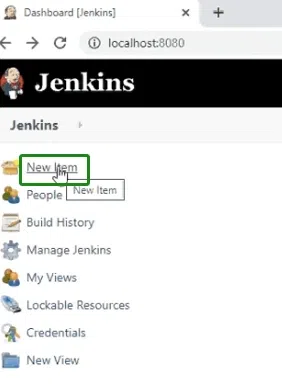
Step 1: Create new item
First step is to go to the Jenkins and click on "new item" from the top left side, this will allow us to create a new project.
Step 2: Select freestyle project
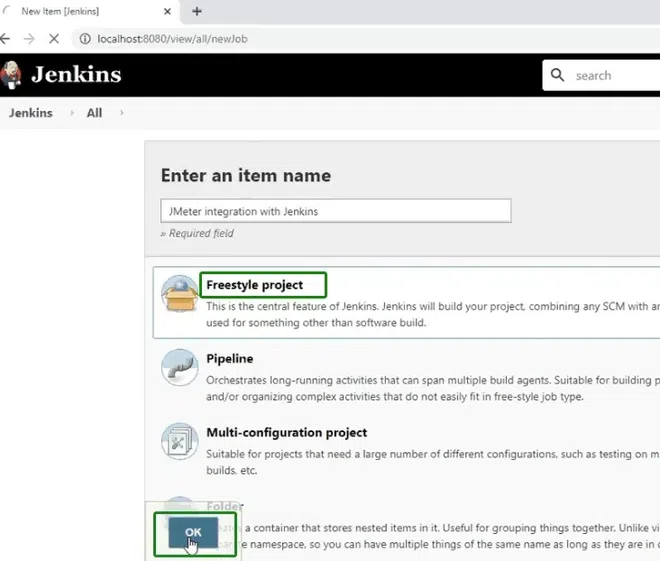
Next step is to select the freestyle project, this option will give us more options such as integration with the Jmeter and other configurations as well.
Step 3: Select build step
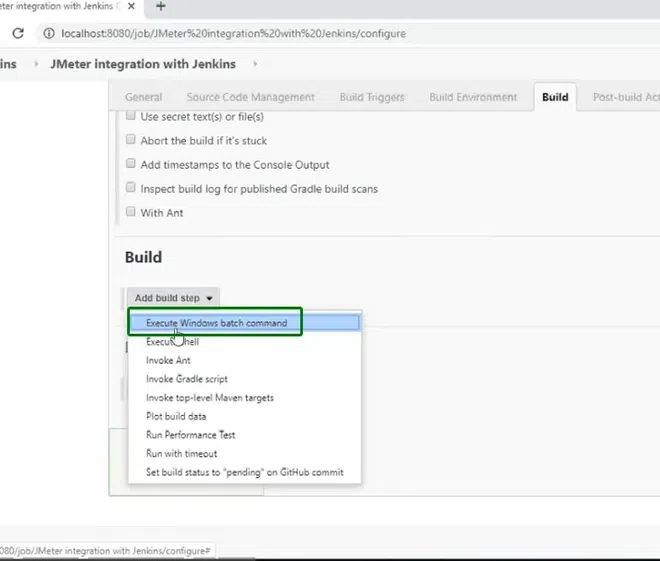
Next step is to select the build step for the integration, here we are going to execute a windows batch command file so i am selecting that option, depending on the integration, other option can also be selected.
Step 4: Add the command for integration
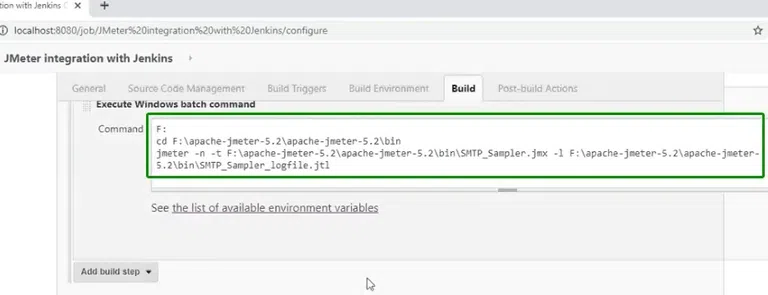
Next step is to add the command that will be used for the integration, following is the command i am adding, it can vary depending on the actions you are going to take.
F: cd F:\apache-Jmeter-5.2\apache-Jmeter-5.2\bin Jmeter -n -t F:\apache-Jmeter-5.2\apache-Jmeter-5.2\bin\SMTP_Sampler.jmx -l F:\apache-Jmeter-5.2\apache-Jmeter-5.2\bin\SMTP_Sampler_logfile.jtl
This is also displayed in the image below.
Step 5: Start the build
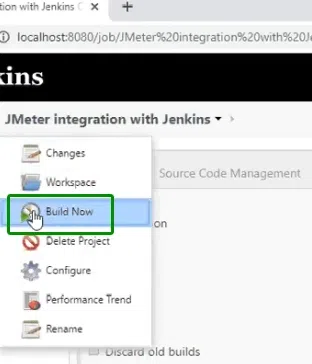
Once the steps are completed and the command is also added, we can now start the build, for this click on the build now option which is located on the top left corner of jenkins.
Step 6: Check Console Output
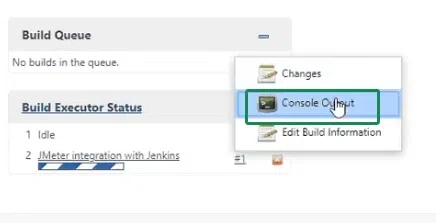
To check whether the integration was a success or not we can check the build queue of the project, for this the bottom left corner will display this, click on the console output option here.
Step 7: Wait till queue is finished
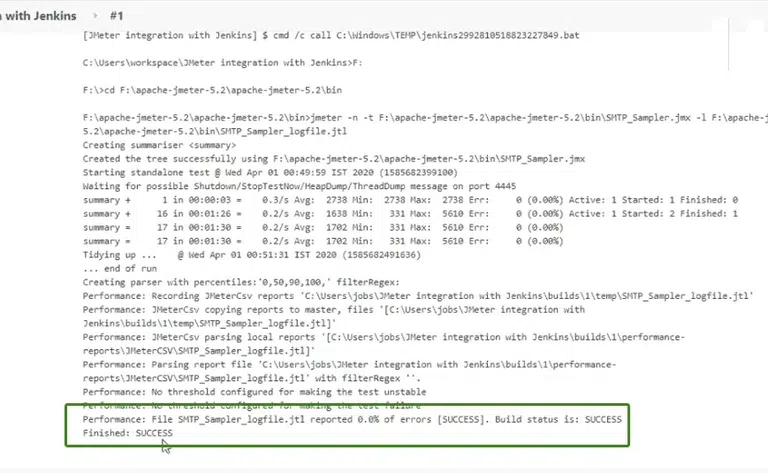
Once the execution of the integration is finished, it will show it as "SUCCESS" this means that the integration has been successful.
We can also check the various reports available in the Jenkins as well by going to the reports options:
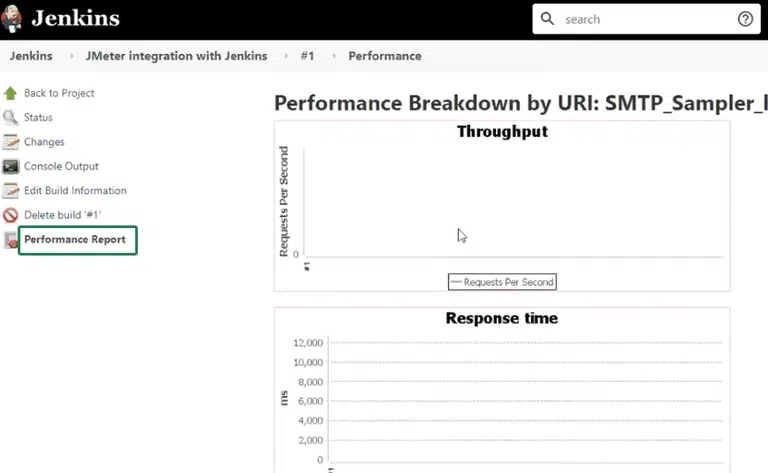
This will display various types of reports such as response time throughput etc. in the form of graphs
Conclusion
Integrating JMeter with Jenkins is a powerful way to automate performance testing in your CI/CD pipeline. By combining the strengths of JMeter for testing and Jenkins for automation, you can ensure that your application is high-performing and meets user expectations. This integration not only improves the efficiency of the development process but also enhances the overall quality of your software. Adopting JMeter and Jenkins together enables consistent, scalable, and reliable testing, helping your team deliver better software faster.
