
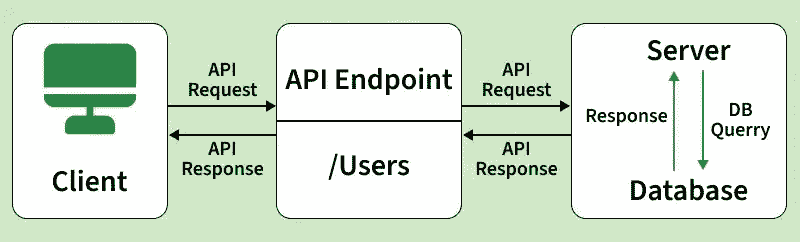
API Testing is a software testing method used to verify communication between applications via APIs. It ensures that APIs process requests correctly, return expected responses, and handle data efficiently.
- Tests request and response behavior without using a user interface
- Verifies status codes, response data, and business logic
- Improves system integration, stability, and reliability
Types of API Test Cases
API test cases are designed to validate functionality, security, performance, and error handling under different conditions.
- Functional Test Cases: Verify that the API performs expected operations and returns correct responses based on requirements.
- Validation Test Cases: Check input data, response format, and status codes to ensure they match the defined specifications.
- Negative Test Cases: Ensure the API properly handles invalid, missing, or incorrect inputs without breaking.
- Authentication Test Cases: Validate that only users with valid credentials or tokens can access the API.
- Authorization Test Cases: Confirm users can access only the resources and actions they are permitted to use.
- Security Test Cases: Identify vulnerabilities like unauthorized access, data leaks, and injection attacks.
- Performance Test Cases: Measure response time, speed, and stability of the API under different loads.
- Error Handling Test Cases: Verify that the API returns proper error messages and correct HTTP status codes during failures.
API Test Case Design Techniques
API Test Case Design Techniques are structured methods used to create effective test cases that verify functionality, input handling, performance, and security. They help improve test coverage while reducing redundancy.
- Equivalence Partitioning: Divides inputs into valid and invalid groups and tests one value from each group to reduce effort while ensuring coverage.
- Boundary Value Analysis (BVA): Focuses on testing edge values of input ranges where defects are most likely to occur.
- Decision Table Testing: Uses a table to test different combinations of conditions and verify expected outcomes.
- State Transition Testing: Checks API behavior when it moves between different states based on inputs or actions.
- Error Guessing: Uses tester experience to identify likely error-prone areas and design test cases accordingly.
- Pairwise Testing: Tests combinations of input pairs to reduce test cases while maintaining good coverage.
- Use Case-Based Testing: Creates test cases based on real user workflows and business scenarios.
- Negative Testing: Tests APIs with invalid or missing inputs to verify proper error handling.
- Fuzz Testing: Sends random or unexpected data to detect crashes or security issues.
- Exploratory Testing: Tests the API without predefined cases by exploring system behavior dynamically.
Writing Test Cases for API Testing
API test cases verify that endpoints behave correctly across happy paths, edge cases, and failure scenarios.
1. Understand the API Before Writing Tests
Before writing test cases, gather the following:
- API documentation (Swagger/OpenAPI spec, Postman collection)
- Request and response contracts (fields, data types, status codes)
- Authentication method (API key, OAuth, JWT, Basic Auth)
- Business rules (validation logic, rate limits, dependencies)
2. Structure of a Test Case
Each API test case should include the following fields:
| Field | Description | Example |
|---|---|---|
| Test ID | Unique identifier for the test case | TC_LOGIN_001 |
| Test Name | Short description of the test case | Verify login with valid credentials |
| Endpoint | API method and URL | POST /api/v1/auth/login |
| Preconditions | Required setup before execution | User exists in database |
| Request Headers | Headers like content type or auth token | Content-Type: application/json |
| Request Body | Input payload sent to API | {"email":"user@test.com","password":"abc123"} |
| Expected Status | Expected HTTP status code | 200 OK |
| Expected Response | Expected output validation | access_token should be returned |
| Actual Result | Final test execution result | Pass / Fail |
API Response Validation in Testing
API Response Validation ensures that the API returns correct status codes, accurate data, proper structure, and expected behavior for both positive and negative scenarios.
API Response Validation Areas
| Validation Area | What to Validate | Example |
|---|---|---|
| Status Code | Verify correct HTTP status code is returned | 200 OK, 401 Unauthorized |
| Response Body | Ensure required fields and correct data are present | id, name, email in response |
| Schema Validation | Validate response structure and data types match the contract | JSON structure follows specification |
| Business Logic | Ensure API follows defined business rules correctly | User can access only own data |
| Headers | Check required response headers are correct | Content-Type: application/json |
| Response Time | Ensure API responds within acceptable time | Less than 2 seconds |
| Error Messages | Validate proper error messages for failures | “Invalid credentials” |
| Data Integrity | Ensure response matches database/source data | Updated values are correctly reflected |
Example: Test Cases for GET /users/{id} Endpoint
| Test Case ID | Scenario | API Request | Expected Result |
|---|---|---|---|
| TC_001 | Get user with valid ID | GET /users/123 (with valid token) | 200 OK, user details returned (id, name, email) |
| TC_002 | Non-existent user ID | GET /users/99999 (with valid token) | 404 Not Found, error message returned |
| TC_003 | Missing authentication | GET /users/123 (without token) | 401 Unauthorized |
| TC_004 | IDOR security check (Insecure Direct Object Reference) | GET /users/456 (logged in as user 123) | 403 Forbidden |
| TC_005 | Invalid ID format | GET /users/abc | 400 Bad Request, validation error message |
Challenges in API Test Cases
API test case design and execution face several challenges due to complex integrations, data dependencies, and evolving system behavior. These challenges can affect test coverage and accuracy if not managed properly.
- Lack of proper documentation makes test case design difficult
- Frequent API changes require continuous updates to test cases
- Managing test data and environment setup is complex
- Handling authentication mechanisms and security tokens can be challenging
- Dependencies on other services may lead to unstable test results
- Difficulty in simulating real-world load and edge scenarios
