TestNG annotations form the backbone of structured test automation in TestNG, allowing developers to define the execution flow of test methods with precision. By using these annotations, you can control the sequence in which test methods execute, manage setup and teardown operations, and implement advanced features like parameterized testing.
In Java, annotations are tags prefixed with @, used to attach metadata to classes, methods, or interfaces. TestNG leverages annotations to control the execution of test methods, enabling testers to organize their tests systematically and execute them efficiently.
For example, the @Test annotation marks a method as a test case:
@Test
public void testMethod() {
    System.out.println("This is a test method.");
}
Hierarchy in TestNG
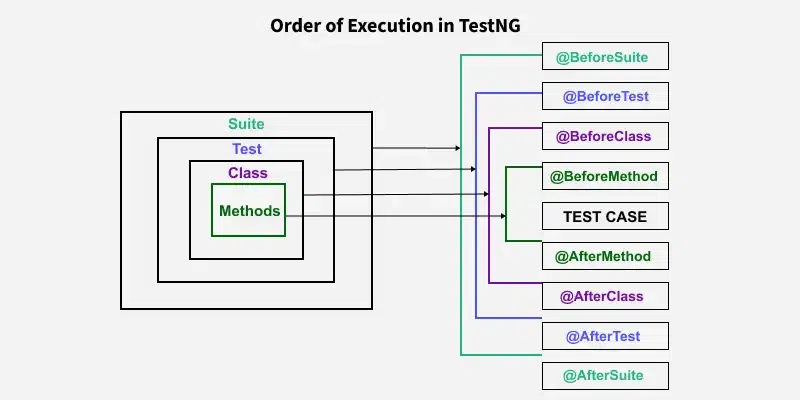
TestNG's hierarchy defines the organization and execution flow of tests. It consists of four levels:
- Suite: The highest level, representing a collection of tests.
- Test: Contains one or more classes.
- Class: Contains one or more methods.
- Method: Represents the individual test logic.
Example of Hierarchy:
- A suite contains multiple tests.
- Each test contains multiple classes.
- Each class contains multiple methods.
Common TestNG Annotations and Their Usage
Below is a table of frequently used TestNG annotations and their descriptions:
| Annotation | Description |
|---|---|
@Test | Marks a method as a test method. |
@BeforeSuite | Runs before all tests in a suite. |
@AfterSuite | Runs after all tests in a suite. |
@BeforeTest | Runs before any test method in a <test> tag defined in testng.xml. |
@AfterTest | Runs after all test methods in a <test> tag. |
@BeforeClass | Runs before the first test method in a class. |
@AfterClass | Runs after all test methods in a class. |
@BeforeMethod | Runs before each test method. |
@AfterMethod | Runs after each test method. |
@BeforeGroups | Runs before methods belonging to specified groups. |
@AfterGroups | Runs after methods belonging to specified groups. |
@DataProvider | Supplies data for parameterized tests. |
@Parameters | Passes parameters to test methods. |
@Listeners | Tracks test execution events, enabling custom actions like taking screenshots. |
Order of Execution in TestNG
The order in which TestNG annotations execute is predefined:
Examples of TestNG Annotations
1. @Test Annotation
The @Test annotation is central to TestNG and is used to mark methods as test cases.
import org.testng.Assert;
import org.testng.annotations.Test;

public class LoginTest {

    // Example of a simple test method using @Test annotation
    @Test
    public void testLogin() {
        String expected = "Welcome, user!";
        String actual = login("user", "password");

        // Assert the result of the login method
        Assert.assertEquals(actual, expected, "Login failed!");
    }

    // Simulated login method for demonstration
    public String login(String username, String password) {
        // This is a simple mock of a login functionality
        if ("user".equals(username) && "password".equals(password)) {
            return "Welcome, user!";
        }
        return "Invalid credentials";
    }
}
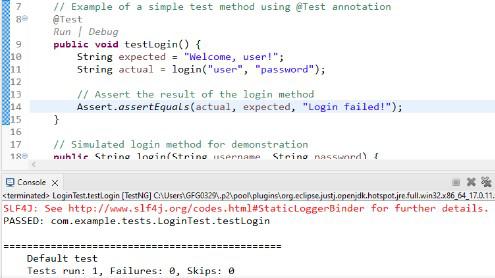
Output:
2. @BeforeMethod, and @AfterMethod Annotations
package com.example.tests;

import org.testng.annotations.BeforeMethod;
import org.testng.annotations.AfterMethod;
import org.testng.annotations.Test;

public class BeforeAndAfterMethod {

    @BeforeMethod
    public void beforeMethod() {
        System.out.println("These Method will be executed before the Actual Test Method: ");
    }


    @Test
    public void testMethod() {
        System.out.println("This is a Actual Test method will be shown");
    }

    @AfterMethod
    public void afterMethod() {
        System.out.println("These Method will be executed after the Actual Test Method: ");
    }
}
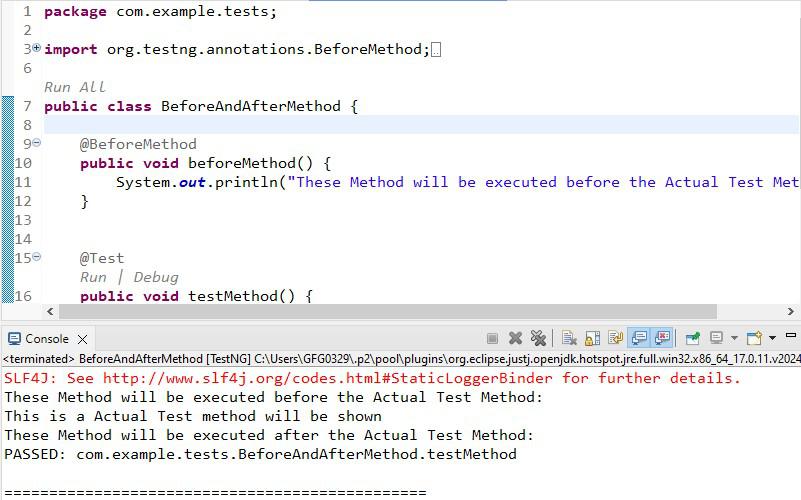
Output:
3. @BeforeSuite and @AfterSuite
How They Work
- @BeforeSuite: This annotation is used to set up global test configurations before any test in the suite starts. It typically handles tasks such as initializing databases, setting up servers, or loading configuration files that need to be ready before running tests.
- @AfterSuite: Executes after all tests in the suite are completed, making it an ideal place for cleaning up resources such as closing database connections, clearing caches, or resetting global states.
In short, These annotations handle setup and teardown operations at the suite level.
@BeforeSuite
public void setupSuite() {
    System.out.println("Setting up the suite");
}

@AfterSuite
public void teardownSuite() {
    System.out.println("Tearing down the suite");
}
4. @BeforeClass and @AfterClass
These annotations execute once per class, before and after all test methods.
@BeforeClass
public void setupClass() {
    System.out.println("Setup before class");
}

@AfterClass
public void teardownClass() {
    System.out.println("Teardown after class");
}
5. @DataProvider for Parameterized Tests
@DataProvider allows you to supply multiple sets of data for a single test method.
@DataProvider(name = "loginData")
public Object[][] provideData() {
    return new Object[][] {
        {"user1", "pass1"},
        {"user2", "pass2"}
    };
}

@Test(dataProvider = "loginData")
public void testLogin(String username, String password) {
    System.out.println("Testing login with " + username + " and " + password);
}
6. @BeforeTest and @AfterTest
How They Work
- @BeforeTest: This annotation is used to configure the setup for a specific
<test>section in the TestNG XML file. It runs before any test methods in that section are executed. For instance, you might use it to initialize browser configurations for cross-browser testing. - @AfterTest: It runs after all the test methods within the same
<test>tag in the XML file are completed. It's ideal for handling test-specific cleanup tasks like closing browsers or logging results.
Example with Multiple Test Sections in TestNG XML
TestNG XML Configuration:
<suite name="Example Suite">
    <test name="First Test Section">
        <classes>
            <class name="FirstTestClass"/>
        </classes>
    </test>
    <test name="Second Test Section">
        <classes>
            <class name="SecondTestClass"/>
        </classes>
    </test>
</suite>
Execution Flow:
- @BeforeTest executes before the first test method.
- All test methods (
testMethod1andtestMethod2) execute. - @AfterTest executes after all test methods in the
<test>tag are completed.
Output:
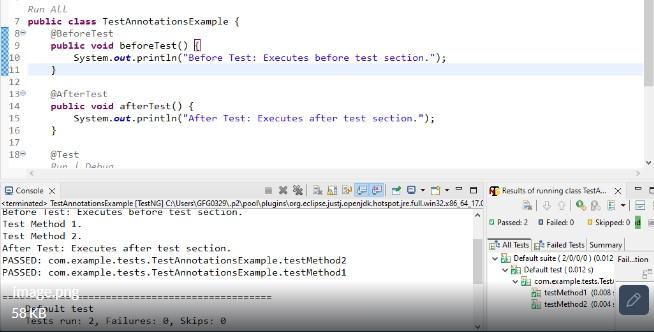
When you have multiple <test> sections in your XML file, the @BeforeTest and @AfterTest annotations are executed for each test section.
Best Practices for Using TestNG Annotations
- Use Setup and Teardown Sparingly
Avoid overloading tests with excessive setup and teardown logic. Keep your tests lightweight and focused. - Group Related Tests
Use@BeforeGroupsand@AfterGroupsto manage setup and teardown for specific test groups. - Parameterize Test Data
Leverage@DataProviderand@Parametersto pass data dynamically, making your tests reusable. - Control Test Execution
Utilize attributes likeenabled,priority, anddependsOnMethodsto organize and prioritize test execution.
Example: Test Execution Flow
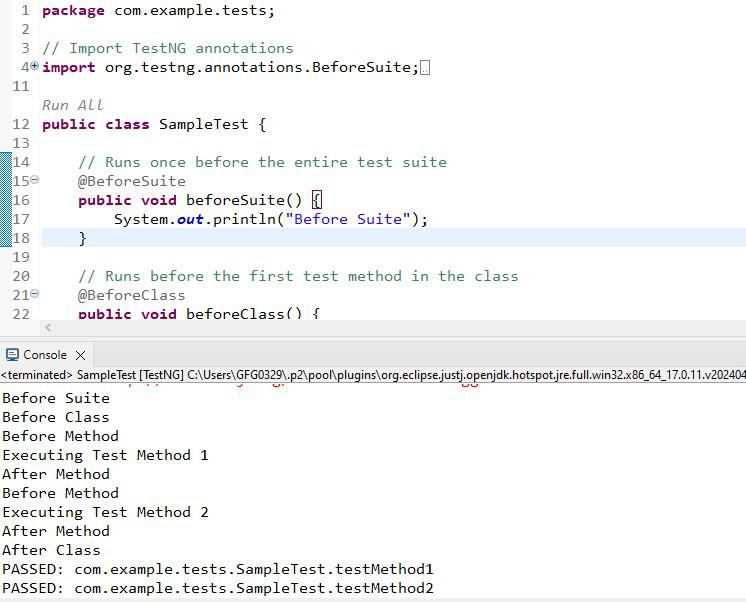
Below is an example demonstrating the order of execution of TestNG annotations:
Code:
package com.example.tests;

// Import TestNG annotations
import org.testng.annotations.BeforeSuite;
import org.testng.annotations.BeforeClass;
import org.testng.annotations.BeforeMethod;
import org.testng.annotations.Test;
import org.testng.annotations.AfterMethod;
import org.testng.annotations.AfterClass;
import org.testng.annotations.AfterSuite;

public class SampleTest {

    // Runs once before the entire test suite
    @BeforeSuite
    public void beforeSuite() {
        System.out.println("Before Suite");
    }

    // Runs before the first test method in the class
    @BeforeClass
    public void beforeClass() {
        System.out.println("Before Class");
    }

    // Runs before each test method
    @BeforeMethod
    public void beforeMethod() {
        System.out.println("Before Method");
    }

    // The first test method
    @Test
    public void testMethod1() {
        System.out.println("Executing Test Method 1");
    }

    // The second test method
    @Test
    public void testMethod2() {
        System.out.println("Executing Test Method 2");
    }

    // Runs after each test method
    @AfterMethod
    public void afterMethod() {
        System.out.println("After Method");
    }

    // Runs after all test methods in the class
    @AfterClass
    public void afterClass() {
        System.out.println("After Class");
    }

    // Runs once after the entire test suite
    @AfterSuite
    public void afterSuite() {
        System.out.println("After Suite");
    }

}
Output:
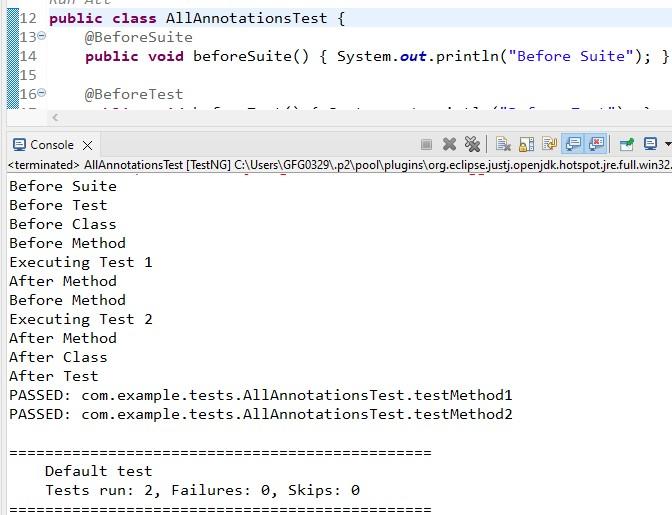
Combining TestNG Annotations in a Single Test Class
To see how multiple TestNG annotations work together, consider the following example:
package com.example.tests;
import org.testng.annotations.AfterClass;
import org.testng.annotations.AfterMethod;
import org.testng.annotations.AfterSuite;
import org.testng.annotations.AfterTest;
import org.testng.annotations.BeforeClass;
import org.testng.annotations.BeforeMethod;
import org.testng.annotations.BeforeSuite;
import org.testng.annotations.BeforeTest;
import org.testng.annotations.Test;

public class AllAnnotationsTest {
    @BeforeSuite
    public void beforeSuite() { System.out.println("Before Suite"); }

    @BeforeTest
    public void beforeTest() { System.out.println("Before Test"); }

    @BeforeClass
    public void beforeClass() { System.out.println("Before Class"); }

    @BeforeMethod
    public void beforeMethod() { System.out.println("Before Method"); }

    @Test
    public void testMethod1() { System.out.println("Executing Test 1"); }

    @Test
    public void testMethod2() { System.out.println("Executing Test 2"); }

    @AfterMethod
    public void afterMethod() { System.out.println("After Method"); }

    @AfterClass
    public void afterClass() { System.out.println("After Class"); }

    @AfterTest
    public void afterTest() { System.out.println("After Test"); }

    @AfterSuite
    public void afterSuite() { System.out.println("After Suite"); }
}
Execution Order:
- @BeforeSuite → @BeforeTest → @BeforeClass → @BeforeMethod → Test Execution
- After each test method: @AfterMethod
- After all tests: @AfterClass → @AfterTest → @AfterSuite
Output: