
A Data Staging Area (also known as a data conduit or data clearing house) is a temporary storage space where raw data from multiple sources is collected, cleaned, transformed and prepared before being loaded into the data warehouse. It acts as a bridge between source systems (like ERP, CRM, or flat files) and the data warehouse, ensuring data quality, schema alignment and processing efficiency.
Need: In essence, the DSA ensures that only accurate, standardized and consistent data makes its way into the analytical systems.
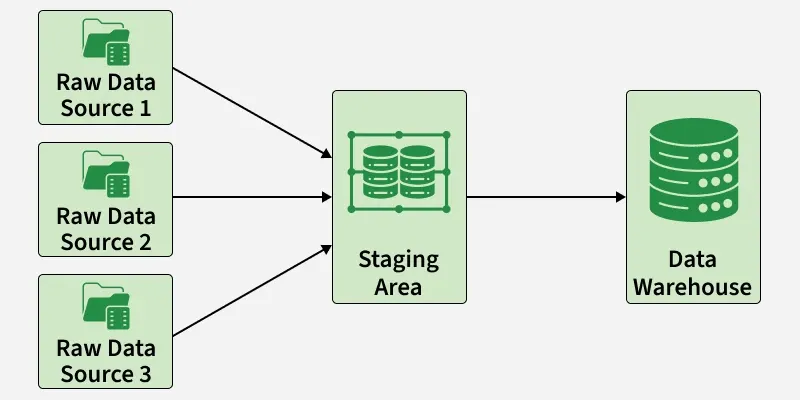
Importance of Data Staging Area
- Data Consolidation: Collects data from multiple sources into one place, making it easier to process uniformly.
- Enhanced Data Quality: Cleanses data through deduplication, error correction and standardization before loading.
- Schema Alignment: Maps and converts different source formats into a unified schema for the warehouse.
- Improved Performance: Handles heavy transformations outside the warehouse to ensure faster analytical queries.
- Temporary Storage for Batches: Stores incoming data temporarily so it can be synchronized and loaded in organized batches.
- Better Data Security: Provides a controlled zone where sensitive data undergoes ETL with proper security measures.
- Audit & Traceability: Maintains logs of all ETL steps, enabling full data lineage and easier troubleshooting.
Role of the Data Staging Area in a Data Warehouse
| Role | Purpose |
|---|---|
| Temporary Storage | Holds raw data from multiple sources until ready for batch loading. |
| Data Cleaning | Removes duplicates, nulls, and inconsistencies. |
| Data Transformation | Applies business rules, conversions, and reformatting. |
| Performance Optimization | Frees up the warehouse for fast query performance. |
| Synchronization | Aligns data from sources with different refresh cycles. |
| Security & Compliance | Ensures data safety through encryption and access controls. |
| Audit & Troubleshooting | Tracks data lineage and logs every processing step. |
Real-World Examples of Data Staging Usage
- Retail Industry: Retailers consolidate data from POS systems, e-commerce sites and supply chains. The DSA cleans and formats this data for accurate sales and inventory analysis.
- Healthcare Sector: Hospitals collect data from EHRs, labs and billing systems. The DSA ensures data consistency and HIPAA compliance before analysis.
- Financial Services: Financial institutions integrate transaction, CRM and market data via the DSA for fraud detection, risk analysis, and regulatory reporting.
- Telecommunications: Telecom operators process vast call records and billing data in the DSA for performance optimization and customer pattern analysis.
- Manufacturing: Manufacturers use the DSA to gather and clean production, supply chain and quality control data to improve efficiency and reduce costs.
Key Steps in the Data Staging Process
- Data Extraction: Gather raw data from databases, APIs, or files.
- Data Profiling: Assess data structure and identify inconsistencies.
- Data Cleansing: Remove errors, duplicates and formatting issues.
- Data Transformation: Apply business rules, type conversions, and aggregation.
- Data Validation: Ensure completeness and correctness of data.
- Data Integration: Merge data from multiple systems into unified form.
- Temporal Storage: Temporarily store processed data before loading.
- Data Loading: Transfer the cleaned and transformed data into the warehouse.
Popular tools for the data staging area
| Tool | Key Features |
|---|---|
| Apache NiFi | Automates data flows and real-time streaming. |
| Apache Kafka | High-speed, fault-tolerant data streaming platform. |
| AWS Glue | Serverless ETL tool with automation and cataloging. |
| Google Cloud Dataflow | Unified batch and stream data processing service. |
| Pentaho Data Integration (PDI) | Open-source ETL tool for complex transformations. |
Best practices for a data staging area
- Design for Scalability: Use modular, cloud-based and load-balanced architectures.
- Maintain Data Integrity: Implement validation and consistency checks.
- Use Version Control: Track ETL scripts and configurations.
- Prioritize Security: Enforce encryption, access control and audit logs.
- Automate ETL Workflows: Reduce manual errors and speed up processing.
- Monitor and Alert: Implement real-time monitoring and notifications.
