
A sprint is a short, time-boxed iteration in Agile where a team works on a defined set of tasks to deliver a usable product increment. It helps break the project into smaller cycles for better planning and continuous delivery.
- Projects are divided into multiple sprints to ensure steady progress and structured execution.
- Each sprint typically lasts 2–4 weeks and is planned during a Sprint Planning Meeting.
- Focuses on completing a defined set of tasks and delivering incremental product updates with regular feedback.
Example: A food delivery app like Swiggy is built step by step, where each sprint adds features such as login, ordering, and payment instead of building the full app at once.
Working of a Scrum Sprint
A Scrum Sprint ensures continuous development, regular feedback, and effective collaboration throughout the project lifecycle.
- Focuses on delivering small but meaningful product increments in each cycle.
- Encourages continuous feedback from stakeholders to improve future sprints.
- Promotes effective planning, transparency, and teamwork.
- Helps in early identification and resolution of issues, reducing project risks.
Planning and Execution of Scrum Sprints
A Scrum Sprint includes both planning and execution phases where the team first defines the work and then delivers it within a fixed time frame. It ensures structured progress, collaboration, and continuous delivery of a working product increment.
- Combines planning, development, testing, and delivery within a single sprint cycle.
- Ensures alignment on goals, priorities, and execution approach before work begins.
- Focuses on delivering a potentially shippable product increment at the end of each sprint.
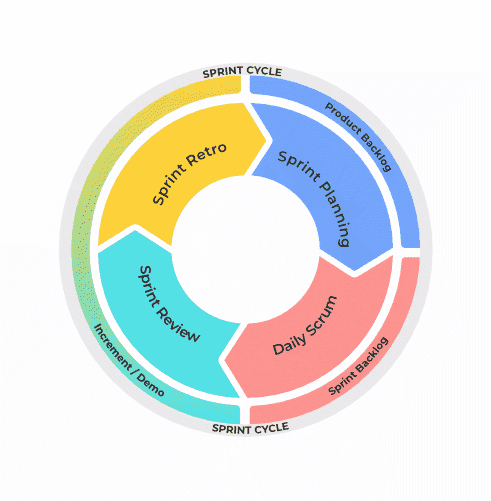
Steps in Scrum Sprint
These steps represent the complete flow from planning to execution of a sprint.
1. Define Sprint Goal
A clear objective is set to guide all sprint activities and outcomes.
- Provides direction and focus for the entire sprint.
- Helps prioritize tasks and align team efforts.
- Ensures everyone works toward a common objective.
2. Select Backlog Items
User stories are selected from the Product Backlog for the sprint.
- Items are chosen based on priority and business value.
- Team capacity and sprint duration are considered.
- Ensures realistic and achievable workload.
3. Break Down and Estimate Tasks
Selected stories are divided and effort is estimated for execution.
- Break large stories into smaller, manageable tasks.
- Identify dependencies and technical challenges.
- Estimate effort using story points or hours.
4. Development and Execution
The team starts implementing the planned work.
- Developers build features based on defined tasks.
- Daily stand-ups help track progress and resolve blockers.
- Continuous collaboration ensures smooth execution.
5. Testing and Integration
Developed features are tested to ensure quality and stability.
- Perform unit and integration testing regularly.
- Identify and fix bugs during the sprint.
- Ensure features meet requirements.
6. Delivery and Review
Completed work is delivered and evaluated at the end of the sprint.
- Deploy a potentially shippable product increment.
- Conduct Sprint Review with stakeholders for feedback.
- Conduct Sprint Retrospective for process improvement.
Events of Scrum Sprint
A Scrum Sprint is organized through key events that guide planning, execution, inspection, and continuous improvement. These events ensure structured progress, clear communication, and delivery of a usable product increment in every sprint.
1. Sprint Planning
Sprint Planning defines what will be delivered in the sprint and how the team will achieve it.
- Conducted at the start of the sprint with Product Owner, Scrum Master, and Development Team.
- Sprint Goal is defined and prioritized Product Backlog items are selected.
- Sprint Backlog is created to guide execution during the sprint.
2. Daily Scrum (Daily Stand-up)
A short daily meeting to track progress and ensure team alignment.
- Team members share updates on progress, plans, and blockers.
- Helps identify and resolve issues quickly during the sprint.
- Ensures transparency and keeps focus on sprint goals.
3. Sprint Review
A session held at the end of the sprint to evaluate completed work.
- Completed work is demonstrated to stakeholders for feedback.
- Sprint outcomes are reviewed against the defined goals.
- Feedback is used to update and refine the Product Backlog.
4. Sprint Retrospective
A reflection meeting focused on improving team performance and processes.
- Team discusses what went well and what needs improvement.
- Action points are identified to improve future sprints.
- Enhances collaboration, efficiency, and overall productivity.
5. Sprint Execution (Ongoing Work)
This phase involves actual development, testing, and delivery of features.
- Developers work on Sprint Backlog tasks throughout the sprint.
- Continuous testing ensures quality and reduces defects.
- A potentially shippable product increment is delivered at the end.
Best Practices and Common Pitfalls
This section highlights the key practices to follow and mistakes to avoid while working in a Scrum environment. It helps ensure smooth sprint execution, better collaboration, and improved delivery outcomes.
Do’s
Follow these practices to ensure effective teamwork and successful sprint delivery.
- Clearly define sprint goals and ensure the entire team understands the expected outcome.
- Actively participate in all Scrum events like planning, daily stand-ups, review, and retrospective.
- Continuously communicate progress, blockers, and updates to maintain transparency within the team.
Don’ts
Avoid these mistakes as they can negatively impact sprint progress and team efficiency.
- Do not overcommit work beyond the team’s actual capacity during sprint planning.
- Do not skip or ignore Scrum ceremonies, as they are essential for coordination and tracking.
- Do not delay reporting issues or blockers, as it can impact sprint progress and delivery.
Optimizing Sprints with Automation
Once you understand how sprints work, automation can help simplify tracking, reduce manual effort, and improve sprint management efficiency. Tools like Jira provide built-in automation rules to streamline common sprint activities.
- Automation helps reduce repetitive manual work and improves team productivity.
- It ensures timely updates, better tracking, and smoother sprint transitions.
- Jira automation templates provide ready-to-use rules for common sprint workflows.
