ADF BC offers LOV caching feature. There are two caching levels - application and session. With application level enabled, it makes LOV rows available for all users. On contrary for session level LOVs, data is cached for single session only. In this post I will focus on session level LOV's and I'm going to explain when cached data expires and is re-fetched.
You can configure caching level for LOV's in Model.jpx file, open AppModules section and select appropriate caching level for AM. I will be using Session level. Key point to understand - session level caching for LOV is nothing to do with Web user session lifetime. Session here is AM session, and cache remains in memory only until AM session remains assigned to the current user session:

LOV with caching feature is defined a bit differently, List Data Source must be selected from shared AM, other steps are the same:

My sample application implements two different VO's, based on Employees data. Both VO's are using the same cached LOV in session level for Jobs. This helps to make a test and check if cached LOV data expires. When cache is not expired, LOV data cached during first VO initialisation, should be present on the second LOV access. Above is example of Jobs LOV definition for Employees VO and below another example of Jobs LOV definition for Employees By Departments VO:

LOV VO is created with implementation class, where I override createRowFromResultSet method. It helps to track if LOV data was expired and rows were re-fetched:

As I have mentioned earlier, there are two VO's, both using the same cached LOV. On UI I have two different fragments, each located in TF. Call between two TF's is implemented, I'm using two different TF's to simulate Isolated TF behaviour. Isolated TF creates new instance of AM and this clears the cache of LOV on AM session level:

Let's understand how it works. First fragment is loaded, LOV data is fetched and cache is populated:

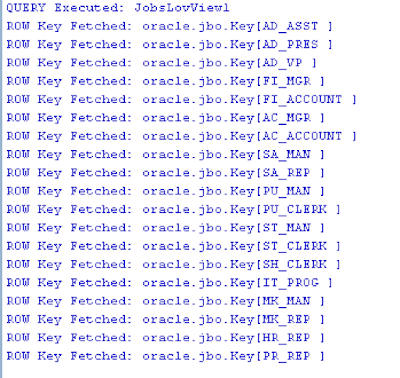
We can observe in the log, all rows fetched for LOV:

Open second fragment, LOV data is not re-fetched, it will be taken from the cache:

There are no rows fetched reported in the log:

Session cache works correctly for LOV. Now if user invoked Rollback, AM is reset and this indicates end of cache on AM session level, rows will be re-fetched. Try to press Cancel button:

There will be entries in the log, showing information about fetched rows - cache was cleared on Rollback:
Let's do another test with second TF set with Isolated option. When TF is set to be Isolated, it will force new AM instance creation, each time with TF is loaded. Meaning - there will be always new AM session and LOV cache will never be reused. TF is set to be Isolated:

Try to open TF and check LOV:

Differently than before, LOV data will be fetched - new AM instance was created on Isolated TF access and this requires to refill LOV data list:

Download sample application - ADFBCSharedSessionLOVApp.zip.
You can configure caching level for LOV's in Model.jpx file, open AppModules section and select appropriate caching level for AM. I will be using Session level. Key point to understand - session level caching for LOV is nothing to do with Web user session lifetime. Session here is AM session, and cache remains in memory only until AM session remains assigned to the current user session:

LOV with caching feature is defined a bit differently, List Data Source must be selected from shared AM, other steps are the same:

My sample application implements two different VO's, based on Employees data. Both VO's are using the same cached LOV in session level for Jobs. This helps to make a test and check if cached LOV data expires. When cache is not expired, LOV data cached during first VO initialisation, should be present on the second LOV access. Above is example of Jobs LOV definition for Employees VO and below another example of Jobs LOV definition for Employees By Departments VO:

LOV VO is created with implementation class, where I override createRowFromResultSet method. It helps to track if LOV data was expired and rows were re-fetched:

As I have mentioned earlier, there are two VO's, both using the same cached LOV. On UI I have two different fragments, each located in TF. Call between two TF's is implemented, I'm using two different TF's to simulate Isolated TF behaviour. Isolated TF creates new instance of AM and this clears the cache of LOV on AM session level:

Let's understand how it works. First fragment is loaded, LOV data is fetched and cache is populated:

We can observe in the log, all rows fetched for LOV:

Open second fragment, LOV data is not re-fetched, it will be taken from the cache:

There are no rows fetched reported in the log:

Session cache works correctly for LOV. Now if user invoked Rollback, AM is reset and this indicates end of cache on AM session level, rows will be re-fetched. Try to press Cancel button:

There will be entries in the log, showing information about fetched rows - cache was cleared on Rollback:

Let's do another test with second TF set with Isolated option. When TF is set to be Isolated, it will force new AM instance creation, each time with TF is loaded. Meaning - there will be always new AM session and LOV cache will never be reused. TF is set to be Isolated:

Try to open TF and check LOV:

Differently than before, LOV data will be fetched - new AM instance was created on Isolated TF access and this requires to refill LOV data list:

Download sample application - ADFBCSharedSessionLOVApp.zip.


