Showing posts with label Dynamic. Show all posts

Monday, April 10, 2017

ADF Multi Task Flow Binding and Tab Order

I had a post while ago about ADF multi task flow binding and loading dynamic regions - Building Custom UI Shell with ADF 11g R2. In that sample, new region was opened in the first tab position. Meaning tab order was from right to left. It is more natural to have left to right tab opening order. This can be done too, check updated sample app - we need to control disclosed property and add new region to the end of array.

Sample app - MultiTaskFlowApp_TabOrder.zip. Sample app contains four regions that can be opened dynamically. Let's say user opens region Locations:


With improved tab order, next region will be opened in the tab on the right (before it was on the left, in the first position):


Tab closing works in the way. Let's say user wants to close second tab:


When tab with Departments is closed, next tab on the right is opened - Employees tab:


Key thing in implementation for this requirement - disclosed property in dynamic tab:
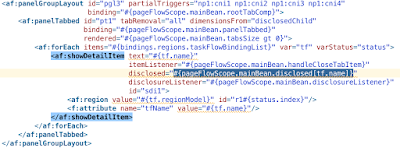

It calls bean method, where it evaluates current tab to be disclosed. If given tab is matching the value - it will be disclosed. Disclosed property for all other tabs will be reset:


Each time when new tab is loaded, it is loaded to the end of the array. New tab is set to be disclosed:


When user selects tab - currently disclosed tab property is updated too, to make sure info about new disclosed tab is stored:


One more case - tab closure. When tab is closed - next tab is selected, unless current tab was the last one:


When tab is selected programmatically, we update information about current selected tab too:

Tuesday, September 1, 2015

ADF 12c Dynamic Forms with ADF BC UI Categories

ADF 12c offers completely new way to implement UI forms. We can implement dynamic forms, based on static ADF BC components. Such approach could simplify form maintenance - when there will be changes in DB, developer would need to adjust only ADF BC EO/VO structure, without changing anything on UI. Bindings layers could determine data structure dynamically and dictate how to render UI blocks. ADF BC VO provides special metadata option to define how form UI should be rendered - UI Categories. Through categories we could group attributes and this would help to render dynamic UI with separate blocks and proper order.

Using UI Categories is straightforward, add category group and move attributes under the category. Label and tooltip can be defined, this will be a title for UI block:


ADF 12c is using general collection binding for dynamic UI, it doesn't depend on specific attribute binding:


Collection binding is generic, without a list of accessible attributes, it just points to the VO. This means we can change list of attributes registered in the VO at any time:


This is how looks dynamic form generated in ADF 12c. I have customised it a bit, but major part is generated automatically by JDeveloper 12c. There is global iterator over UI Categories, rendered UI blocks. Inner iterator renders UI Category attributes. Each attribute is rendered through ADF 12c dynamic component, this means there is no dependency related to attribute UI implementation (input text, LOV, choice list, etc.) - UI implementation is controlled from attribute UI hints in ADF BC:


It is easier to understand how dynamic form is organised from UI structure view:


This is the result - dynamic form is rendered with two blocks, based on defined UI Categories:


I have customised dynamic form rendering with metadata usage. Buttons are rendered only in the first block, identified by PersonalData:


Block identified by JobData is rendered with maximum 4 rows:


I hope this post will give you some new ideas about robust ADF UI implementation. Download sample application - ADFAltaApp_v7.zip.

Saturday, November 29, 2014

Adaptive Form with Dynamic ADF LOV Value Binding

Previously I had a post about dynamic ADF attribute binding creation and dynamic ADF form generation - Adaptive Form with Dynamic ADF Attribute Value Binding. Blog reader was asking how to generate dynamic ADF LOV binding using similar approach. This is possible and actually documented in Eugene Fedorenko post here - Dynamic LOV binding. I will use the same piece of code to extend my sample application with dynamic ADF LOV binding support.

Here you can download updated sample application - DynamicAttributeBindingApp_v2.zip. This application is updated with LOV definition for JobId attribute in ADF BC:


Once you are generating dynamic components on the UI and getting VO attributes to render, you should not be surprised there will be more attribute entries returned than you can see defined in VO. Additional attributes are for View Accessors, and we don't need them while generating dynamic ADF UI. This can be controlled by checking attribute kind property for attribute definition. If attribute kind is not of rowset kind, we can display it:


There is another method in the sample app, it checks for attribute type. This helps to decide what kind of UI component to render - input text, input date, LOV, etc.:


Dynamic ADF LOV binding is constructed from helper method below, this method is invoked from ADF UI LOV component:


Here is the essential part of the updated sample app - LOV binding creation method. LOV binding is constructed, similar as ADF attribute binding, by pointing to the iterator, LOV server binding name, attribute name and ID:


Dynamic ADF UI components are stamped through ADF UI iterator:


There is a special Facet to support ADF LOV UI component creation. UI component is created by pointing to the helper method, where ADF LOV binding is constructed:


LOV generated dynamically works well on runtime, user can open a list and select a value:


LOV validation also works, try to enter invalid value (not available in the list), user will be prompted to enter existing value instead:

Thursday, May 1, 2014

Adaptive Form with Dynamic ADF Attribute Value Binding

You can implement adaptive forms, generated on runtime using ADF Dynamic Form component in 11g R1 or 11g R2 (keep in mind - ADF Dynamic Form component is not supported with Facelets). In 12c you could use new ADF Dynamic Component to generate adaptive forms. All good, but customisation options are limited. For example, if you would need to define Value Change Listener for adaptive form UI component, this would be quite tricky as there is no direct access to ADF UI component properties.

If you need to control how UI is generated, you could implement your own ADF UI generation procedure. This would allow to manage ADF UI and ADF Bindings construction on runtime. I'm going to explain high level framework for such task and share sample application with ADF dynamic UI and ADF Bindings implementation.

Here you can download sample application - DynamicAttributeBindingApp.zip. The key part of this application is in the method below:


This method creates attribute binding dynamically, so you don't need to define attributeValues property in page definition on design time - this will be created on runtime. PNAME_TextField identifies simple binding (you could create different binding for LOV or Check Box). Iterator name must be set, along with attribute name and binding ID (exactly as it is defined in Page Definition XML, only programmatically this time). This code is not documented, you must check ADF source code for different scenarios.

Sample application contains ADF BC components, there is regular VO for Employees with a list of attributes defined:


There are no bindings for these attributes in Page Definition, all of them will be generated automatically on runtime. In real use case, you would have dynamic VO in the background or switch Iterator to use different VO's at runtime. This would allow to synchronise and generate adaptive form on runtime:


There are 3 steps to follow. Firstly we would need to construct on runtime a list of attributes to be displayed. This could be a custom method invoked from forEach ADF UI component:


This method gets a list of attributes from iterator and constructs a list of attributes to be displayed (some attributes could be hidden):


Second step is to render different attribute types. Text, number and date should be rendered differently, with different formatters or ADF UI components. For this purpose, we could use ADF UI switcher component and call custom method to return current attribute type:


Custom method retrieves information about given attribute and returns type to be used in the switcher (here I'm checking for text, date and numeric type only):


Third step is to provide properties for actual ADF UI component we are going to display. All properties as value, label, columns, validator, etc. should be provided. Expression language points to our custom method:


Custom method checks, if such attribute binding was already created, if not - it will be created. Attribute binding is created through a method described in the beginning of this post:


This is how it looks on UI - form is rendered same way, as it would be prepared on design time. I was checking if validation is executed correctly - as you can see, validation message is displayed properly:

Monday, December 30, 2013

ADF Dynamic ADF BC - Loading Multiple Instances (Nr. 100 in 2013)

This is Nr. 100 post in 2013 !

We learned how to build dynamic ADF BC passivation/activation safe in the previous post - ADF Dynamic ADF BC - Surviving Passivation/Activation Events. There is one more trick to learn - how to reload and open UI with dynamic ADF multiple times. This is useful when dynamic ADF form can  be opened from multiple menu items, passing parameter and re-drawing dynamic ADF UI.

This is implemented in the sample - ADFDynamicReportUI_v5.zip. Custom method from Application Module class constructs View Definition, each time when form is loaded from the menu - this method is invoked with parameter and new View Definition is created:


For the test purposes, we set Hire Date to be displayed only when parameter is not NULL:


Before creating new View Object instance, we should check if our dynamic View Object instance already exists. If yes - we should remove it first and only then create new one (otherwise there will be error about existing View Object instance with the same name):


This is mainly all about loading multiple instances. Now I will describe several improvements in UI part. ADF 12c supports declarative component tag, this simplifies complex ADF UI rendering. Sample application ADF UI form renders different kind UI components from iterator using ADF UI dynamic component tag:


We are referencing attributeModel from iterator and accessing Page Definition bindings:


Dynamic form in ADF 12c is created simply by drag and drop and selecting dynamic option - fairly simple and stable.

Sample application is based on Multi Task Flow Binding, described in my previous post for ADF 12c - Smooth Migration from ADF 11g R1/R2 Apps to ADF 12c. I'm loading ADF Task Flow with dynamic ADF UI, passing additional parameter for the second menu option (Hire Date will be displayed):


ADF Task Flow with dynamic ADF UI is closed and loaded from the menu dynamically, controlled by Multi Task Flow binding:


You can try to open first or second menu option, this will load the same ADF Task Flow, but reinitialise dynamic ADF BC with different parameter - dynamic ADF UI will be displayed accordingly:

Friday, December 27, 2013

ADF Dynamic ADF BC - Surviving Passivation/Activation Events

ADF dynamic ADF BC and dynamic ADF UI implementation is useful functionality and is required almost in every larger project. Primary area where this functionality is applied - report parameters screens, instead of building hundreds of static report parameter screens for every report, we can build one dynamic and regenerate required ADF BC objects structure, together with dynamic ADF UI. Here you can read my previous post for the same topic - ADF Generator for Dynamic ADF BC and ADF UI - Recreate. Today post provides improved sample application with added support for ADF dynamic functionality working in passivation/activation event scenario.

Download updated sample application - ADFDynamicReportUI_v4.zip. Previous sample application contained one dummy VO - DynamicView:


This VO was replaced on runtime with real dynamic VO, created programmatically in HrModule class. This didn't worked in stress test environment, simulated by disabling AM pooling:


Null pointer exception for ADF dynamic form - activation event was failing:


It was failing, because on activation, ADF runtime was trying to activate original dummy VO - not the one we have substituted programmatically:


In theory it should work to remove dummy VO and change it with programmatic one, but really it fails on activation event:


Solution is pretty simple for this - we can get rid of dummy VO completely and rely directly on VO instance created programmatically on runtime. There is no need to define dummy VO in AM Data Model:


There is no need to have dummy VO either:


As there is no dummy VO anymore, no need to remove it's instance. We can simply create new programmatic VO instance with given name:


In page definition we should reference VO instance by the same name, obviously it will be highlighted as design time error - as there is no such VO instance defined statically, but this will work on runtime:


There are few additional improvements to survive passivation/activation events better - I will list them all below:

1. Non editable primary key - you should add primary key attribute and hide it to be non editable


2. If there is no default value for the attribute, it can be marked as not selected in query and there will be no need to include it into SQL statement


3. Not specifically related to passivation/activation - but for dependent LOV's, we need to set AutoSubmit=true for the parent attribute:


Dependent attribute should be set with backward dependency, this will reset attribute value automatically, when parent attribute value is changed:


4. SQL statement includes only selected attributes, where default value is set:


5. Dynamic VO doesn't passivate and activate correctly by default. We need to passivate and activate such VO manually. Standard method for passivation should be overridden, we can read current row attribute values and passivate them:


Standard method for activation should be overridden, to activate and set values to the current row attributes back:


6. If there are LOV's created dynamically, all such LOV's must be assigned with primary key:


Here you can see how it works on UI. Let's select Location Id, based on selected value LOV for Department Id is filtered and returns 50:


If you change Location Id, Department Id will be cleared automatically and user could select new Department Id value corresponding to the currently selected Location Id: