There is out of the box ADF BC method available to refresh current row, see this post for details - Refreshing Single Row Without Full Rollback. There could be use cases, when refresh method is not sufficient (particularly for a row with dependent LOV's) - it may not reset data correctly. Also there is extra SQL query sent to DB, to fetch row data by key. Even it works well most of the time, still it is good to know the alternative. I'm going to present alternative row refresh approach here, using getPostedAttribute method.
User could edit data in the current row:
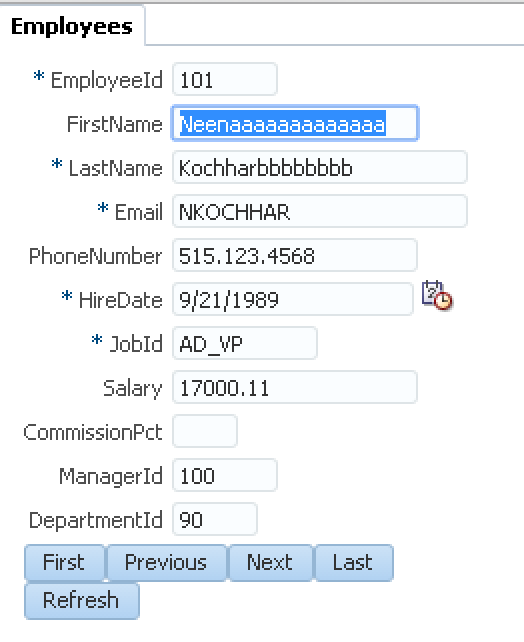
Press Refresh button:

All attributes are refreshed and synchronised back to the original values, currently available in the database:

UI data is synchronised with the help of Change Event Policy = PPR functionality enabled for iterator in the bindings, we can see synchronisation events executed in the log:

You should know - ADF BC method getPostedAttribute is protected, this is why we need to have a wrapper method in EO Impl, with public access. Wrapper method allows to invoke originally protected method from different class, other than EO Impl:

They key logic resides in refreshCurrentRow custom method, implemented in VO Impl class. This method gets a full list of EO attributes and for all attributes with index higher or equal to 0 (there could be accessors with negative index), it goes and retrieves posted attribute value. Current value is reset back with posted value - this is how attribute value is reset back to the same as it is posted to DB. Sample application is set to use DB pooling, this means it will always return actual value committed to DB, and it will ignore any temporary posted values (each request will get different DB connection):

Row refresh method is exposed to be accessible from the bindings layer:

As it was mentioned above, iterator in the bindings is set to use Change Event Policy = PPR, this is synchronising data displayed on UI with changes in ADF BC automatically:

Keep in mind, no matter if using standard row refresh method or approach described in this post - transaction still will remain dirty, only data will be reset. To clear transaction and revert it back to non dirty, user still must use full Rollback operation.
Download sample application - CustomRowRefreshApp.zip.
User could edit data in the current row:

Press Refresh button:

All attributes are refreshed and synchronised back to the original values, currently available in the database:

UI data is synchronised with the help of Change Event Policy = PPR functionality enabled for iterator in the bindings, we can see synchronisation events executed in the log:

You should know - ADF BC method getPostedAttribute is protected, this is why we need to have a wrapper method in EO Impl, with public access. Wrapper method allows to invoke originally protected method from different class, other than EO Impl:

They key logic resides in refreshCurrentRow custom method, implemented in VO Impl class. This method gets a full list of EO attributes and for all attributes with index higher or equal to 0 (there could be accessors with negative index), it goes and retrieves posted attribute value. Current value is reset back with posted value - this is how attribute value is reset back to the same as it is posted to DB. Sample application is set to use DB pooling, this means it will always return actual value committed to DB, and it will ignore any temporary posted values (each request will get different DB connection):

Row refresh method is exposed to be accessible from the bindings layer:

As it was mentioned above, iterator in the bindings is set to use Change Event Policy = PPR, this is synchronising data displayed on UI with changes in ADF BC automatically:

Keep in mind, no matter if using standard row refresh method or approach described in this post - transaction still will remain dirty, only data will be reset. To clear transaction and revert it back to non dirty, user still must use full Rollback operation.
Download sample application - CustomRowRefreshApp.zip.


