There is a new excellent Virtual Box VM for the latest SOA/BPM 11.1.1.7.1. This one is my favourite, it includes latest Oracle products for SOA/BPM and WebCenter. All is configured, fine tuned and ready to use. Read more and download from Oracle OTN site - Pre-built Virtual Machine for SOA Suite and BPM Suite 11g.
The same as in previous release of this VM, you can start each server with one click in the console window:

UI for the standard BPM Worklist application is refined in SOA/BPM 11.1.1.7.1 release - it looks lighter and cleaner. Definitely, something users would like to use, everything can be customised if needed:

This new VM comes with a sample application for Case Management - Car Rental Sample. What I didn't liked about this sample - it doesn't implement proper ADF UI. There are two screens, first one brings a form to fill a car rental request. This is a proper ADF UI:

Press a button - Reserve Car. This will bring you to the next screen, with login dialog (this doesn't look like ADF anymore - login dialog UI reminds some plain HTML):

Provide jcooper/welcome1 credentials and login. You will be redirected to the screen with multiple tables. However, none of these tables are build with ADF:
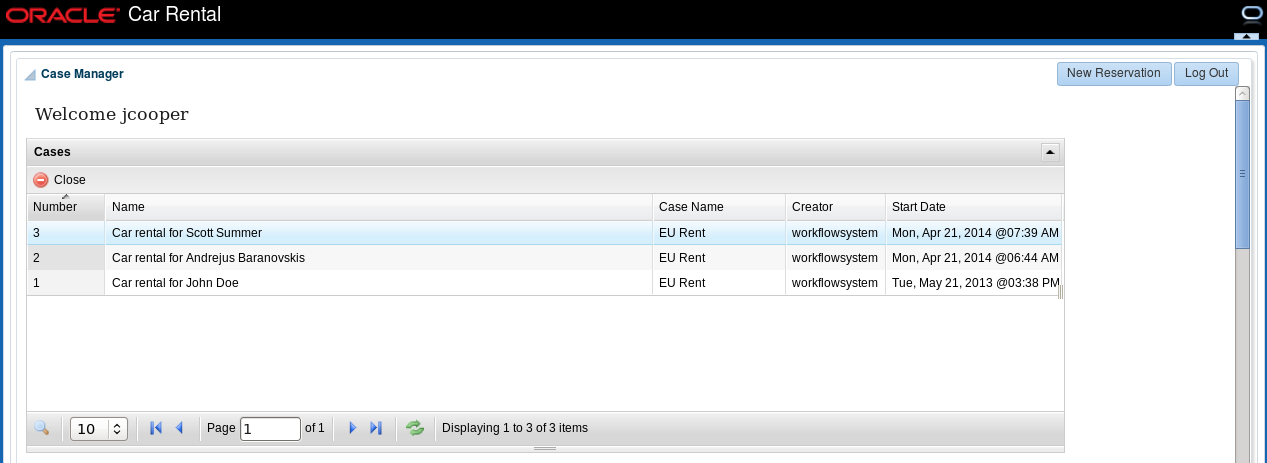
It turns out, there is a basic inline frame included into ADF shell. Why to build separate application and include it into ADF with inline frame (while the same tables could be implemented in ADF):

Someone could get confused by this sample, and think of such design as a best practice. Or even worse - ADF not capable to implement a pair of tables. I hope this sample will be improved in the future and based fully on ADF.
The same as in previous release of this VM, you can start each server with one click in the console window:

UI for the standard BPM Worklist application is refined in SOA/BPM 11.1.1.7.1 release - it looks lighter and cleaner. Definitely, something users would like to use, everything can be customised if needed:

This new VM comes with a sample application for Case Management - Car Rental Sample. What I didn't liked about this sample - it doesn't implement proper ADF UI. There are two screens, first one brings a form to fill a car rental request. This is a proper ADF UI:

Press a button - Reserve Car. This will bring you to the next screen, with login dialog (this doesn't look like ADF anymore - login dialog UI reminds some plain HTML):

Provide jcooper/welcome1 credentials and login. You will be redirected to the screen with multiple tables. However, none of these tables are build with ADF:

It turns out, there is a basic inline frame included into ADF shell. Why to build separate application and include it into ADF with inline frame (while the same tables could be implemented in ADF):

Someone could get confused by this sample, and think of such design as a best practice. Or even worse - ADF not capable to implement a pair of tables. I hope this sample will be improved in the future and based fully on ADF.


