

01
Dedicated, non-shared database infrastructure
Every database runs on dedicated infrastructure with no noisy neighbors or cross-tenant risk. Isolation is enforced by design, not configuration.
02
Access control and auditability by default
Control who can connect, tunnel into, inspect, and modify databases using identity-based permissions. Every access event is logged and attributable.
03
Encryption, backups, and durability built in
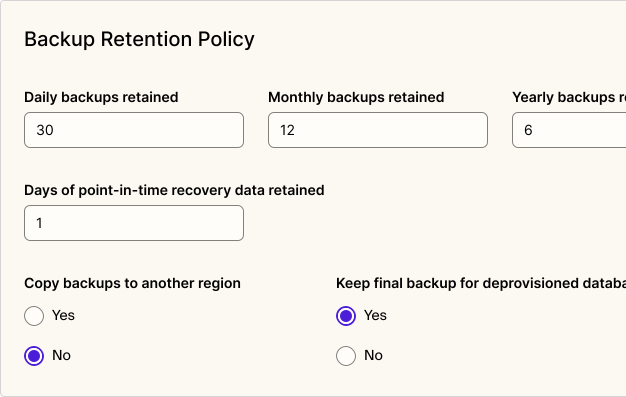
Encryption at rest and in transit, automated backups, and point-in-time recovery are enforced automatically. Data protection does not depend on manual setup or constant oversight.
04
Production-ready provisioning without AWS
Provision compliant databases in minutes without configuring VPCs, IAM, or storage policies. Databases are production-ready from day one and stay secure and compliant as you scale.
05
Operate without a DBA
Patching, upgrades, monitoring, and maintenance are handled by Aptible so your team does not accidentally become database administrators.
06
Databases your team already uses
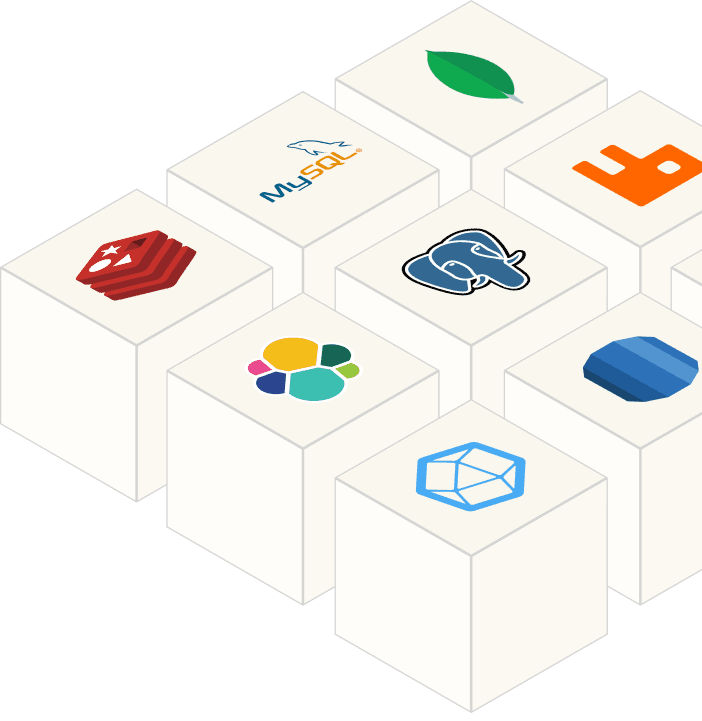
Run 8 database types with the same isolation, security, and compliance guarantees.
Postgres
Redis
MySQL
Elasticsearch
See full list
View docs
Digital health startup launching an AI-enabled product handling PHI
Teams need databases that are compliant from day one, not configured toward compliance later. Choosing a non-compliant database early creates a retrofit problem that's expensive to fix under customer or auditor pressure. Aptible provisions production-ready databases with the right controls already in place.
Growing team migrating from DIY RDS or self managed databases
As systems scale, misconfiguration risk compounds and operational overhead grows. Teams move to Aptible to get consistent security posture across all databases and remove the ongoing maintenance burden without rebuilding their data layer.
Early-stage team without SREs, platform engineers, or DBAs
Founders who need to move fast without becoming accidental database administrators choose Aptible. The platform handles patching, backups, and access controls so the team stays focused on the product, not the infrastructure underneath it.
FAQs
What database high-availability and failover options are available?
Aptible supports replication and clustering for supported databases: replication for PostgreSQL, MySQL, and Redis, and clustering for MongoDB on the Production and Enterprise plans. Replicas are automatically distributed across availability zones. MongoDB uses replica sets. Create replicas with aptible db:replicate.
For PostgreSQL, Aptible supports both read-only hot standby replicas and logical replication. Logical replication is useful when you need replication behavior that is not simply a read-only standby.
Replication is not enabled by default, so for production workloads with specific RTO and RPO targets, design the replica and recovery setup before launch rather than after. Aptible also documents its reliability division of responsibility and container recovery, but container recovery is separate from database failover design.
Which databases, versions, and extensions are supported?
Aptible supports managed databases, including PostgreSQL, MySQL, Redis, MongoDB, Elasticsearch, InfluxDB, RabbitMQ, and SFTP. Check available versions with aptible db:versions.
On PostgreSQL, pgvector, pgaudit, and postgis are available on versions 14 through 18, alongside the PostgreSQL contrib modules, and pg_cron works with some additional configuration. If you need an extension that isn’t listed, contact support and they’ll tell you whether it fits.
Can Aptible migrate my existing production database?
If you’re moving a database from one Aptible environment to another, or from one Aptible stack to another dedicated stack, contact support. Aptible can handle those environment or stack migrations as maintenance operations.
If you’re moving a database from outside Aptible onto Aptible, there isn’t a one-click built-in migration tool. The two common PostgreSQL paths are dump and restore and logical replication.
Dump and restore is the simplest path, but the database is unavailable for the duration of the dump, transfer, and restore. For sizable databases, especially above roughly 10 GB, that downtime can be long.
Logical replication can reduce cutover downtime because the final cutover is mostly pointing your app at the new database. But the time it takes for the Aptible replica to catch up with the source database still depends on database size, write volume, and replication lag.
Aptible’s database upgrade methods cover these approaches in more detail, though they’re primarily documented for database upgrades on Aptible rather than external-to-Aptible migrations. Aptible’s support plans describe in-scope maintenance operations
How do backups, point-in-time recovery, and retention work?
Aptible backs up every database automatically once every 24 hours. Backups are encrypted, compressed volume snapshots taken from the underlying storage, so they cause no performance degradation and aren’t stored on the primary volume.
Retention is configured per environment and defaults to 30 daily, 12 monthly, and 6 yearly backups, plus a final backup when a database is deprovisioned. Cross-region copies are available and off by default. Configure retention in the dashboard, the CLI, or Terraform.
PostgreSQL point-in-time recovery is available for PostgreSQL 13 and newer, and restores into a new database rather than rolling the original back. Write-ahead log data is typically available within about five minutes of a committed transaction. PITR retention defaults to one day of WAL data and isn’t currently configurable.
If you need a longer PITR retention window, reach out to Aptible so the team can understand your requirements and factor that feedback into future planning. Large databases, especially around 500 GB with high I/O, can take several hours to restore.
Who controls patch and upgrade timing?
Regarding infrastructure-related patching and upgrades for Aptible-managed resources, your team is still responsible for patching and securing your own application code, dependencies, and container images, as described in Aptible’s division of responsibilities.
Aptible schedules and runs platform and database maintenance, but you can choose when it happens for some resources.
Aptible-controlled: Aptible schedules maintenance windows and notifies you ahead of time through status.aptible.com and/or your Ops Alert contacts. During the window, Aptible automatically restarts the affected resources.
You-controlled, when offered: For some apps and databases, Aptible provides a self-service option. You can restart the resource before the scheduled window, and deploying, scaling a database, or creating a new release also completes the maintenance.
To see which resources need maintenance and when their windows are, run aptible maintenance:apps or aptible maintenance:dbs. For details, see the Maintenance docs.
