

01
Isolation enforced at the infrastructure layer
Aptible enforces environment isolation by default so workloads remain separated without requiring custom network design or ongoing validation. New apps and services inherit the same protections automatically.
02
Guardrails that prevent drift
Secure defaults and enforced patterns preserve a consistent security posture as teams, permissions, and systems change. Engineers can move quickly without gradually expanding access or exposure.
03
Role-based access without shared credentials
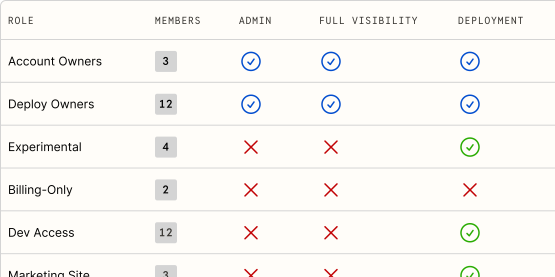
Access to deploy, operate, and inspect production systems is governed through roles tied to real identities. Teams avoid managing IAM policies or shared credentials while maintaining full auditability.
04
Encryption and runtime protection by default
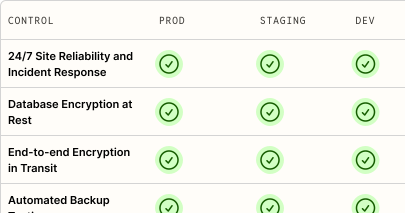
Encryption and other platform-level protections are enforced automatically across your infrastructure. Aptible maintains host security and detection so teams focus on application-level risk.
05
Every action is logged and attributable
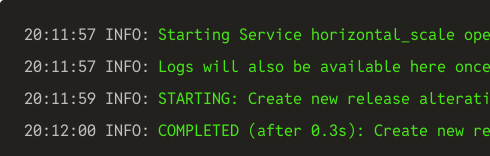
Deploys, access events, and configuration changes are captured automatically as they occur. Teams have a complete, reliable activity record for investigations, reviews, and incident response.
View docs
Control production access without slowing delivery
Aptible gives engineers, clinicians, and operators access to production systems without shared credentials or blanket permissions. Role-based access, full auditability, and automatic revocation reduce internal risk while keeping teams productive.
Replace fragile, hard-to-maintain AWS security setups
Teams move to Aptible after outgrowing scattered IAM policies, custom scripts, and manual reviews. Aptible provides a consistent security model for access, isolation, encryption, and logging without requiring ongoing security infrastructure maintenance.
Prepare for enterprise security scrutiny with confidence
Aptible allows teams to adopt clear, recognizable security controls that are easy to explain to customers, auditors, and partners. Centralized access, logging, and monitoring make security posture consistent and defensible as expectations increase.
FAQs
What does Aptible monitor for, and what happens during a security event?
Dedicated stacks include Managed Host Intrusion Detection built on OSSEC, monitoring for CIS benchmark non-conformance, file integrity changes, rootkits, malware, and privilege-escalation signals. Events route through automated, bulk, or manual review depending on type, with malware detections and unexplained configuration changes reviewed by hand.
If an intrusion is suspected or detected, Aptible’s security team activates its incident response process to assess, contain, and eradicate the threat, and notifies affected users. A HIDS compliance report is available periodically as evidence of that activity for an additional fee.
What security responsibilities stay with my team?
Your team owns application security: auth logic, user permissions, dependency management, secure development, secrets usage, third-party vendors, application logging, policies, training, and incident response for your own app. Aptible secures and operates the platform and infrastructure layer.
What can Aptible staff access in my environment?
Aptible staff access to customer environments is controlled, monitored, and limited to what is needed to operate and support the platform. Aptible does not access or use customer content except as described in Aptible’s Security Policy and related legal terms.
Operations Aptible performs on your resources appear in your Activity record, so your team can review platform actions taken in your environment.
Who holds the encryption keys?
Aptible encrypts customer data at rest and in transit. Database encryption at rest is enforced automatically, and Aptible documents the underlying database encryption model. S3 log archives use an AES-GCM 256-bit key.
For key custody, rotation, BYOK, or customer-managed key requirements, Aptible should provide current security-reviewed guidance.
How do I get your SOC 2 report, pen test summary, and HITRUST certificate?
Use trust.aptible.com. Request access with the email on your Aptible account. Confidential reports require an NDA with Aptible, which you can e-sign in the portal.
Aptible’s Security & Compliance overview describes the available evidence, including the SOC 2 Type 2 Report, SOC 2 Continued Operations Letter, Penetration Test Summary, HITRUST CSF Letter of Certification, HITRUST CSF Validated Assessment Report, HITRUST NIST CSF Assessment, and the HITRUST Engagement Letter. The PCI DSS Service Provider Level 2 attestation is available on request through the same portal.
Can I enforce MFA, SSO, and automatic deprovisioning across my org?
Yes. Aptible supports multi-factor authentication and password authentication controls, SAML single sign-on, and SCIM provisioning. SSO and SAML are available on Production and above, as shown on the pricing page.
Turning on Require SSO for Access means users can only reach your organization’s resources through your SAML provider, which lets you enforce your IdP’s own password and second-factor policies. Session duration is controlled in your IdP. With SCIM, users are removed when they’re disassociated in your identity provider.
However, Account Owners are always exempt from the SSO requirement, and you can add specific users to an SSO Bypass Allowlist. Those users can generate CLI tokens lasting up to seven days, and there’s no organization-level setting to shorten that, so keep the Account Owner role tight.
